Your CRM is drowning in data. AI can turn that chaos into competitive advantage—and it's easier than you think.
HubSpot's rolled out a three-pronged approach to AI that's usable. We're talking native tools that live right inside your workflow, direct connectors to Claude and ChatGPT that analyze your data, and custom automations that scale whatever repetitive tasks are eating your team's time.
Let's break down what works.
15+ Ready-to-Use HubSpot AI Prompts
Use AI to catch real problems before they cost you money.
Download Now

What's Inside HubSpot's AI Ecosystem?
HubSpot's AI ecosystem has three layers: native tools (Breeze), direct LLM connectors (Claude/ChatGPT), and custom workflow integrations.
The native layer is your everyday workhorse, handling tactical tasks like drafting emails, prepping for sales calls, and generating ad copy. These tools come with your subscription and work directly within HubSpot. The second layer consists of direct LLM connectors like Claude and ChatGPT, which bring advanced reasoning capabilities into your workspace. Finally, workflow integrations let you incorporate LLM research or analysis directly into your automations.
The key distinction: while native tools are built for execution, LLM connectors and workflow integrations are designed for strategy. We'll explain each of these layers in detail in the following sections.
📚 If you want to know everything about HubSpot Breeze AI, check out our YouTube playlist or visit our blog post: The Best AI Tools for Business: Grow with HubSpot Breeze AI. 🤖
How Do HubSpot's Native AI Tools Work?
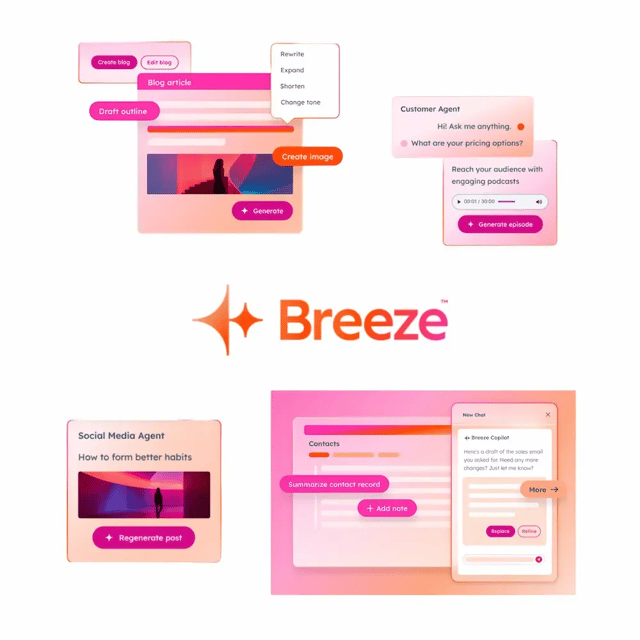
HubSpot's native AI tools work through Breeze Assistant (your conversational AI companion) and Breeze Agents (specialized AI teammates for specific functions).
Breeze Assistant is your conversational AI companion—think of it as having a really smart assistant who knows your CRM inside and out. It helps you prospect companies, prep for important meetings, and knock out content without the usual back-and-forth.
Then there are Breeze Agents: specialized AI teammates focused on specific jobs. You've got agents for content marketing, sales prospecting, and customer engagement. Your admin picks which ones your team needs from HubSpot's marketplace.
The tools are powerful, but they come with guardrails. Content generation caps out at 30 times per minute and 1,000 times per day. It's HubSpot's way of managing costs and keeping things running smoothly. And before anyone on your team can touch Breeze Assistant, an admin needs to flip the switch in your AI settings.
Where These Tools Shine
Marketing gets Campaign Assistant—your centralized content generator. It cranks out copy for landing pages, marketing emails, and ad campaigns. The real advantage? Everything integrates natively with HubSpot's automation workflows. No tedious copy-paste dance between tools.
Sales and service teams get AI Chatbots that do way more than answer FAQs at 3 AM. These bots qualify leads, book meetings, and drive conversions. They're basically digital SDRs. When things get complex, they seamlessly hand off to your human team—so your people focus on high-value conversations, not repetitive qualification calls.
One client generated over $60,000 in annual recurring revenue in less than a year using these chatbots. That's not theory—that's revenue you can bank on.
There's also AI Lead Scoring that evaluates contacts based on lifecycle changes—like tracking how long it takes someone to move from subscriber to sales-qualified lead. Set your timeframe (say, 90 days), and let the AI flag who's ready to buy.
What Are HubSpot Direct LLM Connectors?
HubSpot's built official connectors that let you plug Claude and ChatGPT directly into your CRM data—without writing a single line of code.
These connectors give the AI read-only access to your CRM. That means Claude or ChatGPT can analyze your data, spot trends, and generate insights—but they can't modify or delete anything. Smart move on HubSpot's part.
The Claude Connector: When You Need Deep Reasoning
Claude excels at complex reasoning and handling massive amounts of context. We're talking up to 100,000 tokens—that's a lot of data crunching power.
Setup is straightforward. You start from inside Claude (not HubSpot). Navigate to Settings, hit Connectors, browse for HubSpot, and add it. Then authenticate your HubSpot account. One important note: a Super Admin or someone with App Marketplace permissions needs to complete the initial connection and set data permissions before your team can connect their individual accounts.
You'll need a paid Anthropic subscription (Pro, Max, Team, or Enterprise) plus an active HubSpot account. No way around it.
Security's baked in. The connector respects HubSpot's existing user permissions automatically. So if your sales rep can only see their own pipeline in HubSpot, they'll only see that same data in Claude. No backdoor access to confidential information. Plus, Claude explicitly excludes sensitive data properties, personal health information, and anything marked as highly sensitive.
Where Claude crushes it:
- Sales: Pull quick summaries of active deals by name, amount, stage, and close date to focus your weekly priorities
- Marketing: Track time spent by contacts in specific lifecycle stages over a quarter, or spot email openers who didn't click for sharper follow-up segmentation
- Customer Success: Compare resolution strategies and outcomes across different support channels to improve consistency and quality
The ChatGPT Connector: When You Need Strategic Research
ChatGPT takes a different approach. It's all about complex strategic research and multi-variable analysis. Less about quick tactical reasoning, more about connecting the dots across diverse datasets.
Setup mirrors Claude's process: initiate the connection from within ChatGPT (Profile > Settings > Connectors), authenticate, and grant permissions.
Once connected, you can leverage ChatGPT's "Deep research" functionality with your HubSpot context. Ask complex questions like "Which industries generated the most revenue last quarter?" or "What were the top reasons deals were lost by region?" and watch it surface trends you'd miss manually.
The big picture: These external LLM connectors are read-only and live outside HubSpot's standard automation workflow. Their job is analytical—generate strategic recommendations and insights that you then implement manually or through other HubSpot tools. This limits operational risk while maximizing analytical power.
Just know that these connectors require budget commitment. You need that paid Claude subscription, and ChatGPT's most capable models (like GPT-4) come with premium pricing. You'll need to assess whether the ROI justifies the investment.

How Do You Automate AI Tasks with HubSpot Workflows?
Now we're getting into the advanced stuff—and this is where AI really starts paying dividends. HubSpot lets you integrate your preferred LLM directly into workflow automation using your own API keys.
This path gives you maximum flexibility for executing complex, high-volume, repetitive AI tasks. We're talking about automating processes that would otherwise eat hours of your team's time every week.
Which LLMs Can You Use in Workflows?
HubSpot supports several major providers:
- OpenAI: Ask OpenAI Assistant action
- Anthropic (Claude): Ask Anthropic (BETA) action
- Other Providers: Cohere, xAI (Grok), and Gemini are also supported for advanced text generation and classification
This comprehensive support means you're not locked into one vendor. You can compare and select LLMs based on accuracy, speed, and cost—crucial in a rapidly evolving market.
The Cost Model Is Different Here
Unlike native tools, you connect using your own API key. That means you're billed directly by the LLM provider for API usage. Costs vary based on which model you pick (GPT-3.5 is cheaper than GPT-4), how complex your prompts are, and your temperature settings.
The upside: for high-volume but simple tasks (like categorization), you can choose cheaper, faster models to minimize costs. That's hard to do with premium-tier native or connector services.
Setting Up a Custom LLM Workflow Action
It's technical but not rocket science. Here's the process:
- Connection: Navigate to HubSpot's App Marketplace, search for your desired LLM integration (like OpenAI Integration), install it, and enter your API key.
- Workflow Enrollment: In the Workflow editor, set your enrollment triggers. For example, trigger when a contact fills out a specific form.
- Adding the LLM Action: Add an action and select your desired LLM action (Ask OpenAI Assistant or Ask Anthropic).
- Prompt Engineering: Enter your custom prompt. Critical step: select which CRM properties from the enrolled record should be included to give the LLM necessary context. Only the properties you explicitly select are sent to the LLM.
- Output Mapping: The text output generated by the LLM can be used as input for subsequent workflow steps. Map the summarized response to create an internal task, send a notification via Google Chat, or update a property value on the contact record.
Real-World Workflow Examples That Save Time
Sales and Service Optimization: When a new ticket or deal is created, the workflow uses the LLM to summarize lengthy lead notes, long customer complaint histories, or extensive chat logs. This summary is instantly sent to the assigned sales rep or service manager, streamlining handoffs and cutting prep time.
Data Categorization and Hygiene: Workflows use the LLM's classification capabilities to categorize open-text descriptions (like a lead's business description) into standardized industry sectors or quality scores. This ensures accurate, clean data for segmentation and reporting.
One important operational consideration: if you're using LLM output to update CRM properties (like setting a Lead Status based on AI analysis), watch out for data conflicts. If that updated property is also managed by an external system syncing with HubSpot (like Salesforce), you need rigorous data governance planning to define property ownership and synchronization rules. Otherwise, you'll end up with workflow breakdowns.
Which HubSpot AI Tool Should You Use?
Let's be real: choosing between Breeze, Claude, and ChatGPT isn't about picking "the best" tool. It's about understanding what each one does well and using them strategically.
Breeze Assistant is your embedded execution layer. It's built for sales prospecting, meeting prep, and quick drafts. Limitation? Daily usage caps, and it's execution-focused, not strategic.
Claude Connector excels at complex reasoning and long context analysis. Perfect for summarizing lengthy ticket chains or visualizing pipeline trends. Catch? You need a paid Anthropic subscription, and web access is limited.
ChatGPT Connector is your deep research and multi-variable analysis tool. Use it for strategy formulation and connecting diverse datasets for trend analysis. It may be less focused on quick CRM reasoning than Claude.
The Optimal Strategy: Use All Three
The most sophisticated deployments use all three layers strategically:
- Strategic Insight (ChatGPT): Use ChatGPT for "doctorate-level research" and multi-variable analysis to identify market trends or strategic opportunities. This is your Strategy Layer.
- Tactical Clarity (Claude): Use Claude for rapid reasoning and visualization, especially when analyzing large volumes of existing CRM data (like long support ticket threads) thanks to its superior context length. This is your Reasoning Layer.
- Scaling Execution (Breeze/Workflows): Use Breeze Agents to automate execution and scale AI across the CRM for day-to-day tasks, or use custom LLM workflows for automated data processing and categorization. This is your Execution Layer.
Picture this: A marketer uses the ChatGPT Connector to identify market trends (Strategy), then leverages the Campaign Assistant (Native AI) to draft personalized content based on those trends (Execution), and finally applies AEO principles to ensure discovery.
How Does HubSpot Keep Your Data Safe with AI?
Security isn't an afterthought here—it's baked into the architecture. HubSpot has implemented strict protocols to ensure data security when connecting external LLMs.
The Read-Only Mandate
Both the Claude and ChatGPT connectors are strictly designed for read-only access to standard CRM objects. This is the central security mechanism preventing any LLM from modifying, deleting, or corrupting core customer data.
Furthermore, both connectors automatically respect the user permissions defined within HubSpot. Individual users (like sales reps) will only see deal pipeline data in Claude that they're already authorized to view in HubSpot. The granular security prevents the LLM connector from being used as a backdoor to access confidential internal data.
Handling Sensitive Data
HubSpot has implemented explicit exclusions to protect highly sensitive information:
- Exclusion: The connectors cannot access or store custom properties marked as Sensitive Data within HubSpot, including personal health information, financial data, or government identifiers
- Data Scope Limitation: The connectors are also barred from accessing unstructured data like attachments, call recordings, notes, or emails stored within HubSpot
- Zero Retention: For HubSpot's internal, native AI features (Breeze), the organization enforces zero data retention and prohibits LLM service providers (like OpenAI) from using customer data for model training. This commitment is vital for ensuring compliance with global privacy regulations like GDPR
What About Custom Workflow Actions?
When you're using custom workflow actions (the advanced automation path), responsibility shifts. HubSpot enforces security on its end, but you're responsible for classifying your internal data correctly, managing the API key securely, and actively monitoring the associated billing and rate limits enforced by the external LLM provider.
This necessitates developing internal AI literacy programs and clear governance frameworks. Your team needs to know what data can be sent to external LLMs and what stays locked down.
How Do You Troubleshoot Common AI Workflow Issues?
When using custom LLM workflow actions, operational stability and error handling become critical. Let's talk about the most common issues.
Managing Rate Limit Errors
Rate limits are a common challenge when interacting with high-traffic external APIs. If a workflow sends a request to an LLM provider that responds with a 429 rate limit error, HubSpot employs built-in resilience measures:
- Automatic Retry: Workflows will automatically retry the action upon receiving a 429 response, respecting the Retry-After header provided by the external API
- Custom Code Actions: For custom code actions (which may contain direct API calls), HubSpot will reattempt execution for up to three days, with increasing intervals between retries. This robust retry mechanism significantly enhances the success rate for high-volume, automated AI processing tasks
Common Workflow Configuration Errors
Automation failures often trace back to foundational configuration issues:
- Enrollment Triggers: Triggers that are either too broad (enrolling unqualified records) or too narrow (missing legitimate prospects) are a primary source of failure
- Data Conflicts: Workflow breakdowns frequently stem from conflicts when attempting to update a property that's also managed and synced by an external CRM system
Troubleshooting requires administrators to review the automation issues dashboard to identify workflows with errors. Resolution typically involves refining enrollment logic and reviewing data property ownership and sync rules to ensure the LLM outputs don't cause data integrity issues.
Key Takeaways: Making AI Work for Your Business
Let's wrap this up with what matters.
HubSpot's layered strategy works. The Native Layer (Breeze) handles embedded execution. The External Connectors (Claude/ChatGPT) provide high-level reasoning and deep research. This prevents costly, premium external LLMs from getting bottlenecked by routine execution tasks.
Security is designed in, not bolted on. The integration approach prioritizes data governance through strict protocols: mandatory read-only scope for external connectors, automatic respect for existing HubSpot user permissions, and explicit exclusion of sensitive data types. This architectural choice minimizes compliance risk for organizations adopting AI.
Flexibility and cost control matter for automation. Custom Workflow Actions offer the highest degree of control, allowing experienced users to select models based on performance benchmarks (accuracy, speed, cost) and manage their own usage limits. This is essential for achieving cost-effective scaling of repetitive AI processing tasks.
Content strategy needs to evolve. The rise of LLMs necessitates that marketing and content teams adopt Answer Engine Optimization (AEO). You must ensure your content is structured to be accurately cited by AI engines, establishing critical authority for future buyer research and discovery.
Where to Start Based on Your Goals
If you want to quickly start generating content and automating simple tasks: Use Native Tools (Breeze Assistant/Campaign Assistant). Check AI settings to ensure generative features are enabled for users, then start using the Campaign Assistant tool for email and ad copy.
If you need to analyze large chunks of CRM data for tactical insights: Use the Claude Connector. Secure a paid Anthropic subscription (Pro or higher) and follow the connector setup process initiated in the Claude interface.
If you want to conduct deep, strategic research based on multi-variable CRM data: Use the ChatGPT Connector. Leverage the Deep research function within ChatGPT after connecting the HubSpot connector for strategic analysis.
If you're ready to automate high-volume data categorization or summarization tasks: Use Custom Workflow Actions. Obtain an API key from your chosen LLM provider, connect it to HubSpot, and carefully design a workflow that uses the LLM output to update CRM properties—ensuring property ownership rules are clearly defined.
The Bottom Line
The best AI for HubSpot isn't one tool—it's the right combination for your needs. HubSpot's Breeze is indispensable for day-to-day productivity and should be your default for anything involving direct customer touches or CRM updates. ChatGPT is the perfect creative partner when you need to think outside the box. Claude is like an on-demand analyst for complex questions on your data.
Used together, these tools complement each other. ChatGPT helps you "think wide" and HubSpot AI helps you "act fast." By leveraging each where it excels, you build a powerful hybrid human-AI workflow—with AI contributing at every stage from insight to execution, and humans providing the critical oversight, strategic direction, and personal touch that ensure the end result drives growth.