2026 Breeze Implementation Playbook
Readiness audits, setup walkthroughs for all core agents, and prioritized action plans to deploy AI agents.
Download Now!

Your team's already juggling deal follow-ups, support tickets, and lead qualification. Now HubSpot's pitching AI agents that supposedly handle these tasks for you.
Here's the reality for 2026: Breeze AI Agents have evolved from experimental tools into the core infrastructure of the "Smart CRM." They are no longer just "nice-to-have" add-ons; they are the primary mechanism for scaling operations without scaling headcount.
This guide covers what these agents do, what they cost, and whether they're worth adding to your HubSpot subscription.
What Are Breeze AI Agents?
Breeze AI Agents are autonomous digital workers integrated into the HubSpot platform. Unlike standard automation (which follows rigid "if/this/then/that" rules), Agents use reasoning to interpret data, make decisions, and execute complex workflows.
-
Breeze Assistant (formerly known as ChatSpot and briefly as Breeze Copilot).: Your everyday AI helper for writing emails, summarizing records, and answering basic CRM questions. This is generally included with Core Seats (Starter+) at no extra usage cost.
-
Breeze Agents (The Workers): Specialized AI teammates that handle complete workflows (Support, Prospecting, Content). These consume HubSpot Credits per action.
-
Smart CRM & Data Enrichment (The Foundation): Formerly known as "Breeze Intelligence," standard data enrichment is now included free with Core Seats (Starter+). You no longer pay credits for basic firmographic data like revenue, industry, or employee count.
Core Breeze Agents Available
As of early 2026, HubSpot offers four "Core Agents" that are fully supported and integrated into the platform's stability layer. These agents currently operate on established LLM architectures (GPT-4.x) to ensure maximum reliability for customer-facing tasks.
Confirmed core agents:
-
Customer Agent (The Frontline): Answers support questions, resolves tickets, and acts as a first-line concierge.
- Channels: Now supports 9 channels including WhatsApp, SMS, and a new Voice/Calling channel (currently in Beta).
- Transparency: Features Audit Cards that show exactly which CRM properties were updated and how the agent qualified the lead during the conversation.
-
Prospecting Agent (The BDR): Monitors leads for buying signals, researches accounts, and drafts highly personalized outreach.
- Urgency: For early adopters, the grace period for free usage officially ends on March 3, 2026.
- Data Agent (The Analyst): The engine behind Smart Properties. It answers custom research questions ("Who is the CFO?" or "What is their strategic focus?") by scraping the web and analyzing your internal data.
- Content Agent (The Marketer): Generates high-quality marketing assets (landing pages, blog posts, social content) using your brand voice and CRM data context.
Additional marketplace agents: Beyond the core four, the Breeze Marketplace offers specialized agents like the Deal Loss Agent, Customer Health Agent, and RFP Agent.
Note: As of January 2026, these marketplace agents have migrated to the GPT-5 architecture. This makes them "smarter" at complex reasoning but potentially less battle-tested than the Core Agents, so these ones (prospecting, customer, data and content agents) still run with the previous architecture.

The Importance of HubSpot AI Agents for Small Business Operations
You're probably running HubSpot with a lean team. Maybe one RevOps person, a couple sales reps, and a marketing coordinator who wears six hats.
Here's where these agents help:
-
They handle the "Agentic" Automation: The new "Run Agent" workflow action (Private Beta) allows you to trigger research or outreach automatically when a deal stage changes. This scales your operations without adding headcount.
-
They maintain consistency with "Audit Cards": Your top rep updates the CRM perfectly; everyone else forgets. Agents update records instantly and generate an Audit Card , creating an immutable log of exactly why they qualified a lead or updated a property.
-
They scale support instantly: When you jump from 50 to 150 inbound tickets, you don't need to hire another support rep. The Customer Agent handles the volume spike, now resolving over 62% of conversations autonomously for top-performing teams.
But here's what they don't do: Fix a messy CRM. If your contact properties are inconsistent, adding agents just automates the chaos faster. (Read: HubSpot Support Guide to Identify & Merge Duplicates)
Is Breeze AI Free?
Partially. The most significant change for 2026 is that Data Enrichment is now free for standard fields.
What's included at no extra cost (Starter+):
- Standard Enrichment: Auto-populating Company Revenue, Industry, Employee Count, and Location.
- Breeze Assistant: Email writing, record summarization, and reporting helpers.
These features are available across Starter, Professional, and Enterprise plans.
What requires Professional/Enterprise + Credits:
- Autonomous Agents: Customer, Prospecting, and Data Agents.
- Smart Properties: Custom AI-researched fields (e.g., "Find the CEO's LinkedIn URL").
- Buyer Intent: Creating CRM records from anonymous website traffic.
- Workflow Actions: The new "Run Agent" action inside workflows.
How Much Does Breeze AI Cost in 2026?
HubSpot has transitioned to a unified "HubSpot Credits" system. Understanding the "burn rate" is essential for budgeting.
Credit pricing structure:
- 1 Credit ≈ $0.01 USD (based on standard add-on pack pricing).
- No Rollover: Credits expire at the end of your billing month. They do not carry over
What agents cost per action:
| Agent / Feature | Specific Action | Cost (Credits) | Est. Cost (USD) |
| Customer Agent | Handle 1 Conversation (Text-based) | 50 | $0.50 |
| Prospecting Agent | Monitor 1 Contact per Month | 100 | $1.00 |
| Prospecting Agent | Deep Research on 1 Company | 10 | $0.10 |
| Data Agent | 1 Research Prompt | 10 | $0.10 |
| Workflow Actions | "Run Agent" (1 execution) | 10 | $0.10 |
| Buyer Intent | Create/Monitor 1 Company | 10 | $0.10 |
| Smart Properties | Fill 1 Custom Property | 10 | $0.10 |
| Standard Enrichment | Enrich Contact/Company (Basic Fields) | 0 (Free) | $0.00 |
Monthly Credit Allowances Included with Subscriptions:
-
Starter Plans: ~500 Credits/month.
-
Professional Plans: ~3,000 Credits/month.
-
Enterprise Plans: ~5,000 – 10,000 Credits/month.
Elite Partner Tip: All AI features draw from the same credit pool. If your Marketing team uses 4,000 credits running "Smart Properties" to find LinkedIn URLs, your Customer Support team may effectively "run out of money" for their Chat Agent.
Hidden Costs:
-
HubSpot defaults to "Auto-Upgrade" your credit tier if you exceed limits. This results in a permanent subscription increase. You should change this setting to "Pay-as-you-go" ($0.01/credit) or set a hard cap to avoid surprise bills.
How to Implement Breeze AI Agents in HubSpot
Most companies activate agents without proper setup. Then they wonder why responses sound generic or miss the mark.
Here's the right sequence:
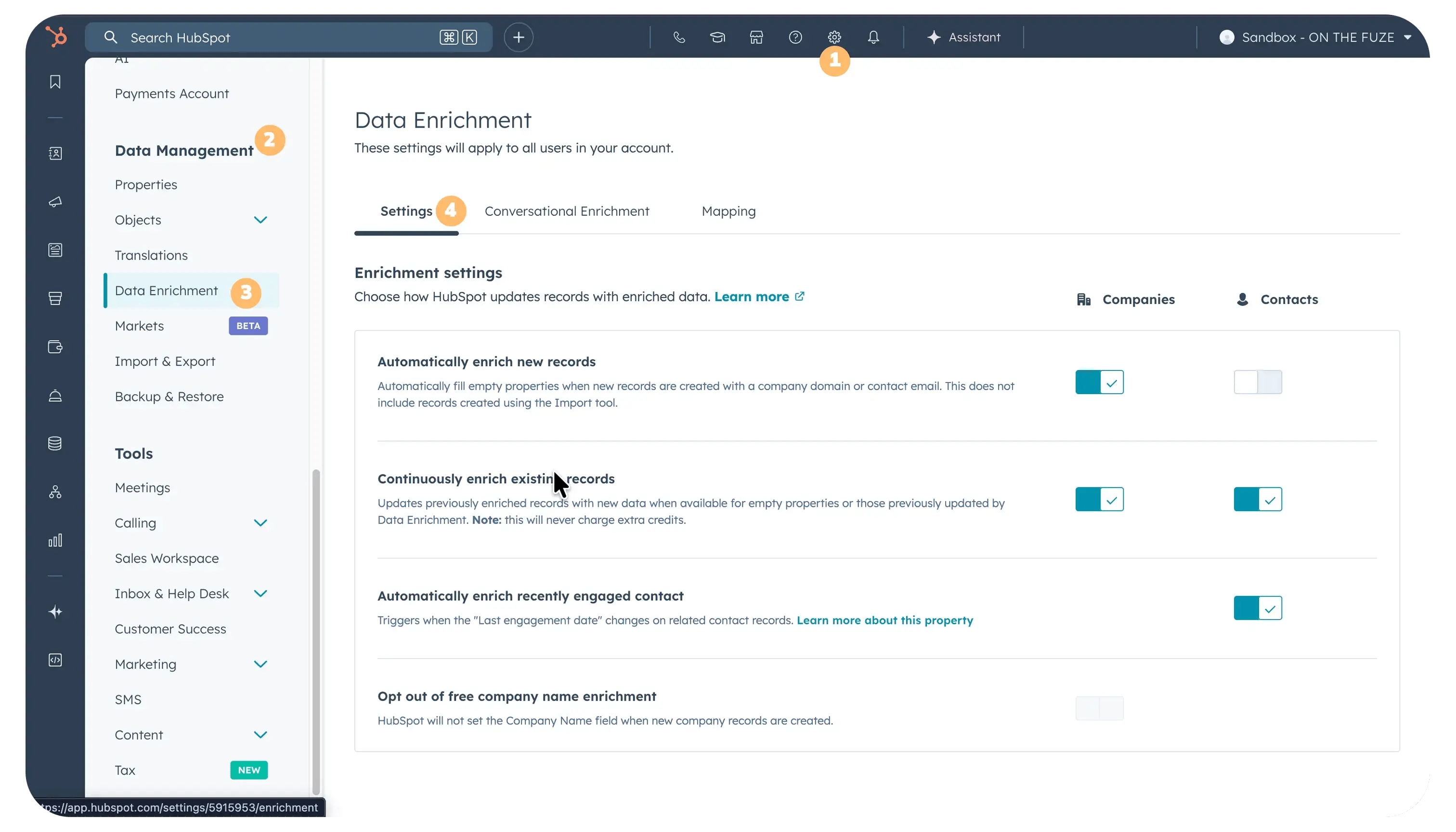
Step 1: The Free Data Audit
Since Standard Enrichment is now free, enable "Auto-Enrichment" in your CRM settings immediately:
- Action: Turn on automatic enrichment for companies and contacts. Let HubSpot fill in the gaps (Revenue, Industry, Size) at no cost.
- Why: Agents perform significantly better when the CRM data is complete. A Prospecting Agent cannot segment leads if "Industry" is unknown.
Step 2: Choose the Right Agent & Define The Budget
Don't activate multiple agents at once.
- Service Teams: Use the Customer Agent. Budget 100 credits per expected conversation.
- Sales Teams: Use the Prospecting Agent. Budget 100 credits per target contact/month.
- RevOps: Use the Data Agent. Budget 10 credits per custom field enriched.
Step 3: Configure the Agent's Knowledge Base
This is where most implementations fail.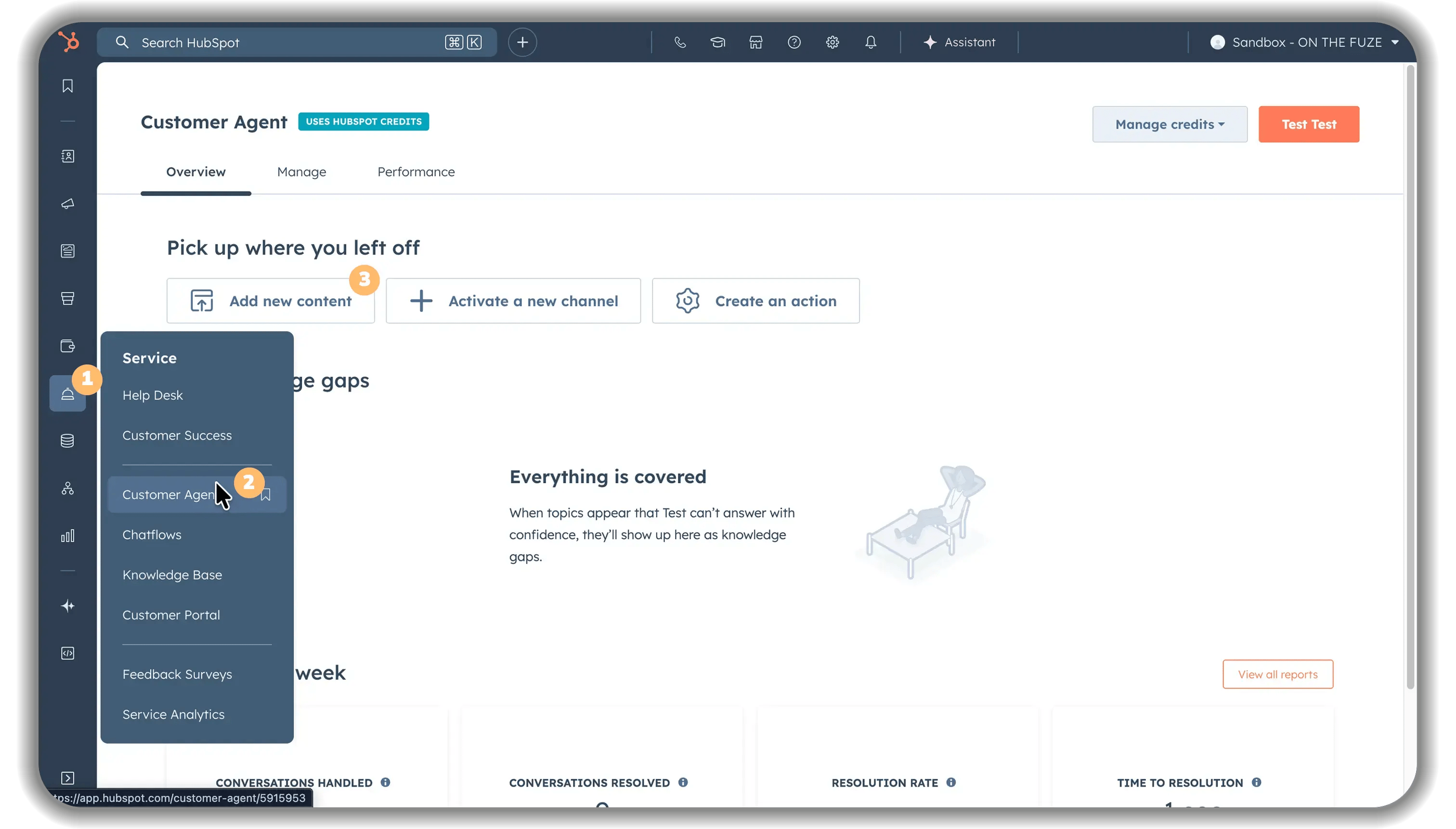
Each agent needs specific information to do its job well:
For Customer Agent:
- Upload your product documentation
- Add your FAQ articles and knowledge base content
- Include troubleshooting guides
- Add pricing and policy information
- Connect to your website content (the agent can learn from your pages)
Step 4: Write Clear Instructions (System Prompts)
Vague instructions = vague outputs.
-
Bad: "Help customers with questions."
-
Good: "You are a Level 1 Support Tech. Prioritize solutions from our KB articles. Always ask for the 'Portal ID' before troubleshooting. If you do not know the answer, escalate to the 'Tier 2 Support' team."
Be specific about:
- What information to request before responding
- When to escalate to a human
- Topics the agent should never handle
Step 5: Set Up Proper Guardrails
Control where and when agents can act:
Customer Agent guardrails:
- Define business hours or enable 24/7 operation
- Set escalation rules (e.g., after 3 back-and-forth exchanges)
- Never share billing information without verification
- Configure which channels it operates on (you now have 9 options: chat, email, WhatsApp, Messenger, SMS, Instagram, Telegram, LINE, Slack)
Prospecting Agent guardrails:
- Only research companies matching your ICP criteria
- Don't draft outreach for contacts without verified email addresses
- Flag accounts showing signs of recent budget cuts or layoffs
New Feature: Review the Audit Card after every test interaction. Verify that the agent is modifying properties correctly and citing the right Knowledge Base articles. This is your "Trust Layer" to prevent hallucinations.
Step 6: Test Before Full Deployment
Run the agent in "test mode for at least one week:
- Submit test scenarios from your team
- Review every response the agent generates
- Check the Audit Cards to see exactly which properties were modified.
- Identify patterns in incorrect or unhelpful responses
- Refine your instructions and knowledge base accordingly
Elite Partner Tip: Test conversations do consume credits. Budget for this testing phase (e.g., 50 test chats = 5,000 credits = $50).
Step 7: Monitor Performance and Adjust
Agents don't "set and forget." Plan to review performance weekly for the first month, then monthly afterward.
Metrics to track:
- Response accuracy rate
- Average time to resolution
- Escalation frequency
- Customer satisfaction scores for agent interactions
- Credit consumption versus budget
Watch your credit usage carefully: HubSpot defaults to automatic credit tier upgrades. If you have a spike in volume (say your marketing campaign drives 2,000 conversations instead of your usual 200), your credit consumption jumps from 20,000 to 200,000 credits ($200 to $2,000).
Set a maximum monthly credit limit in your account settings to avoid surprise bills.
Critical budgeting issue: All AI features draw from the same credit pool. Heavy Data Agent usage in sales research means fewer credits available for Customer Agent support conversations. Monitor your total credit consumption across all AI features, not just individual agents.
Common adjustments needed:
- Updating knowledge base as products change
- Refining instructions based on edge cases
- Adding new topics as business priorities shift
- Adjusting credit budgets based on actual usage patterns
- Reallocating credit usage between different AI features
What Mistakes Should You Avoid?
These are the implementation failures we see repeatedly:
Mistake 1: Ignoring the "Shared Pool" Risk
You budget 3,000 credits for Customer Support, but Sales uses them all on "Smart Properties" research on Day 1.
Fix: Establish internal "Credit Budgets" per department and monitor the Breeze Dashboard weekly.
Mistake 2: The "Infinite Loop" Workflow
You set up a workflow to "Run Agent" whenever a form is submitted. A viral post drives 5,000 spam submissions overnight.
Result: You wake up to a $500 credit bill because the agent tried to research 5,000 fake companies.
Fix: Always add a "filtering" step before the agent action (e.g., "Only run agent if Email Domain is not free email provider").
Mistake 3: Failing to Check Audit Cards
You let the agent run wild and discover it has been disqualifying good leads.
Fix: Check Audit Cards daily during the first month. They provide an immutable log of why the agent made a decision.
Mistake 4: Over-Purchasing Credit Packs
You buy a 100,000 credit pack but only use 10,000.
Fix: Credits do not roll over. Start small and use "Pay-as-you-go" for overages until you have a stable baseline volume.
Advanced Configuration: Custom Agents and Workflow Integration
If your team has technical resources, you can go beyond the basics.
The "Run Agent" Workflow Action (Private Beta)
This feature allows you to trigger an agent as a step in a standard workflow, moving AI from "Assisted" (human clicks a button) to "Agentic" (system triggers action).
Example workflow:
- Trigger: "Deal Stage changes to Negotiation."
- Action: "Run Data Agent: Research recent executive hires at this company."
- Output: Agent writes the finding to a custom property "Recent Hires," which triggers a Slack notification to the rep.
This connects the intelligence of agents with the structure of workflows.
Building Custom Tools with Model Context Protocol (MCP)
HubSpot now supports the Model Context Protocol (MCP). This allows developers to build custom connectors that agents can use to fetch data from external systems.
When a customer asks "Is the blue shirt in stock?", the agent:
- Queries the company's ERP system via API
- Gets real-time stock levels for that SKU
- Responds with accurate availability and estimated ship date
Note: This is a developer-grade feature, not a no-code feature. It requires building an API connector that the agent can "call" during a conversation.
- Write API integrations
- Use HubSpot's CLI tools
- Understand tool definition structures
- Maintain the integration as systems change
This is not a no-code feature. It's an advanced developer workflow for teams with technical resources.
Tool definition example (conceptual):
{
"name": "get_warehouse_stock",
"description": "Retrieves real-time stock levels from the ERP",
"parameters": {
"sku": "string",
"warehouse_id": "string"
}
}
Once deployed via HubSpot's CLI, this custom tool becomes available in Breeze Studio where you attach it to the relevant agent.
Marketplace Agents and Customization
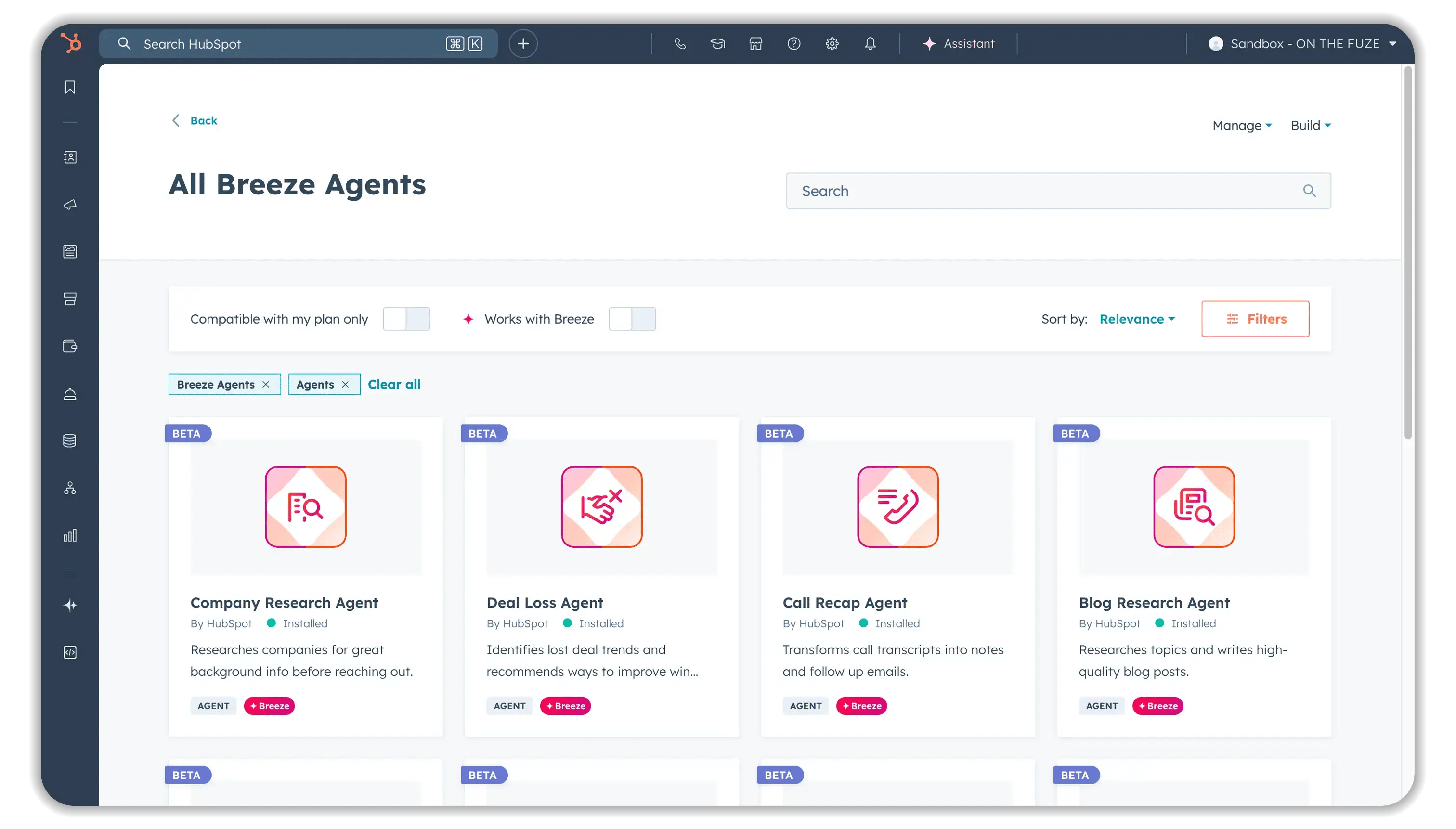
Browse the Breeze Marketplace to find pre-built agents for specific use cases beyond the core three (Customer, Prospecting, Data). HubSpot continues adding new marketplace agents, though the exact number and availability changes over time.
You can install marketplace agents directly and customize them in Breeze Studio to match your business needs—though customization options vary by agent.
Frequently Asked Questions
- Can Breeze agents work with HubSpot Starter?
No. Agents require HubSpot Professional or Enterprise tier. However, Breeze Assistant (the basic AI helper for writing and summaries) is available on Starter plans. - How do credits work if I have seasonal volume spikes?
HubSpot defaults to automatic credit tier upgrades, but you can set maximum monthly credit limits to control costs. Plan ahead for known busy seasons and adjust your credit budget accordingly. Remember that unused credits expire monthly. - What happens if an agent gives wrong information?
Check the audit cards to see exactly what actions the agent took. You can configure escalation rules so agents hand off to humans when uncertain. Review and correct agent responses regularly to improve accuracy. - Do I get billed for agent conversations during testing?
Yes, test conversations consume credits. Budget for testing costs when planning your implementation. - Can agents send emails on behalf of my team?
The Prospecting Agent can draft emails, but you should set up approval workflows. Don't let agents send customer-facing emails without human review until you've verified consistent quality. - How do I measure agent ROI?
Track time saved, response quality, and credit costs. If your Customer Agent handles 500 conversations monthly at 100 credits each (50,000 credits = $500) and saves your support team 40 hours of work, you're paying $500 for labor that would cost $1,600+ at $40/hour. - Can I turn off an agent if it's not working?
Yes. You can pause or deactivate agents anytime without losing your configuration. Credit consumption stops when the agent is paused. - What's the difference between Breeze Assistant and Breeze Agents?
Breeze Assistant is a basic AI helper (included with most plans) for writing emails, summarizing records, and answering simple questions. Breeze Agents are specialized AI teammates that run complete workflows autonomously and consume credits per action. - Do credits roll over month-to-month?
No. Unused credits generally expire monthly and don't carry forward to the next billing period. - Which Hub do I need for each agent?
Customer Agent requires Service Hub Professional or Enterprise. Prospecting Agent requires Sales Hub Professional or Enterprise. Data Agent availability may vary by Hub. Check HubSpot's current documentation for specific requirements.
Key Takeaways
- HubSpot uses credit-based pricing where 1 credit = $0.01—Customer Agent costs ~100 credits ($1) per conversation, workflow actions cost 10 credits each, and specific agent costs vary
- Monthly credit allowances vary by tier—Starter plans include ~500 credits, Professional ~3,000 credits, Enterprise ~5,000 credits (amounts vary by Hub)
- Credits don't roll over—unused credits expire monthly, so plan your usage carefully
- All AI features share the same credit pool—heavy Data Agent usage means fewer credits for Customer Agent conversations
- Three core agents are well-established—Customer Agent, Prospecting Agent, and Data Agent are the proven options; additional marketplace agents exist but availability changes
- Agents require Professional or Enterprise subscriptions—Breeze Assistant is available on Starter, but actual agents need paid subscriptions plus credits
- Specific agents require specific Hubs—Customer Agent needs Service Hub, Prospecting Agent needs Sales Hub
- Clean data matters more than fancy AI—agents automate what's already in your CRM, so fix data quality issues before activation
- Set credit limits to control costs—HubSpot defaults to automatic credit tier upgrades, which can cause surprise bills during volume spikes
- Use audit cards to verify agent actions—the January 2026 update shows exactly which properties agents modified and which actions they performed
- Workflow integration is in beta—the new "Run Agent" action lets you trigger agents inside workflows, but expect limitations as the feature evolves
- Plan for ongoing maintenance—review agent performance weekly initially, monthly afterward, and update knowledge bases as your business changes
- Custom integrations require developers—MCP support exists for building custom tools, but it's an advanced developer workflow, not a no-code feature