HubSpot is a customer platform that connects your marketing, sales, and service teams through one central database. It's the system that finally gets your departments talking to each other—and using the same information.
You've probably heard the name in marketing meetings, seen competitors using it, or had your CMO mention it during budget reviews. Here's what it does and whether it's right for your business.
HubSpot's Origin Story

Back in 2006, two MIT grads—Brian Halligan and Dharmesh Shah—noticed something that probably frustrated you too: traditional advertising was dying. Cold calls were getting ignored. Banner ads were being blocked.
Customers weren't waiting for your sales pitch anymore. They were Googling their problems, reading reviews, and making decisions before your sales team even knew they existed.
So HubSpot built a platform around a different idea: what if you attracted customers by being helpful instead of interruptive? They called it Inbound Marketing. Instead of interrupting people with ads, you'd create content that answers their questions, solves their problems, and builds trust.
Is HubSpot a CRM?
Yes, but calling HubSpot just a CRM undersells what it does.
HubSpot is a complete customer platform. The Smart CRM is the free foundation—where all contact information, website activity, and purchase history live. But the platform extends far beyond basic CRM functions.
The CRM serves as your "single source of truth." Every department—marketing, sales, and service—works from the same data. No more disconnected spreadsheets. No more asking, "whose numbers are right?"
When marketing runs a campaign, sales sees which prospects engaged. When sales closes a deal, service sees what was promised. When service resolves an issue, marketing knows not to send promotional emails to frustrated customers.
What Does HubSpot Do?
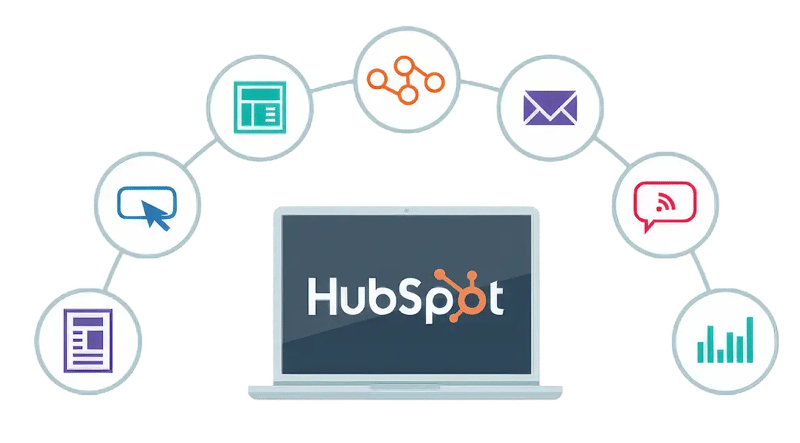
HubSpot handles four core business functions: marketing automation, sales pipeline management, customer service, and content creation. Each function connects to the same customer database, so your teams work from shared information instead of disconnected tools.
If you want to know everything about HubSpot Marketing Hub, watch our YouTube playlist: HubSpot Marketing Hub Masterclass
Marketing Automation
Your marketing team can build email campaigns, track which content is working, see which ads are worth the budget (and which are burning cash), and score leads based on behavior—not guesswork.
Sales Pipeline Management
Sales gets tools to track every deal, automate follow-up emails, forecast revenue, and see exactly which marketing content a prospect engaged with before they showed up on a sales call. No more "warm transfer" confusion.
Customer Service Tools
After the sale closes, service teams can manage support tickets, track satisfaction scores, build knowledge bases, and use AI to handle routine questions 24/7. Happy customers stick around—and they refer others.
Content Creation
Need a website? Landing pages? Blog? HubSpot's Content Hub includes hosting, drag-and-drop builders, and AI writing assistance. No developer required for most tasks.
Why is HubSpot So Popular?
HubSpot solves three problems that plague most businesses: disconnected data across departments, steep learning curves for complex software, and difficulty measuring marketing ROI. The platform's popularity comes from delivering fast results without requiring an IT team or months of training.
Unified data eliminates chaos
When your marketing, sales, and service teams use different tools that don't talk to each other, you end up with data chaos. Your sales rep doesn't know the prospect downloaded three whitepapers last week. Your service team can't see the promises your sales team made during the deal. Your marketing team is guessing which campaigns closed revenue.
Easy to learn and adopt
Most teams can get productive in weeks, not months. The platform is intuitive enough that you don't need months of training or expensive consultants just to send an email campaign.
AI does the heavy lifting
HubSpot's AI tools (called "Breeze") boost productivity across the platform. Content generation, sales prospecting, 24/7 customer service responses—automation handles routine work so your team can focus on strategy and relationships.
Measurable results
After one year, the average HubSpot customer sees 129% more leads, closes 36% more deals, and improves ticket closure rates by 37%. 95% report positive ROI. These numbers come from HubSpot's customer data.
What Are the Main Benefits of HubSpot?
HubSpot eliminates the data fragmentation that kills collaboration between your revenue teams. Beyond that, the platform delivers five specific advantages that directly impact your bottom line.
Benefit 1: No more data disconnect
Sales, marketing, and service work from the same customer record. No duplicate data. No version conflicts. No "let me check with marketing."
Benefit 2: Faster time to value
You'll see results in weeks, not quarters. The platform is designed for quick wins that build momentum.
Benefit 3: Scales with your growth
Start with the free CRM. Add marketing automation when you're ready. Layer in advanced sales tools as your pipeline grows. The platform grows with you.
Benefit 4: Everything integrates
Need to connect Slack? Salesforce? Stripe? QuickBooks? HubSpot's App Marketplace has 1,500+ integrations. Custom API connections work for specialized tools.
If your thinking about integrating Salesforce with HubSpot, read our full guide: Integrating HubSpot With Salesforce? Read This Before
Benefit 5: Built-in automation
Workflows handle lead nurturing, email sequences manage sales follow-up, and AI agents resolve customer questions 24/7. Your team focuses on high-value work, not repetitive tasks.
Who Should Use HubSpot?
HubSpot works best for businesses committed to content marketing and ready to break down barriers between marketing, sales, and service. If your teams currently work from disconnected tools and you're serious about fixing that, HubSpot is built for you.
Best for businesses that:
- Need to eliminate data gaps between marketing, sales, and service teams
- Want tools teams can learn quickly (weeks, not months)
- Are committed to creating helpful content instead of relying only on ads
- Have budget room for growth-focused tools
- Require marketing and sales to work from the same playbook
When Should You Look at Alternatives?
HubSpot isn't the right fit if you only need one or two basic features, have strict budget constraints, or require deep industry-specific customization. The platform's value comes from using it fully—if you can't do that, you're paying for capabilities you won't use.
Consider other options if:
- You only need basic email marketing or simple contact management (cheaper options exist)
- Your budget can't support the jump from free tools to $890/month
- You need hyper-specialized, industry-specific CRM features HubSpot doesn't offer
How Much Does HubSpot Cost?
HubSpot pricing starts free and scales to $3,600+/month depending on features and contact volume. The jump from free tools to useful automation happens at the Professional tier ($890/month), which catches most businesses off guard.
HubSpot offers four tiers with these starting prices:
- Free: $0
- Starter: ~$15-50/seat
- Professional: ~$890/month base
- Enterprise: ~$3,600/month base
The critical detail most businesses discover too late: useful automation features require the Professional tier or higher.
The Free CRM works for getting started. But if you're serious about scaling, you'll outgrow it fast. Upgrading to Professional includes a mandatory $3,000 onboarding fee for Marketing Hub.
Make an informed decision
Use our HubSpot Total Cost Calculator and discover how much you need to leverage your investment on this smart CRM.
What Drives HubSpot's Cost Up?
Your cost increases as you generate more leads—which is the goal but creates a pricing trap. Every additional 1,000-5,000 marketing contacts adds $50-250 to your monthly bill depending on your tier.
Marketing contacts are the primary cost driver. As you generate more leads, your monthly cost increases.
Professional tier includes 2,000 marketing contacts. Need 7,000? Add $250/month. Need 12,000? Add another $250/month.
The Six Core "Hubs"
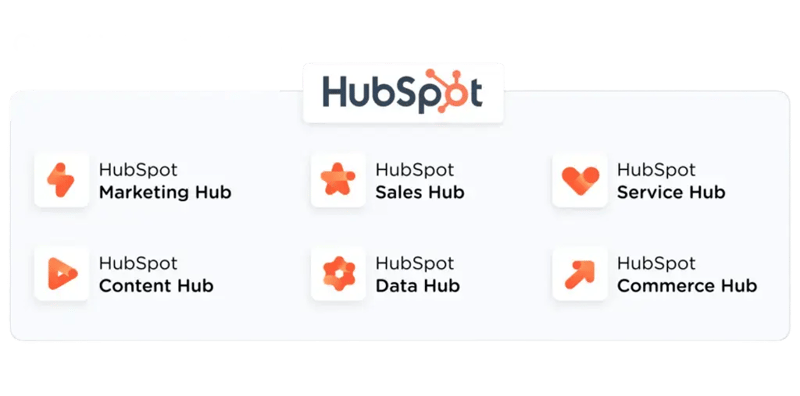 HubSpot organizes its tools into six functional areas:
- Smart CRM (Free) - The foundation. Contact records, activity tracking, basic reporting.
- Marketing Hub - Email campaigns, landing pages, SEO tools, ad tracking, and automation workflows.
- If you want to know everything about HubSpot Marketing Hub, watch our YouTube playlist: HubSpot Marketing Hub Masterclass
- Sales Hub - Deal tracking, email sequences, pipeline management, and revenue forecasting.
- Service Hub - Ticketing system, help desk, customer feedback surveys, knowledge base.
- Content Hub - Website builder, blog management, hosting, and AI content writer.
- Data Hub - Data quality controls, custom rules, app synchronization, and governance tools.
- Commerce Hub - B2B commerce solution that enables businesses to accept payments, manage quotes, process subscriptions, and handle complex B2B transactions directly within the CRM
HubSpot CRM becomes powerful when you use multiple hubs together. Data flows automatically between them, so you can track a customer's entire journey—from first website visit to closed deal to support ticket resolution.
How Flexible and Scalable is HubSpot?
.webp?width=800&height=399&name=Top%20HubSpot%20Integrations-1%20(1).webp)
HubSpot scales from startup to enterprise without requiring platform migration. The centralized database grows with you—add users, increase contact volume, expand into new markets—all on the same system. Customization options let you adapt workflows and pipelines to match your specific processes instead of forcing you into rigid templates.
Flexibility
Customize workflows, sales pipelines, and reporting dashboards to match your specific business processes. The platform adapts to your workflow, not the other way around.
HubSpot supports custom API integrations for specialized tools. Need to connect proprietary software? Build custom connections that keep your entire tech stack unified.
Scalability
The centralized data foundation means all teams can access the same information as you grow. Add users, increase contact volume, or expand into new markets without switching platforms.
Cloud-based infrastructure automatically adjusts to handle fluctuations in website traffic and data volume. You're not managing servers or worrying about capacity.
Integration ecosystem
The App Marketplace offers 1,500+ third-party integrations. Connect popular tools like Slack, Salesforce, Google Analytics, Zoom, and Shopify without custom development.
If your thinking about integrating Salesforce with HubSpot, read our full guide: Integrating HubSpot With Salesforce? Read This Before
How Do You Automate with HubSpot?
Automation is how HubSpot delivers ROI. 89% of customers report productivity increases from automated workflows.
Workflows (Marketing automation)
Build multi-step campaigns that nurture leads automatically. Someone downloads a whitepaper? Trigger a 5-email sequence over two weeks. They visit your pricing page twice? Alert sales immediately. Workflows handle more than emails. Automate internal tasks, clean up data, assign leads to the right sales rep, update contact properties based on behavior—all without manual work.
Sequences (Sales automation)
Sales teams automate personalized follow-up. Create a series of emails and tasks that execute automatically. When a prospect replies, the sequence stops. When they don't, your next touchpoint happens on schedule.
AI-powered automation
HubSpot's Breeze AI tools accelerate content creation, identify high-value leads, and resolve customer questions without human intervention. The AI learns from your data to make smarter recommendations over time.
Critical automation features unlock at the Professional tier ($890/month). Starter tier has basic automation. Free tier has almost none.
Want to learn more about how HubSpot AI integrates with ChatGPT and Claude? Check out our latest video: HubSpot AI Tutorial: Learn how to use ChatGPT with HubSpot + Claude HubSpot integration!
How Do You Set Up HubSpot?
Setup requires four critical steps in a specific order: install tracking code, establish naming conventions, configure domains, and set user permissions. Skip any of these and you'll create data problems that take months to fix. The entire process takes 2-4 hours if you do it right the first time.
Follow these essential setup steps in order:
- Step 1: Install tracking code on your website: Without this, HubSpot can't see what prospects do on your site. WordPress has a plugin. Other platforms require pasting code into your site's header.
- Step 2: Set up naming conventions: HubSpot allows 1,000 custom fields per object. Without a system, this becomes chaos. Use prefixes (contact_, deal_, company_) and document your standards before building.
- Step 3: Add all your domains: Operating across multiple domains or subdomains? Add them in Advanced Tracking settings. Otherwise, cross-domain tracking breaks and form submissions may get flagged as spam.
- Step 4: Invite your team and set permissions: Define who can see what before someone deletes your entire contact database. Not everyone needs access to everything.
What Are HubSpot's Limitations?
HubSpot caps workflows at 500 per portal, limits custom fields to 1,000 per object, and restricts email sending based on your contact tier. Some ad formats (Facebook Messenger, LinkedIn Carousel) have limited tracking, forcing you to use native platform analytics for complete data.
System Limits:
- Maximum 500 workflows per Enterprise portal
- Maximum 1,000 custom fields per object type
- Email sending capped at 5-20x your contact tier (depends on subscription level)
Tracking Limitations: Facebook Messenger ads and LinkedIn Carousel ads have limited tracking. You'll need to use those platforms' native analytics for complete data.
Why Do HubSpot Implementations Fail?
Most failures come from three preventable mistakes: launching without defined success metrics, poor data migration planning, and team resistance to change. Even user-friendly platforms fail when organizations skip strategic planning or can't get buy-in from the people who need to use them daily.
Three common reasons:
- No clear plan: Teams activate features without defining success metrics. The system feels disconnected from business outcomes.
- Data migration problems: Transferring historical data from legacy systems is complex. Poor planning creates errors that take months to fix.
- To learn how to properly migrate to HubSpot, check out our full guide: How to use HubSpot: Full HubSpot Migration Tutorial for Beginners
- Low team adoption: Resistance to change and communication gaps between marketing and sales stall implementation, regardless of platform quality.
Where Can You Learn HubSpot?
HubSpot Academy offers free courses, certifications, and learning paths that teach platform skills and marketing strategy. The certifications are globally recognized and prove competency to employers and clients. Beyond Academy, HubSpot User Groups and the Community Forum provide peer support when you're stuck.
- HubSpot Academy: Self-paced courses, certifications, and learning paths organized by role or business objective. Certifications are globally recognized and validate your team's expertise.
- On The Fuze YouTube Channel (Free): HubSpot tutorials, masterclasses and New Features. New content weekly.
- HubSpot Community Forum: Troubleshooting help when something breaks or you can't figure out how to build a specific workflow.
Is HubSpot Right for Your Business?
HubSpot works when you're ready to eliminate data divisions, commit to content-driven growth, and invest in changing how your teams collaborate. It fails when you're looking for cheap point solutions, can't afford the Professional tier jump, or aren't willing to change team workflows. The ROI shows up in months if you use it fully—but only if you use it fully.
HubSpot is a customer platform built around one core idea: keep all your customer data in one place so your teams can collaborate instead of competing.
Choose HubSpot if you:
- Need to eliminate departmental data silos
- Want speed-to-value over deep customization
- Are committed to creating helpful content
- Can invest in tools that require team behavior change
The ROI typically shows up in your pipeline within months, not years—if you use it fully by connecting marketing, sales, and service.
Skip HubSpot if you:
- Only need basic tools
- Have strict budget constraints
- Require extreme customization
- Aren't ready to change how teams work together
Key Takeaways
- HubSpot connects marketing, sales, and service teams through one shared database
- Built around Inbound Marketing: attract customers by being helpful, not interruptive
- Average customers see 129% more leads, 36% more closed deals, and 37% better ticket resolution after year one
- Pricing scales with success—more leads means higher costs
- Essential features like advanced automation require Professional tier ($890/month+)
- Best for businesses ready to eliminate data silos and commit to content-driven growth
- Not ideal if you only need basic tools or have strict budget constraints