HubSpot Lifecycle Stages 2026
Get lifecycle stage definitions, step-by-step setup, MQL to SQL definition frameworks, and an audit playbook to align Marketing and Sales.
Download Now

Most HubSpot portals have the same problem: lifecycle stages exist in the system, but nobody on the team can clearly explain what each one means — or agree on when a contact should move from one to the next.
That ambiguity is expensive. Marketing sends nurture emails to contacts who are ready to buy. Sales calls leads who haven't been qualified. Leadership reviews a pipeline report that no longer reflects reality.
Lifecycle stages are not a cosmetic CRM feature. They are the operating logic your entire revenue team runs on. When they're properly defined, they tell your marketing team who to nurture, your sales team who to contact, and your leadership team where revenue is likely to come from. When they're undefined or misused, the revenue consequences are direct and measurable.
What Is the Lifecycle Stage in HubSpot?
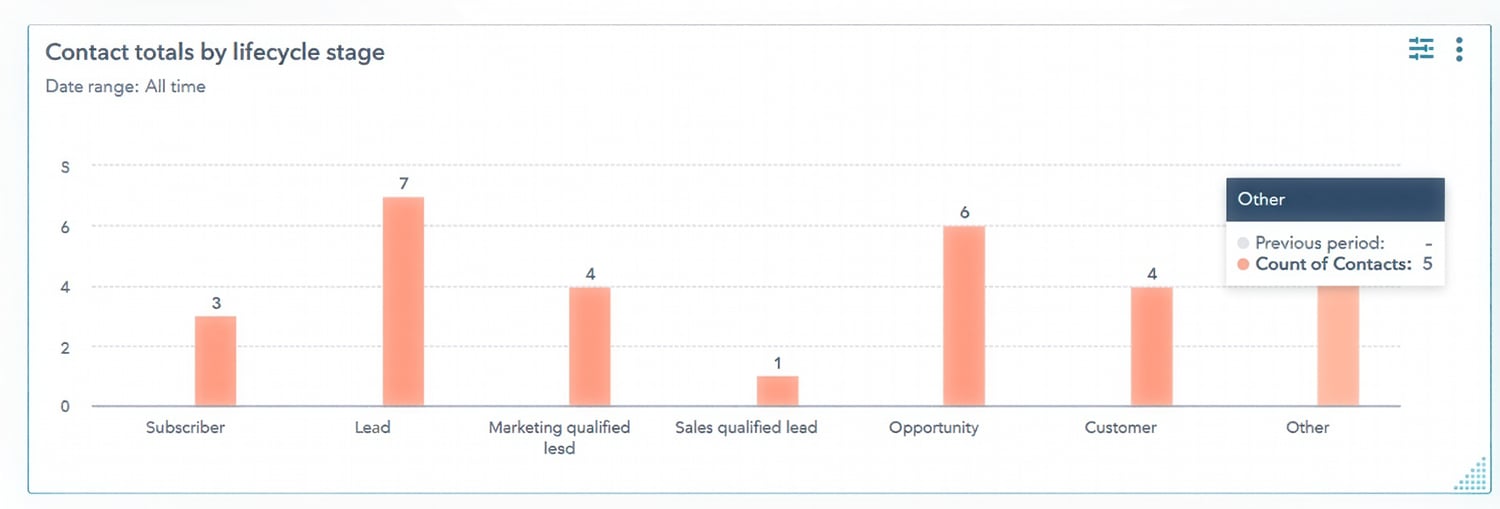
The Lifecycle Stage is a native HubSpot property that describes where a contact or company sits in your customer journey — from their first interaction with your brand all the way through purchase, retention, and referral.
Every contact and every company in HubSpot has a Lifecycle Stage. If you haven't configured it, HubSpot defaults new contacts to "Subscriber" — which means a large percentage of your database may be carrying the same label regardless of where they actually are in the funnel.
The Lifecycle Stage is the single source of truth for relationship maturity. It answers one question for everyone on your team: "What stage is this contact at in their journey with us, and what should we do next?"
Lifecycle Stage is a macro property — it covers the full customer journey and is used by marketing, sales, and customer service. It is not a task-tracking property. It should only be updated when a real milestone has been crossed.
What Are the 8 Stages of the Customer Lifecycle in HubSpot?
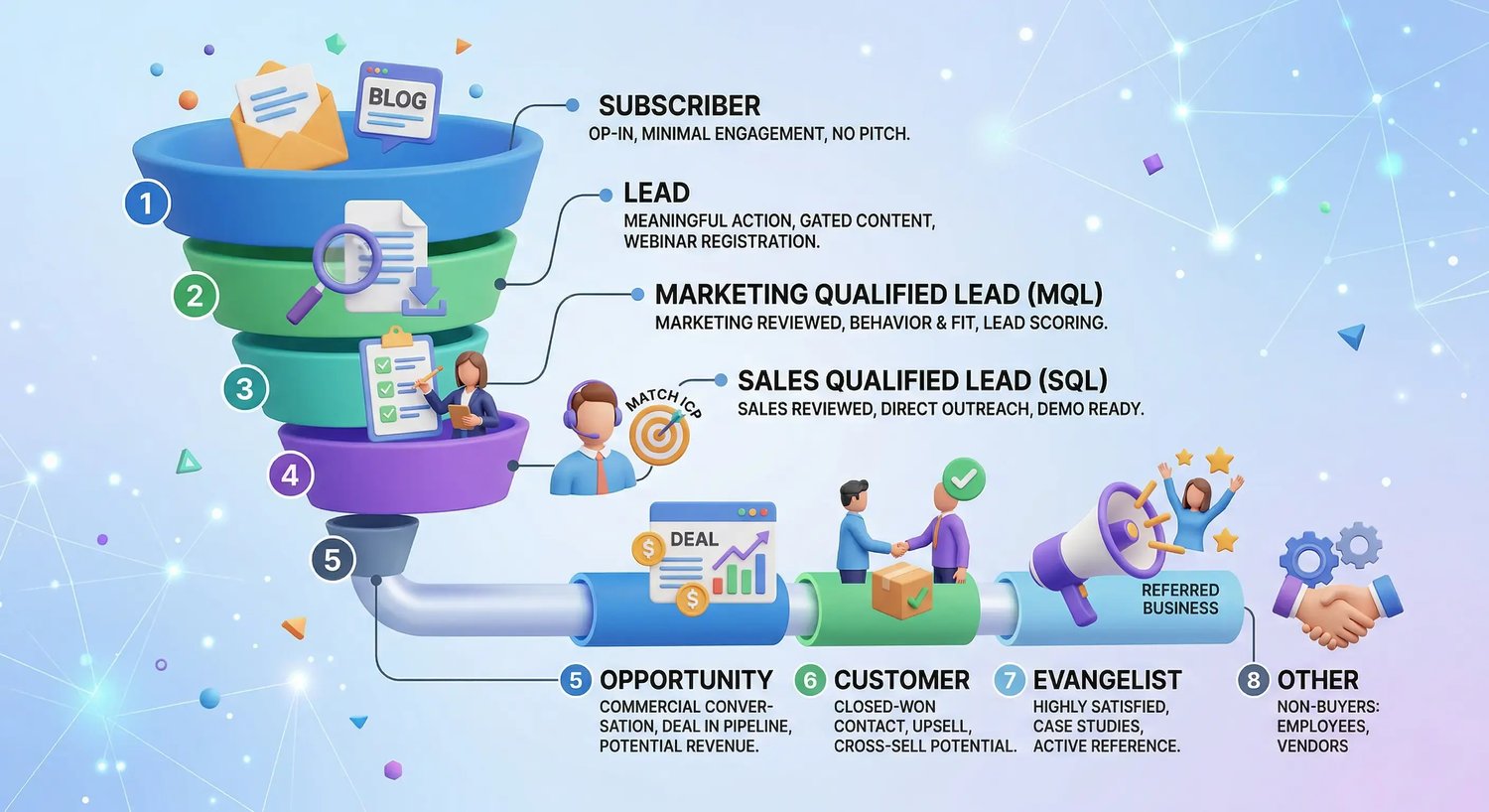
HubSpot provides eight default lifecycle stages. Here is what each one actually means and what action it signals for your team.
| # | Stage | Who They Are | What To Do Next |
|---|---|---|---|
| 1 | Subscriber | Opted into your comms (newsletter, blog). No buying intent confirmed. | Send educational content. Build familiarity. Do not push for a sale. |
| 2 | Lead | Took a meaningful action — downloaded gated content, registered for a webinar. Intent unknown. | Evaluate before starting a sales conversation. |
| 3 | MQL | Marketing has reviewed this contact against defined criteria and confirmed readiness for sales. | Warm handoff to sales. This is a marketing decision. |
| 4 | SQL | Sales has independently verified this contact matches the ICP and shows active buying intent. | Schedule direct outreach or a product demo. BANT confirmed. |
| 5 | Opportunity | A formal deal record exists with a dollar amount. Active commercial discussion underway. | Update pipeline stage consistently. This feeds your forecast. |
| 6 | Customer | Closed-won. This contact purchased your product or service. | Begin onboarding, retention, and expansion workflows immediately. |
| 7 | Evangelist | A satisfied customer who refers new business or participates in case studies. | Automate referral workflows. Segment for exclusive offers and case studies. |
| 8 | Other | Non-buyers only: employees, vendors, press contacts, technology partners. | Keep out of funnel metrics. Do not use as a catch-all for unclassified contacts. |
Stage-by-Stage Breakdown
1. Subscriber
A Subscriber has opted into your communications — newsletter signups, blog subscribers, or general mailing list contacts. They've shown minimal engagement and have not taken any action that suggests commercial interest. Do not pitch to Subscribers. Educate them and let behavior reveal intent over time.
2. Lead
A Lead has taken a more meaningful action — a gated content download, webinar registration, or event attendance. Engagement is confirmed but commercial intent has not been verified. Leads need to be evaluated against your MQL criteria before any sales involvement begins.
3. Marketing Qualified Lead (MQL)
An MQL is a contact your marketing team has reviewed against predefined qualification criteria — behavioral signals, demographic fit, and lead scoring — and determined is ready for a sales conversation. This is a marketing decision, not a sales one.
Elite Partner Tip
The MQL definition is the single most important configuration decision in this system. Document it clearly, get sign-off from both Marketing and Sales leadership, and review it quarterly. Verbal agreements re-interpreted independently by each team cause more alignment problems than wrong definitions.
4. Sales Qualified Lead (SQL)
An SQL is a contact that sales has independently reviewed, confirmed matches your Ideal Customer Profile, and deemed ready for direct outreach or a product demonstration. This is a sales decision — not a rubber stamp on marketing's MQL assessment.
5. Opportunity
An Opportunity is tied to a deal record in your pipeline. A formalized commercial conversation has started, there is a specific dollar amount attached, and this contact is being forecast as potential revenue. The accuracy of your Opportunity stage depends entirely on the accuracy of your SQL definition upstream.
6. Customer
A Customer is a closed-won contact. Most companies stop here and move on to the next acquisition. That's a structural mistake. The Customer stage is where upsell, cross-sell, and referral revenue lives. Without a post-sale lifecycle workflow, that revenue is invisible and unmanaged.
7. Evangelist
An Evangelist is a highly satisfied customer who actively refers new business, participates in case studies, or serves as a reference on sales calls. If your referral-generating customers are still labeled "Customer," you can't segment them, automate referral sequences, or track the revenue they generate.
8. Other
Other is for non-buyers only: employees, vendors, press contacts, and technology partners. It is not a catch-all for contacts you haven't classified yet. When more than 5% of your CRM database sits in "Other," it signals a structural problem in your import process or routing workflows.
Elite Partner Tip
Two custom stages worth adding to almost every portal: "Ready for Upsell" and "Retention Risk" — both positioned after Customer. Building both costs fifteen minutes. Not building them costs you expansion revenue every quarter.

Who Owns Lifecycle Stages — Marketing or Sales?
Both teams use Lifecycle Stage, but each one owns specific transitions within it.
| Lifecycle Transition | Who Owns It and What Triggers It |
|---|---|
| Subscriber → Lead | Marketing automation (workflow only). Not manually editable by reps. |
| Lead → MQL | Marketing automation (workflow only). Not manually editable by reps. |
| MQL → SQL | Sales reps — but only after BANT confirmation is logged in a required field. |
| SQL → Opportunity | Sales reps — triggered by deal creation in HubSpot pipeline. |
| Opportunity → Customer | Sales reps — triggered by closing a deal as won. |
| Customer → Evangelist | Marketing or Customer Success — triggered by referral activity or case study participation. |
Rule
Never let one team unilaterally change the definition of a stage the other team owns. Both teams must agree in writing. This is the structural foundation of marketing-sales alignment.
How Do You Set Up Lifecycle Stages in HubSpot?
Lifecycle Stage settings are found in one place in HubSpot. Here is the complete setup path for 2026.
Navigation Path
- Click the gear icon (Settings) in the top navigation bar.
- In the left sidebar, scroll to Objects → Contacts.
- Click the Lifecycle Stage tab at the top of the Contacts settings page.
- You will see all eight default stages listed in sequence with options to add, rename, and reorder.
How Do You Add a Custom Stage?
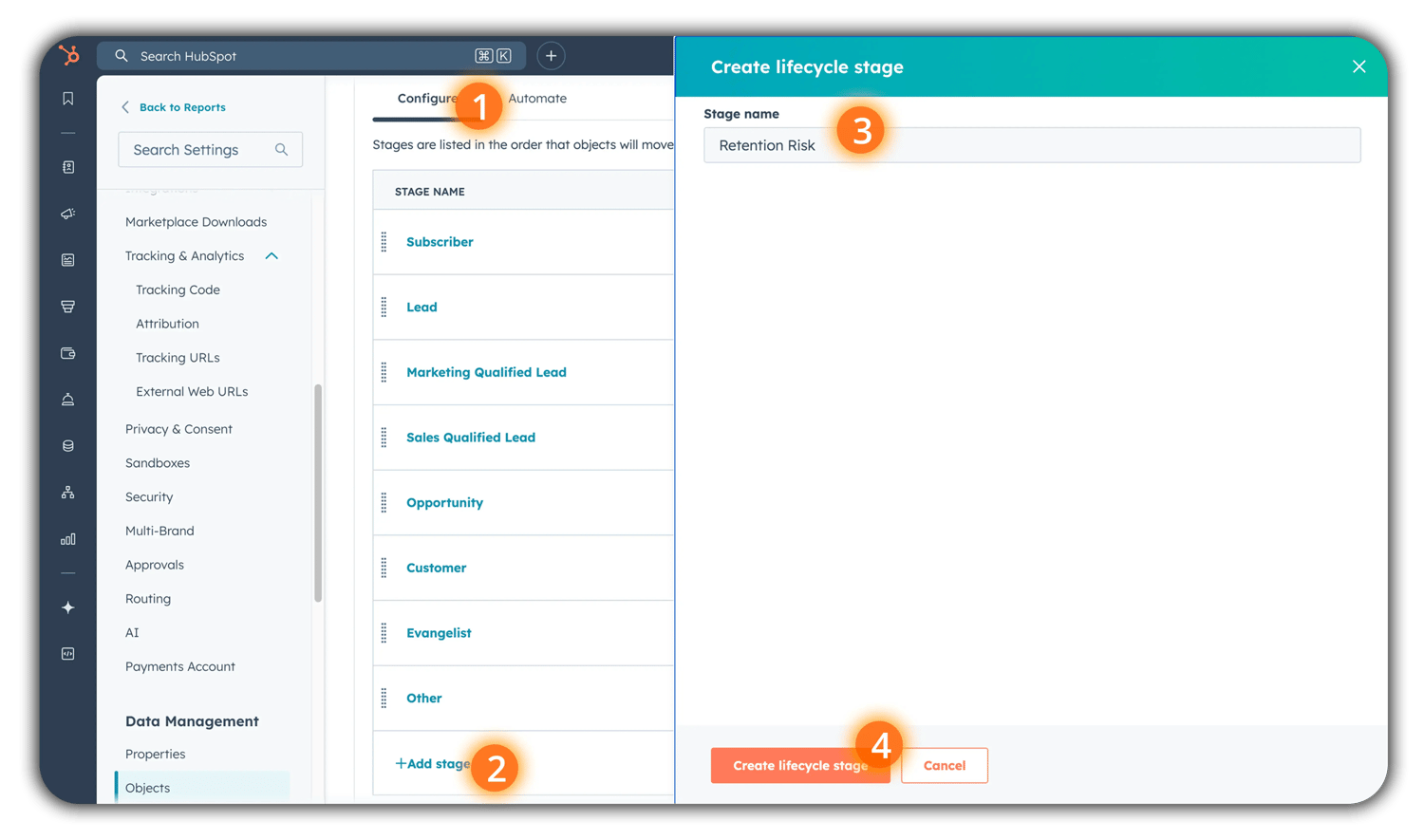 HubSpot's eight default stages cover most business models, but not all. If your sales process includes a distinct step that doesn't map cleanly to the defaults — a technical evaluation, a formal scoping session, a pre-renewal check-in — add a custom stage.
- Click the + Add stage button at the bottom of the stage list.
- Name it specifically. Not "Evaluation" — use "Technical Scoping" or "Retention Risk."
- Drag it to the correct position in the sequence.
- HubSpot automatically generates timestamp properties for the new stage: date entered, date exited, and time in stage. No additional setup required.
How Do You Update Your Existing Database in Bulk?
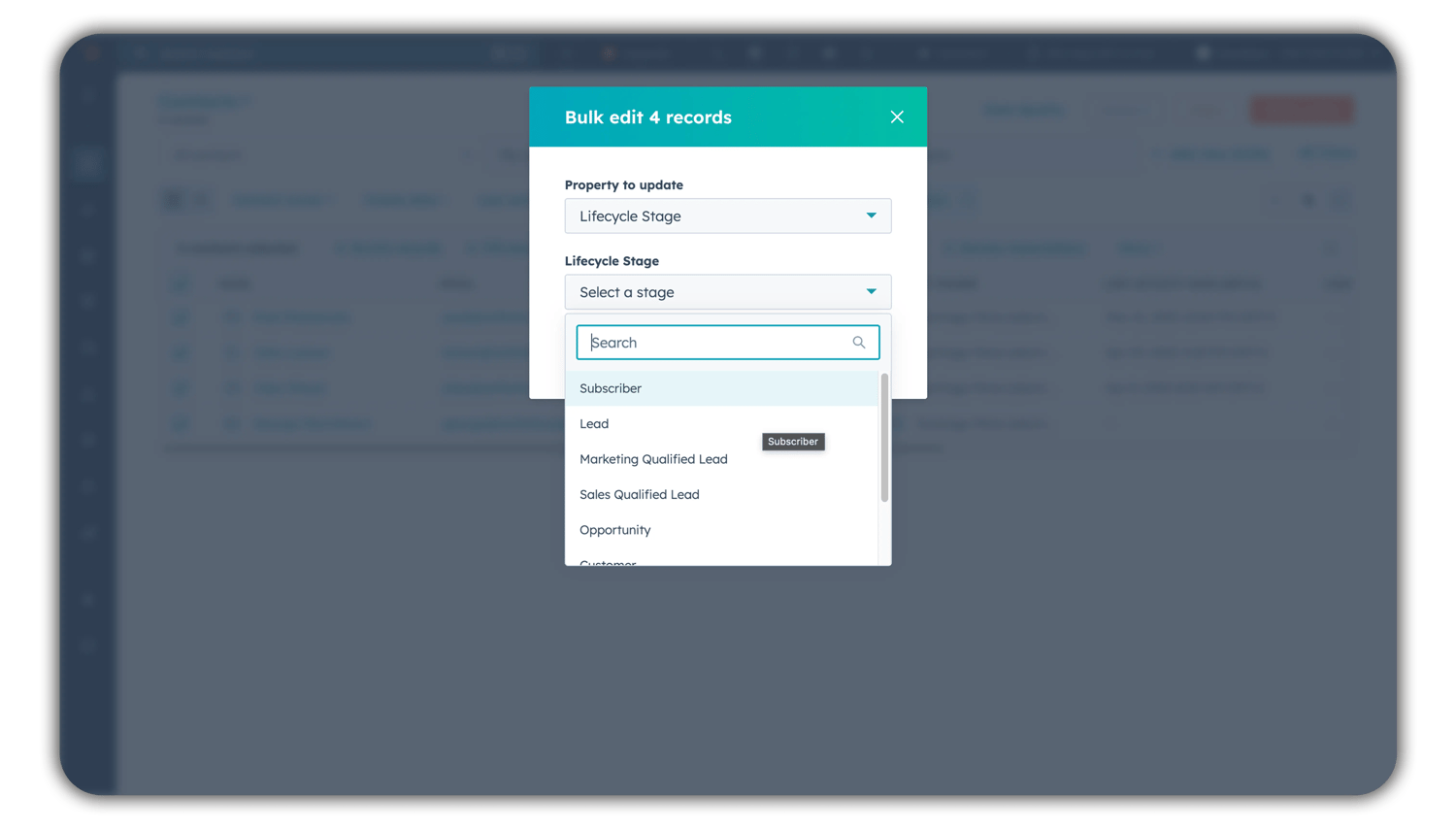
- Go to CRM → Contacts.
- Apply a filter: Lifecycle Stage is unknown.
- Select all records using the checkbox at the top of the table.
- Click Edit → Lifecycle Stage → choose the correct value → click Update.
- HubSpot processes the update across all selected records simultaneously.
Note
For large migrations from a legacy CRM, use a CSV import. Export your contacts, add a Lifecycle Stage column with the correct HubSpot internal values, and reimport. Delete any old custom lifecycle dropdown properties immediately after — if two fields exist, someone will use the wrong one within a week.
What Is the Difference Between Lifecycle Stage and Lead Status?
This distinction is one of the most frequently misunderstood in HubSpot. Using these two properties interchangeably corrupts your funnel reports in ways that are hard to diagnose after the fact.
| Lifecycle Stage | Lead Status | |
|---|---|---|
| What it tracks | The full customer journey — from first contact to closed customer to active advocate. | The granular, day-to-day activity state of a contact while they are in the SQL stage. |
| Who uses it | Marketing, sales, and customer service. | Sales reps only. |
| What it represents | A milestone — a real threshold that has been crossed in the relationship. | An operational notation — what a rep has done or needs to do next. |
| When it moves | Only when a substantive change in relationship maturity occurs. | Frequently — as a rep progresses through their outreach sequence. |
| Default values | Subscriber, Lead, MQL, SQL, Opportunity, Customer, Evangelist, Other. | Open, Attempted to Contact, Connected, In Progress, Open Deal, Unqualified, Bad Timing. |
Warning
Never use Lifecycle Stage to track what a rep has done. Only use it to record what a contact has achieved. If a rep moves a contact to SQL every time they send an email, your funnel reports will show inflated pipeline numbers that don't reflect real commercial intent.
How Do You Define MQL and SQL for Your Specific Business?
The MQL-to-SQL handoff is where more revenue disappears than at any other point in a B2B company's funnel. The reason is almost always the same: nobody has formally agreed on what those labels mean.
MQL Definition: Three Required Components
A complete MQL definition requires all three of the following elements:
- Behavioral Threshold: What has the contact done? Not general engagement — something specific. For example: downloaded a technical resource and visited the pricing page within 14 days. Base this on the minimum behavioral pattern you've seen from contacts who eventually became customers. Pull your historical data and work backward.
- Demographic Filter: Does this contact fit your Ideal Customer Profile? Budget range, company headcount, industry, and title are common filters. A contact who engages perfectly behaviorally but works at a two-person company when your minimum client size is twenty is not an MQL. The filter catches that before it reaches your sales team.
- Time Component: Is this activity recent? If someone meets all your behavioral criteria but their last activity was six months ago, they are not an MQL today. Define a time window — typically the last 30 to 60 days.
SQL Verification: The BANT Framework
SQL qualification confirms that marketing's MQL assessment is correct before a rep commits time to a contact. The most proven framework for SQL verification is BANT: Budget, Authority, Need, and Timeline. All four must be confirmed — not guessed at — before a contact moves to SQL.
| Criterion | How to Confirm It — Not Guess At It |
|---|---|
| B — Budget | Has allocated budget been confirmed — not just interest in pricing? A contact who wants to understand pricing is not the same as one whose CFO has approved a line item. |
| A — Authority | Is this contact the decision-maker, or have you identified and engaged the person who is? Do not mark SQL until you have confirmed who will sign the contract. |
| N — Need | Is there a specific, documented business problem that your product or service solves? Not a general interest in improving — an actual pain point with a measurable consequence. |
| T — Timeline | Is there urgency? A date, trigger event, or business consequence that makes now the right time to buy? Contacts without a timeline belong in MQL, not SQL. |
Elite Partner Tip
Put your MQL and SQL definitions in writing — one shared document, one page, signed by your Marketing Director and VP of Sales. Include the specific behavioral criteria, BANT requirements, and a review schedule. Review quarterly in Year 1, then semi-annually once the definitions stabilize.
How Do You Know If Your SQL Definition Is Working?
After your SQL definition has been live for 60 to 90 days, run one specific report: what percentage of SQLs are converting to Opportunities?
| Conversion Signal | What To Do |
|---|---|
| Below 20% | Your definition is too loose. Tighten at least one BANT criterion — usually Authority or Timeline, which are most commonly skipped or assumed. |
| 20%–50% | Healthy performance for most B2B SMBs. Review quarterly and recalibrate as your market evolves. |
| Above 50% | Your definition may be too strict. You could be filtering out good prospects. Loosen one criterion and monitor. |
How to build this report
Go to Reports → Reports → create a Funnel report showing lifecycle stage conversions → filter to show SQL → Opportunity conversion rate → review the percentage column. Set this report as a monthly review in your revenue cadence.
Industry Benchmarks: What Does Good Actually Look Like?
Use these to diagnose, not to set targets. Your performance should be measured against your own baseline.
| Industry | Benchmark Reference |
|---|---|
| B2B SaaS | Lead-to-Customer conversion rate: 2%–5% |
| Professional Services / Consulting | Lead-to-Customer conversion rate: 10%–15% |
| Biotech | Lead-to-MQL rate: 36% (audience is pre-filtered by technical content) |
| FinTech | Lead-to-MQL: 21% · MQL-to-SQL: 46% (strict qualification, accurate conversion) |
Source: First Page Sage, Sales Funnel Conversion Rate Benchmarks 2026; HubSpot 2026 Marketing Statistics.
What Are the Three Most Common Lifecycle Stage Mistakes?
These are not beginner errors. We find them in portals managed by experienced teams at companies that have used HubSpot for two or three years. They're subtle, and because they're subtle, they compound.
Mistake 1: Premature Sales Handoff
A contact downloads your pricing guide. Someone on the team sees that as high intent and moves them to SQL. The rep calls — and discovers it was a student writing a research paper.
The consequence isn't just a wasted call. It's the erosion of the marketing-sales relationship. Once your sales team starts ignoring MQL handoffs because too many of them have been premature, you've broken the handoff mechanism. Recovering that trust takes quarters, not days.
- Fix: Require BANT criteria to be explicitly confirmed before any contact moves to SQL. Not implied. Not assumed. Confirmed through a direct conversation or a verifiable behavioral signal.
Mistake 2: The Post-Sale Nurture Gap
Most CRM environments go quiet the moment a contact hits "Customer." The deal is signed, the contact goes to onboarding, and from a lifecycle perspective they disappear — indefinitely labeled "Customer" with no expansion triggers and no retention tracking.
In SaaS businesses, renewals and expansion deals can represent 40% or more of total revenue. If your CRM has no structured post-sale lifecycle workflow, you're leaving that revenue unmanaged.
- Fix: Add two custom stages — "Ready for Upsell" and "Retention Risk."
- "Ready for Upsell" triggers when a customer hits a usage milestone or subscription anniversary.
- "Retention Risk" triggers when activity drops, support tickets spike, or renewal is within 60 days without a conversation started.
Mistake 3: The Junk Drawer
The "Other" lifecycle stage exists for a specific purpose: contacts who will never purchase your product. It is not a catch-all for records you haven't decided what to do with.
When more than 5% of your CRM database sits in "Other," it signals a structural problem — your import process, lead routing, or manual data entry has an issue.
- Fix: Create a custom "Relationship Type" property at the Company level with values like Vendor, Technology Partner, Press Contact, and Internal Team.
- This lets a company be a vendor and a prospective customer simultaneously — without either data point corrupting the other.
What Advanced Lifecycle Stage Features Should You Use in 2026?
HubSpot's 2026 infrastructure updates introduced several capabilities that materially change what's possible with lifecycle stage management.
Native Temporal Tracking at the Company Level
HubSpot now automatically generates four timestamp properties for every lifecycle stage — both default and custom — at the Company object level. No additional setup required.
| Property | What It Tracks |
|---|---|
hs_v2_date_entered_<stage> |
The precise timestamp a company entered this stage. |
hs_v2_date_exited_<stage> |
The exact timestamp the company exited this stage. |
hs_v2_latest_time_in_<stage> |
Duration spent during the most recent visit to this stage. |
hs_v2_cumulative_time_in_<stage> |
Total aggregate time spent across all sales cycles. |
These properties enable sales velocity analysis, funnel bottleneck identification, and revenue modeling that goes far beyond HubSpot's out-of-the-box reporting dashboards.
Cross-Object Lifecycle Stage Synchronization
You can configure HubSpot to automatically synchronize lifecycle stages across related objects. When a Deal record advances to a qualifying pipeline stage, HubSpot can automatically update the associated Company and all associated Contact records to the matching lifecycle stage simultaneously.
This prevents data fragmentation and ensures your reporting is accurate regardless of whether leadership is viewing the funnel from a contact, company, or deal perspective.
AI-Assisted Lead Qualification
HubSpot's Breeze AI agents can now be embedded as steps inside workflows. When a contact triggers a high-intent enrollment event, the agent researches the contact's company externally, analyzes firmographic signals, and writes intelligence directly into Smart Properties. Based on that data, your workflow can automatically assign a lifecycle stage — accelerating high-fit prospects and routing others into appropriate nurture tracks without manual research.
Note
AI-assisted qualification is available on HubSpot's higher-tier plans. If you're on a lower tier, the manual BANT-based qualification process remains the most effective approach.
How Often Should You Audit Your Lifecycle Stages?
Lifecycle stage data decays continuously as a byproduct of daily activity, data imports, and employee turnover. A structured audit schedule is the mechanism that keeps your system aligned with how your business actually operates.
| Phase | Key Actions |
|---|---|
| Days 1–30 Data Hygiene |
Export all contacts. Identify records with no stage assigned. Verify contact-company association syncs are active. Move non-buyer contacts to "Other" or tag with a Relationship Type property. Document current MQL/SQL definitions. |
| Days 31–60 Definition Review |
Run the SQL-to-Opportunity conversion report. Review historical MQL-to-Customer rate. Tighten criteria if conversion is below your industry benchmark. Hold a joint marketing-sales alignment meeting. Get written sign-off on updated definitions. |
| Days 61–90 Automation Audit |
Review all lifecycle-triggered workflows. Confirm post-Customer workflows are active (upsell, retention, referral). Verify AI-driven scoring is configured if available on your plan. Set the next audit date. |
After Year 1, shift from quarterly to semi-annual audits once your definitions have stabilized.
Frequently Asked Questions
What is the lifecycle stage in HubSpot?
The Lifecycle Stage is a native HubSpot CRM property that tracks where a contact or company is in your customer journey — from first communication through purchase, retention, and referral. It is a macro property used by marketing, sales, and customer service, and it should only update when a substantive relationship milestone has been crossed.
What are the 8 stages of the customer lifecycle in HubSpot?
HubSpot's eight default lifecycle stages are: Subscriber (opted into communications, no buying intent), Lead (took a meaningful engagement action), MQL (marketing-qualified as ready for sales), SQL (sales-verified against ICP and BANT criteria), Opportunity (formal deal record with a dollar amount), Customer (closed-won), Evangelist (active referral source or case study participant), and Other (non-buyers only).
What is the difference between Lifecycle Stage and Lead Status in HubSpot?
Lifecycle Stage is a macro property describing where a contact is in the overall customer journey — used by marketing, sales, and service. Lead Status is a micro property used exclusively by the sales team to track the activity state of a contact within the SQL stage (e.g., Attempted to Contact, In Progress, Bad Timing). Never use Lifecycle Stage to track daily rep activity.
When should a contact move from MQL to SQL in HubSpot?
A contact should move from MQL to SQL when a sales rep has independently verified all four BANT criteria: Budget (allocated), Authority (decision-maker confirmed), Need (specific documented problem), and Timeline (defined urgency or trigger date). If any criterion is unconfirmed, the contact remains in MQL.
Can you add custom lifecycle stages in HubSpot?
Yes. In HubSpot's Settings → Objects → Contacts → Lifecycle Stage tab, you can add custom stages by clicking + Add stage. HubSpot automatically generates timestamp properties (date entered, date exited, time in stage) for each custom stage. Recommended custom stages for most SMB portals: Ready for Upsell and Retention Risk, both positioned after Customer.
What percentage of SQLs should convert to Opportunities?
A healthy SQL-to-Opportunity conversion rate for B2B SMBs is generally between 20% and 50%. If your rate falls below 20%, your SQL definition is too loose — tighten your Authority or Timeline BANT criteria first. If your rate exceeds 50%, your definition may be too restrictive.
What is the "Other" lifecycle stage used for in HubSpot?
The "Other" stage is specifically for non-buyers: employees, vendors, press contacts, and technology partners. It is not a catch-all for unclassified contacts. When more than 5% of your database is in "Other," it signals an import or routing problem. Use a custom Relationship Type property at the Company level for contacts who could be both a partner and a prospective customer.
How often should you audit your HubSpot lifecycle stages?
Quarterly in Year 1, then semi-annually once your definitions stabilize. Use the 30-60-90 day framework: Days 1–30 for data hygiene, Days 31–60 for definition and threshold review, Days 61–90 for automation and feature utilization audit.
Key Takeaways
- Lifecycle Stage is not a cosmetic feature. It is the operating logic your entire revenue team depends on for knowing who to contact, nurture, and report on.
- HubSpot has 8 default stages. Each requires a specific definition for your business — HubSpot's defaults are starting points, not final answers.
- MQL and SQL definitions must be written and signed off by both teams. Verbal agreements re-interpreted independently are the leading cause of marketing-sales misalignment.
- Use BANT to verify SQL status. Budget, Authority, Need, and Timeline must all be confirmed — not guessed at — before a contact moves to SQL.
- Lifecycle Stage ≠ Lead Status. Lifecycle Stage tracks relationship milestones. Lead Status tracks daily rep activity within the SQL stage. Never use them interchangeably.
- The Customer stage is not the end of the journey. Add "Ready for Upsell" and "Retention Risk" custom stages. In SaaS businesses, expansion and renewal revenue can represent 40%+ of total revenue.
- Benchmark your SQL-to-Opportunity rate at 20%. If it's below that, your SQL definition is too loose. Tighten Authority or Timeline criteria first.
- Audit quarterly in Year 1. Data hygiene decays continuously. A structured 30-60-90 day audit cycle keeps your system aligned with how your business actually operates.