Skip to content

How a Residential Lighting Installation Company Fixed Revenue Reporting Gaps and Gained Leadership Visibility & Decision-Making

Home Decor 11-50 Employees Sales Hub | Marketing Hub | Operations Hub
How a Residential Lighting Installation Company Fixed Revenue Reporting Gaps and Gained Leadership Visibility & Decision-Making
Background-icon

Background

EverLights is a residential and commercial lighting installation company operating across multiple locations in the United States. The company serves both direct customers through in-home consultations and a growing dealer network across the country.
Problem-icon

Problem

Their revenue model depends on converting appointment leads into signed proposals, with HubSpot sitting at the center of their sales operations. Square manages appointment scheduling, PandaDoc handles contract creation, and multiple call tracking integrations (CallRail, Convolo) capture inbound leads from various marketing channels. With operations spanning multiple states and a growing team of sales representatives, leadership needed HubSpot to provide accurate, real-time visibility into what was actually driving revenue.


  • Sales Activity Was Invisible to Leadership: The company had no reliable way to answer basic questions: How many appointments did each rep conduct last month? What's our appointment-to-customer conversion rate? Which sales reps need support? Square stored appointment data, but none of it flowed into HubSpot. Sales managers had no dashboard to track daily activity, no way to identify struggling reps early, and no historical data to forecast capacity needs. Each question required manual exports and spreadsheet work.


  • Marketing Spend Couldn't Be Tied to Revenue: Every inbound call from Google Ads, print campaigns, and organic search was lumped into "Offline Sources" in HubSpot. The integrations were technically connected but useless for decision-making. Leadership couldn't determine which channels actually generated customers versus which just generated noise. They were marketing blind—spending thousands monthly without knowing what worked. Email campaign reports showed deals closed in February being attributed to emails sent in September, making performance tracking impossible.


  • Data Quality Was Eroding Trust in the System: Out of 134,000 contacts, HubSpot flagged 5,000 duplicates. Marketing was paying for 52,000 contacts, including 81 with bounced emails and hundreds who hadn't engaged in over six months. The team had stopped trusting their own CRM. When reports contradicted what reps saw in the field, they abandoned dashboards altogether. No one believed the numbers, so no one made decisions based on them.
  •  
Light-Bulb

Solution

The problems weren't isolated technical issues, they were symptoms of a system built without a data strategy. It required a sequenced approach: establish data trust first, then build integration architecture that captured the right information, then deliver the operational visibility leadership needed to run the business.

Group 139-2 Group 139-2
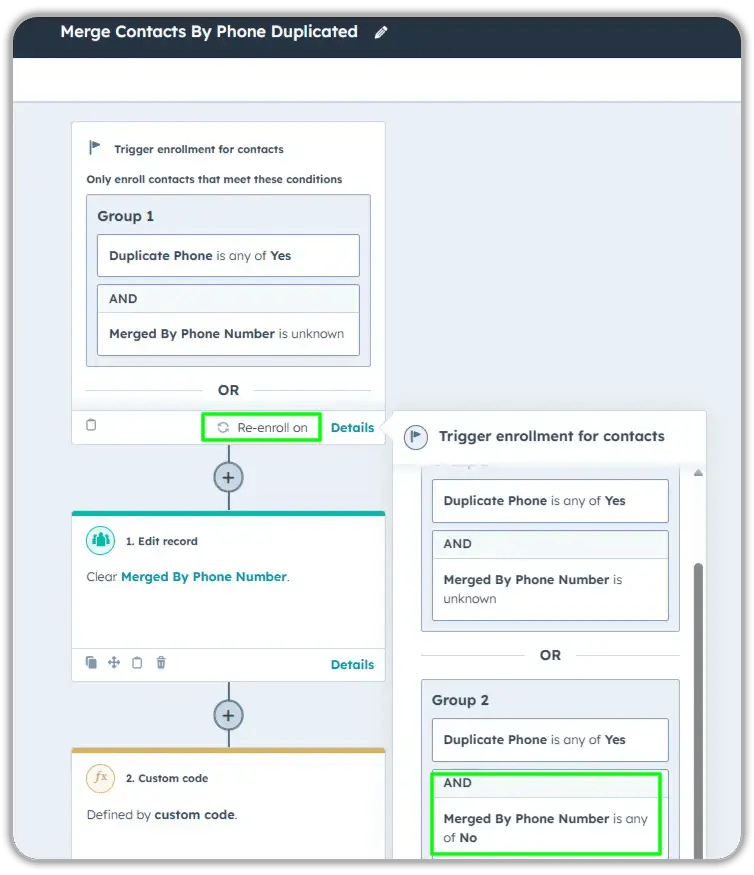
HubSpot workflow for merging contacts with duplicate phone numbers showing enrollment triggers for contacts where Duplicate Phone is Yes and Merged By Phone Number is unknown or No, followed by edit record action clearing merge status and custom code execution
Group 141 (1)
HubSpot workflow for merging contacts with duplicate phone numbers showing enrollment triggers for contacts where Duplicate Phone is Yes and Merged By Phone Number is unknown or No, followed by edit record action clearing merge status and custom code execution
Group 141 (1)
×

Part 1: Establish a Trustworthy Data Foundation

  • Performed duplicate analysis, identifying patterns in how duplicates were being created
  • Removed 162 bounced emails from the marketing contact list and created ongoing monitoring lists for data quality
  • Designed automated duplicate prevention workflows using Operations Hub to flag records with matching email addresses, phone numbers, or company domains before they could create reporting problems
  • Built custom PandaDoc integration logic to ensure contact merges preserved signed contracts attached to the correct record
  • Reduced marketing contact count by identifying and removing inactive contacts who hadn't engaged in six months, cutting unnecessary subscription costs

Part 2: Build Integration Architecture That Reveals the Truth

  • Designed and built custom Zapier-to-HubSpot integration using Python to pull appointment data from Square's API, mapping each appointment to the correct sales rep and creating meeting engagements with proper timestamps
  • Migrated 18 months of historical appointment data (January 2023–June 2024) into HubSpot to establish baseline metrics and enable year-over-year comparisons
  • Rebuilt CallRail integration to bypass the "Offline Sources" default and create custom properties tracking first source contacted, last source contacted, and specific tracking numbers
  • Constructed Convolo integration to capture referring campaign data and store it in HubSpot properties tied to each contact's timeline
  • Developed custom code within Zapier to automatically set meeting outcomes as "Scheduled" upon creation, ensuring accurate status tracking
  • Created mapping logic for Square cancellation fields to distinguish "cancelled by customer" from "cancelled by us" for different follow-up workflows
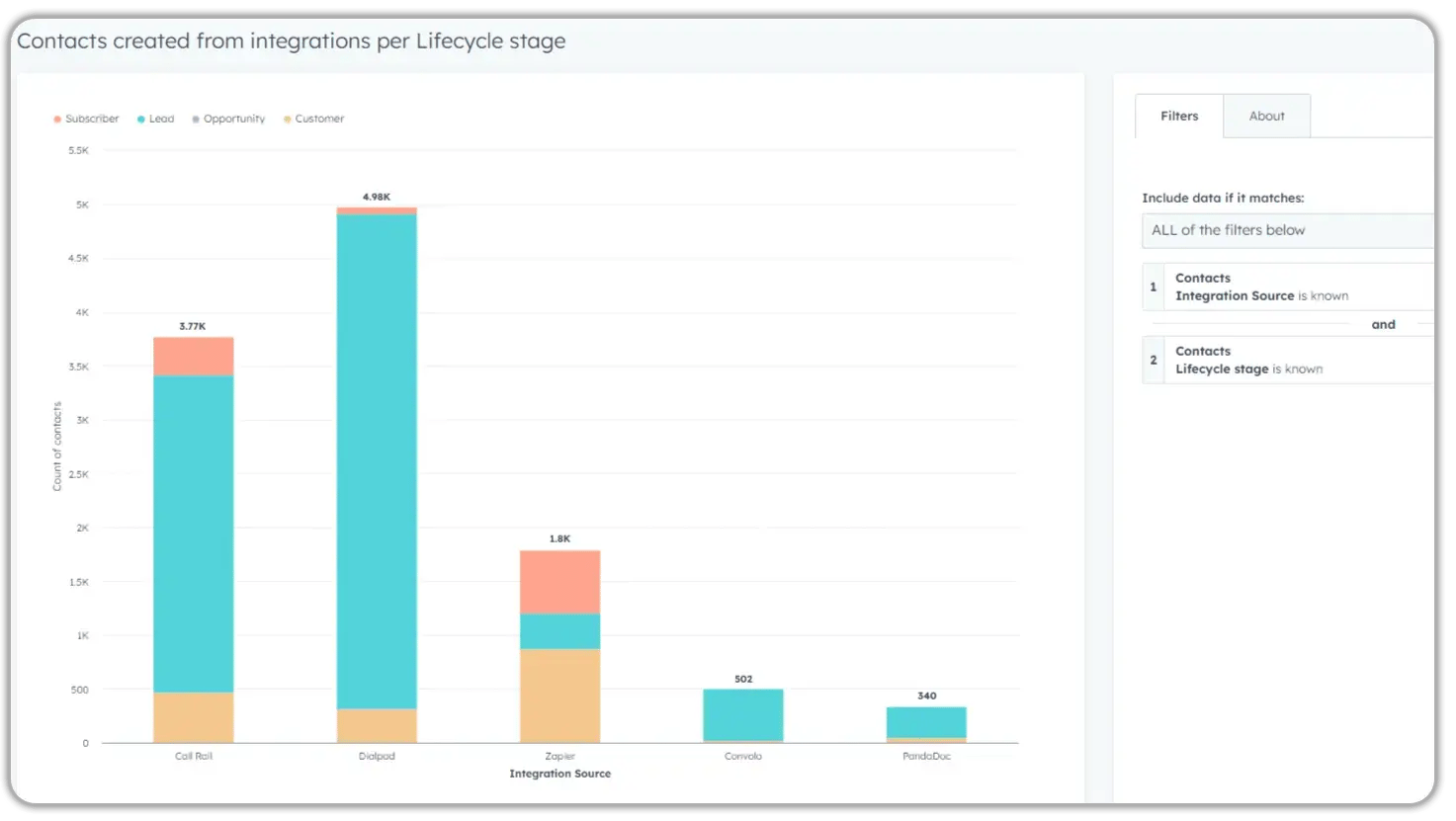
HubSpot custom report showing contacts created from integrations per lifecycle stage with stacked bar chart displaying CallRail, Dialpad, Zapier, Convolo, and PandaDoc sources segmented by Subscriber, Lead, Opportunity, and Customer stages
Group 141 (1)
HubSpot custom report showing contacts created from integrations per lifecycle stage with stacked bar chart displaying CallRail, Dialpad, Zapier, Convolo, and PandaDoc sources segmented by Subscriber, Lead, Opportunity, and Customer stages
Group 141 (1)
×
HubSpot Email Revenue report by Latest Source showing 2023 monthly deal amounts with stacked bar chart, July showing highest revenue around $21,000 followed by September with approximately $19,000
Group 141 (1)
HubSpot Email Revenue report by Latest Source showing 2023 monthly deal amounts with stacked bar chart, July showing highest revenue around $21,000 followed by September with approximately $19,000
Group 141 (1)
×

Part 3: Deliver Real-Time Operational Control

  • Built custom reporting dashboard showing appointments created per day, appointments by rep, and quarterly appointment trends, replacing manual Excel tracking
  • Created email revenue attribution dashboard that correctly maps deal close dates to actual campaign send dates, excluding post-sale surveys from attribution calculations
  • Designed automated lifecycle stage workflows that update contacts from "Lead" to "Prospecting" when reps make first outreach via call or email
  • Built lead status automation tied to PandaDoc contract status: "Expired Bid" for expired proposals, "Customer" for paid contracts, automatic remarketing list enrollment for declined proposals
  • Created dealer prospecting workflow that auto-enrolls ZoomInfo contacts into a four-part email campaign with proper unenrollment rules to prevent message fatigue
  • Developed contact owner assignment automation: ownership updates when Square appointment is logged, it is then reassigned based on which rep has a signed PandaDoc contract
Vector (3)

Results

Before: Sales managers manually exported Square data to track rep performance. Appointment metrics required Excel pivot tables. Historical data didn't exist.
After: Leadership opens a single HubSpot dashboard to see daily appointment volume by rep, monthly trends, and quarterly forecasts. Historical data from 2023 forward enables year-over-year comparisons.
  • Financial Impact

    • Reduced marketing contact costs: By removing 162 contacts with bounced emails and hundreds of inactive records, the company stopped paying for marketing contacts who could never convert, directly reducing monthly HubSpot subscription costs.
    • Clearer revenue attribution by channel: CallRail and Convolo integrations now reveal which specific marketing sources (Google Ads, print, Google My Business) generate appointments versus just phone calls, enabling budget reallocation to the highest-performing channels.


  • Operational Impact

    • Clearer sales next steps: Automated lead status updates based on PandaDoc contract status (expired, completed, or declined) trigger appropriate follow-up workflows without manual status checking.
    • Faster sales rep onboarding: New sales reps added to the team are automatically incorporated into Square-to-HubSpot integration via a documented process, with historical appointment data immediately visible.
    • Reduced manual sales work: Lifecycle stage progression, contact ownership assignment, and lead status updates all happen automatically based on actual sales activity captured through integrations.


  • Strategic Impact

    • Real-time business visibility: Leadership can answer "How many appointments did we run yesterday?" and "Which reps need coaching?" instantly from dashboards instead of requesting manual reports.
    • Data-driven decision-making: Clean, reliable data restored team confidence in HubSpot reporting. Decisions about rep performance, marketing spend, and capacity planning are now based on accurate metrics.
    • Earlier identification of bottlenecks: Appointment-to-proposal and proposal-to-customer conversion metrics reveal exactly where deals stall, enabling targeted process improvements.
Most residential service companies face similar challenges when they outgrow basic appointment tracking and need true revenue operations visibility. The difference between a connected system and a strategic system comes down to whether it answers the questions your leadership actually asks.
 
If you're running HubSpot with integrations that technically work but don't give you the clarity to make confident decisions about your business, you're not alone.
 
Book a free consultation to discuss your specific situation.

Others Case studies

Only Using 10% of HubSpot?

You can get these results too:

Group 14 (1) Group 14 (1)