
How On The Fuze Turned Careaga Plastic Surgery's Broken Patient Pipeline Into a Bilingual Revenue Engine on HubSpot


How Do You Fix a Broken HubSpot Sales Pipeline When Your Business Has Outgrown Its Original Setup?
When a business migrates to HubSpot and grows faster than the original configuration was designed to handle, the system stops working as intended. Leads go missing. Reporting becomes unreliable. Automations run on outdated logic. All slowing your team down.
The fix is rebuilding the foundations of HubSpot to match how the business actually operates: separate pipelines for separate stages.
5 patterns that apply to any high-volume B2C business running HubSpot:
- Separating lead filtering from conversion into two distinct pipelines prevents unqualified volume from contaminating the metrics that actually matter to leadership.
- A segmentation property set at the point of entry is what makes conditional automation reliable. Retrofitting it after contact creation produces gaps and inconsistencies.
- Owner assignment automation needs a conditional check: only assign when the field is empty. Automations that overwrite manual entries erode team trust in the CRM faster than almost anything else.
- Tracking codes and attribution parameters must be embedded at the landing page level. Centralizing all traffic into one generic form makes campaign-level revenue reporting impossible, regardless of how many dashboards exist.
- Marketing contact status should be governed by engagement behavior. Contacts who have not engaged in seven or more months dilute deliverability and inflate subscription costs.
Our client, Careaga Plastic Surgery, a plastic surgery practice with a high lead volume and a bilingual team needed a system where every lead is routed to the right person, every communication arrives in the right language, and leadership can trace revenue back to the campaign that generated it.
| Client | Careaga Plastic Surgery |
| Industry | Medical Aesthetics / Plastic Surgery |
| Location | United States, with operations team in Colombia |
| Growth model | B2C, Consultation-based |
| HubSpot product | Enterprise - Marketing Hub, Sales Hub, Operations Hub |
| Engagement type | Full portal restructure, bilingual automation, attribution infrastructure, reporting |
| Legacy system | My Med Lead (migrated to HubSpot prior to engagement) |
| Records migrated | 100K+ legacy contacts reclassified; Deposit Date migrated from Contact to Deal |
| Automations built | 8+ bilingual patient journey workflows, owner assignment logic, non-marketing contact governance, sales cycle tracking, meeting notifications |
| Reports delivered |
6 dashboards, 3 campaign attribution reports (revenue by campaign, Google by landing page, Meta by campaign) |

Problem
How do you know if your business has this problem?
These are the signs that a HubSpot portal has outgrown its original setup:
- Your team reports leads that never showed up in HubSpot, and you cannot tell whether the source was a form, a integration, or somewhere else.
- Contacts in the CRM have no meaningful segmentation. Everyone is in the same list, receiving the same message, regardless of where they came from, what product/service they're interested in or what language they speak.
- You are paying for HubSpot seats that no one is actively using, and the contact database has large volumes of records that were imported from a previous system and never cleaned.
This is exactly where we started with our client...
Careaga's Patient Pipeline Problem: Why Is a Broken HubSpot Setup Costing You Leads Before They Ever Reach Your Sales Team?
Careaga Plastic Surgery had migrated to HubSpot from a legacy system called My Med Lead. The migration brought over thousands of contacts, most of them inactive, and set up basic pipeline management that had since broken down.
At the time of the kick-off call, the practice was generating approximately 5,000 leads per month and only converting 2% of them to surgeries, against a stated target of 4%.
3 specific risks were active at the start of the engagement:
- Leads were getting lost due to integration failures. The Google Forms integration was capturing 37 leads out of an estimated 270, meaning the practice was flying blind on the majority of its paid campaign traffic. The Instagram integration was creating duplicate contacts, which corrupted pipeline counts and made conversion metrics untrustworthy. Leadership could not tell whether a 2% conversion rate reflected real performance or missing data.
- A former physician was embedded across active automations. Patients were receiving text messages and emails referencing a physician who no longer worked at the practice. The legal team had an active compliance process underway that required workflow exports as evidence before any deletions could occur. The system could not be safely cleaned without first understanding everything that physician's credentials touched, and the practice could not wait indefinitely.
- The contact database and licensing were creating compounding costs. The practice was paying for 17 HubSpot seats with 3-4 active users. The 100,000+ legacy contacts imported from the previous system were taking up marketing contact capacity, inflating the monthly cost, and making any engagement reporting meaningless.

Solution
To customize HubSpot to Careaga's needs, below are the questions we answered...

How Do You Build a Bilingual Patient Acquisition System in HubSpot?
The work required sequencing. Removing the former physician from the portal without first auditing every place his credentials appeared would have broken active patient sequences. Activating bilingual workflows before the language preference property was properly set would have sent patients the wrong communications. Attribution infrastructure had to be in place before reporting could be trusted.
How Do You Safely Remove a Former Employee from a Live HubSpot Portal?
When someone's credentials are woven into workflows, email senders, pipeline stages, and automation logic, removal is an architectural problem, not a settings change.
- We conducted a full audit of every active and inactive workflow, email template, pipeline, and personalization token referencing the former physician, producing a risk-rated inventory before any changes were made.
- Workflows that needed to remain active had their sender credentials replaced. Workflows that could be deleted were removed only after the export was confirmed.
- In-flight patient communications referencing the former physician's name were stopped. No active sequences were broken in the process.
- The removal was completed in the first week of the engagement, resolving the compliance risk before any other system work began.
.svg)
How Do You Build a Bilingual Sales Process in HubSpot That Actually Routes Correctly?
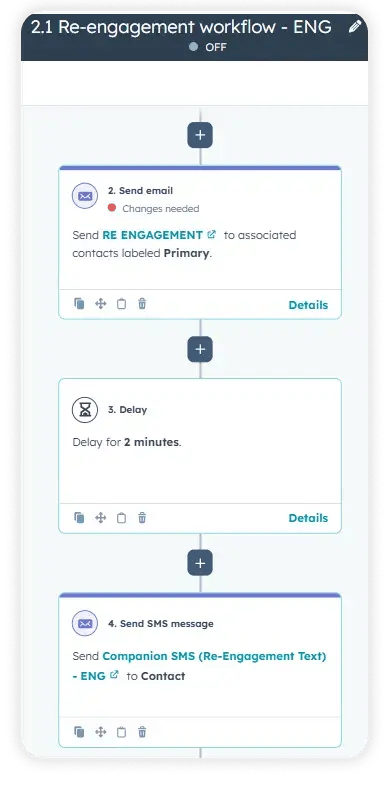
The practice operated with a Colombia-based filtering team and a US-based closing team. Every patient communication needed to arrive in the patient's preferred language.
- A language preference property was created at the contact level, set at form entry before the record entered HubSpot. This is the only reliable point to capture language preference.
- The property was standardized to 3 values: Spanish, English, and Other. Existing contact records were remapped to the new structure.
- Conditional workflow logic was built to enroll contacts in the correct language track based on the property value.
- The owner assignment automation was updated to preserve manually entered values. The fix: assign only when the owner field is empty.
- A generic marketing SMS number was selected over individual consultant numbers to prevent patient confusion about whether they were contacting a specific person or the practice.
How Do You Build Attribution Infrastructure When Every Landing Page Feeds the Same Form?
Without named forms tied to named pages, campaign revenue reporting is not possible regardless of how many dashboards exist.
| What was built | Purpose |
| Dedicated named forms per landing page (English and Spanish) | Match every form submission to its source page and language variant |
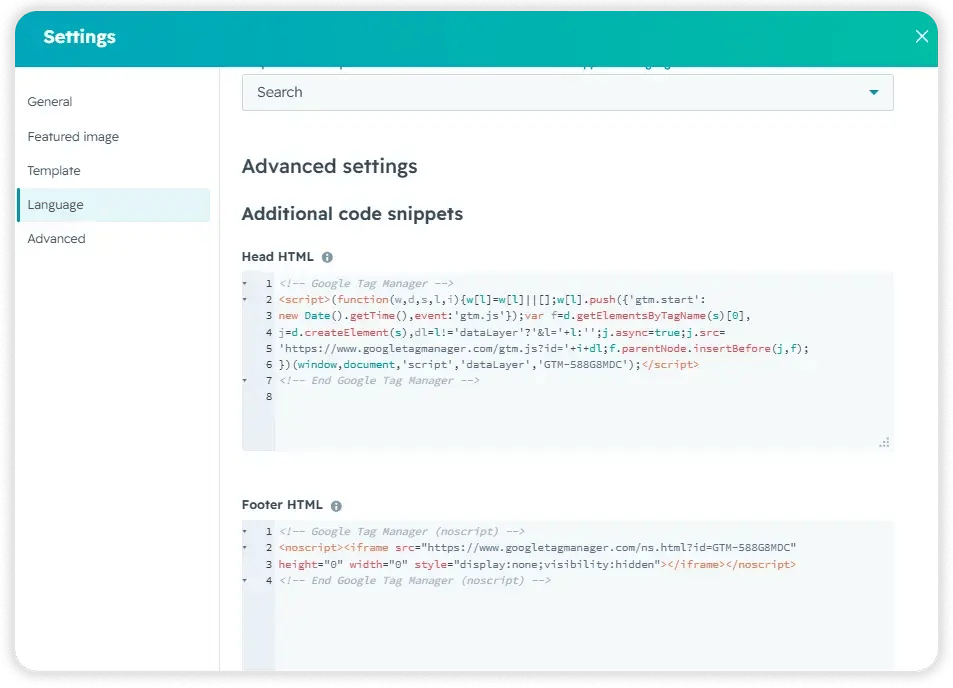
| Client tracking codes embedded in head and body of each landing page | Enable external campaign measurement and visitor activity tracking |
| 3 attribution reports: revenue by campaign, Google deals by landing page, Meta deals by campaign | Connect ad spend directly to closed surgeries |
| 5 Campaign-level revenue reports for Meta and Google Ads landing pages | Added to the main dashboard for ongoing leadership visibility |
| Sales cycle automation: days from contact creation to Booked stage | Track conversion speed for the first time |
How Do You Govern a Contact Database That Has Grown Beyond Its Useful Size?
A database with 100,000+ inactive legacy contacts inflates costs, distorts reporting, and degrades email deliverability.
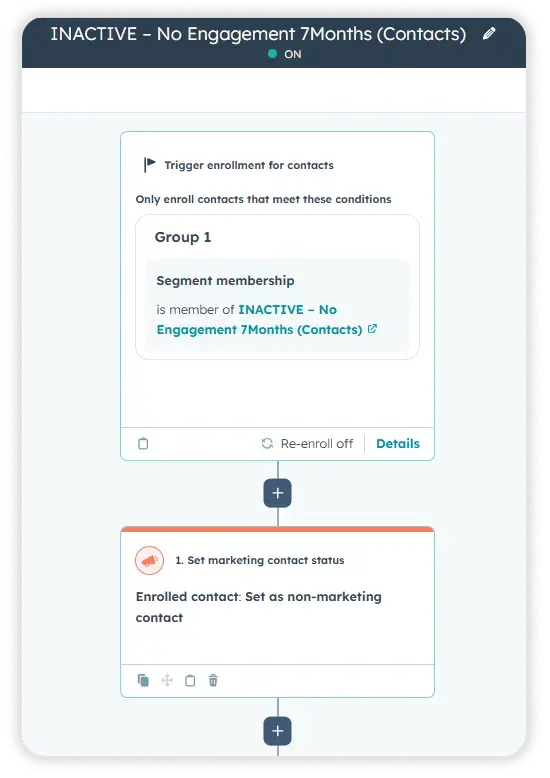
- An automation was built to identify contacts with no engagement activity in the preceding seven months and update their status to Non-Marketing Contacts. This removes them from the billable marketing contact count without deleting records.
- Deposit Date data was migrated from the Contact record to the Deal record using a workflow to copy existing values, establishing the Deal as the correct object for financial tracking.
How Do You Set Up Reporting That Leadership Will Actually Use?
Dashboards are only useful if the underlying data is consistent and the reports answer the questions leadership is actually asking.
- 6 dashboards were built covering pipeline activity, patient source, consultation performance, and campaign revenue.
- Report visibility was configured per user role, so each team sees the reports relevant to their function.
- A meeting notification workflow was built to alert 4 designated team members automatically whenever a consultation with the lead physician is booked, removing a manual communication step from the scheduling process.
- A Meta Conversions API (CAPI) integration feasibility investigation was completed, with a written recommendation delivered to the client on requirements, HubSpot subscription prerequisites, and implementation approach before any commitment to proceed.
.png?width=60&height=46&name=Vector%20(3).png)
Results
What results did this HubSpot rebuild produce?
- 8+ communication sequences in English and Spanish across the full patient journey.
- 6 dashboards built. Covering pipeline, source, consultation, and campaign revenue.
- 3 attribution reports created. Revenue by campaign, Google deals by landing page, and Meta deals by campaign.
- Sales cycle automation built. Days from contact creation to the booked stage are calculated automatically.
- Non-marketing contact automation built. 7-month no-engagement trigger governing marketing contact status.
- Pre-September 2025 contacts reclassified. Full export delivered as backup before status change applied.
- Deposit Date migrated. Contact-level data moved to Deal record via workflow.
These results translate into the following business outcomes:
- Reduced lead leakage: The Google Forms integration was capturing 37 of an estimated 270 leads per month. Fixing source integrations and building named forms means leads are no longer lost between the ad and the CRM record.
- Clearer revenue attribution by channel: Campaign-level reports connecting Meta and Google spend to closed deals now exist. Leadership can evaluate which campaigns produce surgeries, not just which campaigns produce clicks.
- Improved lifecycle stage accuracy: The bilingual workflow structure enrolls contacts into the correct communication track at creation, preventing the mixed-language, mixed-stage confusion that characterized the prior setup.
- Improved trust in HubSpot data: Deposit Date now lives on the Deal record. The procedures of the property are audited and standardized. The owner assignment logic no longer overwrites manual entries. The data the team enters is the data that stays.
- Increased ROI from HubSpot subscription: The practice was paying $5,000 per month with significant unused capacity. Contact database governance, license audit recommendations, and full utilization of enterprise automation features across both pipelines work toward changing that ratio.

Key Takeaways
- Bilingual automation only works reliably when language preference is captured at the form level, before the contact record is created in HubSpot.
- Attribution requires infrastructure: named forms, tracking codes, and reports built to connect source to revenue. None of that can be retroactively added to a system where all traffic flows through one generic form.
- Marketing contact governance is a cost control mechanism. An automated rule based on engagement behavior is more sustainable than manual list management.
- Owner assignment automation must account for manual record creation. A workflow that overwrites intentional human input will eventually stop being trusted by the team using it.
Would this approach work for a company like mine?
This engagement is a close fit for practices and healthcare-adjacent businesses that meet the following profile:
This engagement is a close fit for B2C practices with high lead volume and a consultation-based sales process, particularly those with a split team structure where one group filters or qualifies leads and another handles closing. If your operations are bilingual and patient communications need to match patient language, the architecture we built here applies directly. On the HubSpot side, Marketing Hub at any tier works; Enterprise is recommended when the automation volume and reporting depth match what Careaga needed.
Frequently Asked Questions
How long did it take to remove the former physician from the portal?
Can you build bilingual automation in HubSpot without a custom integration?
Yes. HubSpot's native contact properties, workflow branching logic, and email template system support bilingual automation without third-party tools. The key is capturing language preference at form submission before the record enters HubSpot.
What happens to legacy contacts that are set to non-marketing status?
Why does owner assignment automation need a conditional check?
Without a conditional check, the automation runs on every contact regardless of whether an owner was already entered. For teams that create contacts manually and populate fields at creation, this means every manually assigned owner gets overwritten. The fix is a branch: if the owner is empty, assign; if not, skip.
What is the difference between the Lead Journey pipeline and the Patient Journey pipeline?
The Lead Journey handles the Colombia-based filtering step, where unqualified or incomplete leads are assessed before they reach the clinical team. The Patient Journey handles consultation scheduling, quote follow-up, surgery booking, and post-surgery recovery. Keeping them separate means conversion metrics in the patient journey are not contaminated by unqualified leads still in the filtering stage.
How do you connect HubSpot to Meta and Google campaign data for revenue reporting?
Attribution requires three things: tracking parameters on the ad link, a named form on the landing page that captures those parameters, and a HubSpot report that joins the contact source data to the deal revenue. All three were built as part of this engagement.
Can this type of engagement be done while the practice is still running day-to-day operations?

Others Case studies


