The Ultimate HubSpot Audit Checklist
In 10 minutes, you'll self-assess your current HubSpot setup, spot the most critical problems, and learn how to fix them.
Download Now

Keeping your contact information up-to-date in HubSpot is crucial to maintaining smooth communication and a clean database. Whether you're adding new details or correcting outdated info, editing contact records is a quick and simple process.
Here’s a step-by-step guide on how to edit contacts in HubSpot!
How to Edit Contact Info in HubSpot CRM (Quick Tutorial)
This video is part of our HubSpot Contact Management for Beginners series. Don't miss out on the full guide! Learn about importing, exporting contacts, and more by watching the complete video here.

Editing Contacts In HubSpot
Here's how to edit contact in HubSpot:
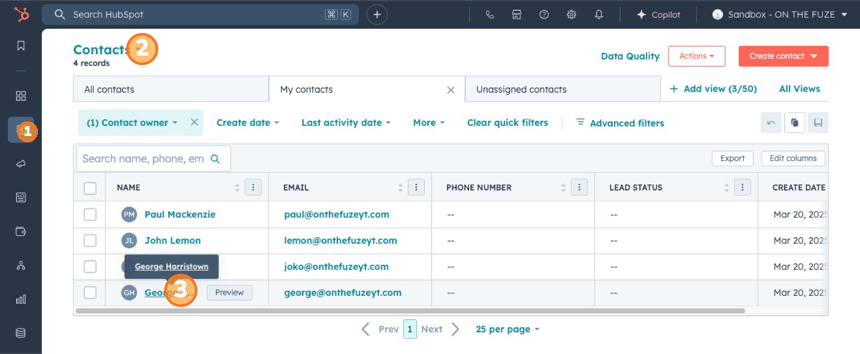
- Access the Contact Profile: To edit a contact, you first need to bring up their profile. Simply click on the contact’s name from your contact list. For this example, let’s say we’re editing George’s contact record. Once you click on George’s name, you’ll be taken to his contact page.
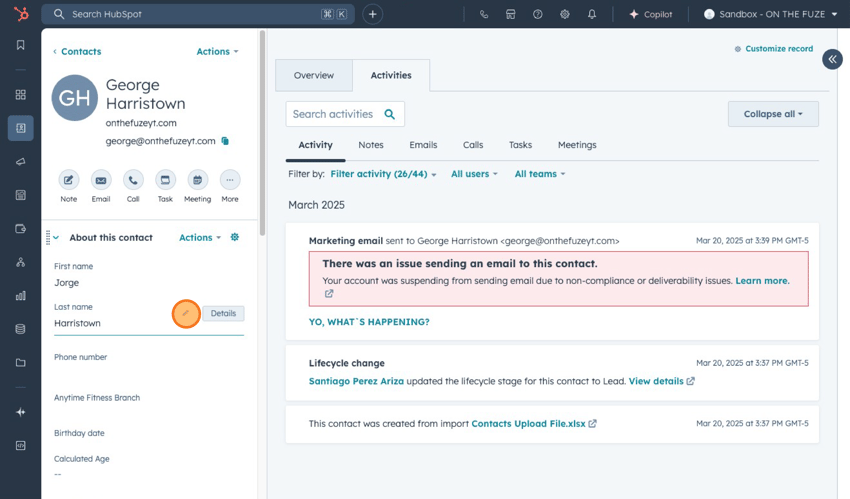
- Make the edits: On the left side of the screen, you'll see the most relevant information for that contact. If you want to update or edit any of these details, there are two ways you can do it:
- Double-click directly on the text you want to edit.
<img loading="lazy" contenteditable="false" data-natural-width="5492" data-natural-height="3559" data-id="521ace42-9116-4a76-92c2-d0a0b48b72ca.png" src="https://5165527.fs1.hubspotusercontent-na1.net/hubfs/5165527/Imported_Blog_Media/2%20Edits-1.png" width="850" style="width: 850px; height: auto; max-width: 100%;" height="551" alt="" hubspot="" contact="" view="" with="" the="" 'first="" name'="" property="" highlighted="" inside="" profile"="" tabindex="0"> - Click the pencil icon next to the field you want to change.
- Double-click directly on the text you want to edit.
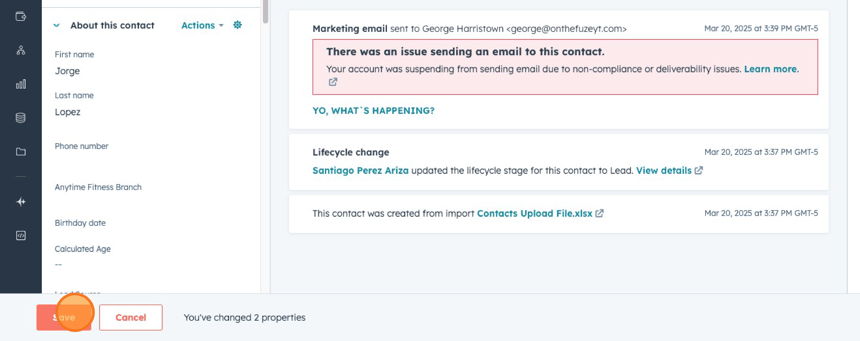
- Don’t Forget to Save: After making your edits, it’s crucial to click the Save button at the bottom of the screen. If you forget to save, your changes won’t be stored, and you’ll have to redo them.
💡 Pro Tips for Editing Contacts
- Update Regularly: Keep your contact information fresh by reviewing it periodically. Old or incorrect details can lead to miscommunication or lost opportunities.
- Use HubSpot's Bulk Edit Feature: If you need to update multiple contacts at once, consider using HubSpot’s bulk edit feature. It can save you a lot of time, especially if you're managing a large list.
- Set Reminders for Follow-Ups: If you're editing a contact’s information and there’s an action item or a follow-up needed, set a reminder or task to ensure you don’t forget about it.
- Clean Up Your Contact List: Periodically audit your contact records for duplicates or outdated information. This will ensure that your CRM remains organized and functional.
📺 Want to see more helpful tutorials? Click HERE to master HubSpot 📺