
How On The Fuze Turned Encore Labs' 3,000-Lead Backlog Into An Automated Sales Pipeline


How Do You Clean Up a Sales Process Built on Disconnected Pipelines and Tools?
You start by auditing what already exists in the CRM before building anything new: audit, create a project plan, retire duplicate pipelines, remove stale records, qualify new leads at the point of entry, and finally, connect outside systems.
Most outdated CRM setups run into the same issues:
- Legacy pipelines built for a specific region, product line, or acquired entity usually need to be merged into one sales process.
- A lead database that has never been cleaned will contain both records with zero sales activity alongside genuinely active prospects.
- Forms that live outside the CRM create a manual re-entry step that let leads slip through the cracks.
- Any integration with a line-of-business platform needs its data structure mapped before an import, or duplicate and mismatched records show up on the other side.
- Qualification should happen automatically at the moment of contact, using the information the prospect already gave you, rather than relying on a rep to manually sort inbound submissions.
| Client | Encore Labs |
| Industry | Cannabis & Hemp Compliance Testing |
| Locations | Pasadena, California |
| HubSpot product | Service Hub Pro + Marketin Hub Starter |
| Automations built | 92-day closed-lost automation targeting 3 qualifying loss reasons |
Encore Labs, a cannabis and hemp compliance testing lab operating in a competitive regional market, came to us with exactly this kind of outdated HubSpot setup: 2 legacy sales pipelines, a Contact Us form that lived outside HubSpot, roughly 3,000 leads with no consistent qualification process, and 4 separate line-of-business tools that had never been mapped into the CRM.
We rebuilt the foundation in HubSpot before touching any of the outside integrations.

Problem
How do you know if your business has this problem?
Signs to look out for:
- Your sales team is manually re-typing form submissions into the CRM instead of having them flow in automatically.
- You have more than one pipeline tracking what is functionally the same sales process, and reporting requires manually reconciling numbers across them.
- Leads that came from an investor inquiry, a media request, or another non-sales source are mixed in with genuine prospects, with no automated way to tell them apart.
- An outside platform your team relies on for day-to-day operations (order management, e-signature, and accounting) has never been mapped into the CRM, so its data exists in a silo.
If two or more of these sound familiar, you are looking at the same risk profile Encore Labs was carrying.
Encore Labs Sales Problem: Why Is a Fragmented Sales Stack Risky?
For Encore Labs specifically, three risks stood out once we started the audit:
- The company was running a Sales Journey pipeline alongside two older pipelines (one built around a specific region, one used for a discontinued line of business). Reporting had to be manually reconciled across all three, which made pipeline predictability difficult to trust.
- Nearly 3,000 leads had accumulated in the system, many created automatically by legacy workflows that were no longer active. Reps had no reliable way to tell a genuinely warm lead from a years-old record with 0 engagement.
- The Contact Us form on the company website was not connected to HubSpot. Every submission, regardless of whether it came from a prospective client, an investor, or a media inquiry, required manual triage before it reached the sales team, and there was no automated routing based on intent.

Solution
To customize HubSpot to ONYX needs, below are the questions we answered...

How Do You Rebuild a Sales and Service Foundation Inside HubSpot for a Testing Lab?
How Do You Consolidate Pipelines and Clean a Lead Database Before Automating?
Before any automation goes live, the underlying data has to be trustworthy. This is the step most companies skip, and it's the reason later automations misfire. For Encore Labs we...
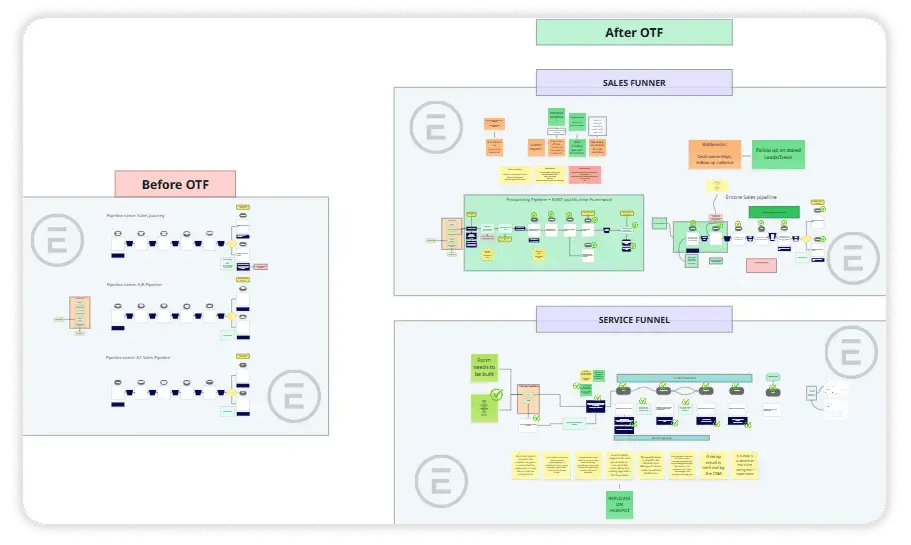
- We retired the legacy pipelines, migrating open opportunities from the region-specific pipeline into a single, redesigned Sales Journey pipeline and removing the discontinued pipeline entirely.
- We built a separate Leads pipeline so top-of-funnel qualification work stays distinct from active sales opportunities in Deals.
- We audited thousands of existing leads against an activity filter and removed hundreds of records that showed zero engagement, exporting a full backup before deletion.
.svg)
How Do You Route Form Submissions by Intent Instead of Creating a Lead for Every Submission?
A form that creates a lead for every single submission treats an investor inquiry the same as a compliance testing request. That's a lead-quality problem hiding inside a lead-volume number.
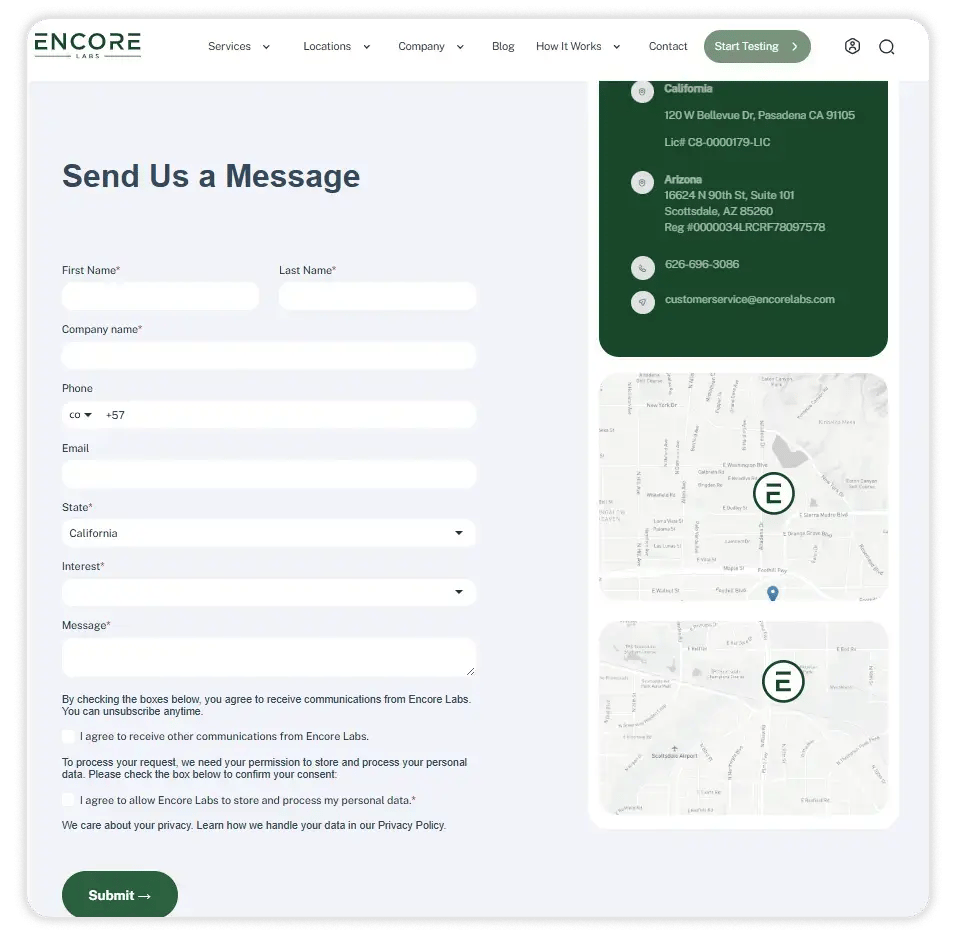
- We rebuilt the Website Contact Us form natively in HubSpot, replacing the external version, and connected it to a routing automation keyed off the prospect's stated interest.
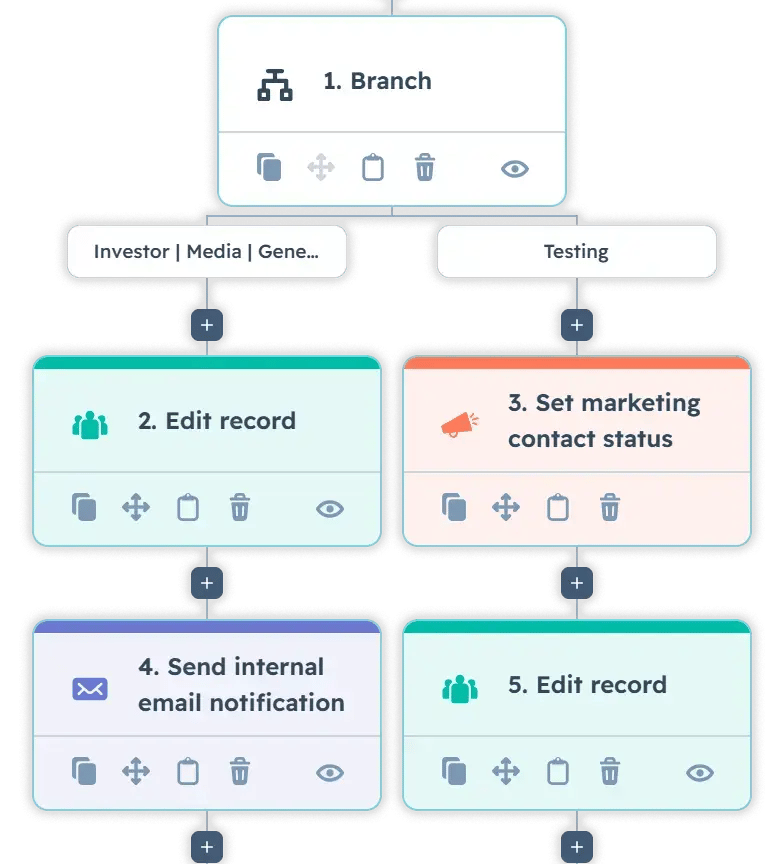
- Submissions marked Investor, Media, or Other create a contact and route to the relevant internal team but stay at the Subscriber lifecycle stage instead of entering the Leads pipeline.
- Submissions indicating a genuine service interest automatically create both a contact and a lead, get added as a marketing contact, and trigger internal notifications to the sales team.
- Qualified submissions receive an immediate confirmation email, followed two business days later by a warmer follow-up email carrying a direct booking link, so a rep never has to manually chase a first response.
How Do You Automate Deal Health Tracking and Closed-Lost Re-engagement?
A pipeline only stays useful if stalled deals and unowned leads surface themselves instead of quietly aging out of view.
- We built deal and lead health tags (old, dormant, stalled, overdue opportunity, missing associated records; no owner, old lead) so reps and management can filter for records that need attention without manually scanning every record.
- We created custom deal-to-contact association labels (Decision Maker, Primary Contact) so a deal with multiple stakeholders on the buying side can track each person's role, which matters when a compliance decision and a budget decision sit with different people.
- We standardized meeting types (consultation, demo, intro call, qualification, deal closing) with automated reminders one day and one hour before each meeting.
- We built a 92-day closed-lost re-engagement automation that targets deals lost specifically to price, turnaround time, or a competitor, on the logic that those objections are the ones most likely to resolve themselves within a quarter. It skips deals lost for reasons unlikely to change, like a prospect going out of business.
- Any sales team that closes deals lost for changeable reasons can apply this same delayed re-engagement pattern instead of relying on individual reps to remember to circle back.
How Do You Map an External Platform's Data Before Importing It Into HubSpot?
Encore Labs runs client and order data through a dedicated lab ordering platform that is not a native HubSpot integration. Before importing anything from it, we needed to understand exactly what data it could expose.
- We conducted a full discovery of the platform's Zapier integration, documenting every available trigger and the payload fields attached to each one.
- We confirmed the platform's data supports future automations, including compliance test alerts, customer tier identification, and monthly check-in triggers, and flagged which use cases would require custom API work instead of Zapier.
- Separately, we audited how the platform's client records would map to existing HubSpot company records and found that the platform does not expose a reliable company-domain identifier, meaning company names alone are not enough to prevent duplicate or mismatched records during import.
How Do You Model Deal Properties Around How the Business Actually Operates?
Generic CRM deal fields don't capture what a compliance lab needs to track. We built custom properties around the way Encore Labs actually prices and delivers work.
- A Volume Tier dropdown segments deals by projected monthly revenue, giving the sales team an instant read on account size.
- Test Type, Test Offered, and Number of Tests properties track potency, pesticide, and other test categories directly on the deal record, tied to a Current Rate field that flags entries priced under a defined floor.
- A Pickup Scheduled checkbox tracks a lab-specific operational step (sample pickup confirmation) that has no equivalent in a standard sales pipeline template.
.png?width=60&height=46&name=Vector%20(3).png)
Results
What Did the HubSpot Rebuild Deliver?
- 3,000 legacy leads reviewed; 548 removed with zero 30-day activity, backed up before deletion
- 2 legacy pipelines retired; 1 new Sales Journey pipeline plus 1 dedicated Leads pipeline built
- Native Contact Us form with a 4-branch routing automation by stated interest
- 2-email sequence (immediate confirmation, 2-day follow-up) tied to a 45-minute booking page
- 92-day closed-lost automation targeting 3 qualifying loss reasons
- Full trigger and payload documentation across client, order, sample, and test objects
- 8 new custom properties modeling lab-specific pricing and service data
These results translate into the following business outcomes:
- Reduced lead leakage: Removing 548 dormant leads and routing new submissions by intent keeps the pipeline stocked with contacts a rep can actually act on, instead of years-old records with no engagement history.
- Improved lead quality: Investor, Media, and Other submissions now stay at the Subscriber stage instead of entering the Leads pipeline, so sales-ready lead counts reflect real prospects.
- Reduced manual sales work: The booking link, automatic lead creation, and closed-lost re-engagement automation each remove a coordination step that previously depended on a rep remembering to follow up...
- Improved trust in HubSpot data: The company-matching strategy for the lab ordering platform import prevents duplicate and mismatched company records before that data ever enters the CRM.
- Systemized customer onboarding: The DocuSign notification workflow gives the team real-time visibility into onboarding packet status instead of requiring someone to check DocuSign directly.
- Reduced tool sprawl: A native HubSpot form replaced the external Contact Us form, and native e-signature is being evaluated as a lower-cost alternative to a standalone e-signature subscription.

Key Takeaways
- Clean the database before automating on top of it. Automation applied to bad data just produces bad data faster.
- The route leads by declared intent at the point of contact instead of qualifying everything after the fact.
- Consolidate parallel pipelines into one process before adding new automation layers, so reporting stays trustworthy.
- Map an outside platform's data structure fully before importing it, especially when the platform doesn't expose a reliable matching identifier.
- Build CRM properties around how the business actually operates, not around a generic template.
Would this approach work for a company like mine?
This approach works well for small, established businesses with a lean sales and client-services team, where a handful of people need automation to cover for the lack of dedicated headcount. The core rebuild, pipeline consolidation, lead cleanup, form routing, and health tagging work on Starter and Professional tiers. Native e-signature and certain reusable template features require a higher Sales or Marketing Hub tier, which is worth confirming before scoping a similar project.
Frequently Asked Questions
Should I delete stale leads or archive them?
How do I decide which closed-lost deals are worth a re-engagement automation?
Do I need a developer to connect a lab or order-management platform to HubSpot?
Not always. Many platforms expose a Zapier integration that covers common triggers, but you should document the available payload fields first to confirm it covers your reporting needs before committing to Zapier over a custom API build.
Why route investor and media form submissions differently than sales inquiries?
Can I merge 2 legacy pipelines without losing historical deal data?
What should I check before matching an external platform's records to existing CRM companies?
Confirm whether the platform provides a reliable identifier, like a domain. If it doesn't, plan on name-similarity matching combined with related contact data, and audit your existing CRM company data first.
Is HubSpot's native e-signature a full replacement for DocuSign?
It depends on your document complexity and existing DocuSign usage. A field-by-field comparison against your current envelope structure is the right first step before switching.

Others Case studies


