
How On The Fuze Turned Timeline's Disconnected HCP Wholesale Channel Into a Unified Revenue Forecasting Engine


How Do You Build RevOps When Your Systems Don’t Talk to Each Other?
You build RevOps by creating a connected system that brings your CRM, e-commerce, marketing, and other revenue platforms into a single source of truth. When a wholesale channel runs on Shopify for commerce, HubSpot for CRM, Klaviyo for email marketing, and manual Google Sheets for forecasting, the CEO has no single view of revenue.
- If your sales team manages accounts in one system and processes orders in another, deal and order data will drift apart, and your pipeline numbers will be wrong.
- Native integrations between major platforms often have structural limitations that block critical data fields.
- Revenue forecasting requires more than a dashboard. It requires automated deal creation, lifecycle staging, and proactive alerting when forecasts go stale.
- Webinar and event engagement data loses its value when it stays trapped in the platform where the event was hosted. Syncing it into both CRM and email tools unlocks follow-up, segmentation, and attribution.
- Documenting every workflow, every automation trigger, and every manual step is part of the deliverable, not an afterthought.
On The Fuze connected all four platforms for Timeline, a Swiss longevity science company, building a HubSpot-centered revenue operations system that replaced manual tracking with automated forecasting, lifecycle management, and cross-platform data sync. The sales team was growing, orders were flowing through Shopify, and HubSpot held the CRM data. But the systems were not connected in the ways that mattered. We built the bridge.
| Criteria | Fit |
| Business model | B2B wholesale or distribution with an application/approval process before first order |
| Platform stack | HubSpot CRM + Shopify (or similar e-commerce) + email marketing platform (Klaviyo, Mailchimp, etc.) |
| Company size | 10-200 employees with a sales/account management team actively managing customer accounts |
| HubSpot tier | Sales Hub Professional or Enterprise. Marketing Hub Professional if webinar tracking or Marketing Events are needed |
| Revenue model | Recurring or repeat-purchase revenue where forecasting matters |
| Pain point | Disconnected systems creating manual workarounds, unreliable metrics, or invisible account health |

Problem
How do you know if your business has this problem?
If you recognize any of these patterns in your own operation, the problem described here likely applies to you:
- Your sales team checks one system for account status and another for order history. Neither gives the full picture.
- Leadership reviews revenue in a spreadsheet that someone manually updates weekly or monthly, not from a live dashboard.
- You have an e-commerce integration that syncs some data but silently drops critical fields like addresses, approval tags, or billing details.
- Replacement orders, test orders, or zero-dollar transactions pollute your metrics, and nobody catches them until quarterly review.
- Your marketing team runs webinars, but the CRM has no record of who registered, who attended, and what happened next.
Timeline's HCP wholesale channel had all five problems running simultaneously.
Timeline's Problem: Why Is Running a Wholesale Channel Across Disconnected Platforms Risky for a Scaling Business?
- Orders existed in Shopify but had no association with deals in HubSpot. The sales team could not see that a customer placed an order by looking at the deal record. Revenue visibility was broken at the most basic level.
- Forecasting was a manual process. One team member maintained a Google Sheet to track new versus returning customer revenue, conversion funnels, and monthly targets. Nothing in HubSpot supported this analysis. When a forecast deal's expected close date passed without an update, stale forecasts accumulated in reports.
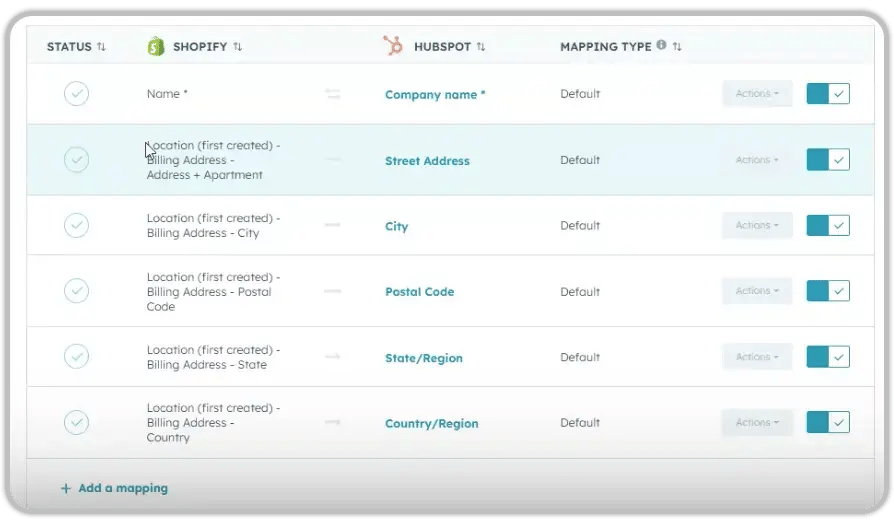
- The native HubSpot-Shopify integration had a structural limitation. Companies created in HubSpot synced to Shopify, but location address data did not transfer. Shopify's address fields are internally validated and calculated properties, meaning the connector could not write to them. The result: every new account required manual address entry in Shopify before orders could be placed.
- Approval status was out of sync. Only 13 contacts showed as "HCP Approved" in HubSpot, while hundreds had been approved in Shopify. A large-scale order sync job had blocked all other sync operations for over two days, creating a data discrepancy the team could not resolve without investigation.

Solution
To customize HubSpot to Timeline's needs, below are the questions we answered...

How Do You Build a HubSpot-Centered Revenue Operations System for a Multi-Platform Wholesale Channel?
How Do You Connect Orders to Deals When the Native Integration Doesn't Do It?
The Shopify integration synced orders to contacts and maintained a separate order pipeline. But orders were not associated with deals. We built a workflow that:
- Synced a unique identifier across company, deal, and order objects
- Automatically associated the first Shopify order with the corresponding deal when both a company-deal relationship and a first order existed
- Labeled the association as "First Order" within the deal record
- Pulled order data directly into the deal record for revenue visibility
This gave the sales team what they had been missing: the ability to open a deal and see every order attached to it, with actual revenue amounts.
How Do You Automate Revenue Forecasting When Order Timing Is Unpredictable?
Timeline's HCP customers have variable ordering patterns. Some reorder monthly... some skip months. The team needed a forecasting model that accounted for this variability without requiring constant manual input.
We built a multi-stage automated lifecycle:
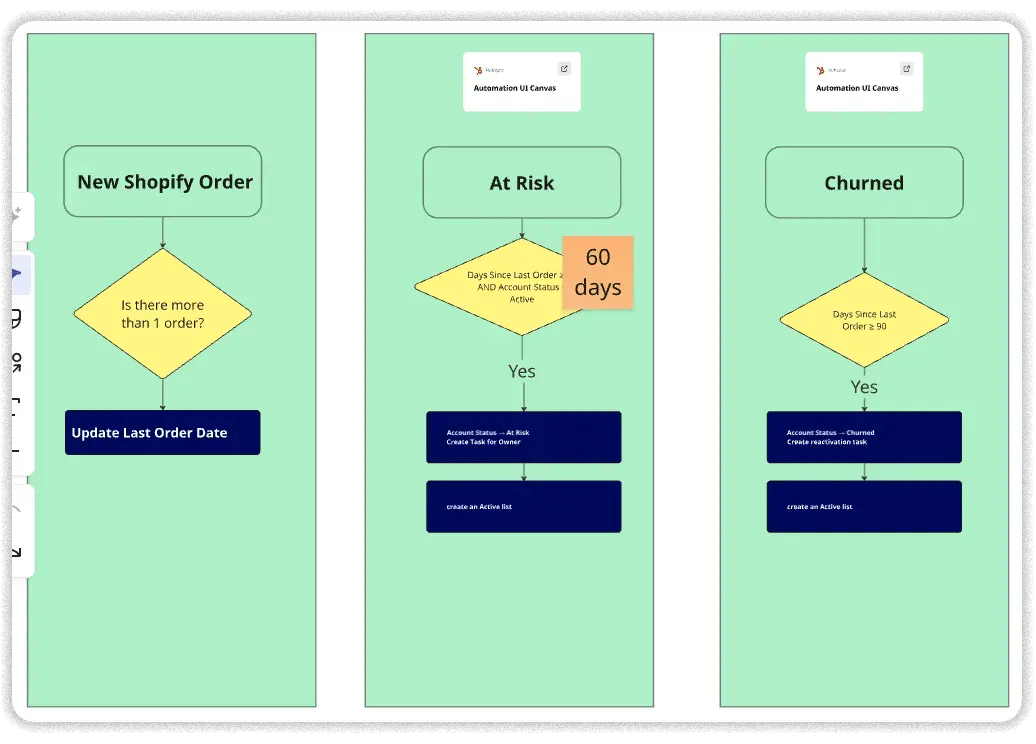
- When a deal in the HCP First Purchase Pipeline reaches Closed Won, a new forecast deal is automatically created in the Active Customer Pipeline under the "Forecast" stage.
- The previous order amount is copied as a starting placeholder for the expected amount.
- A calculated property adds 30 days to the previous close date to project the next billing cycle.
- When a new Shopify order is associated with the company, the forecast deal moves to "Active Customer," the order's actual total price replaces the placeholder amount, and a new forecast deal is created for the next cycle.
- If no order arrives within 60 days, the deal moves to "At Risk." At 90 days, it moves to "Churned."
- A dedicated workflow creates a review task for the deal owner one day after any forecast deal's expected close date passes without an update.
The team also established key benchmarks during this process: 60% probability for new business deals in the first stage (based on funnel data showing 60% conversion from account approved to first order), an average of six days from approval to first order, and a 30% capture rate for returning revenue from active customers.
.svg)
Why Did a Zapier Middleware Layer Replace the Native Shopify Integration for Key Workflows?
After testing in the sandbox environment, we confirmed that HubSpot's native Shopify connector cannot reliably update billing address fields in Shopify. Shopify's address fields (state, country, and postal code) are validated and calculated properties that reject external writes from the native connector.
We recommended and implemented Zapier as the middleware layer. The decision to use Zapier over the native connector was made after:
- Confirming the limitation was structural, not configuration-related, through sandbox testing
- Documenting the specific fields that fail (billing address, location address, state codes)
- Evaluating that Zapier provided the most reliable and maintainable path
- Scoping the Zapier workflow to handle only what the native integration could not, keeping native sync active for objects it handles well (products, orders)
How Do You Fix a 575,000-Contact Data Sync Backlog Without Breaking Production?
Timeline's HubSpot portal contained over 575,000 contacts excluded from the HCP integration as expected D2C (direct-to-consumer) customers. The HCP-relevant population was much smaller, but a large-scale Shopify order sync job had blocked all other sync operations for more than two days. Only 13 contacts showed as "HCP Approved" in HubSpot, even though the actual number of approved accounts in Shopify was significantly larger.
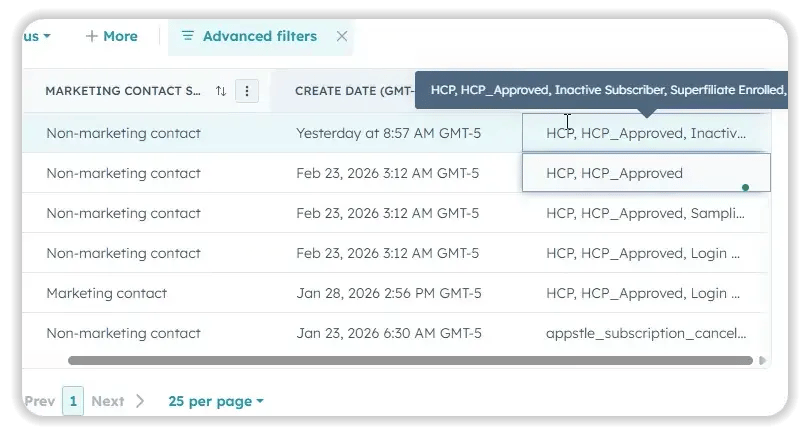
We built a segmentation model using tag-based exclusion logic:
- Pending: HCP tag present, no HCP Approved tag (requires approval attention)
- Approved: HCP tag present, HCP Approved tag present (no action needed)
- Rejected: HCP tag present, custom "Rejected" property flagged (triggered when a decline email is sent)
We also created a "Pending Approval" company list view in HubSpot that filters for companies without the HCP Approved tag, giving account managers a clear queue.
How Do You Replace Manual Google Sheets Reporting With Live HubSpot Dashboards?
Before this engagement, three core reports were maintained manually in Google Sheets: new versus returning customer revenue, submission-to-close funnel conversion, and monthly revenue against targets.
We built all three directly in HubSpot:
| Report | What It Shows | Previous Method |
| New vs. Returning Revenue | Monthly revenue split by Company Account Status | Manual Google Sheet |
| Submission-to-Close Funnel | Three-stage conversion funnel with conversion rates and average time between stages | Manual Google Sheet |
| Forecasting Dashboard | Monthly goals, closed revenue, forecasted revenue to close, at-risk revenue, and churned revenue, with a monthly/quarterly toggle | No centralized view |
Additional reports included first orders per month, average first order value, average time to first order, average monthly order value versus expected monthly revenue, and deal velocity for closed deals.
How Do You Sync Webinar Engagement Across HubSpot, Klaviyo, and Microsoft Teams?
Timeline runs bi-monthly educational webinars through Microsoft Teams for both existing HCP customers and prospective practitioners. Before this project, registration and attendance data stayed in Teams. HubSpot had no visibility into who attended. Klaviyo had no data for follow-up emails.
We built an event-agnostic sync system:
- HubSpot segments detect when a contact registers for or attends a webinar (using marketing event data from the Teams integration).
- A HubSpot workflow temporarily sets a "Send to Zapier" property with the appropriate status (Registered or Attended).
- Zapier reads that signal, identifies the related marketing event, and sends the contact to Klaviyo.
- In Klaviyo, contacts are added to a single fixed list ("Webinar Leads 2026") rather than a separate list per webinar, and custom events ("Webinar Registered" and "Webinar Attended") are created on the contact profile with full event properties.
.png?width=60&height=46&name=Vector%20(3).png)
Results
What were the measurable results of this engagement?
- 20+ HubSpot workflows built and activated covering lead routing, deal creation, order association, forecasting lifecycle, account status automation, approval segmentation, Slack notifications, and missed-forecast reminders
- 4 Zapier automations built: HubSpot-to-Shopify company/location/contact creation, HubSpot-to-Klaviyo webinar registration sync, HubSpot-to-Klaviyo attendance sync, and HCP form consent-to-Klaviyo subscription sync
- 7 account status segments created in HubSpot
- 1 unified forecasting and core metrics dashboard with 10+ custom reports
- 1 HCP First Purchase Pipeline with 4 stages (Account Approved, Provider Education, Closed Won, Closed Lost)
- 1 Active Customer Pipeline with automated lifecycle stages (Forecast, Active Customer, At Risk, Churned)
- 3 process manuals delivered: Revenue forecasting process, HCP account setup workflow, and Shopify sync documentation
- Order-to-deal association system linking Shopify orders to HubSpot deals with "First Order" labeling
These results translate into the following business outcomes:
- Improved revenue visibility. Leadership can now see closed revenue, forecasted revenue, at-risk revenue, and churned revenue in a single dashboard instead of assembling this picture manually across systems.
- Increased pipeline predictability. Forecast deals are created automatically after every closed order, with calculated close dates and placeholder amounts. Stale forecasts trigger review tasks within 24 hours.
- Reduced manual sales work. Account setup, deal creation, stage transitions, order associations, and Slack notifications are automated. Account managers no longer manually create companies in Shopify or route leads between stages.
- Improved follow-up consistency. Missed-forecast reminders, At Risk/Churn lifecycle triggers, and automated Slack notifications with full form data ensure no account or lead falls through the cracks.
- Reduced reliance on tribal knowledge. Three process manuals document every automation, manual step, and edge case. A new rep can follow the HCP setup process end-to-end without live training.
- Reduced churn risk. Accounts without orders for 60 days are automatically flagged as risk. At 90 days, they move to Churned. This replaced a process where no one was monitoring account inactivity.

Key Takeaways
- Test native integrations in the sandbox before assuming they handle your data requirements. Platform limitations in address field handling forced a Zapier middleware approach that would have been caught earlier with upfront sandbox testing.
- Revenue forecasting needs more than a dashboard. It needs automated deal creation, lifecycle staging, proactive stale-forecast alerting, and clear documentation of what the system does versus what the human must do.
- Tag-based segmentation by exclusion (HCP tag present, HCP Approved tag absent) is a practical pattern when one platform does not support a "not approved" status natively.
- Moving webinar engagement from a per-event list model to a single-list-plus-custom-events model in Klaviyo keeps the platform clean and makes multi-webinar analysis possible.
- Process documentation is a deliverable. If the person who built the system is unavailable, the team should be able to maintain it from the manual alone.
Would this approach work for a company like mine?
This engagement fits companies that meet the following profile: If your business runs on fewer platforms or does not have a recurring order cycle, the forecasting and lifecycle components may not apply. The integration investigation methodology (sandbox testing, documenting native limitations, and scoping middleware only where needed) applies to any multi-platform HubSpot implementation.
Frequently Asked Questions
Does this require HubSpot Sales Hub Enterprise?
How long did the full implementation take?
The engagement started with a mapping call in February 2026 and was delivered iteratively through June 2026, with active work across multiple sprints.
Can this work with e-commerce platforms other than Shopify?
Yes. The pattern of using Zapier as middleware to push data that a native integration cannot handle applies to WooCommerce, BigCommerce, and similar platforms.
Does the forecasting model work for non-recurring revenue?
The automatic forecast deal creation is designed for repeat-purchase businesses. For one-time sales, the funnel reporting and pipeline automation still apply, but the lifecycle staging (Active, At Risk, Churned) would not.
What happens if a Zapier automation fails?
Sync status, last sync date, and error messages are written back to HubSpot. If the sync fails, the account manager sees the error directly on the HubSpot record instead of investigating across systems.
How are zero-dollar orders handled going forward?
Three workflows now include filters that exclude orders with a total price of $0. These filters apply to forecasting notifications, deal associations, and active customer pipeline logic.
Can webinar data sync with email platforms other than Klaviyo?
The HubSpot-to-Zapier trigger pattern works with any email platform Zapier connects to. The specific Klaviyo steps (custom events, list management, and consent sync) would need to be rebuilt for the target platform's API.
Is the process manual included or a separate deliverable?
Every engagement includes documentation. For Timeline, three separate manuals were delivered: revenue forecasting operations, HCP account setup, and Shopify sync technical documentation.

Others Case studies


