
How On The Fuze Turned Guru IT Consulting's Blank HubSpot Portal Into a Fully Automated Sales Pipeline in Four Weeks


How Do You Launch a Working Sales Pipeline in HubSpot Without Any Legacy CRM Data?
You don't migrate what you don't need. You build the pipeline, the automation, and the reporting layer first, then let real deal activity populate the system from day one.
- Skip CSV imports entirely if the source data can't meet a clean data bar.
- Build lead and deal pipelines around how the sales team actually works, not HubSpot's default stage names.
- Put automation on the deal stages that are genuinely at risk of going stale, not on every stage.
- Pair pipeline automation with reporting from week one, so leadership has visibility before the first quarter closes.
- Treat the first weeks of onboarding as infrastructure. Email and calendar connection matter as much as the pipeline itself, since automation only reports on activity that gets logged.
Guru IT Consulting came to On The Fuze needing a working sales process inside HubSpot. There was no dataset to clean up or migrate so our engagement started from a blank portal, we conducted a Done For Your HubSpot Sales Hub Setup.
| Metric | Detail |
| Setup length | 4 weeks |
| Pipelines built | 2 (1 Leads pipeline, 1 Deal pipeline) |
| Lifecycle and Deal automations | 4 |
| Sales reports delivered | 27 |

Problem
How do you know if your business has this problem?
If a new lead's response time depends on who happens to be checking the inbox that day, you likely have this problem...
Signs to look out for:
- New leads get worked based on whoever noticed the email first, not a defined owner assigned by the system.
- You can't say whether a contact is actually sales-ready or still just a name in the database, because there's no consistent rule for when a lead becomes qualified.
- Deals can sit in the same stage for weeks with nothing prompting anyone to check in until a rep happens to remember on their own.
- Nobody can quickly answer "how many deals are we on track to close this month" without pinging two or three people first.
If 2 or more of these are true, the underlying problem is that the sales process isn't systemized or easy to use. This is exactly where we started with Guru IT Consulting...
Guru's IT Sales Problem: Why Is an Unstructured Sales Process Risky?
A sales process with no automation slows you down, and that's the problem it created for Guru IT Consulting. They needed leads and deals to move through a defined process automatically, not if someone remembered to follow up.
They needed a from scratch HubSpot setup, so we needed to address the following gaps in the setup:
- No owner assignment trigger: New contacts had no automatic rule assigning a contact owner, so response time depended entirely on who happened to be checking the inbox when a lead came in.
- No qualification rule: There was no system-enforced distinction between a Marketing Qualified Lead and a Sales Qualified Lead, so that call was made inconsistently depending on who was looking at the record.
- No stall safety net: Nothing prompted anyone to check on a deal that had gone quiet in a late pipeline stage, meaning a commit-stage deal could sit untouched for as long as it took someone to notice on their own.

Solution
To customize HubSpot to Guru's IT needs, below are the questions we answered...

How Do You Build an Automated Sales Pipeline in HubSpot From Scratch?
You build the lead and deal pipelines around the sales team's real process first, then layer in lifecycle automation, stage-based workflows, and role-based reporting so the system enforces consistency instead of relying on someone remembering to do it.
How Do You Automate Lead Qualification Without Manual Triage?
We built a workflow that sets a new contact's lifecycle stage to Marketing Qualified Lead and assigns a contact owner the moment the record is created. A second workflow watches for a contact getting associated with a lead in the Connected stage and automatically updates that contact's lifecycle stage to Sales Qualified Lead. Together, these replace the manual step of someone deciding whether a lead is real. Use this pattern when lead volume is high enough that manual triage introduces delay, or when different people are triaging leads inconsistently.
.svg)
How Do You Structure a Deal Pipeline Around a Real Sales Process?
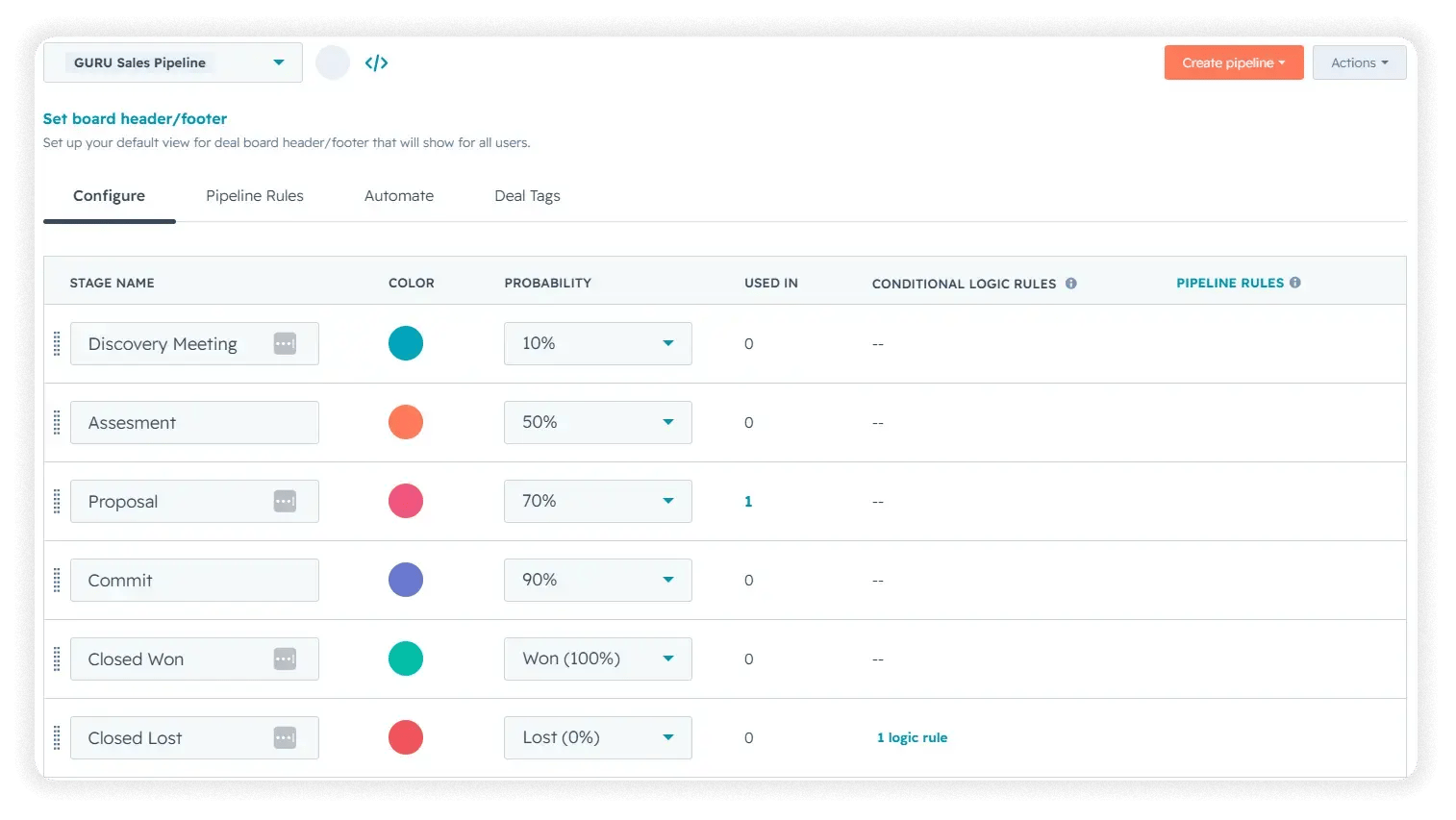
We built one deal pipeline with stages matching Guru IT Consulting's actual sales process rather than HubSpot's default stage names. This pattern applies almost universally. A generic pipeline forces a sales team to translate their real process into someone else's labels, and that's usually where adoption breaks down.
How Do You Stop Deals From Going Stale Without Micromanaging the Team?
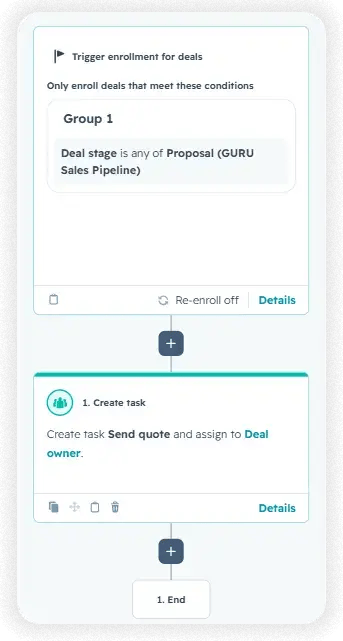
Two workflows handle this, both scoped to the pipeline stages where a stalled deal is most expensive.
| Workflow | Trigger | Automated Action | When You'd Need This Pattern |
| Proposal Quote Task | Deal enters the Proposal stage | Creates a high-priority task to send a quote | Any stage where the next action is well-defined but easy to forget under a rep's normal workload |
| Commit-Stage Stall Detection | Deal sits in the Commit stage with no record update for 7 days | Automatically creates a follow-up task for the deal owner | Late-stage deals, where a deal going silent is the most expensive kind of drop |
How Do You Give Leadership Visibility Without Building Custom Reports From Scratch?
We used HubSpot's standard sales reporting library rather than building custom reports and confirmed the full scope directly with the client rather than assuming partial delivery was sufficient.
| Report Category | Reports Included | Primary Audience |
| Sales | 5 | Reps and day-to-day pipeline tracking |
| Sales Manager | 8 | Sales manager, team performance review |
| Sales Opportunity Review | 8 | Monthly opportunity and forecast review |
| Sales Rep | 6 | Individual rep, monthly self-tracking |
Use a reporting library this broad when different roles need different views of the same pipeline data. A rep checking their own monthly numbers doesn't need the same report as a manager reviewing team-wide close rates, and building both up front avoids a second reporting request a few months in.
.png?width=60&height=46&name=Vector%20(3).png)
Results
What Results Did This Produce?
- 4 weeks of onboarding completed, covering general settings, sales pipeline build, sales resources, and handoff.
- 2 dashboards and 27 sales reports were delivered.
- 2 lifecycle stage automations and 2 deal stage workflows live in the account.
- Handover documents built for the team to understand how to use the core pipeline and workflow logic.
These results translate into the following business outcomes:
- Reduced manual sales work. Lifecycle stage assignment and lead ownership now happen automatically at the moment a record is created, removing a manual triage step from every new lead.
- Fewer dropped leads or deals. The Commit-stage stall detection workflow surfaces a late-stage deal automatically if it goes quiet for a week, instead of relying on someone to notice.
- Clearer performance reporting. The Sales Manager dashboard puts deal forecasting, rep activity, and win and loss totals in one place, replacing the need to ask around for pipeline status.
- Improved trust in HubSpot data. Because no unverified legacy data was imported, every record in the new pipeline reflects activity that happened inside HubSpot, not a migrated dataset of unknown quality.

Key Takeaways
- The onboarding took Guru IT Consulting from a blank HubSpot portal to a live, automated sales pipeline.
- Lifecycle stage automation replaced manual lead qualification and ownership assignment.
- Deal stage workflows target the specific points where a stalled deal is most costly, not every stage in the pipeline.
- Standard sales dashboards gave leadership pipeline visibility starting in week one.
- Skipping legacy data migration was a deliberate trade-off in favor of a trustworthy fresh start.
Would this approach work for a company like mine?
If you're starting a HubSpot sales process from scratch, with no legacy CRM or a legacy CRM whose data you don't fully trust, this approach applies directly regardless of industry. It's a better fit for smaller sales teams with a handful of clearly defined pipeline stages than for organizations running multiple complex pipelines across regions or product lines, where stage logic and workflow scoping get considerably more involved. It assumes a Sales Hub tier that supports workflow automation. On a tier without that, the pipeline structure still applies, but stall detection and auto assignment won't be available.
Frequently Asked Questions
Do you need existing CRM data to build HubSpot workflow automation?
What's the difference between a lead pipeline and a deal pipeline in HubSpot?
A lead pipeline tracks prospects before they're qualified into an active sales opportunity, while a deal pipeline tracks the qualified opportunity through stages like Proposal and Commit.
What is a stall detection workflow?
It's an automation that waits a set period for activity on a record and creates a follow-up task automatically if none occurs, acting as a safety net for stages where silence is costly.
Does this kind of automation require a specific HubSpot tier?
Workflow-based automation on deal and contact records generally requires a Sales Hub tier above the free or Starter level. Exact requirements should be confirmed against HubSpot's current pricing page.
What happens if a company skips CRM data migration entirely?
Reporting starts from zero with no historical baseline inside HubSpot, but the pipeline and automation aren't built on top of data quality problems from day one.
Why automate only two deal stages instead of the entire pipeline?
Automation was scoped to the stages where a stalled deal is most expensive and late in the pipeline, rather than applied uniformly, to avoid workflow overhead on stages where a delay isn't as costly.
Does this approach apply outside of IT consulting?
Yes. The pipeline and automation logic isn't industry specific. It applies to any B2B sales process with a defined set of deal stages and a team that needs shared pipeline visibility.

Others Case studies


