How On The Fuze Migrated Auto Use's 140,000+ Salesforce Records Into HubSpot, Building a Single Source of Truth


How Do You Migrate Years of Messy CRM Data Into a Clean, Unified System Without Losing History?
You migrate object by object. Start with a full data export and audit, map each source object into the right destination structure based on what your plan actually supports, and resolve duplicates and field mismatches before they compound into reporting problems.
That is how we moved a fragmented Salesforce and Constant Contact setup into a single HubSpot environment covering more than 140,000 historical records. Here are the things we needed to consider:
- A CRM plan without API access limits you to periodic manual exports, so your migration plan has to work around that constraint from the start, not discover it halfway through.
- Duplicate records created by old sync tools (often flagged by patterns in the email address itself) tend to surface only after the main migration is done, so build in a review pass instead of assuming a clean export.
- When a business runs on one point of contact per account, a company-centric data model cuts more overhead than a contact-heavy structure would.
- Custom fields inherited from an old system quietly break list views and reporting until they're reconciled against the new platform's standard fields.
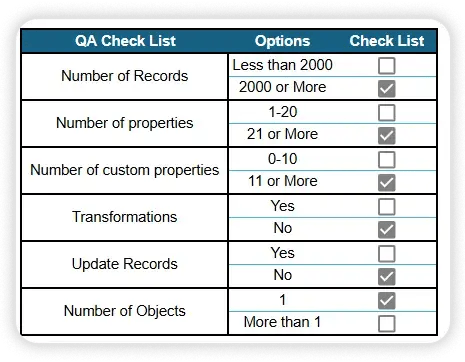
- Objects that don't exist in your source data need to be flagged early so project scope reflects what's actually there to migrate.
Auto Use, a commercial lender that finances vehicle inventory for auto dealerships, came to us running its entire sales and marketing operation on a Salesforce Professional plan paired with a separate Constant Contact account. Neither system talked to the other, and years of manual data entry had left the CRM in a state nobody fully trusted.
| Client | Auto Use |
| Industry | Auto dealer floorplan financing (commercial lending) |
| Locations | Massachusetts, United States |
| Growth model | Dealer network financing (B2B lending to auto dealerships) |
| HubSpot product | Marketing Hub Starter + Sales Hub Starter (Contacts, Companies, Deals, Pipeline, Segmentation, Reporting) |
| Engagement type | Salesforce to HubSpot migration and CRM rebuild |
| Legacy system | Salesforce (Professional plan) + Constant Contact |
| Records migrated | 140,000+ records (contacts, companies, deals, emails, tasks, meetings, notes, files) |
| Reports delivered | 21 reports across 2 dashboards |

Problem
How do you know if your business has this problem?
Signs to look out for:
- Your CRM data has been entered manually for years, and nobody on the team fully trusts what's in it anymore.
- Your CRM plan doesn't include API access, so any serious data project depends on manual exports instead of live syncs.
- Your sales team keeps an informal process (a spreadsheet, a shared doc, or institutional memory) because the official pipeline doesn't reflect how deals actually move.
- Your marketing platform and your CRM are two separate logins with no shared data between them.
- You have more contact records than you have real relationships, because duplicates have piled up over time.
- Different fields get used for the same purpose across records (a custom field here, a standard field there), so list views and reports don't line up cleanly.
Auto Use's Data Problem: Why Is a Data Export-Only CRM Risky for a Growing Floorplan Lender?
Auto Use's Floorplan lending business, financing inventory for auto dealerships, ran on Salesforce's Professional plan. That plan doesn't include API access and limits accounts to one full data export a month, so any cleanup or migration work had to be scoped around that limit rather than handled live.
Marketing operated entirely separately through Constant Contact, disconnected from the sales data in Salesforce. This created 3 risks:
- Data trust risk. Years of manual entry in Salesforce meant the underlying data included duplicate records and inconsistent field usage, undermining confidence in segmentation and reporting.
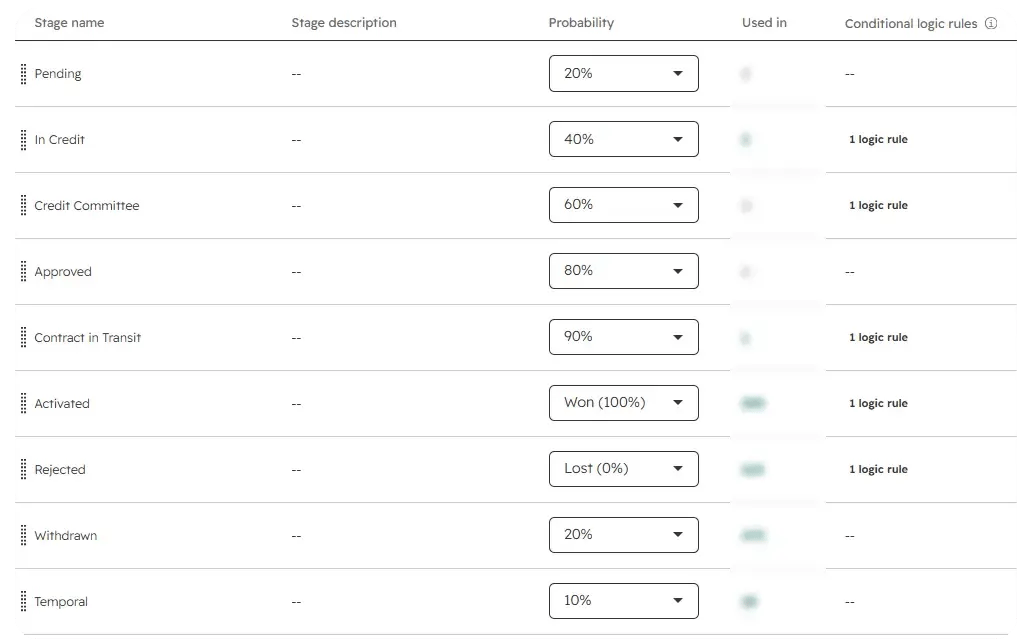
- Process risk. Auto Use's real credit approval workflow (an application moving through credit review, dealer interview, credit committee, contracts, and activation) existed informally rather than as a structured pipeline, so pipeline reporting didn't reflect the actual state of a deal.
- Structural risk. No Opportunity records existed anywhere in the Salesforce export. The deal history Auto Use assumed it had wasn't captured as structured pipeline data at all. It lived entirely inside a separate Floorplan object that had never been connected to a reportable pipeline.

Solution
To customize HubSpot to Auto Use's needs, below are the questions we answered...

How Do You Build a Company-Centric CRM for a Dealer Network in HubSpot?
You migrate accounts as companies, model relationships around a single primary contact per account, and only add contact-level complexity where the process actually requires it. That's the structure we built for Auto Use's dealer network inside Marketing Hub Starter and Sales Hub Starter.
How Do You Migrate Data From a CRM Plan Without API Access?
You scope the entire migration around the platform's export limits instead of relying on API access, sequencing objects from foundational to historical so nothing is missed or migrated out of order.
- We confirmed the Salesforce Professional plan didn't support API access and was limited to one Data Export download per month, so we scoped the entire migration around manual exports from the start.
- A full backup and export of the Salesforce account was pulled before any migration work began, giving us a stable source of truth to work against.
- Objects were prioritized and mapped in a defined migration path (users, then contacts, then companies, then deals, then activities, then files) rather than migrated all at once.
- This approach is the one to use any time a source CRM plan sits below the tier that includes API access. Plan for exports, not live syncing, and sequence the migration accordingly.
How Do You Structure a CRM Around One Contact Per Account?
You migrate the account itself as the Company record and fold the primary contact's key details onto it, rather than building a separate, fully populated Contact record for every account.
- Auto Use's dealerships almost always have a single main point of contact, so we migrated dealership records as HubSpot Companies rather than building out a heavier contact layer.
- Key fields the client relies on daily were mapped onto the company record instead of requiring a connected contact for every dealership.
- This pattern applies any time a business's real relationship structure is one contact per account rather than many contacts per account. Building a full contact hierarchy in that situation adds overhead without adding value.
How Do You Rebuild a Pipeline to Match a Real Approval Process?
You map each stage in the new pipeline to a real step in the business's approval workflow, then translate historical status values from the old system directly into those stages instead of resetting deal history.
- The Floorplan pipeline was rebuilt in HubSpot Deals to mirror Auto Use's actual credit approval flow: In Credit, Pending, Credit Committee, Contracts in Transit, and Activated or Withdrawn.
- Historical status values from Salesforce were mapped directly to the matching HubSpot stage, so existing deal history carried over instead of resetting.
- Records with no status value in the source data were routed to a temporary holding stage rather than dropped or misclassified.
- This is the move to make any time a pipeline exists informally in someone's head or in a status field that doesn't map to a real workflow: rebuild the stages around the actual process, then backfill history into it.
How Do You Handle Duplicate Records and Field Mismatches During Migration?
You review the migrated data for known duplication patterns and inherited custom fields after the main import, then decide case by case whether to merge, exclude, or preserve records rather than dropping anything that might carry historical value.
- Roughly 1,080 duplicate contact records, identifiable by a "+101" pattern appended to email addresses from a prior sync tool, were preserved with an email alias rather than deleted, since many carried historical activity data worth keeping.
- 33 invalid records and 664 records that already existed in HubSpot were excluded from the contact import rather than duplicated.
- Custom dealership-specific fields inherited from the prior setup were flagged where they diverged from HubSpot's standard fields, so list views stayed consistent across older and newer company records.
- Any migration carrying years of manually entered data should expect this category of problem and budget a dedicated review pass rather than assuming the export is clean.
.png?width=60&height=46&name=Vector%20(3).png)
Results
What Did This Migration and Rebuild Actually Deliver?
The migration moved every core object out of Salesforce and Constant Contact and into a working HubSpot environment, without losing historical data along the way.
- 11,984 contacts and leads migrated
- 2,128 companies (dealerships) migrated.
- 1,672 deals migrated into the rebuilt Floorplan pipeline.
- 14,565 emails, 81,126 tasks, and 27,942 meetings migrated with associations to the correct contacts, companies, and deals
- 753 notes and 2,889 files migrated and reattached to their original records
- 868 of 875 contacts from the prior Constant Contact opt-out list imported and correctly flagged
- 3 branded marketing email templates built (standard, full, and newsletter)
- 2 dashboards covering 21 reports built for marketing and pipeline visibility
These results translate into the following business outcomes:
- Single source of truth: Salesforce and Constant Contact data now live in one system, so dealer history, deal status, and marketing engagement are no longer split across two separate logins.
- Increased pipeline predictability: The Floorplan pipeline mirrors the real credit approval process from application to activation, so deals can be tracked by actual stage instead of an approximate status field.
- Improved lifecycle stage accuracy: Dealer segmentation (Active Floorplan Dealers, Non-Active or Prospect, by Sales Rep, by State or Territory) is now built directly into HubSpot rather than relying on an informal Salesforce field.
- Clearer performance reporting: 2 dashboards covering 21 reports give the team one place to check marketing and pipeline performance instead of piecing it together across systems.
- Reduced tool sprawl: Replacing Salesforce and Constant Contact with Marketing Hub Starter and Sales Hub Starter removed a separate marketing platform from the stack entirely.

Key Takeaways
- Migrating off a CRM plan without API access is possible, so the plan has to work around the export limit from day one, not adjust to it midway.
- A CRM's data model should match how the business actually operates. Company-centric structures work best when there's genuinely one contact per account.
- Rebuilding a pipeline around the real approval process, rather than an old status field, is what makes pipeline reporting trustworthy again.
- Duplicate records and mismatched custom fields are common byproducts of long-term manual data entry, and they need a dedicated review pass, not an assumption of a clean export.
- Consolidating a separate marketing platform and CRM into one system closes the data gap between sales and marketing teams.
Would this approach work for a company like mine?
This approach fits businesses running a commercial or institutional sales model, where the relationship centers on a limited number of accounts rather than a high volume of individual consumer contacts, such as dealer networks, distributors, or B2B lenders. It also fits any team migrating off a Salesforce plan below Enterprise tier, since those plans typically lack API access and require the export-based approach used here.
On the HubSpot side, this pattern is built for Starter-tier accounts that don't yet have custom objects or custom association labels, so the models described (company-centric records, deals-based pipelines) work within those limits rather than assuming Professional or Enterprise features are available. Businesses sitting on a large volume of historical activity data, tasks, meetings, notes, and files built up over years will see the most benefit from a structured, phased migration like this one.
Frequently Asked Questions
Can you migrate CRM data from a plan without API access?
What happens to Salesforce Leads if the destination CRM tier doesn't have a Leads object?
They migrate as standard Contacts, distinguished through custom properties and segmentation rather than a separate object.
Why would a CRM migration exclude Opportunity records?
If no Opportunity records exist in the source data export, there's nothing to migrate. Pipeline history has to come from wherever the business actually tracked deals instead.
How do you handle duplicate contacts created by old CRM sync tools?
Review email address patterns after migration for signs of automated duplication, then either merge manually using the CRM's native tools or scope a coded deduplication pass for larger volumes.
Is a company-centric CRM structure right for every business?
What's the practical difference between a Starter tier and a higher HubSpot tier during a migration like this?
Starter tiers don't include custom objects or custom association labels, so pipelines and associations have to be built within HubSpot's standard object model rather than a custom one.
What data actually survives a migration like this?
Contacts, companies, deals, emails, tasks, meetings, notes, and file attachments can all be migrated with their original associations intact, provided they were captured in the source system's export.

Others Case studies