How On The Fuze Turned CLSI's Disconnected Help Desk and Unreliable Reports Into a Scalable Member Service Operation


How Do You Build a Reliable HubSpot Help Desk for a Membership Organization?
Building a reliable HubSpot help desk for a membership organization requires a structured service pipeline, automated ticket routing and re-opening logic, consistent reporting filters, and a segmentation layer that maps member data to outreach workflows.
Without these in place, tickets fall through the cracks, reports contradict each other, and renewal campaigns run on data that can't be trusted. Generalizable takeaways for any membership organization using HubSpot Service Hub:
- A service pipeline only works if every inbox is authenticated, every stage has defined logic, and ticket properties are built before automation is layered on top.
- HubSpot's native ticket reopen logic cannot handle email replies with precision below a 24-hour window; custom code is required for real-time reopen.
- Reporting discrepancies almost always traces back to inconsistent filters across reports built at different times, not bad underlying data.
- Member renewal segmentation must be built on association labels between contacts, companies, and membership records before any outreach automation can be reliable.
- Satisfaction surveys need separate workflow logic for reopened tickets to prevent survey fatigue and skewed trend data.
CLSI is a US-based nonprofit professional association that develops and publishes standards for clinical laboratories. When On The Fuze began the engagement, CLSI had ten departmental inboxes connected to HubSpot but no structured pipeline, no reliable automation, and no reporting environment that leadership could trust.
| Client | CLSI (Clinical and Laboratory Standards Institute) |
| Industry | Healthcare / Non-Profit |
| Location | United States |
| Growth model | Member services and renewal (B2B), not direct consumer acquisition |
| HubSpot product | Service Hub Pro, Marketing Hub Pro, Operations Hub |
| Engagement type | HubSpot Service Hub build, automation, and reporting |
| Legacy system | Unstructured inbox routing, no service pipeline |
| Inboxes connected | 10 departmental inboxes verified and authenticated |
| Automations built | Ticket priority routing, status transitions, re-open logic, survey automation, renewal sequences, escalation workflows |
| Reports delivered | 11 standardized service pipeline reports across SLA, satisfaction, ticket category, escalation, and re-open tracking |

Problem
How do you know if your business has this problem?
Signs to look out for:
- Agents manually check inboxes for replies on tickets already marked "Solved" or "Closed."
- Reports pulled from HubSpot show different ticket totals depending on which dashboard is opened.
- Leadership cannot explain why NPS, CSAT, and CES trend lines move in different directions.
- Renewal outreach is sent without first verifying which contacts are actually eligible.
- Ticket priority is assigned by judgment call, not by a consistent rule.
- New team members rely on tribal knowledge to understand how the help desk works
If two or more of these are true, the issue is structural. Surface-level fixes will not hold.
CLSI's Service Operations Problem: Why Is an Unstructured HubSpot Inbox Setup Risky for Managing Member Inquiries?
CLSI's service team managed inquiries across ten departmental inboxes: customer service, committees, education, marketing, membership, orders, permissions, standard, volunteer, and vote. Those inboxes were connected to HubSpot, but the pipeline, automation, and reporting layers had never been properly built.
- Member replies were going unacknowledged. When a ticket was marked "Solved" and a member sent a follow-up, HubSpot's native logic left the ticket closed. No alert fired. No agent saw the reply. In a single month, 27 tickets were identified that should have reopened based on incoming member activity but had not. For a membership organization, an unanswered follow-up is a retention risk, not an operational footnote.
- Leadership had no reliable performance data. One report showed 6,674 tickets in April. Another showed 1,037. A third showed hundreds. The cause was structural: reports had been built at different times with different category filters and different date ranges. NPS, CSAT, and CES data were also unreliable because January and February records were included in trend lines despite reliable survey collection only beginning in March. Decisions about staffing and member service standards were being made against numbers that could not be reconciled.
- Renewal outreach had no data foundation. CLSI's renewal cycle is revenue-critical. But renewal-eligible contacts could not be reliably identified before outreach went out. Association labels between contacts, companies, and membership records were inconsistent or missing. There was no segmentation by membership type, renewal date, or status. Any campaign launched in this state risked reaching the wrong people, missing eligible members, or sending duplicate messages.

Solution
To customize HubSpot to CLSI's needs, below are the questions we answered...

How Do You Build a Reliable HubSpot Service Operation for a Membership Organization?
The work was sequenced deliberately: Pipeline architecture came first. Automation was built on top of a stable foundation. Reporting was the last layer. Building this way creates a scalable, reliable service process.
How Do You Architect a Service Pipeline That Actually Routes Tickets Correctly?
This is the starting point for any help desk build. Without it, every automation and report that follows is unreliable.
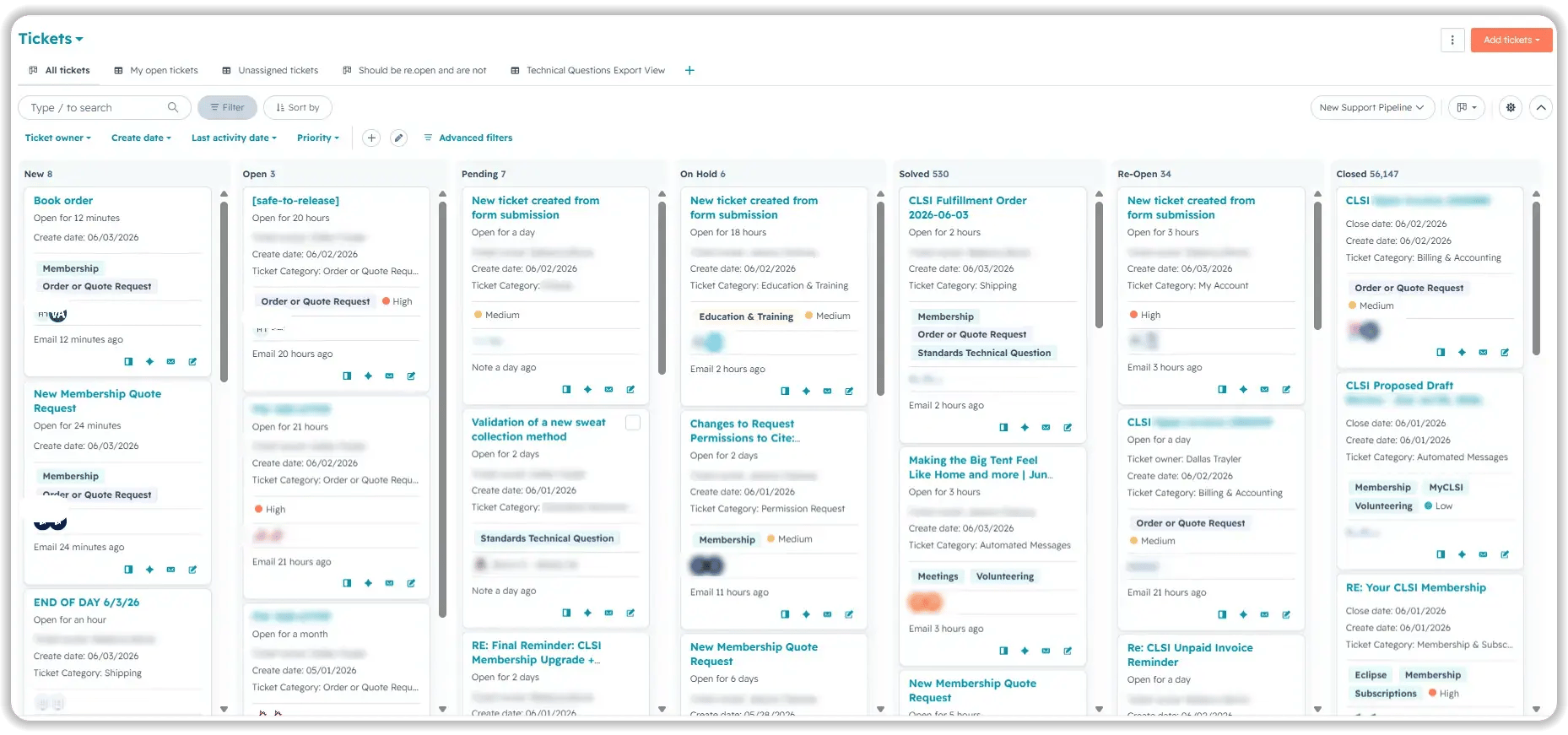
- We built CLSI's service pipeline from scratch, defining seven stages: New, Open, Pending, On Hold, Solved, Re-Open, and Closed, each with explicit transition logic and automation rules.
- All ten departmental inboxes were verified and authenticated individually, confirming that tickets were routing to the correct team and that tracking codes were firing on each connection.
- Custom ticket properties were created to capture ticket category, document category, and specialty area; these fields are the prerequisite for priority routing, escalation logic, and category-level reporting.
- Basic SLA configuration was set at the pipeline level as a foundation, with custom SLA measurement built later using workflow-based property tracking because HubSpot's native SLA tool could not capture the timing logic CLSI required.
- Custom HelpDesk views were configured so agents could see their queue filtered by priority, category, and assignment status without building a new view each session.
.svg)
How Do You Build Membership Renewal Automation in HubSpot?
Renewal automation only works if the contact and association data underneath it is accurate. Segmentation built on misaligned records produces the wrong outreach.
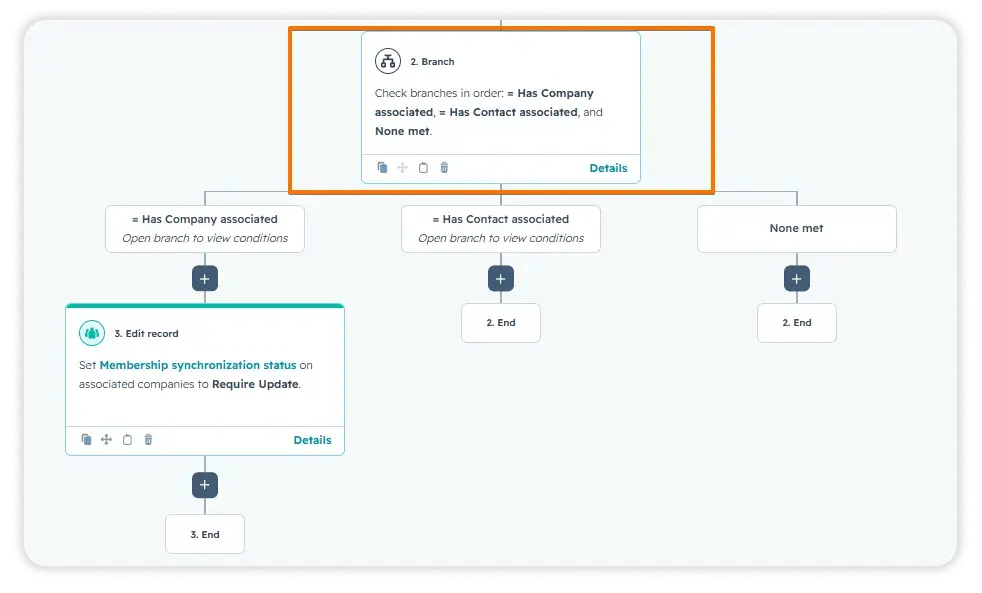
- Association labels were configured between contacts, companies, and membership records, establishing the relational structure that renewal workflows depend on.
- Active member segmentation lists were built filtering by membership type, renewal date, and status and validated to confirm that only eligible records were included.
- Automated renewal reminder sequences were created with enrollment and re-enrollment logic tied to membership status changes.
- Suppression logic was added to prevent duplicate outreach to contacts already in an active renewal sequence.
- A report was built to provide visibility into which contacts were scheduled for renewal outreach in the upcoming week, allowing the team to review and adjust before sends go out.
How Do You Build Ticket Priority Routing and Escalation Workflows?
Manual priority assignment creates inconsistency and missed escalations, especially across a multi-inbox environment.
- A workflow was built to set ticket priority automatically based on ticket category at the moment of creation, removing agent judgment from the triage step.
- A second workflow moves tickets from "New" to "Open" the moment they are assigned to an agent, eliminating the status lag that made active tickets appear unworked.
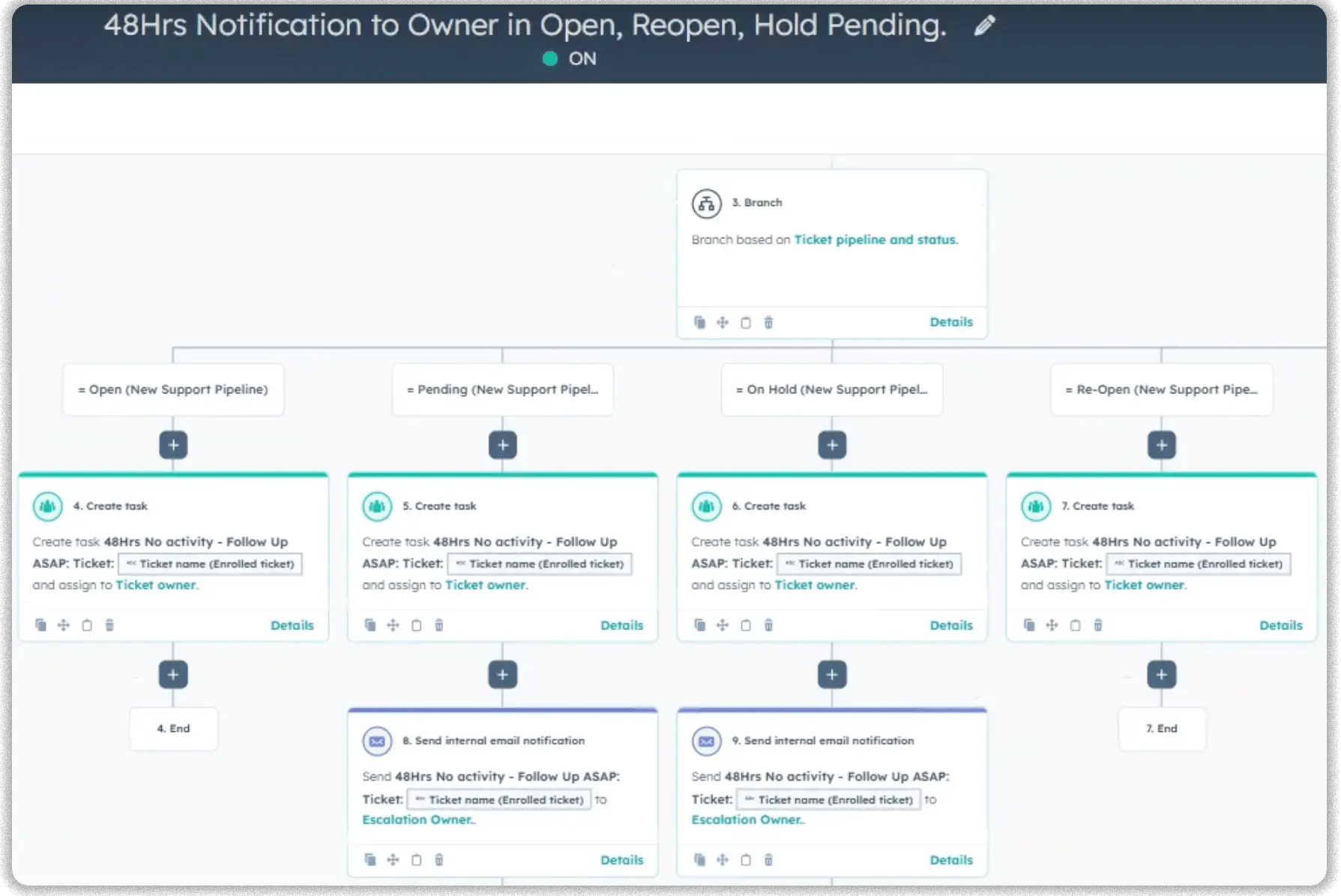
- Task-creation workflows were adjusted from a 48-hour trigger window to 72 hours after auditing that the prior setting was generating premature escalation tasks before agents had a reasonable response window.
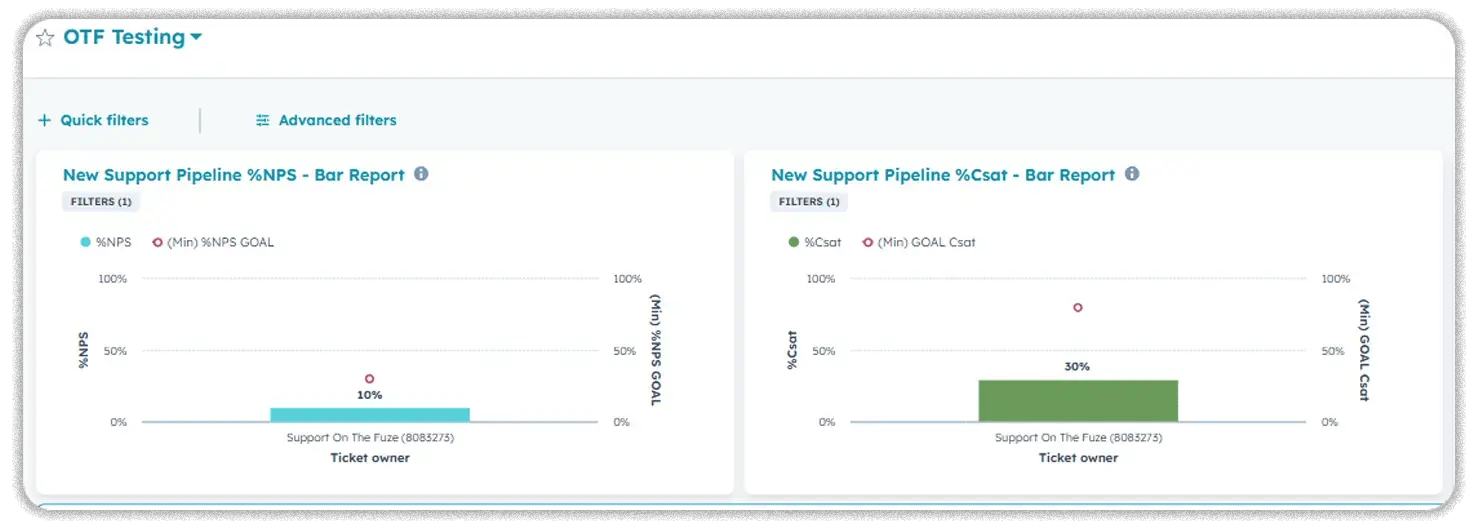
- Survey automation was configured to send CSAT and CES surveys 24 hours after a ticket is marked "Solved," with a separate workflow branch for reopened tickets to prevent survey fatigue and protect the integrity of satisfaction trend data.
How Do You Fix Contradictory HubSpot Reports?
Report discrepancies in HubSpot almost always trace back to inconsistent construction, not data errors. The fix is governance, not data cleaning.
- The ticket count discrepancy was traced to one report including the "Automated Message" ticket category while others excluded it; filters were standardized across all reports.
- January and February data was removed from NPS, CSAT, and CES trend lines because reliable survey collection only began in March; partial-period data was distorting the trend.
- 11 service pipeline reports were built with consistent filters and date ranges, covering service funnel, SLA compliance, ticket category breakdowns (monthly), escalation rates, NPS/CES/CSAT weekly and monthly, reopen rates, reopen reasons, and tickets solved by category.
- Ticket activity tracking was activated in HubSpot to create a full audit trail of status changes, workflow triggers, and interactions on each record.
How Do You Automate Ticket Re-Opening When HubSpot's Native Logic Falls Short?
HubSpot's built-in reopen trigger works on date fields that update once per day. For an organization managing real-time member replies, that delay creates invisible gaps.
- We built a custom Python function that detects incoming email activity by reading actual interaction timestamps, not HubSpot date fields.
- A 5-minute grace period was applied after an agent's first response, allowing the agent to send follow-up messages without triggering a false reopen.
- After that window, any new inbound interaction from the member, a forwarded thread, or a CC'd recipient automatically reopens the ticket.
- This required no change to how agents work; the re-open logic runs in the background against the same workflow agents already follow.
- A dedicated monitoring report was built alongside the automation to surface any tickets that should have reopened but did not, reviewed on a weekly cadence.
.png?width=60&height=46&name=Vector%20(3).png)
Results
What Results Did CLSI See After the HubSpot Service Hub Implementation?
- 10 departmental inboxes verified and authenticated
- 1 service pipeline built from scratch with 5 defined stages
- 11 standardized service reports delivered with aligned filters and date ranges
- 27 missed ticket re-opens identified in a single month; automated reopen logic now covers all reply types.
- Ticket count discrepancy resolved: 6,674 vs. 1,037 variance traced to multiple category filter misalignments
- Custom Python-based reopen function built to operate below HubSpot's native 24-hour date-field limitation
- Custom SLA measurement workflows built using properties because native SLA tracking could not match CLSI's timing requirements
- Renewal segmentation lists built by membership type, renewal date, and status with association labels configured between contacts, companies, and membership records
These results translate into the following business outcomes:
- Fewer missed member replies: Automated re-opening ensures no member reply goes unacknowledged after a ticket is marked solved.
- Improved follow-up consistency: Priority routing and status automation eliminate manual triage steps and status lag.
- More repeatable processes: Ticket priority, status transitions, escalations, and surveys now run on defined rules, not agent judgment.
- Single source of truth: The reports share consistent filters and date ranges; the 6,674 vs 1,037 discrepancy is resolved.
- Increased ROI from HubSpot: The platform now executes routing, prioritization, reopening, survey collection, and renewal segmentation that previously required manual effort or was not happening at all.

Key Takeaways
- A HubSpot help desk built on unverified inboxes and undefined pipeline stages will produce unreliable automation and untrustworthy reports regardless of how many workflows are added on top.
- HubSpot's native ticket reopen trigger works on daily date updates; any organization that needs real-time reopen based on email replies requires a custom code solution.
- Report discrepancies in HubSpot almost always trace to inconsistent category filters or date ranges across reports built at different times, not corrupted data.
- Membership renewal automation is only reliable when association labels between contacts, companies, and membership records are correctly configured before segmentation lists are built.
- Satisfaction survey data produces misleading trend lines if partial-period data from before the full rollout is included; clean baselines matter.
Would this approach work for a company like mine?
This implementation pattern fits membership associations, nonprofits, and B2B service organizations in the 11-50 employee range that are managing high inquiry volume across multiple departmental inboxes. On the HubSpot side, Service Hub Pro or Enterprise is required, and the custom ticket re-opening logic depends on Operations Hub for the programmable automation layer. Organizations that will get the most out of this work are those that already have HubSpot connected but have never gone through a structured pipeline and reporting build.
Frequently Asked Questions
Why did 27 tickets fail to reopen even though replies came in?
What caused the 6,674 vs. 1,037 ticket count discrepancy in CLSI's reports?
One report included the "Automated Message" ticket category in its count, while other reports excluded it. Standardizing the category filter across all 11 reports resolved the variance.
Why was custom SLA measurement built instead of using HubSpot's native SLA tool?
HubSpot's native SLA tool could not capture the specific timing logic CLSI needed. Custom SLA measurement was built using workflow-based property tracking to record time-in-status at the precision the team required.
Why were January and February removed from the CSAT, CES, and NPS reports?
Reliable survey data collection only began in March. Including the earlier months created partial-period data that distorted trend lines and made it impossible to draw valid conclusions about satisfaction performance.
Can the ticket reopen logic handle forwarded email threads, not just direct replies?
Yes. The custom Python function detects new inbound email activity regardless of whether it arrives as a direct reply, a forwarded thread, or a message from a CC'd recipient.
Does this work require a HubSpot developer, or can an admin handle it?
The pipeline, inbox verification, workflows, and reports can be handled by an experienced HubSpot admin or consultant. The custom Python-based reopen function requires a developer or a consultant with Operations Hub programmable automation experience.
What happens to the renewal automation if a contact's membership status changes mid-sequence?
Suppression logic was built into the renewal workflows so that contacts who renew, expire, or change status mid-sequence are removed from active enrollment and do not receive duplicate or irrelevant outreach.

Others Case studies