How On The Fuze Turned PlashLights' Sales Process Into an Automated HubSpot Pipeline

How Do You Set Up HubSpot Without Overbuilding It?
The fastest way to a working sales process in HubSpot is to build only what the team will use on day one: a pipeline that matches how deals actually move, automation for the repetitive steps, and documentation that reps will actually fill out. Everything else should wait until these foundations are working.
- Match the pipeline to the real sales flow, not a generic template.
- Automate deal-stage movement before automating anything else.
- Import only the records tied to active business, not the whole database.
- Build sales documentation (notes, snippets) around the product line reps actually sell.
- Treat "not needed yet" as a valid scope decision, not a gap.
| Client | PlashLights |
| Industry | Marine & powersports LED lighting (e-commerce/wholesale) |
| Location | United States, Texas |
| Growth model | Product catalog sales to dealer and wholesale accounts |
| HubSpot product | Sales Hub Professional (Leads, Deals, Pipeline, Workflows, Sales Documentation) |
| Engagement type | HubSpot Sales Hub Onboarding and Setup |
| Records migrated | Company records tied to an active product catalog |
| Automations built | Deal-stage workflows mapped to the sales process |
PlashLights, an LED lighting business, came to On The Fuze needing a Sales Hub setup optimization, not a full platform rebuild. Below is how we scoped and built it...

Problem
How do you know if your business has this problem?
A business usually has this problem before anyone officially names it.
Signs to look out for:
- Deals move through your pipeline because a rep remembers to update them.
- Every rep takes notes on sales calls differently, so a deal handed to a second person is missing context.
- Your CRM has more records in it than your actual customer base, because everything gets imported instead of what matters.
- Team members are still figuring out email signatures, calendar sync, or basic permissions weeks after go-live.
- Nobody can say with confidence what a "qualified" record looks like once it's inside HubSpot.
If more than one of these sounds familiar, the CRM is running as a database, not a sales process.
PlashLights' Pipeline Problem: Why Is Manual Deal-Stage Tracking Risky for a Product-Based Sales Team?
PlashLights runs sales through an e-commerce catalog and direct customer conversations, meaning a lot of the CRM's value depends on getting company records right and giving reps a consistent way to document demos and proposals. 3 risks showed up directly in the onboarding:
- No automated deal movement. Before this project, deal stages had no defined automation behind them, so pipeline accuracy depended entirely on manual updates.
- No standard way to document a sales conversation. There was no existing snippet or template for capturing demo outcomes or proposal details, which meant every rep's notes looked different and information got lost between the demo and the proposal.
- Risk of a cluttered company database. The client specifically asked to import only companies tied to an active product catalog rather than every contact and company in their e-commerce platform, a sign the existing data included records that weren't sales-relevant.

Solution
To customize HubSpot to Plashlights needs, below are the questions we answered...

How Do You Build a Repeatable Sales Process in HubSpot?
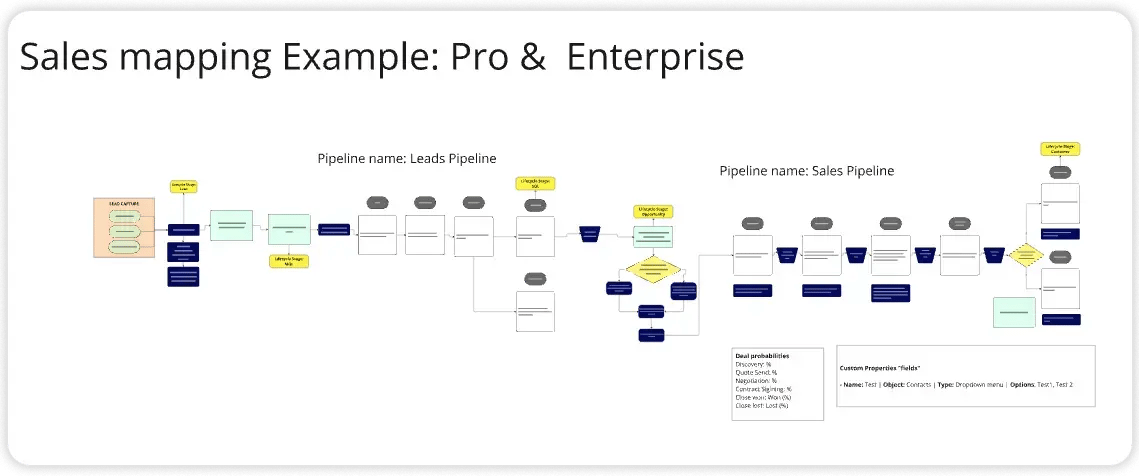
You build it by mapping your sales process first, then matching each step to a pipeline stage, an automated workflow, or a documentation snippet, so HubSpot enforces the process instead of just recording it
How Do You Structure a Deal Pipeline for a Product-Based Sales Team?
You structure it around the single path deals actually follow for that product line, rather than defaulting to a generic multi-stage template.
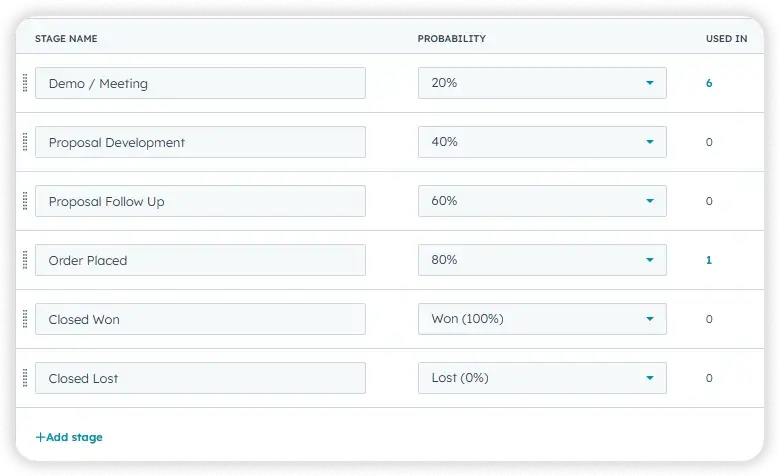
- We built 1 sales pipeline with deal stages that reflect PlashLights' actual sales motion, from first contact through close.
- This pattern applies any time a business has a single, consistent path deals follow, rather than multiple sales motions running in parallel.
- It avoids the common mistake of building stage complexity before the team has used the simple version.
- The pipeline became the foundation every later automation and report would attach to.
How Do You Automate Deal Movement Without Losing Control?
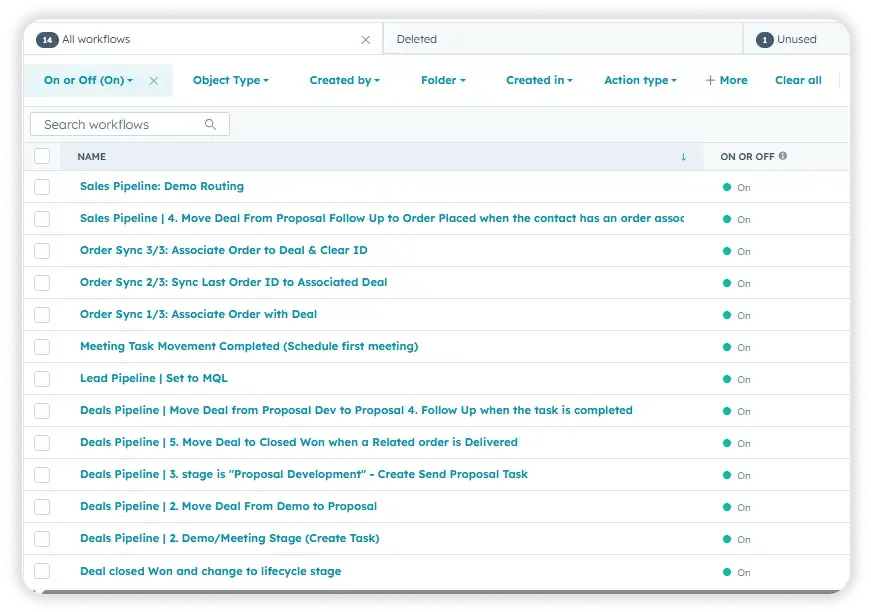
You automate movement by mapping the sales process first and building workflows against that map, so stages change based on defined actions instead of a rep's memory...
- We mapped the client's sales process first, then built deal workflows on top of that map so stage changes trigger automatically based on defined actions rather than manual updates.
- Automating movement at the workflow level, rather than leaving it to reps, is what keeps pipeline reporting reliable later even before formal dashboards exist.
- We built the leads pipeline in parallel, modifying HubSpot's default structure so lead creation ties to a defined lifecycle stage rather than firing on every new contact.
How Do You Standardize Sales Documentation Across a Team?
You standardize it by building documentation templates around the team's actual sales conversations, not a generic note format.
- We built custom snippets modeled on PlashLights' actual sales conversations: a "Demo Completed" note capturing customer needs, product interest, and objections, and a "Proposal Development" note capturing the proposed solution, pricing, and next steps.
- Because the snippets were built around the client's specific product categories and sales stages rather than a generic sales template, they map directly onto conversations reps are already having.
- We also handled the team-facing basics that make a CRM usable day to day: individualized email signatures, user accounts with role-based permissions, and calendar and email sync to HubSpot.
.png?width=60&height=46&name=Vector%20(3).png)
Results
What were the results of this onboarding?
- 1 sales pipeline built with custom deal stages
- 1 lead pipeline built and configured to a defined lifecycle-stage trigger
- Deal-stage workflows built and mapped to the client's sales process
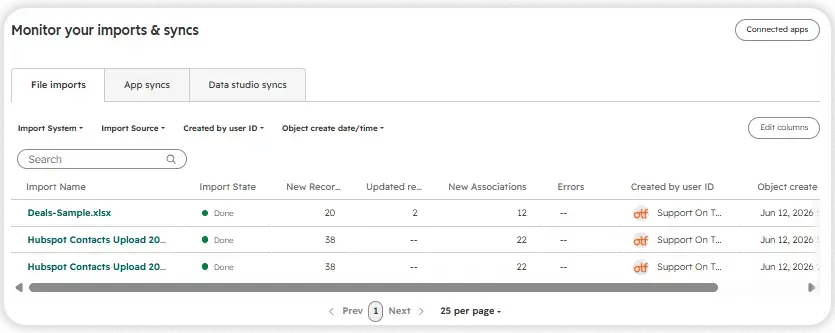
- Company records are imported based on active-catalog criteria, with required custom fields created to support the import.
- 5 segmented lists created against the imported data
- 2 custom sales documentation snippets built around the client's specific sales conversations
- Full user and permission setup completed for the sales team, including individualized email signatures
- The calendar and email are connected and synced to HubSpot.
- Onboarding closed out with a 30-minute portal review and handoff call.
These results translate into the following business outcomes:
- Reduced manual sales work: Deal-stage workflows move records through the pipeline automatically instead of requiring reps to update stages by hand.
- Improved follow-up consistency: Standardized demo and proposal snippets mean every rep captures the same information regardless of experience level.
- More repeatable process: The mapped sales process, pipeline, and documentation snippets together form a system a new hire could follow without additional training.
- Easier day-to-day usage: Working calendar and email sync, correct signature, and a clean permission structure removed the friction that usually slows adoption in the first weeks.

Key Takeaways
- A right-sized HubSpot setup can deliver as much day-to-day value as a full buildout when it's scoped to what the team will actually use.
- Automating deal-stage movement removes a manual step that gets skipped the moment a sales team gets busy.
- Sales documentation built around a business's specific product line drives more consistent adoption than a generic template.
- What gets filtered out of a data import matters as much as what gets brought in.
- Treating certain features as "not needed yet" is a scope decision, not a shortcoming, and it leaves room to add them later without rework.
Would this approach work for a company like mine?
This approach fits businesses running a single, definable sales process rather than several parallel motions, particularly product-based or e-commerce/wholesale companies where deals tie back to a catalog or specific product line. It's a strong fit for teams on Sales Hub Professional who need their pipeline, automation, and documentation working reliably before investing in advanced reporting, sequences, or a full data migration.
Frequently Asked Questions
Does a HubSpot onboarding have to include every available feature?
What's the difference between a deal pipeline and a lead pipeline in HubSpot?
A deal pipeline tracks active sales opportunities through stages toward a close, while a lead pipeline tracks prospects earlier in the process, typically triggered by a lifecycle stage change.
Should I import every contact and company from my existing database?
Not automatically. Importing only the records tied to active business criteria keeps the new CRM clean instead of carrying over disqualified or irrelevant data.
What are HubSpot snippets used for?
Snippets are reusable text blocks reps can drop into notes, emails, or records, most useful when built around a business's actual sales conversations rather than a generic format.
How long does a Sales Hub Professional onboarding typically take?
A scoped onboarding covering pipeline, automation, and core sales resources can be completed in a structured four-week timeline.
Do deal-stage workflows replace the need for a sales manager to review the pipeline?
No. Workflows automate the mechanical movement of records between stages; a sales manager still reviews the pipeline for coaching and forecasting decisions.
Can a business add product imports or reporting dashboards after the initial onboarding?
Yes. Scoping those out of an initial onboarding doesn't prevent adding them later; it just keeps the first phase focused on what the team is ready to use.
Is GDPR setup required for every HubSpot account?
No. It's required for businesses that contact individuals in the European Union; businesses without EU contacts can mark it as not needed.

Others Case studies