HubSpot AEO Tool Setup Checklist
Get the free 4-phased setup checklist. Access, build, monitor, and optimize your AEO — so every AI answer points back to your brand and turns into revenue.
Download Now![Cover graphic for OTF (On The Fuze)'s 'HubSpot AEO Tool [BETA] – Quick Start Checklist,' featuring a 3D illustration of the HubSpot logo connected to a glowing digital brain, a small robot assistant, and analytics icons, set against an orange-to-navy gradient background.](https://www.onthefuze.com/hubfs/AEO%20Tool%20Mockup%20II@2x@2x@2x@2x@2x.webp)
%20(1)-2.webp)
If buyers are asking AI which vendor to choose and your name isn't in the answer, you're being cut from the shortlist before you know the evaluation started.
This is fast becoming one of the most common—and costly—blind spots we see when auditing HubSpot accounts for small businesses across the US and Canada. Leadership still watches Google rankings, but the buying research has quietly moved into ChatGPT, Gemini, and Perplexity—and those tools hand out one confident recommendation, not ten links.
The HubSpot AEO (Answer Engine Optimization) tool exists to make that invisible process visible. It tracks how often, and in what context, your brand shows up in AI answers, then turns the gaps into a prioritized to-do list.
What Is Answer Engine Optimization (AEO)?
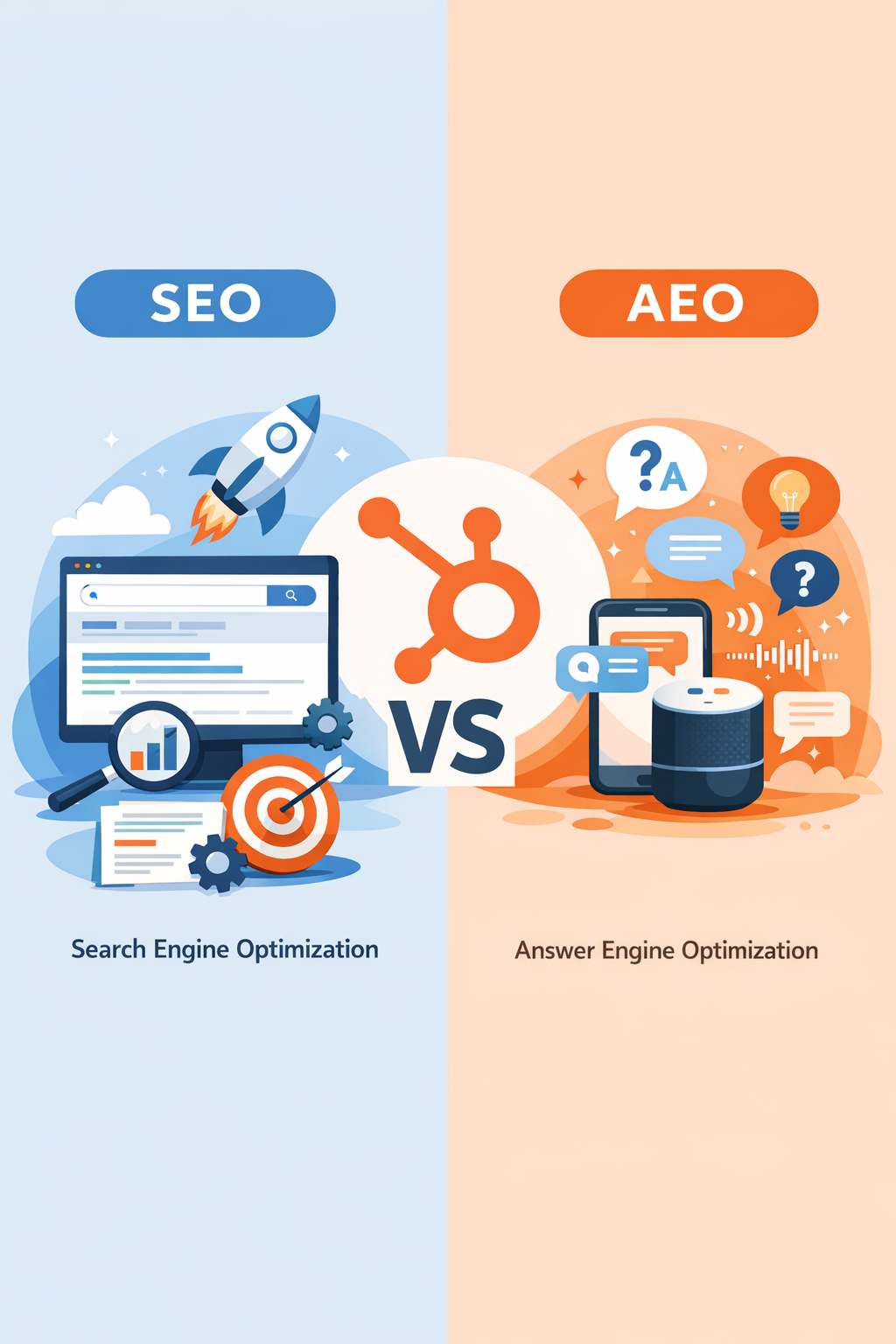
AEO is the practice of structuring your content so AI answer engines can understand, retrieve, and cite your brand as a trusted source. It's the discipline of getting recommended inside the answer—not just ranked on a page of blue links.
Here's the shift in one analogy:
- Traditional search works like a librarian who hands you ten books and lets you read them yourself. You optimized to be one of those ten books.
- AI answer engines work like an expert concierge who reads everything instantly and gives you one recommendation. AEO is making sure the concierge knows you, trusts you, and names you.
You'll see a few acronyms used interchangeably—AEO, GEO (Generative Engine Optimization), and AI SEO. They describe the same goal. HubSpot uses "AEO." The mechanics underneath—structural clarity, topical depth, and authoritative sourcing—stay the same regardless of the label.
What Is the HubSpot AEO Tool, and What Does It Track?
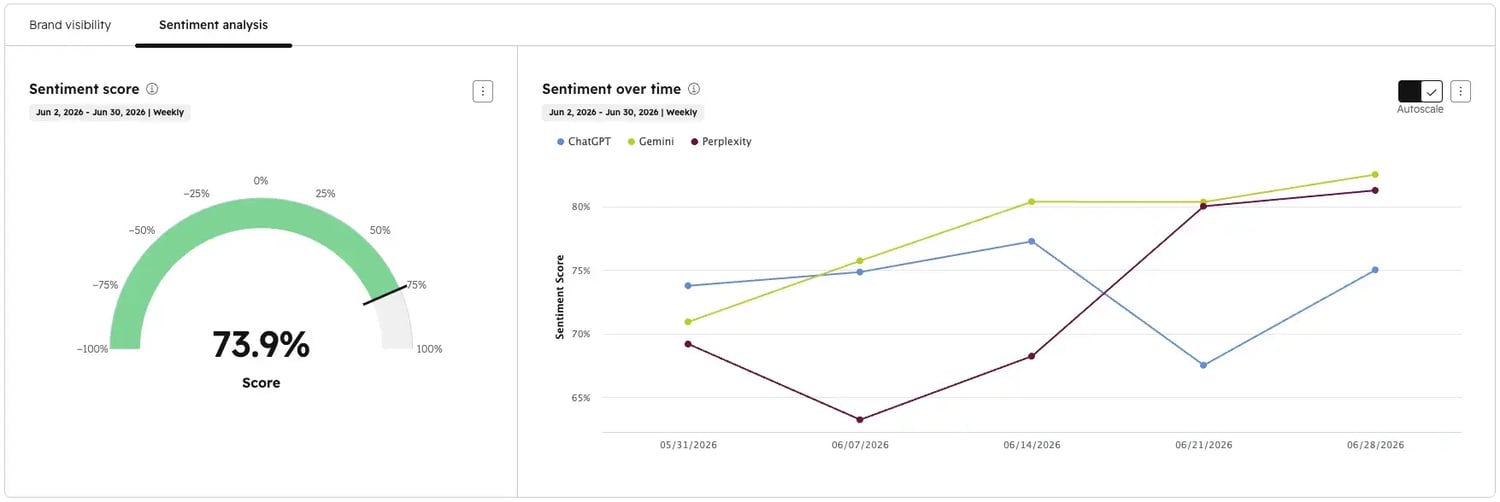
It's a monitoring-and-optimization tool that tracks how often, and in what context, your brand appears in AI-generated answers—then recommends what to fix. You give it the questions your buyers ask; it queries the answer engines on a schedule and reports back.
It has four essential measures:
- Brand mentions — Does the AI say your name when answering a buyer's question?
- Citations — Does the AI link to a specific page on your domain as a source?
- Sentiment — Is the tone positive, neutral, or negative, scored from −100 to +100?
- Share of Voice — How often do you appear versus the competitors you name?
The prompt-tracking dashboard currently covers the three dominant engines: ChatGPT, Google Gemini, and Perplexity. HubSpot's broader web analytics also recognizes referral clicks from other assistants—like Copilot, Claude, and Meta AI—inside its "AI Referrals" traffic source.
Read more: HubSpot AI Integrations: Complete Guide to Claude & ChatGPT.
🏆 Elite Partner Tip: The single most important distinction in this tool is mention vs. citation. A mention builds zero-click awareness but keeps the buyer inside the AI. A citation is a clickable link to your site—the only version that drives traffic you can actually convert. Track both, but engineer your content to earn citations.
Why Does AI Search Visibility Matter for Your Pipeline?
Because the discovery channel is shifting under you, and the numbers are already measurable. This is no longer a brand-awareness "nice to have"—it's a revenue channel with data behind it.
According to HubSpot:
- Organic traffic across its customer base has dropped roughly 27% year over year as buyers move research into AI.
- Beta users who prioritized answer engines saw AI referral traffic grow 20% versus customers who didn't.
- AI-referred leads convert at roughly 3× the rate of traditional search leads.
Two documented case studies show this producing pipeline, not just visibility:
- Fresha, a global booking platform for salons and spas, moved from manually screenshotting ChatGPT results to a 68.3% AI Visibility Score—the highest in its category—ranking first across the engines its team tracks. Its sales team reported AI-referred leads arrived "pre-convinced," closing with fewer touchpoints.
- Docebo, an enterprise learning platform, now generates nearly 15% of its inbound leads from AI traffic after making its content reliably retrievable by answer engines.
The common thread: both had visibility into where they showed up and the tooling to act on it. That's the entire point—replacing guesswork with a measurable, repeatable rhythm.
How Much Does the HubSpot AEO Tool Cost, and How Do You Access It?
There are three ways in, depending on your current stack. If you're already on Marketing Hub Professional or Enterprise, it's included. If not, it's available standalone. And if you're just exploring, there's a free diagnostic.
| How You Access AEO | Prompt Limit | Cost | |
| Marketing Hub Enterprise | Included — Marketing → AEO | Unlimited | Included |
| Marketing Hub Professional | Included — Marketing → AEO | Up to 50 | Included |
| Starter / non-Marketing Hub / no HubSpot | Separate standalone portal | 25–50 | $50/mo ($45/mo billed annually) |
| Just exploring | AEO Grader at hubspot.com/aeo-grader | One-time snapshot | Free |
A few facts worth knowing before you buy:
- The tool launched in beta on April 14, 2026 and remains in active beta. If you're on Pro/Enterprise and don't see it under Marketing → AEO, confirm your enrollment on HubSpot's Product Updates page.
- Prompts—the questions you track—are limited, and slots go fast. If you run multiple product lines, segments, or regions, factor that into your tier choice. The 25–50 limit on base plans is the most common upgrade trigger.
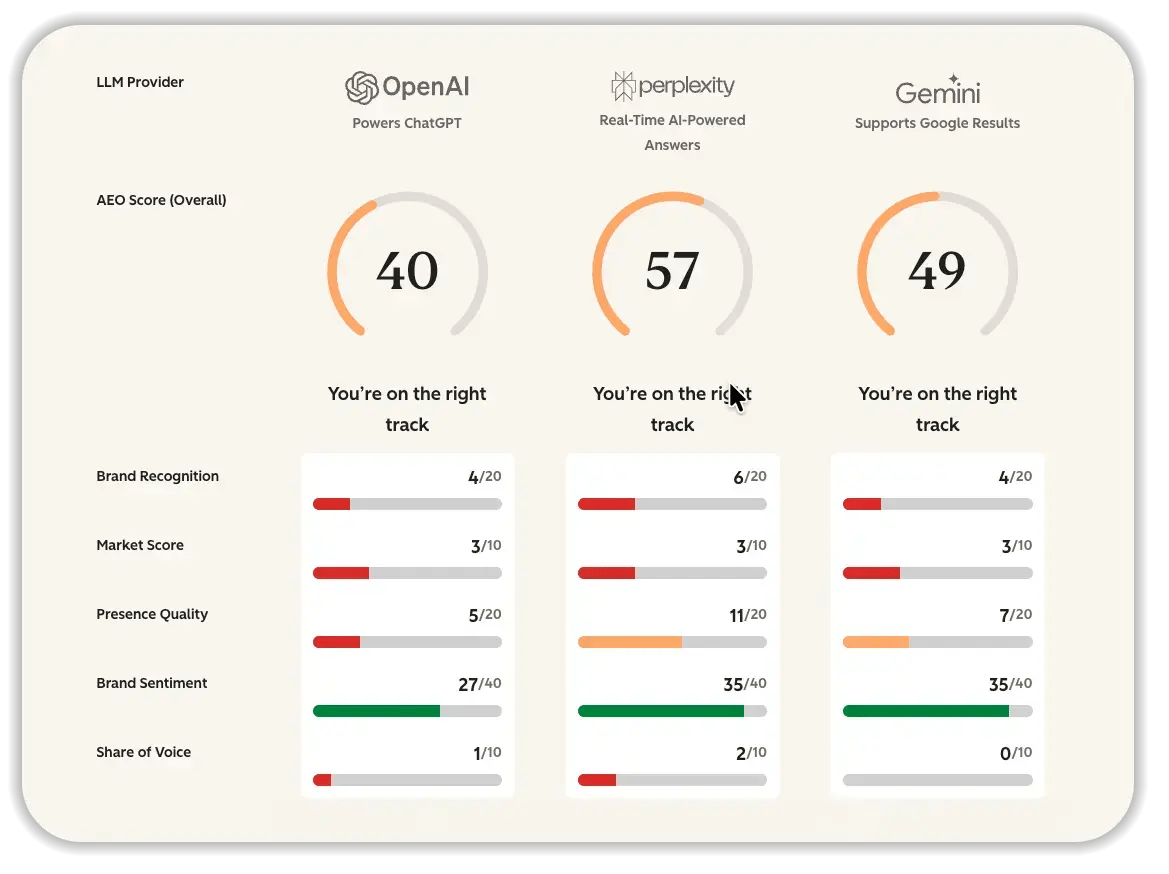
🏆 Elite Partner Tip: Start with the free AEO Grader before you pay for anything. It scores your brand out of 100 across five weighted dimensions—Sentiment (40 pts), Presence Quality (20), Brand Recognition (20), Share of Voice (10), and Market Competition (10)—and gives you a baseline you can point to when you measure improvement 30 days later.
How Do You Set Up the HubSpot AEO Tool?
You configure the tool through a guided wizard—no code required. Follow the steps in order, because each one feeds the next.
Step 1: Open the Tool
Go to Marketing → AEO and click Get Started. On Professional or Enterprise, the features are built-in. On a standalone plan, you'll work inside the dedicated AEO portal.
Step 2: Enter Your Brand Details
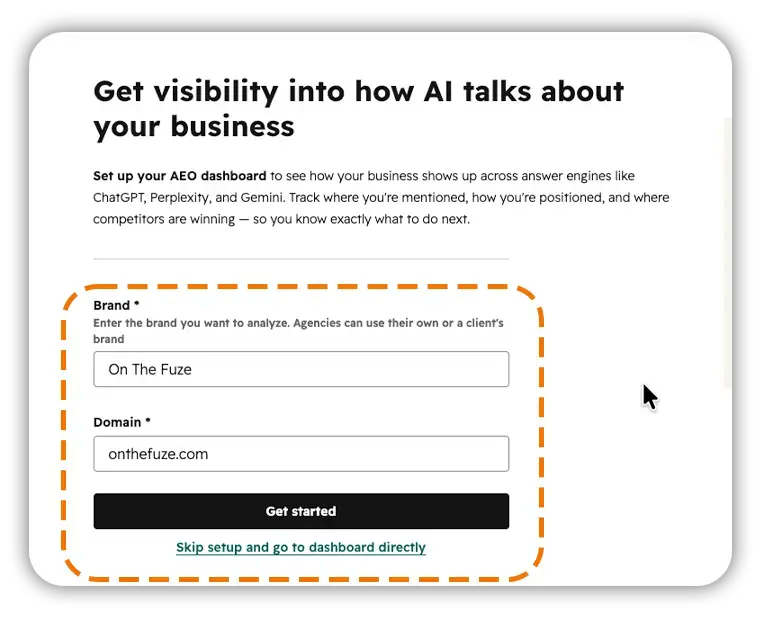
Add your brand name, primary domain, comma-separated brand-name variations, and any additional domains. Variations are case-sensitive—add every version a buyer might type, or the tool undercounts your real mentions. Click Next.
Step 3: Review and Add Competitors
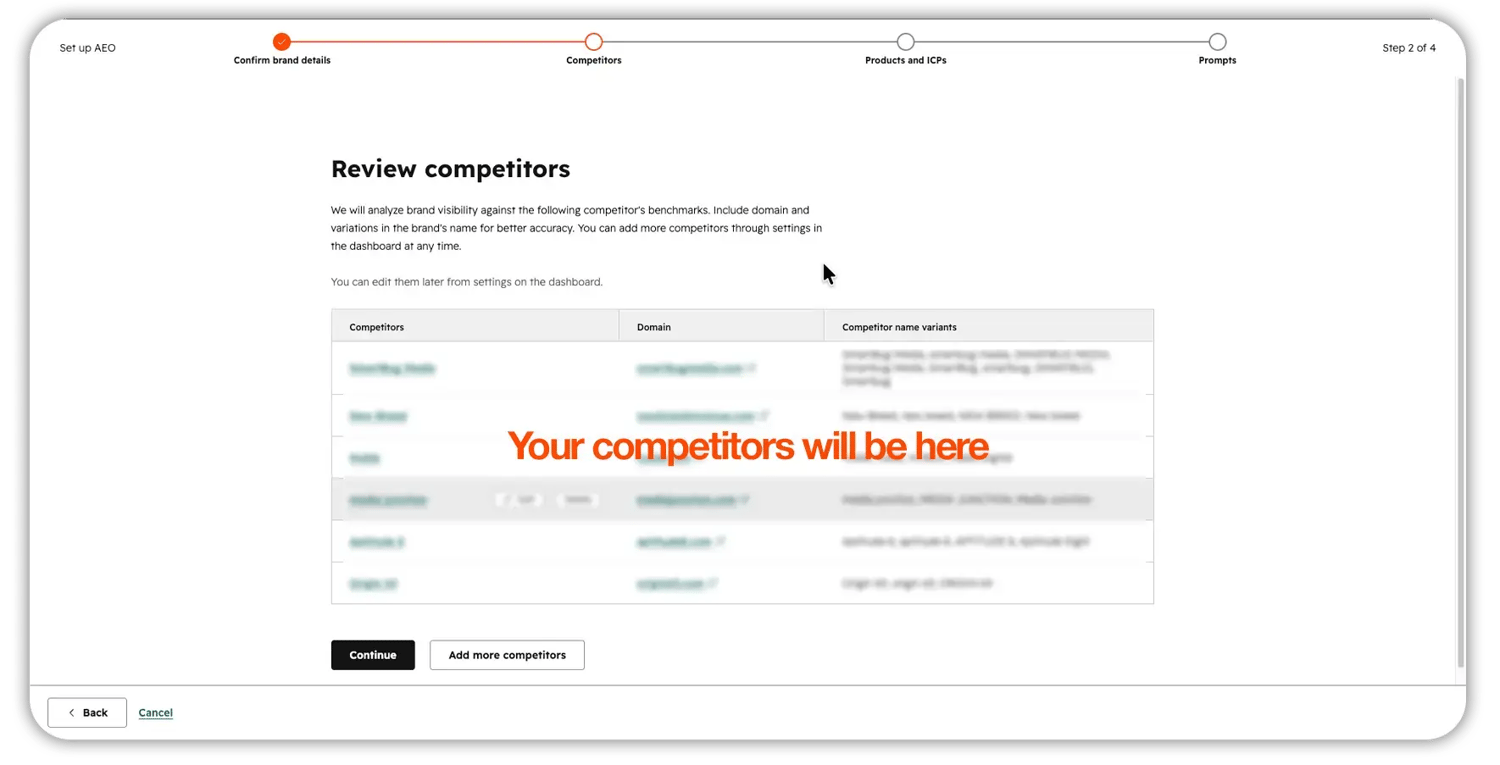 The tool suggests competitors from your brand details. Edit each for accuracy and add your top two or three direct rivals. This step activates Share of Voice—skip it and you have no benchmark. You can update the list anytime in AEO settings. Click "Continue" or "Add more competitors" if the ones in the list are not accurate.
Step 4: Set Up Products/Services and ICPs
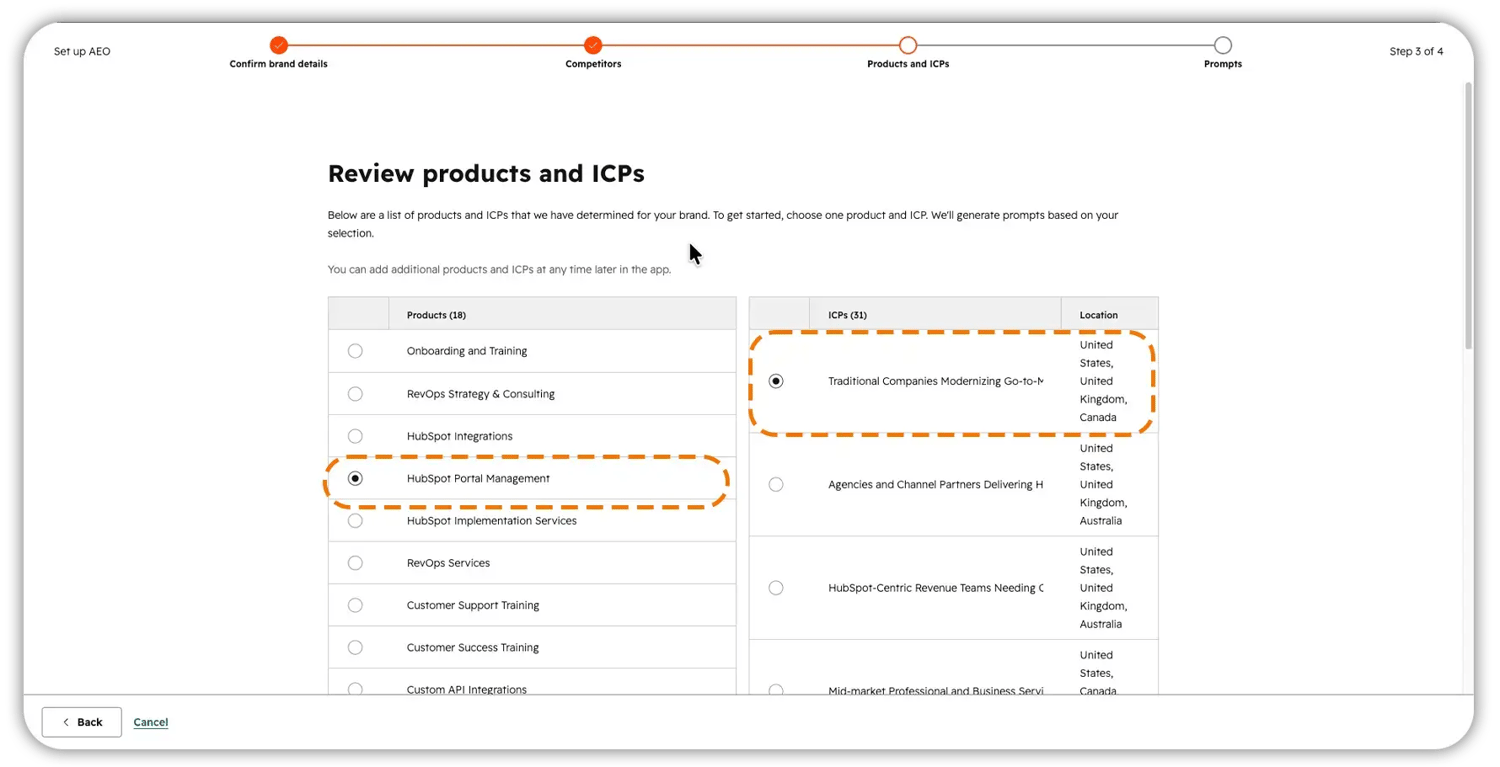
Select what you want to track and define the Ideal Customer Profiles doing the searching—job titles, company sizes, industries, and revenue ranges. The more granular your ICP, the more realistic your suggested prompts. Thin ICPs produce generic, useless suggestions. Click Continue.
Step 5: Select a Location
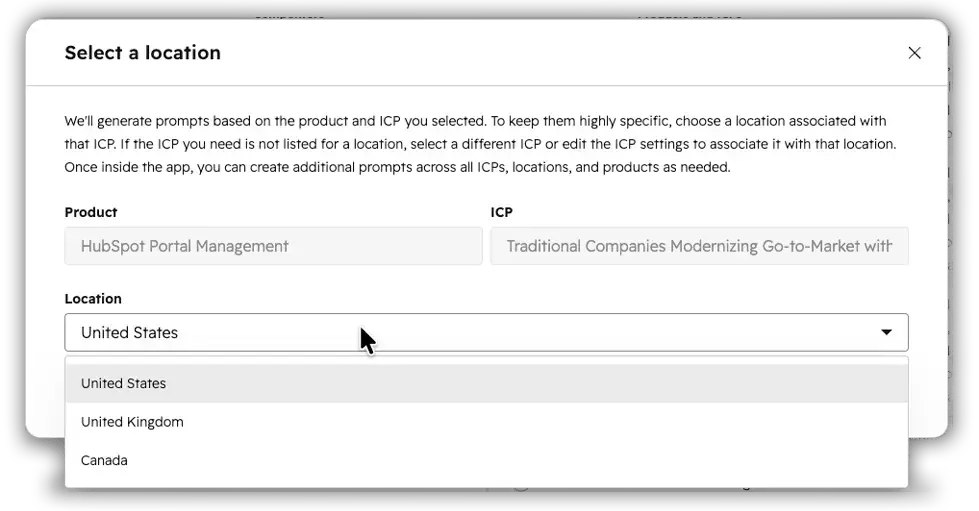
AI answers vary by region, so match this to where your buyers actually are. If you serve multiple regions, plan separate prompts—and budget—for each.
Step 6: Review and Refine Your Prompts
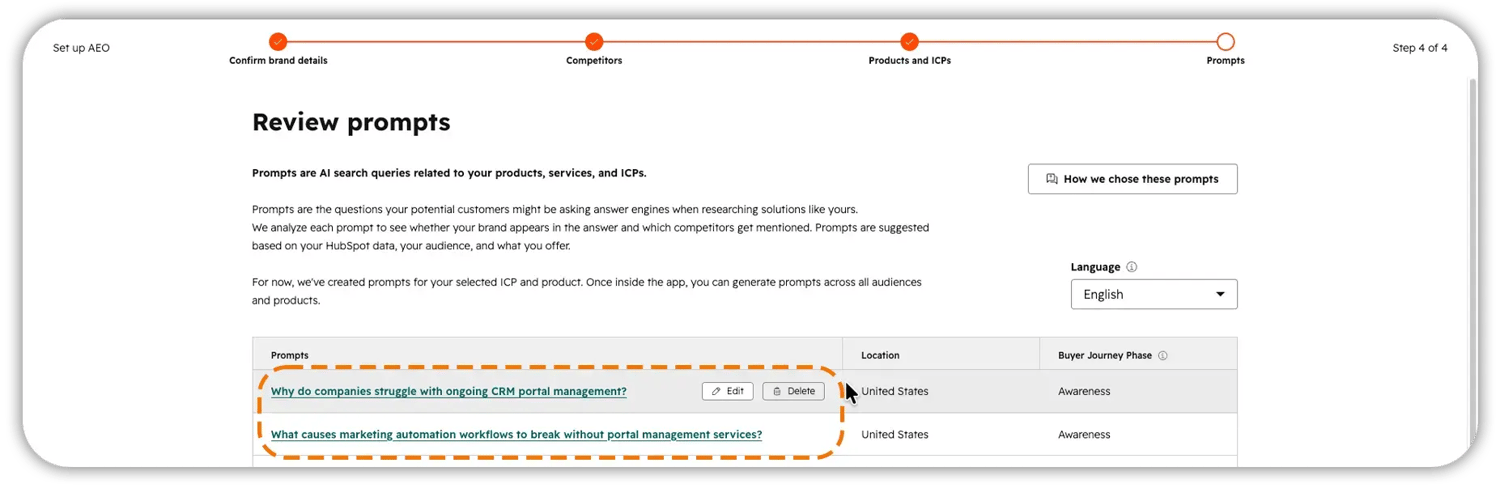
HubSpot auto-generates prompt suggestions from everything above. Don't accept them blindly. Delete anything too broad and rewrite it as a specific, conversational question a real buyer would type. Click Continue to confirm.
Step 7: Wait ~24 Hours
The tool runs your tracked prompts daily; your first data populates within a day. A fresh setup often shows a Brand Visibility score under 1%—that's normal. The goal is steady improvement, not 100%.
Step 8: Validate Manually
Type two or three of your tracked prompts into ChatGPT and Perplexity in an incognito window, then compare to the dashboard. This builds intuition and catches discrepancies early.
🏆 Elite Partner Tip: ICP setup is the highest-leverage screen in the whole flow. In HubSpot, your ICPs pull from real CRM segments—so the quality of your contact data directly determines the quality of your AI insights. If your CRM is messy, the tool inherits that mess. Clean segments in, useful prompts out.
![OTF banner ad for the free HubSpot AEO Tool [BETA] Quick Start Checklist, headlined 'Turn every AI mention into real pipeline,' with a 'Download Now' button and a mockup of the checklist guide on a magenta-to-orange gradient background.](https://no-cache.hubspot.com/cta/default/5165527/interactive-215837801474.png)
How Should You Structure Your Prompt Tracking?
Because slots are limited, map them to the buyer's journey and weight them toward the bottom of the funnel. A prompt is only useful if a real buyer would actually type that exact sentence—broadhead terms waste slots and return data you can't act on.
Use three buckets:
| The Buyer Is… | Example | Priority | |
| Awareness | Realizing they have a problem | "Why do growing startups lose customers in the first 90 days?" | Lower |
| Consideration | Comparing options | "Independent CRM vs. all-in-one platform—which is better for a 30-person team?" | High |
| Decision | Choosing a vendor | "Which CRM should a fintech startup use after a Series A?" | Highest |
Two quick calibration examples:
- ❌ Too generic: "project management software"
- ✅ Specific and conversational: "What's the best tool for a 20-person product team to manage sprints without slowing down engineering?"
Weight your budget toward consideration and decision prompts—that's where buying intent and pipeline actually live.
How Do You Read the AEO Dashboard?
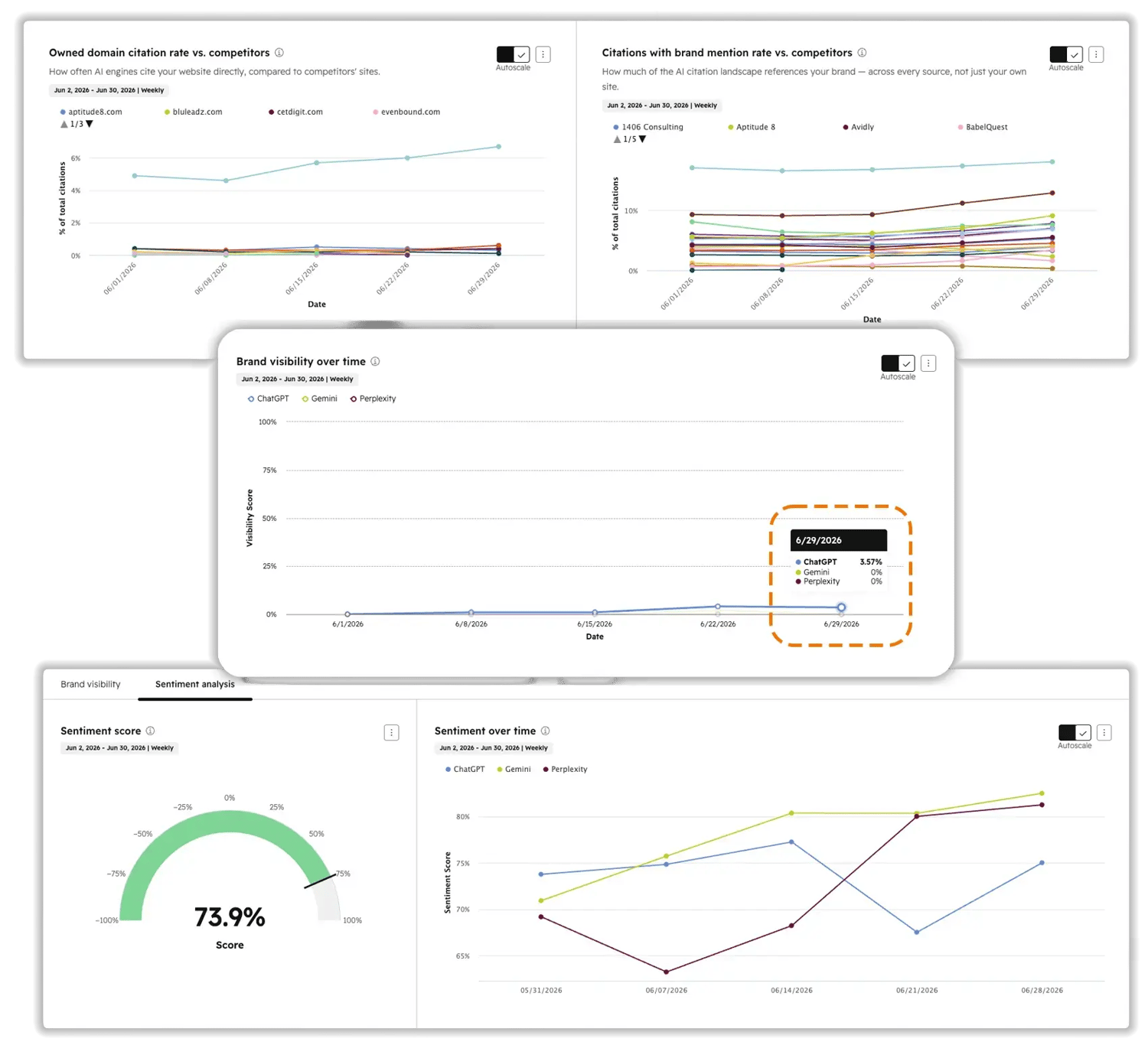
The Dashboard is your command center. Start with the filters, then read three numbers. Filters let you slice by Date, Engine, Group, Products/Services, ICP, Location, and Buyer Journey Phase.
- Brand Visibility — the core metric: the percentage of AI responses that mention your brand. Watch the trend line by engine—you may be strong in Perplexity and invisible in Gemini.
- Sentiment — how the AI describes you (−100 to +100), not just whether. Rising visibility with flat or negative sentiment is not a win.
- Competitor Landscape / Share of Voice — where you rank against the rivals you named.
If you see an alert like "you're only tracking a handful of your ICPs and a fraction of your products," that's the tool naming your blind spots. Work on that first.
What Is the Difference Between a Mention and a Citation?
A mention is when the AI says your name. A citation is when the AI links to your page as a source. Both matter, but only citations drive clickable traffic—so read the Citations tab before you build anything.
The Citations tab surfaces three reports:
- Top domains — the sites answer engines cite most across your prompts.
- Citations by channel — where AI is sourcing its answers, at a glance.
- Brand-mention rate vs. competitors — what percentage of cited sources actually mention you.
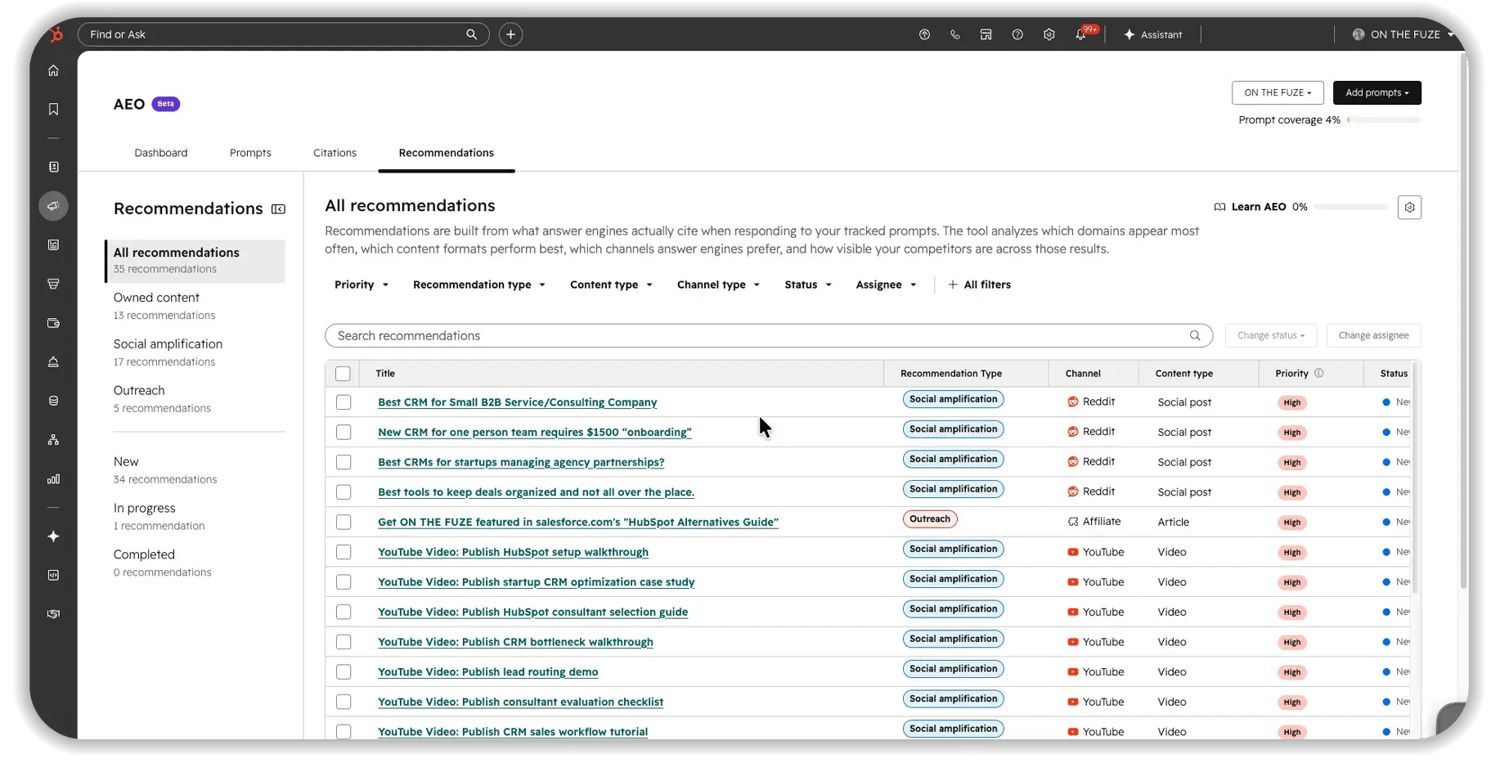
The Recommendations tab then turns that data into a prioritized list, organized into three buckets:
1. Owned Content
Net-new pages AI needs as a source, plus updates to pages that aren't being cited effectively.
2. Social Amplification
Relevant conversations already happening on Reddit, LinkedIn, or YouTube where your brand should be present.
3. Outreach
Third-party articles, guides, and directories AI already cites where you're absent—and should be featured.
Open any recommendation to see the suggested content (title, summary, audience, keywords) and what's driving it (the queries and citations behind it). Set status to In Progress, then Completed. HubSpot keeps completed items tied to the prompts they affected, so you can compare visibility before and after. Give each change multiple weeks—answer engines shift slowly.
🏆 Elite Partner Tip: If review platforms, forums, or competitor pages dominate your Citations tab, on-site edits won't move the needle. AI trusts third-party consensus over self-reported claims—so the fix is off-site reputation: reviews, publisher coverage, and presence where AI already looks.
What Mistakes Should You Avoid with the HubSpot AEO Tool?
The most expensive AEO mistakes aren't technical—they're strategic. Three predictable errors waste most setups.
Tracking Generic Prompts
Broad terms like "marketing automation" drain your slot budget and return unusable data. Treat every slot like it costs money: specific prompts equal actionable data.
Optimizing Your Site While Ignoring External Sources
Teams rewrite pages for weeks, then check Citations and nothing changed—because AI was never citing their site. If external sources dominate your prompts, the priority is off-site reputation, not on-site edits.
Tracking Visibility Without Watching Attribution
A rising visibility score with no pipeline lift usually means one of two things: a citation gap (mentions without a clickable link) or misattributed traffic (covered next). Visibility is the input; pipeline is the goal.
How Do You Prove AEO Is Driving Revenue?
Watch the "AI Referrals" traffic source in HubSpot—and protect it from a common configuration flaw. That bucket is the number that confirms your work is converting into contacts and deals.
Here's the trap most teams miss: when a buyer arrives from an AI link but then clicks an internal link that carries its own UTM parameters, those internal parameters overwrite the original AI source. HubSpot then files that high-value visit as "Direct," and your AEO reporting looks broken even when it's working.
Run this quick attribution audit:
- [ ] Confirm the "AI Referrals" bucket is appearing in your traffic sources.
- [ ] Audit internal links for hardcoded UTM parameters that overwrite the original source.
- [ ] Spot-check new AI-referred contacts to confirm Original Source isn't defaulting to "Direct."
- [ ] Build a saved report tying AI-referred contacts to deals and revenue.
This is exactly where AI visibility becomes a CRM problem—and where most of the value quietly leaks out. A visibility score that isn't wired correctly into your reporting is a number no executive can act on.
How Do AI Answer Engines Decide What to Cite?
Modern engines don't rely only on training data—they read the live web in real time, then anchor their answer to what they find. Understanding this makes your optimization far more precise.
- Retrieval-Augmented Generation (RAG): The engine silently runs a background web search, reads the top results, and generates its answer from them. If your page is blocked from crawlers, it can't be retrieved—or cited. AEO and technical SEO are inseparable here.
- Grounding: The engine anchors its response to those retrieved sources to avoid making things up. Fresh, authoritative, well-structured pages are easier to ground against.
- Query fan-out: A single question like "best CRM for a startup" gets broken into several parallel sub-queries (pricing, comparisons, community opinions). Covering each sub-topic with distinct, structured content raises your odds of being retrieved.
The practical move: use the Citations tab to reverse-engineer format. If Gemini consistently cites listicles for a query, a long narrative essay won't win that slot. Match the structure the engine already rewards—clear headings, direct answers up top, FAQ formatting, and bulleted summaries.
HubSpot AEO vs. Standalone Tools: Which Do You Need?
Choose HubSpot AEO when your priority is tying AI visibility to CRM data and pipeline; choose a specialist when you need agency workflows or the widest engine coverage. HubSpot's edge is that insight and execution live in one platform, connected to your customer data.
| HubSpot AEO | Standalone Specialists (Profound, Rankability, etc.) | |
| Best for | In-house teams already in HubSpot | Agencies and deep-SEO / enterprise use |
| Core strength | Connects visibility → CRM → execution in one place | Broader engine coverage, deep technical SEO data |
| Main gap | 3 engines tracked; 25–50 prompt limit on base plans; no deep technical SEO audit | Not natively tied to a CRM, so closed-loop ROI is harder |
For most small and mid-sized teams that live in HubSpot, the CRM connection is the deciding factor: it's what turns "we're more visible in AI" into "we can see the deals it produced."
Frequently Asked Questions
Is the HubSpot AEO tool a monitoring tool or an optimization tool?
Both. It passively tracks visibility, sentiment, and citations, then surfaces prioritized recommendations you can execute directly inside HubSpot.
Which AI answer engines does the HubSpot AEO tool track?
The prompt-tracking dashboard covers ChatGPT, Google Gemini, and Perplexity. HubSpot's separate web analytics attribution also recognizes referral clicks from assistants like Copilot, Claude, and Meta AI.
Is AEO included in my HubSpot plan?
It's included at no extra cost on Marketing Hub Professional and Enterprise. On Starter, non-Marketing Hub plans, or without HubSpot, it's a standalone tool at $50/month ($45/month billed annually).
How is AEO different from HubSpot's existing SEO tools?
SEO tools track where a page ranks on a list of links. AEO tracks whether your brand is named, cited, and described favorably inside a synthesized AI answer.
Does a higher visibility score guarantee more website traffic?
No. Visibility can drive zero-click brand awareness without a single visit. To earn traffic, optimize specifically for citations—clickable links to your pages.
How long until I see results from the HubSpot AEO tool?
Expect at least 24 hours for initial data and several weeks for optimization changes to register since answer engines update gradually.
Do I need a large content library to start?
No. Start with the free AEO Grader for a baseline, then track niche, low-competition questions to establish an early foothold before scaling.
How does the tool handle competitor tracking?
During setup you input competitor domains. The tool then calculates Share of Voice—how often you appear versus each competitor for the same prompts—and reveals the third-party sources driving their citations.
Key Takeaways
- AEO is now a revenue channel. HubSpot reports organic traffic down ~27% for its customers, AI referral traffic up 20% for beta users prioritizing answer engines, and AI-referred leads converting at ~3×.
- The tool measures four things: brand mentions, citations, sentiment (−100 to +100), and Share of Voice across ChatGPT, Gemini, and Perplexity.
- You can access it three ways: included on Marketing Hub Pro/Enterprise, standalone at $50/mo ($45 annually), or the free AEO Grader for a baseline.
- Setup order matters: brand details → competitors → products/ICPs → location → prompts → wait 24h → validate manually.
- Mentions build awareness; citations drive traffic. Engineer content for citations, and read the Citations tab before you build anything.
- Protect your attribution. Watch the "AI Referrals" bucket and audit internal UTM parameters so AI traffic isn't misfiled as "Direct."
- Proof exists: Fresha reached a 68.3% AI Visibility Score (#1 in category); Docebo now gets ~15% of inbound leads from AI.
- A regular HubSpot audit is the most reliable way to keep your AEO data—and the CRM underneath it—aligned with how your business actually operates.