Deploy HubSpot's Prospecting Agent
Get everything you need to activate HubSpot's Prospecting Agent without burning leads or damaging your domain.
Download Now

The HubSpot Prospecting Agent is an autonomous AI sales rep that researches target accounts, identifies decision-makers, and writes hyper-personalized outbound emails inside HubSpot's Smart CRM—24 hours a day. It is one of five Breeze agents released as part of HubSpot's 2026 platform, and it is the first major CRM prospecting tool to charge on a $1-per-qualified-lead outcome basis instead of seats or tokens.
The Prospecting Agent solves three problems at once: it removes the "who do I call today?" question from your reps' mornings, it eliminates the seat-by-seat cost scaling of legacy sales engagement tools, and it grounds every outbound email in real CRM context—so your messages stop sounding like generic AI spam.
What is HubSpot's Prospecting Agent?
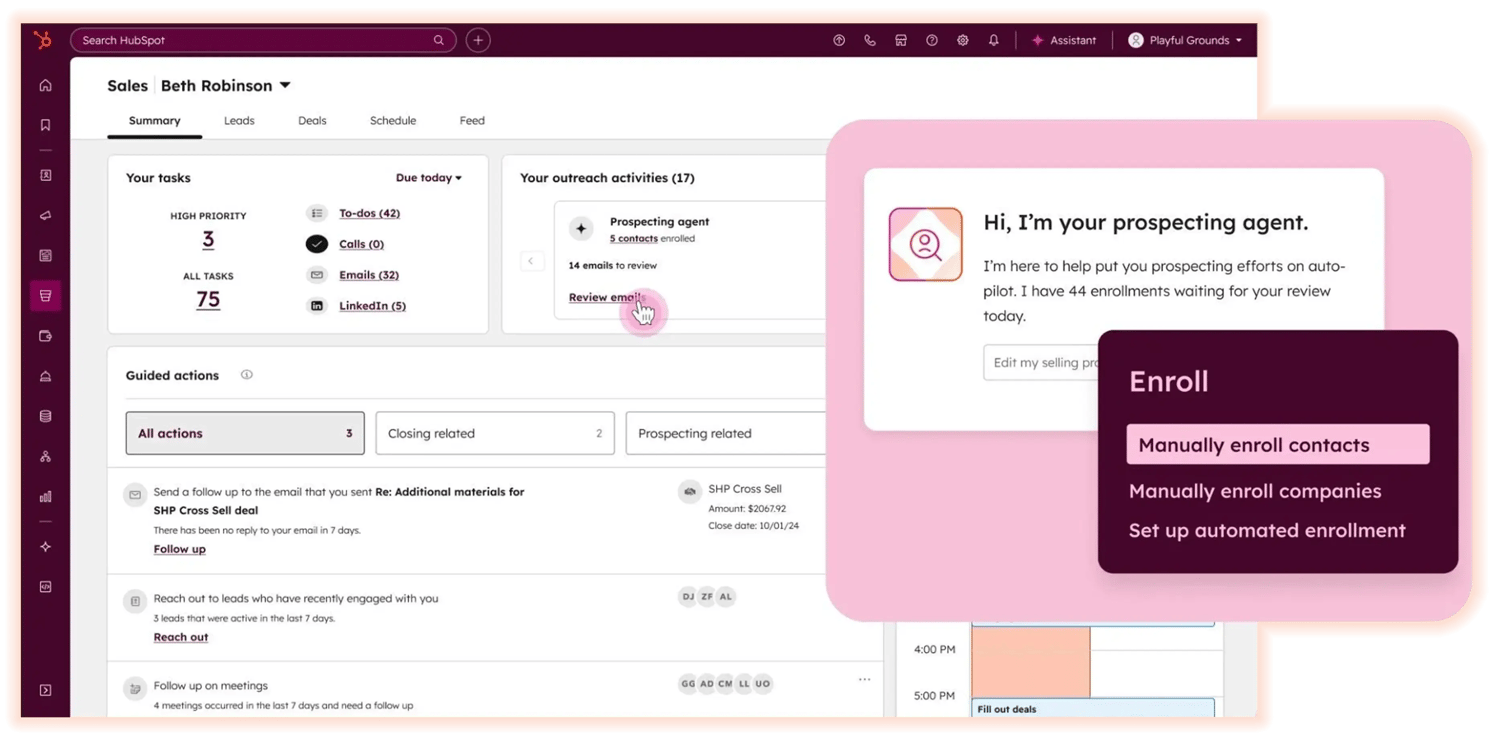 The HubSpot Prospecting Agent is an autonomous AI agent built into HubSpot Sales Hub that monitors buying signals, identifies decision-makers, researches target accounts, and writes personalized outbound emails on behalf of a connected sales rep. It runs continuously in the background and surfaces only the work that requires human judgment.
Unlike a generic LLM wrapper, the Prospecting Agent is grounded in your Smart CRM. Every email thread, call transcript, meeting note, and lifecycle stage change feeds the agent's context. That grounding is what makes outcome-based pricing possible—and what separates this agent from the dozens of standalone "AI SDR" tools on the market.
The four-step agent loop
- Monitor: Scans global data networks for buying signals—leadership changes, funding rounds, M&A activity, and tech-stack shifts.
- Map: Identifies decision-makers inside the target account, matching existing contacts to your personas and sourcing missing ones from connected enrichment providers.
- Research: Reviews the company's website, validates geographic footprint, scans recent press, and pulls context from your five most recent call transcripts with that account.
- Author: Drafts a hyper-personalized email in any of 200+ languages and sends it from the rep's connected inbox — not from HubSpot's servers — to protect deliverability.
Elite Partner TipThe agent runs the loop continuously, but the quality of every step depends on the Selling Profile you configure. A weak profile produces weak personalization, no matter how powerful the underlying model is. Treat the profile like a hire, not a setting.
Does HubSpot have a prospecting tool?
Yes. HubSpot ships a native AI Prospecting Agent inside Sales Hub Professional and Enterprise — no third-party tool required. It replaces what used to require a stack of standalone tools (an AI SDR, an enrichment provider, a sequencer, and a deliverability layer).
The Prospecting Agent is part of the Breeze ecosystem, which includes five autonomous agents:
| Breeze Agent | Primary Job | Where It Lives |
|---|---|---|
| Prospecting Agent | Outbound research + email authoring | Sales Hub |
| Customer Agent | 24/7 inbound chat resolution | Service Hub |
| Content Agent | Blog, landing-page, and social drafting | Content Hub |
| Knowledge Base Agent | Articles, internal docs, snippets | Service Hub |
| Data Agent | CRM hygiene, dedupe, enrichment | Operations Hub |
What is a "prospect" in HubSpot?
In HubSpot, a prospect is a contact or company that fits your Ideal Customer Profile but has not yet been qualified as a lead or assigned to an opportunity. Prospects sit between anonymous traffic and named leads in the lifecycle.
Inside the Prospecting Agent, a contact only counts as a qualified prospect — and therefore a billable outcome — when three conditions are met:
- The associated company matches the ICP defined in your Selling Profile.
- The contact's data (name, title, email) is verifiable.
- The agent has identified at least one current intent or buying signal tied to the account.
If any of those conditions fail, the agent does the work but you are not charged. That is the heart of the new outcome-based model.
What is the best CRM for prospecting in 2026?
For lean teams in North America, HubSpot is currently the most cost-effective CRM for AI-driven prospecting because it is the only major platform charging per qualified lead instead of per seat or per token. Salesforce, Outreach, Apollo, and Salesloft all still run consumption or seat-based pricing on their AI features.
Here is how the math compares as of April 2026:
| Platform | AI Prospecting Pricing | Pricing Risk |
|---|---|---|
| HubSpot Prospecting Agent | $1 per qualified, verified lead | Pay only on outcome |
| Intercom Fin | $0.99 per resolved conversation | Outcome-based, but inbound only |
| Zendesk AI | $1.50–$2 per resolution + $50/mo baseline | Floor cost regardless of volume |
| Salesforce Einstein SDR | Seat license + consumption credits | Cost scales with team size, not results |
Why this mattersIf the agent does not find a match for your ICP, you pay nothing. That is impossible to do unless the agent is grounded in real CRM data — which is exactly what HubSpot built into the Smart CRM. It is also why you should not accept a flat-fee "AI SDR" replacement at face value: the only way to validate ROI is to tie the cost to a verified outcome.
What do you need before turning the Prospecting Agent on?
Five viability gates have to be cleared before the agent can run a single cycle. Skip any of them and you will either get errors or — worse — generic, off-brand emails sent at scale.
- Sales Hub Professional or Enterprise. Starter tiers do not include the Prospecting Agent, regardless of what the price calculator shows you.
- Super Admin rights or the explicit Enable agent access permission. Without it, the agent is invisible inside your portal.
- Connected and verified inboxes. Each rep must connect their inbox and toggle the setting that allows the agent to send on their behalf.
- AI data permissions. A Super Admin must enable generative access plus CRM data, customer-conversation data, and file data under Settings → AI.
- CRM hygiene. Contacts need full names, companies need domains, and dead records should be archived. The agent is only as smart as the data it is grounded in.
How do you configure the HubSpot Prospecting Agent?
Configuration is done through a Selling Profile inside Breeze. The Selling Profile is the agent's playbook — it tells the AI who you sell to, what you sell, how to position it, and what tone to use. Most failed deployments fail here.
Navigate to Breeze → Prospecting Agent → Agent Setup → Create Selling Profile and walk through the six phases below.
Phase 1: Define the Selling Profile
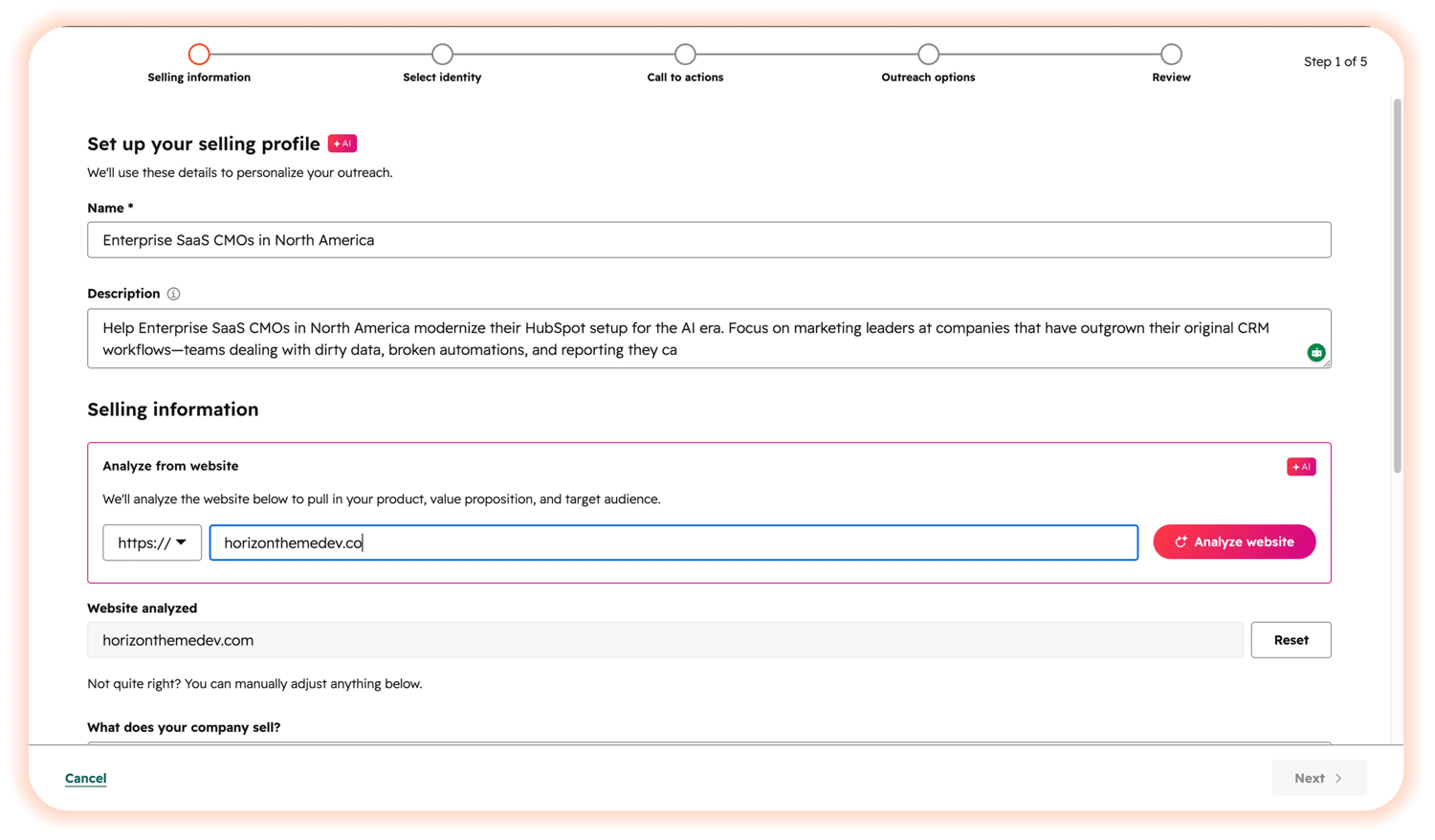
- Name the profile by formula: product line + persona + region (e.g., "Enterprise SaaS CMOs in North America").
- Generate the value prop from your website, then rewrite every line manually — the scrape will hallucinate features you do not have.
- List the top three pain points for that specific persona — not your features.
- Specify ICPs, target industries, and the services tied to this profile.
Elite Partner TipBuild profiles in pairs: one for the SDR-target persona, one for the decision-maker. Same account, two tracks, two tones. That is how you cover buying committees without spray-and-pray.
Phase 2: Sender identity and CTA
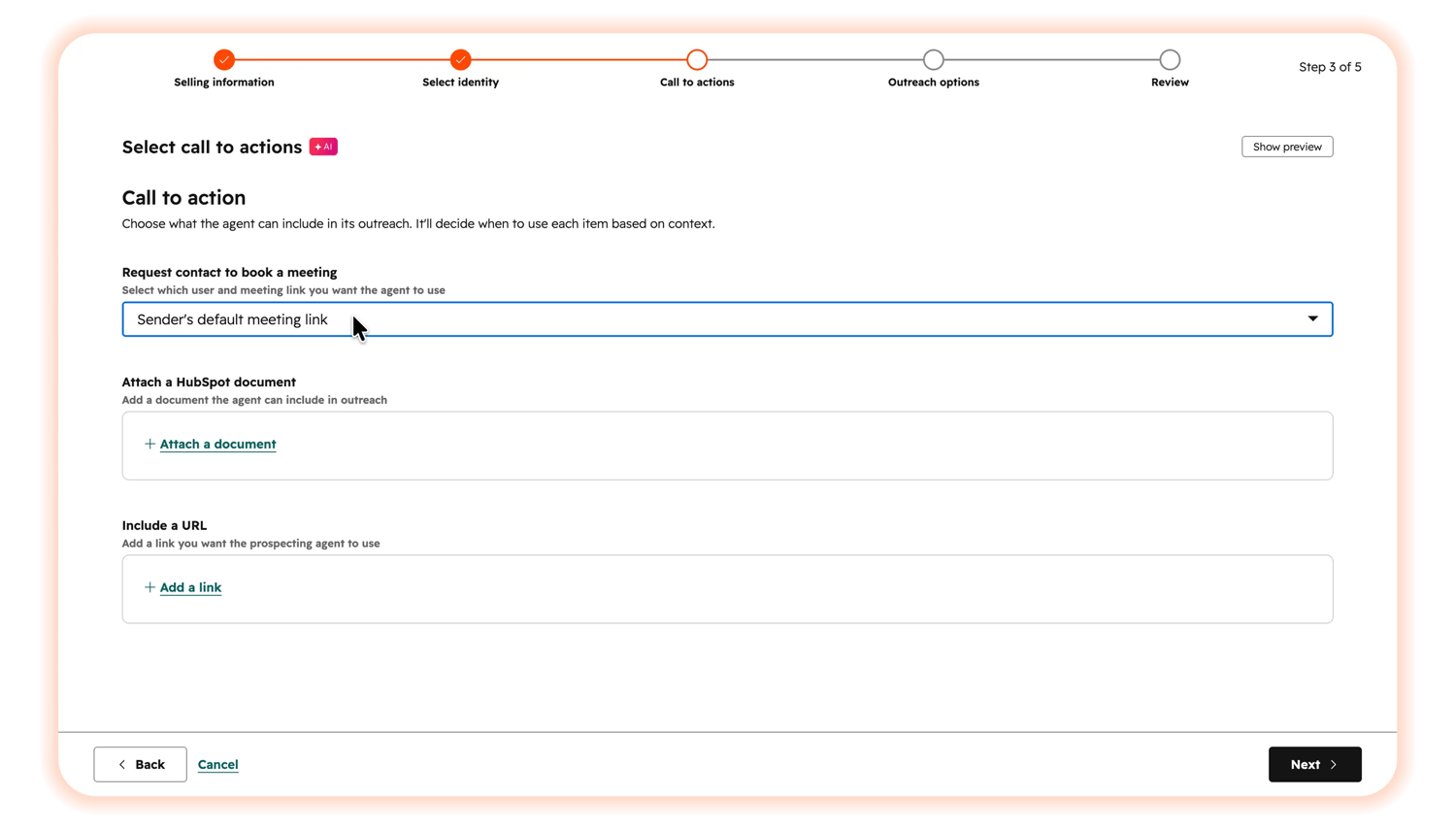 You have three sender modes:
- Send from Contact Owner — best when leads are already routed to reps.
- Send from Company Owner — useful for ABM motions on assigned accounts.
- Send from a single user — typically your SDR team lead, ideal for lean teams.
Then pick one CTA: a meeting link, a HubSpot Document, or an external page. One ask per email.
Phase 3: Autonomous vs. semi-autonomous mode
For your first 30 days, run in semi-autonomous mode. Every draft sits in a queue for human approval. Your team audits the output, fine-tunes the Selling Profile, and catches mistakes before they hit a prospect's inbox.
Only flip to fully autonomous after the agent consistently writes on-brand, factually accurate drafts. HubSpot automatically appends a compliant AI disclaimer to every email either way.
Phase 4: Tone and brand voice
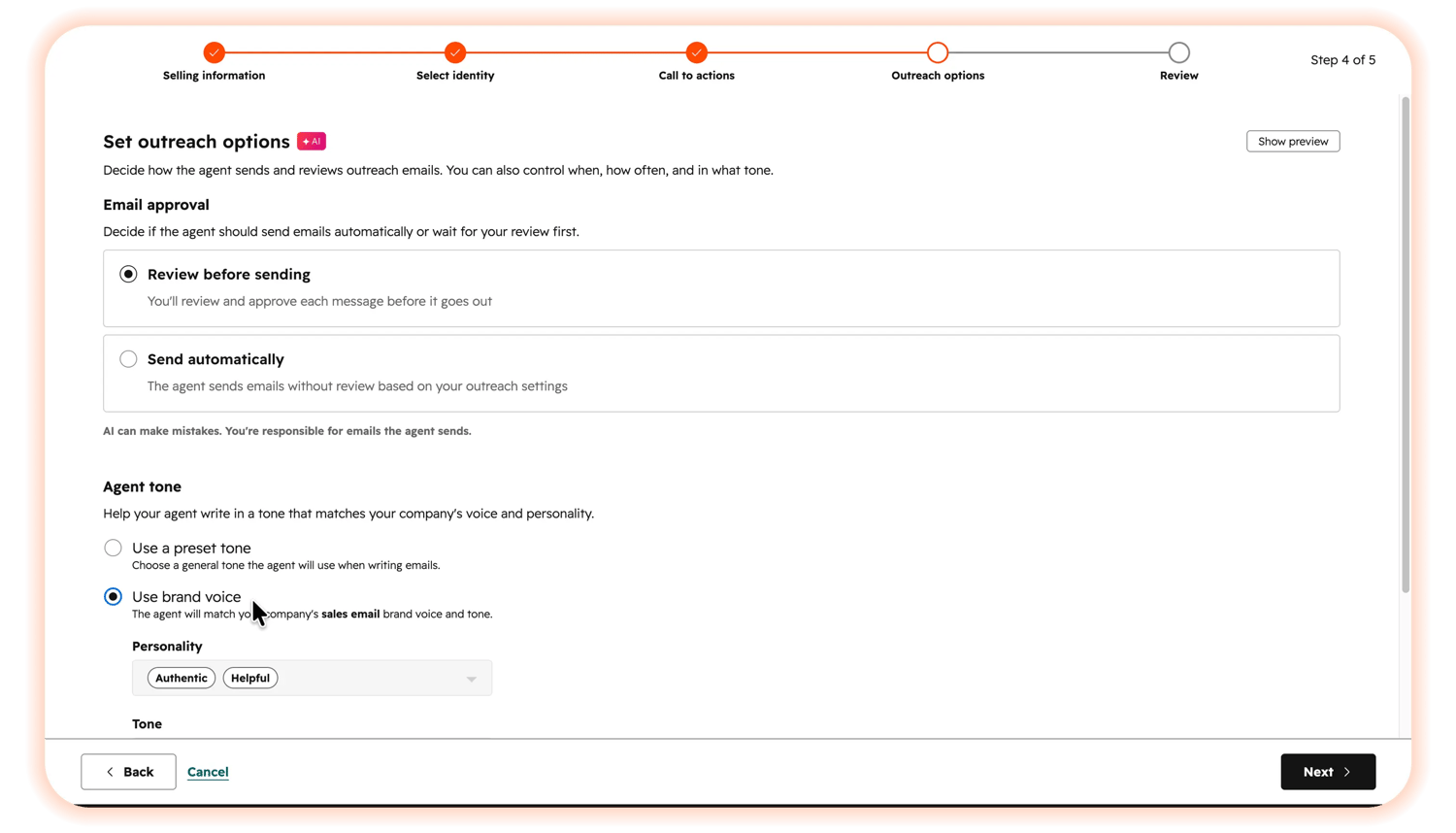
- Use a preset tone — Professional or Helpful covers ~80% of B2B scenarios.
- If you have Content Hub Professional or Enterprise, unlock Brand Voice calibration. Upload historical marketing copy, top-performing emails, and your style guide so Breeze can train on it.
- Configure a Terms to Avoid list: "synergy", "circle back", "revolutionary", and any other words that would embarrass you in a client meeting.
Phase 5: Timing and operational guardrails
- Send window: 8:00 AM – 6:00 PM in the prospect's timezone, business days only.
- Cadence: minimum 48 hours between follow-ups; cap the sequence at five.
- HubSpot's hardcoded safety net auto-stops the agent after three emails in a rolling 90-day window if a prospect shows zero engagement.
Phase 6: Review and confirm
Final QA pass — confirm the persona, ICP, sender, CTA, mode, tone, and cadence. Save the profile. The agent begins its loop on the next scheduled run.
Advanced configuration: Knowledge Vaults, Breeze Studio, and the API
For organizations with complex data ecosystems, the surface-level Selling Profile is the floor — not the ceiling. Three deeper levers separate enterprise-grade deployments from average ones.
Dynamic Knowledge Vaults
Knowledge Vaults are a 2026 addition that solves the persistent LLM problem of generic, unverified outputs. By default, the agent only sees website data and CRM history. With a vault, you can ground it in proprietary documentation:
- Historical RFP responses, technical security docs, client case studies, competitive battlecards.
- Supported file formats: .pdf .md .html .txt (UTF-8) .docx — up to 50 MB per file.
- Image references (.jpeg, .png, .webp) supported up to 10 MB per file.
- Vaults can be linked to active CRM segments — for example, "Tickets created in the last 30 days" — so the agent never opens an expansion email while a known support fire is burning.
Build vaults under Breeze → Knowledge, then attach them inside the Breeze Studio configuration panel. The agent uses retrieval-augmented generation to pull verifiable specs into each draft.
Custom agent behaviors via Breeze Studio
Breeze Studio is the technical command center for agent logic. Use it to:
- Define Custom Inputs — mandatory data fields the agent must have before running.
- Inject Extra Instructions — multi-layered prompt engineering, including methodology overlays like MEDDPICC or Challenger.
- Provision tools (web browsing, CRM read/write) and require human approval for any CRM write action with the "Review before running this tool" protocol — preserving database integrity.
API extensibility and Copilot integration
HubSpot's 2026-03 API supports webhooks and bidirectional sync with external intent providers. A typical enterprise pattern:
- Contact score crosses a threshold inside HubSpot.
- Webhook fires to an external intent-data provider.
- If positive firmographic signals come back, the contact is assigned to a territory owner and enrolled in a localized Selling Profile.
Inside the email editor, Copilot lets reps highlight passages and instantly shorten, retone, simplify, or translate them into 200+ languages — bridging automation and human judgment.
What mistakes should you avoid?
Three deployment mistakes account for most failed Prospecting Agent rollouts. None of them are technical — all of them are operational.
| Mistake | What goes wrong | The fix |
|---|---|---|
| 1. No exclusion lists | The agent enrolls existing customers, open opportunities, competitors, and hard bounces — destroying domain reputation. | Build three dynamic, auto-updating exclusion lists (customers, open deals, hard bounces) before the agent enrolls anyone. |
| 2. Running legacy sequences in parallel | Prospects receive duplicate or contradictory emails from your portal. Looks like chaos on their end. | Audit every active sequence. Retire anything that overlaps the agent's targeting. One system owns the prospect. |
| 3. Going fully autonomous on day one | Reps flip the switch, 400 emails go out, nobody reads a draft, and the agent pitches the wrong product to the wrong persona. | Run semi-autonomous for 30 days. Every draft gets human approval until the output is reliably on-brand and accurate. |
How much does the HubSpot Prospecting Agent cost?
$1 per qualified, verified, hyper-personalized lead delivered. No seat fee. No per-token charges. No baseline AI fee. If the agent cannot find a match for your ICP, you pay nothing.
HubSpot also offers a 28-day free trial with full access to the agent's tools — zero credits, zero outcome fees during the trial window.
Should you turn the Prospecting Agent on?
Use this decision frame:
Turn it on if…
- You are on Sales Hub Professional or Enterprise.
- Your CRM data is clean (or you have a partner cleaning it now).
- Your reps have connected, verified inboxes.
- You can run one segmented Selling Profile in semi-autonomous mode and measure reply + meeting rates against a baseline.
Fix first if…
- You have no exclusion lists or active sequences overlap your target ICP.
- Lifecycle stages, deal stages, or contact ownership are inconsistent.
- You do not have a Super Admin who can toggle AI data permissions.
- Your brand voice is undocumented and you do not have Content Hub Professional+ to calibrate it.
Free download: Prospecting Agent Deployment Checklist
A phased, partner-built checklist to audit your current setup, configure the technical features in the right order, and reformat content so the agent ships on-brand from day one. Includes a Selling Profile workbook.
Frequently Asked Questions
What is the HubSpot Prospecting Agent in one sentence?
It is an autonomous AI agent inside HubSpot Sales Hub that researches target accounts, finds decision-makers, and writes hyper-personalized outbound emails on behalf of a connected sales rep — grounded in the Smart CRM and priced at $1 per qualified lead.
Does HubSpot have a prospecting tool built in?
Yes. As of 2026, HubSpot ships a native AI Prospecting Agent inside Sales Hub Professional and Enterprise. No third-party AI SDR tool is required.
What is the best CRM for prospecting?
For SMBs in North America in 2026, HubSpot is the most cost-aligned CRM for AI prospecting because it is the only major platform billing on a per-qualified-lead outcome basis instead of per seat or per token.
What is a prospect in HubSpot?
A prospect is a contact or company that fits your ICP but has not yet been qualified as a lead or tied to an opportunity. Inside the Prospecting Agent, a prospect counts as a billable qualified lead only when the company matches your ICP, the contact data is verifiable, and an intent signal is present.
What HubSpot plan do I need?
Sales Hub Professional or Enterprise. Starter tiers do not include the Prospecting Agent.
Will the agent send emails from HubSpot's servers?
No. The agent sends from your rep's connected inbox to protect deliverability and domain reputation.
Does HubSpot disclose AI in the email?
Yes. HubSpot automatically appends a compliant AI disclaimer to every email the agent sends, in both autonomous and semi-autonomous modes.
Can I train the agent on my own documents?
Yes. Use Knowledge Vaults under Breeze → Knowledge to upload RFPs, security docs, case studies, and battlecards. Attach the vault to the agent inside Breeze Studio. The agent uses retrieval-augmented generation to pull verifiable specs into drafts.
How long should I run in semi-autonomous mode?
At least 30 days. Use the time to audit drafts, refine the Selling Profile, and confirm the agent writes on-brand, factually accurate emails before flipping to fully autonomous.
What is the free trial?
28 days of full access to the Prospecting Agent's tools — zero credits and zero outcome fees during the trial.
Key takeaways
- The Prospecting Agent is grounded in the Smart CRM — it is not a generic AI wrapper.
- Pricing is outcome-based: $1 per qualified, verified lead delivered.
- You need Sales Hub Pro or Enterprise, Super Admin access, connected inboxes, AI data permissions, and clean CRM data before launch.
- Build the Selling Profile in pairs — one for the SDR-target, one for the decision-maker.
- Run semi-autonomous for 30 days before flipping to fully autonomous.
- Build dynamic exclusion lists for customers, open deals, and bounces before enrolling anyone.
- Retire any legacy sequences that overlap the agent's targeting.
- Use Knowledge Vaults and Breeze Studio for enterprise-grade grounding and behavior control.

On The Fuze is an Elite HubSpot Partner that audits, optimizes, and scales HubSpot for small businesses across the US and Canada. We help growing companies prevent revenue loss caused by a CRM that no longer matches how their business operates.