Get the 5 Minute Invoice Setup
With preset defaults, a reminder schedule that chases for you, and everything you need to send invoices that collect on their own.
Download Now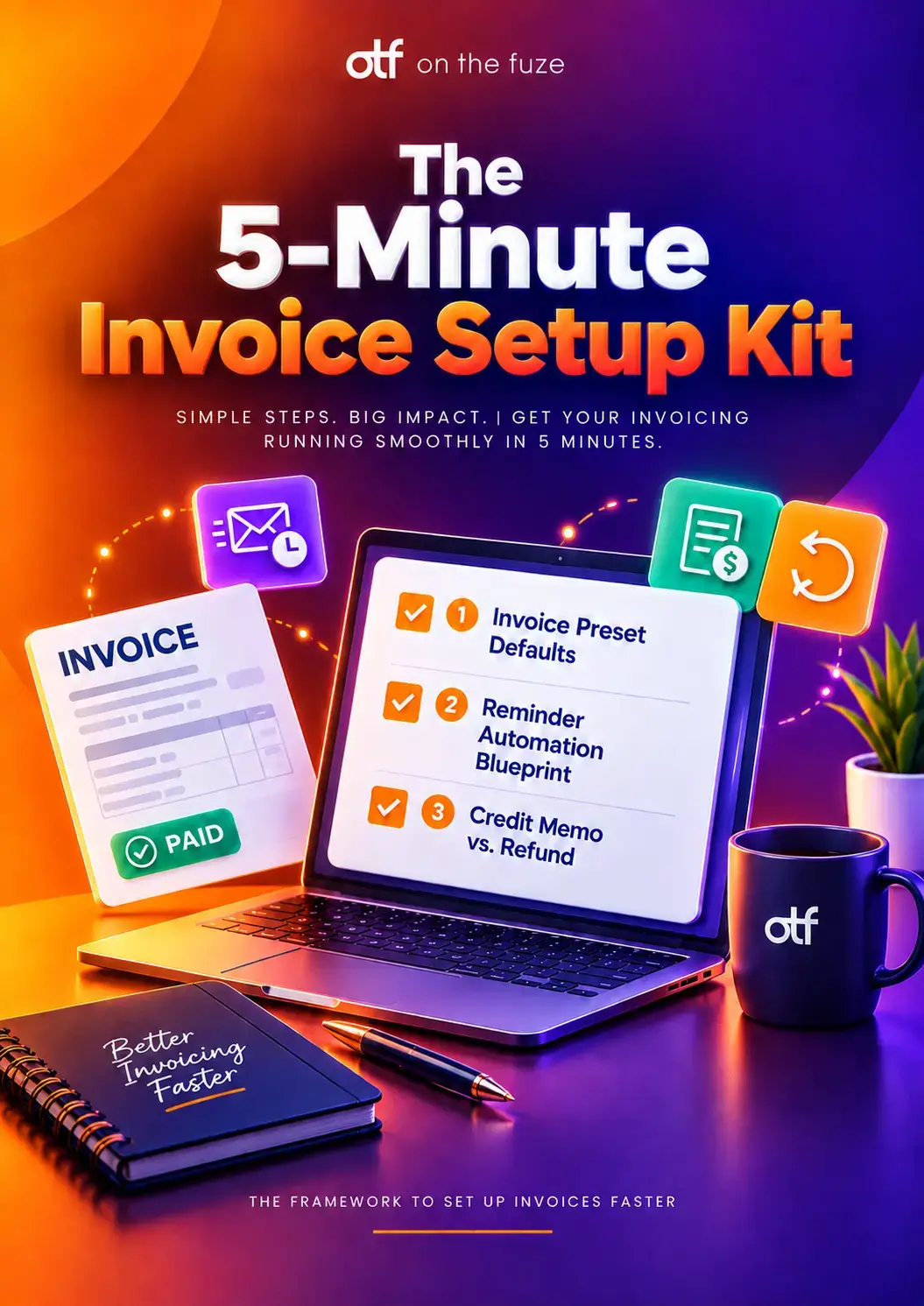
The HubSpot invoice generator lets you create, send, and track invoices inside the CRM, and collect payment on them without sending your customer to a third-party tool. HubSpot invoicing is part of Revenue Hub, HubSpot's quote-to-cash product, and the invoices tool itself is available on every plan, including Free.
This matters because of where cash actually gets stuck. 56% of US small businesses are owed money on unpaid invoices right now, (averaging $17,500 each) and 47% have invoices sitting more than 30 days overdue, according to Intuit QuickBooks' 2025 Small Business Late Payments Report. That's not a collections problem. It's usually a setup problem.
This guide covers how HubSpot CRM invoicing actually works, how to configure it properly, how to automate the chase, what payments currently cost, and when to use a credit memo instead of a refund.
Can HubSpot Do Invoices?
Yes. HubSpot has a native invoices tool, and unlike quotes and contracts, it's also available on the Free tier. You don't need a separate invoicing product, and you don't need a Revenue Hub seat just to send a bill.
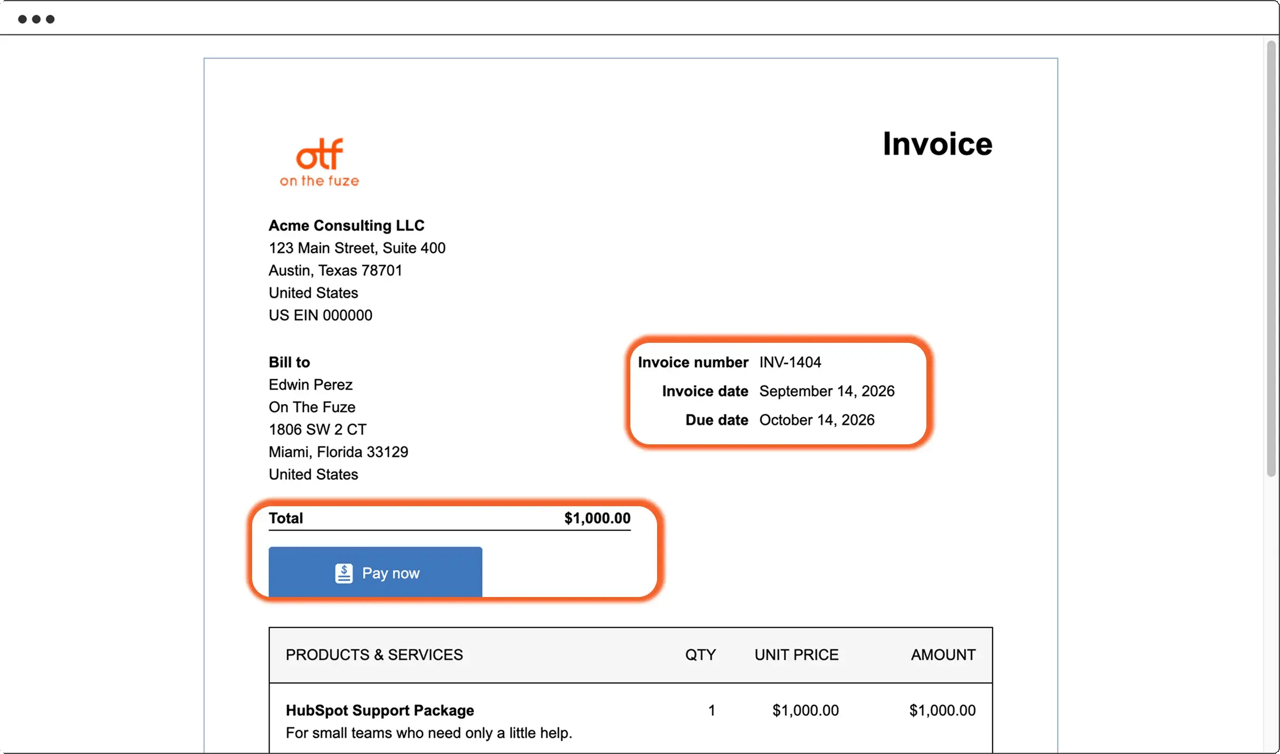
A HubSpot invoice is a formal, trackable document that:
- Carries a sequential invoice number, assigned automatically
- Tracks a due date and a running balance
- Can be paid online if you have a payment processor connected
- Can be marked paid manually if someone sends a check or a bank transfer
- Lives on the customer record, so anyone on your team can see its status without asking finance
Find them under Revenue → Invoices. The index gives you four tabs: All records, Overdue, Upcoming, and Paid.
Is There a HubSpot Invoice Generator?
Yes, and it's better described as a generator than a template, because HubSpot fills most of the invoice in for you. There's no separate HubSpot invoice generator product to buy or install. It's built into the CRM, and it pulls from data you already have.
When you create an invoice, HubSpot generates:
- The invoice number, assigned sequentially without you tracking the last one used
- The due date, calculated from the payment terms on your preset
- Line items, pulled from your product library rather than typed in
- Buyer details, pre-filled from the associated contact, company, or deal
- Your branding, comments, and tax IDs, applied automatically from the invoice preset
HubSpot can generate invoices without anyone opening the tool at all. If a signed quote had billing enabled, the contract's billing schedule generates each invoice on its own and emails it to the billing contact before it's due.
🏆 Elite Partner Tip: If someone on your team is rebuilding the same invoice every month, the generator isn't the problem; the setup is. Recurring billing should come from a contract or subscription, not from a person remembering to duplicate last month's invoice.
What's the Difference Between a Quote, an Invoice, and a Payment Link?
They sit at different points in the same sale, and using the wrong one is the most common structural mistake we see.
| Tool | What it's for | Gets a sequential number | Tracks a balance |
|---|---|---|---|
| Quote | Proposing terms before the customer agrees | No | No |
| Invoice | Formally billing for work already agreed | Yes | Yes |
| Payment link | Collecting a one-off payment with no document | No | No |
A quote asks. An invoice bills. A payment link just collects. If your team is emailing quotes and then asking for payment against them, you're skipping the one record that gives your accountant an audit trail.
What Do You Need Before You Send Your First Invoice?
Two things, and one of them catches people out.
- A payment processor connected. Either HubSpot payments or Stripe as a payment processing option. Without one, you can still create and send invoices, but your customer has no way to pay online.
- A populated product library. Line items pull name, price, and SKU from this library. Typing them in by hand is how invoice totals stop matching quote totals.
Worth knowing: the invoices tool works on Free, but HubSpot payments require a paid HubSpot plan. If you downgrade to Free, you lose access to HubSpot payments, and any active subscriptions keep billing for only 30 days after the downgrade.
🏆 Elite Partner Tip: HubSpot payments isn't supported in sandbox accounts. If you're testing a full quote-to-cash flow before going live, plan to validate the payment step in production with a small real transaction rather than assuming the sandbox will show you the whole picture.
How Do You Set Up Invoice Presets in HubSpot?
Invoice presets are the defaults every invoice starts with, and configuring them once removes most of the manual work forever. A Super Admin sets them under Settings → Objects → Invoices → Customization.
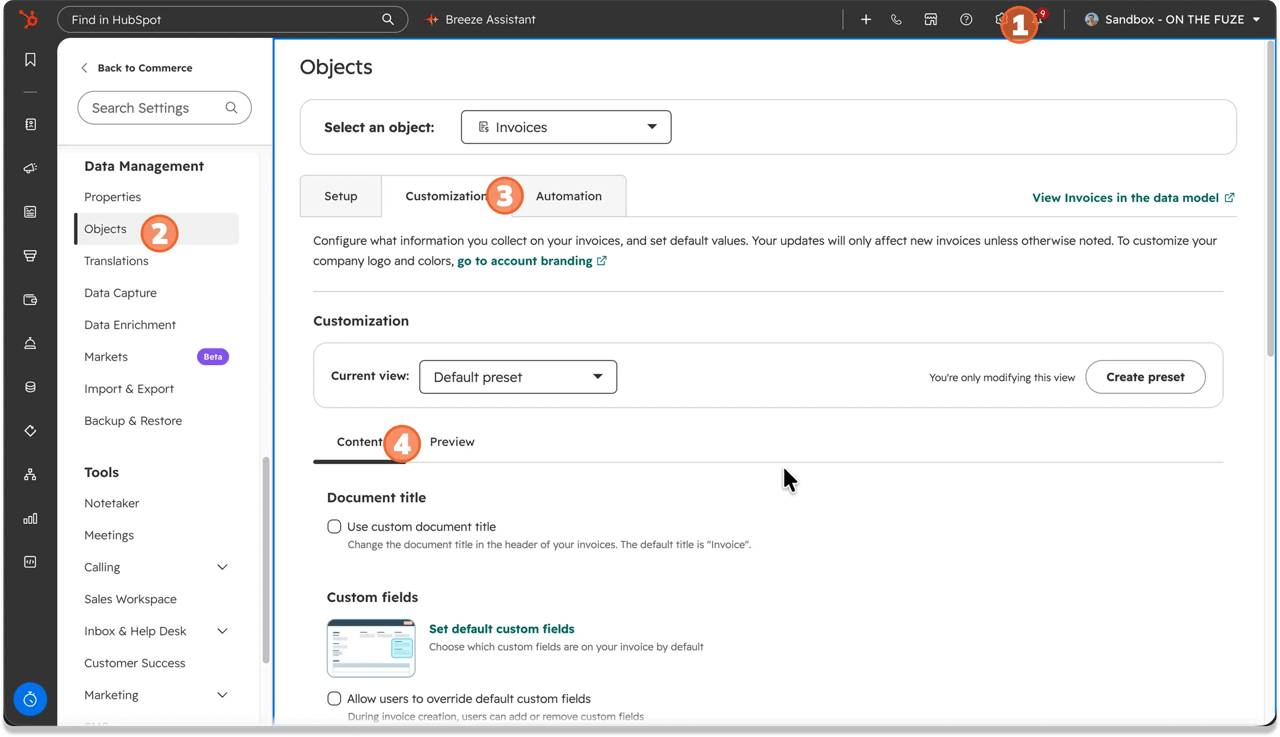
These are the elements you can control inside a preset:
- Invoice title (select Use custom document title if "Invoice" isn't what you want in the header)
- Net payment terms, including which one loads by default
- Default comments, the block at the bottom of every invoice
- Your company information
- Tax IDs, up to three
- Up to four custom properties
- Subscription invoice billing periods
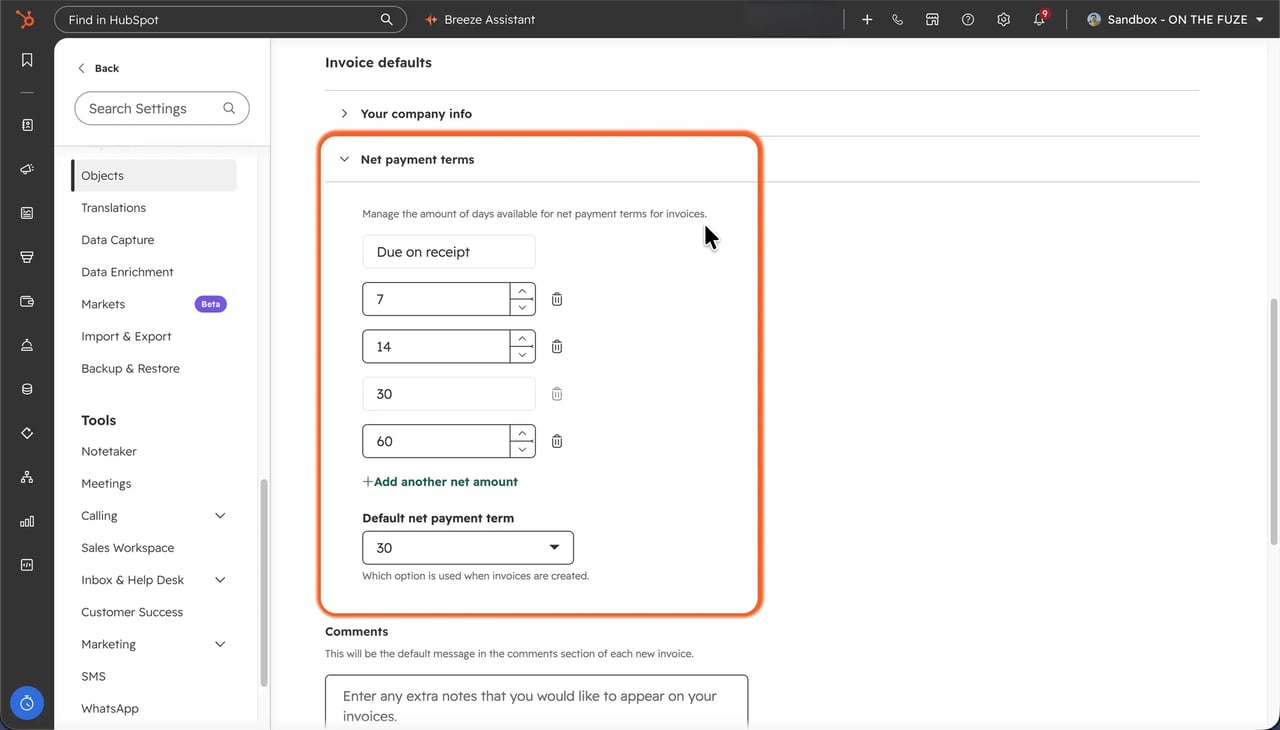
Start with net payment terms. Under Net payment terms, add the terms your business actually uses, then use the Default net payment term dropdown to choose which one loads automatically. Every manually created invoice will start on that term unless someone changes it.
🏆 Elite Partner Tip: the default preset's company information can't be edited because it pulls from your account defaults. If you bill from more than one entity, address, or trading name, don't fight it. Click Create preset, name it, and configure the second entity separately.
Two limits to plan around:
- Comments and tax IDs only apply to new invoices. Saving them won't update existing invoices, including drafts.
- Recurring invoices generated from contracts or subscriptions always use the default preset. They can't be pointed at a custom one.
How Do You Create a HubSpot Invoice?
There are two paths into the HubSpot invoice generator, and which one you use depends on what already exists in your CRM.
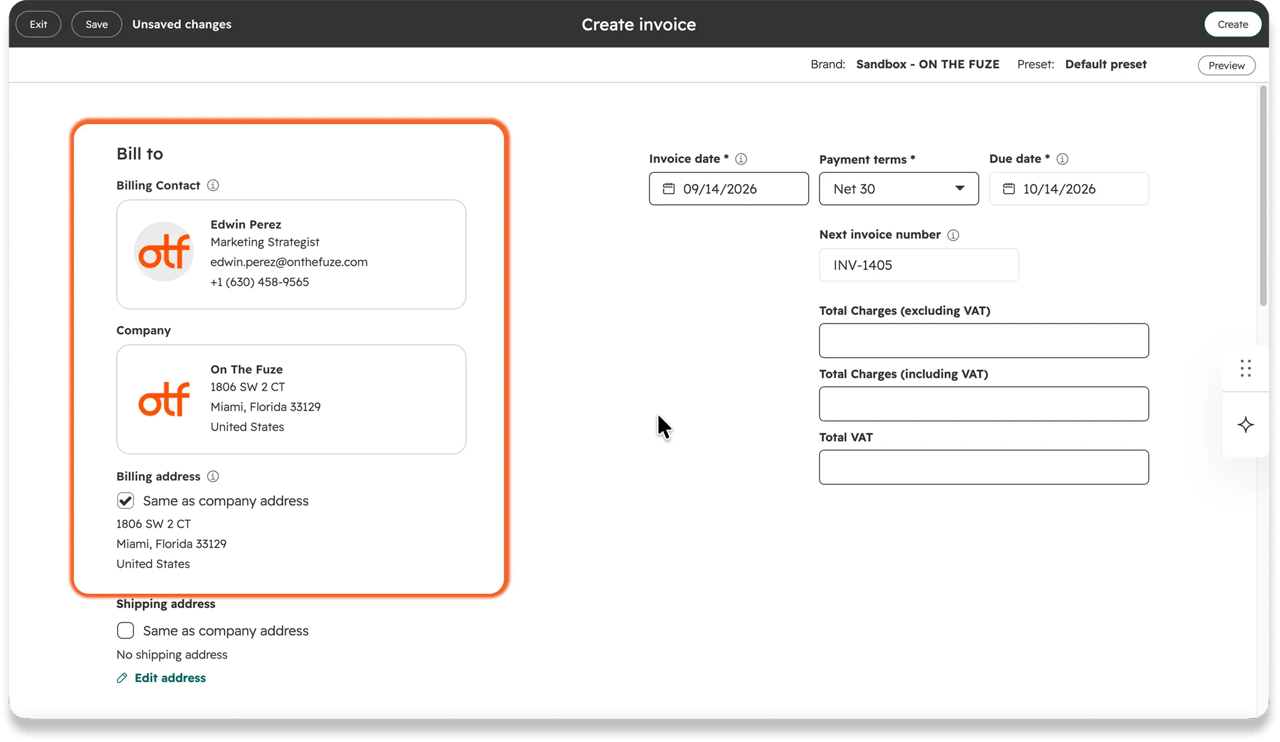
Option 1: From the invoices index
- Go to Revenue → Invoices and click Create.
- Choose Create one-time invoice.
- Under Bill to, add the contact and company.
- Confirm the invoice date, choose payment terms, and let the due date fill in.
- Add line items from your product library, or create a custom line item for a one-off.
- Add a discount, fee, or tax in the Summary section if either applies.
- Add anything the buyer should see in Comments.
- Under Payment collection, choose to send the invoice or charge a stored payment method.
- Toggle Accept online payments on.
- Click Create to finalize, or Save to leave it as a draft.
Option 2: From a contact, company, or deal
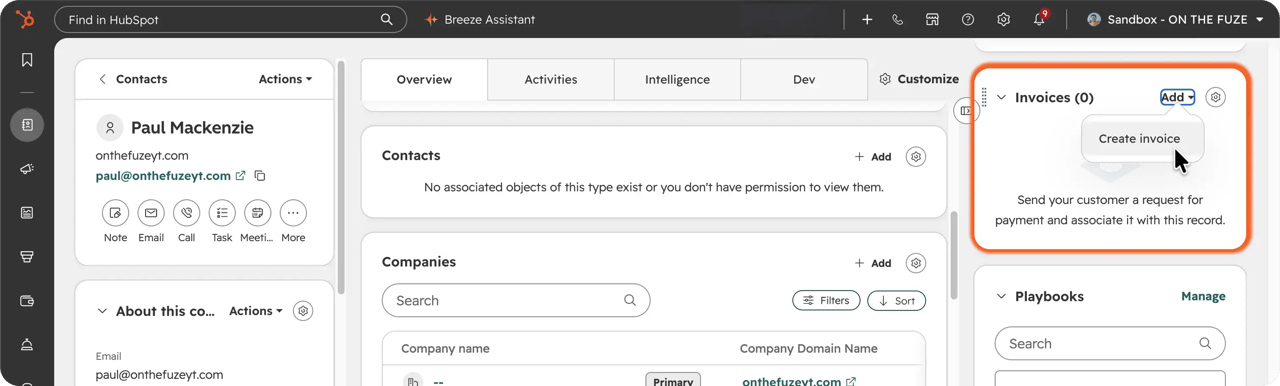
Open the record, find the Invoices card in the right sidebar, and click Add. You'll get four options: convert the deal to a subscription, convert the deal to an invoice, create a blank invoice, or add an existing one. The billing contact and company pre-fill from the record. Line items do not carry over, so you'll still add those.
Option 3: From a published quote
- Go to Revenue → Quotes.
- Hover over the quote and click Preview.
- In the right panel, at the top right, click Actions, then select Convert to invoice.
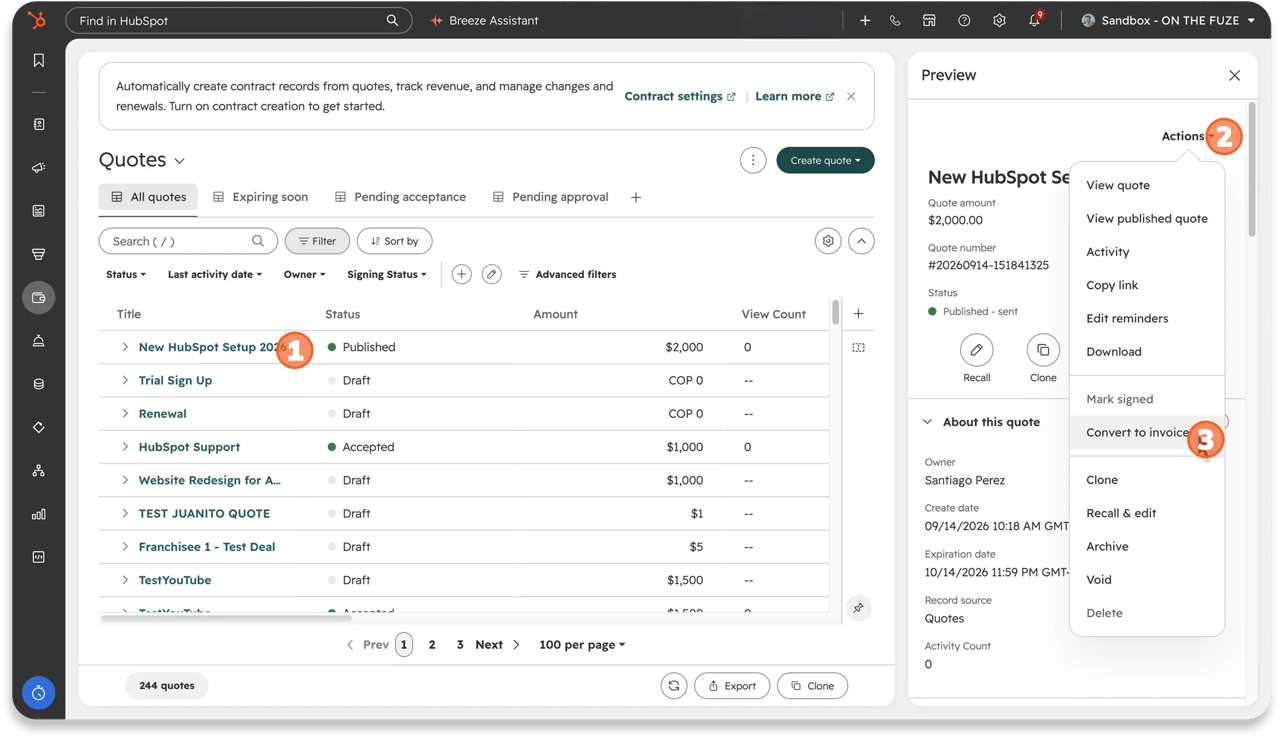 That drops you into the same creation screen with the parties already filled in.
🏆 Elite Partner Tip: if you see Convert to a subscription where you expected Convert to invoice, the quote has recurring line items. HubSpot swaps the option rather than showing both, which is the right behavior, recurring work should bill on a schedule rather than as a one-off invoice. There's also a Convert to invoice workflow action if you'd rather generate draft invoices automatically instead of converting them by hand.
What Do HubSpot's Invoice Statuses Mean?
HubSpot tracks two statuses on every invoice at once, and you only see one of them by default.
| Property | Values | What it tells you |
|---|---|---|
| Invoice status (shown by default) | Draft, Open, Paid, Voided | Your internal, reporting-side view |
| External invoice status | Waiting to be sent, Sent to customer, Partial payment made, Fully paid, Overdue, Voided | Exactly what your buyer sees |
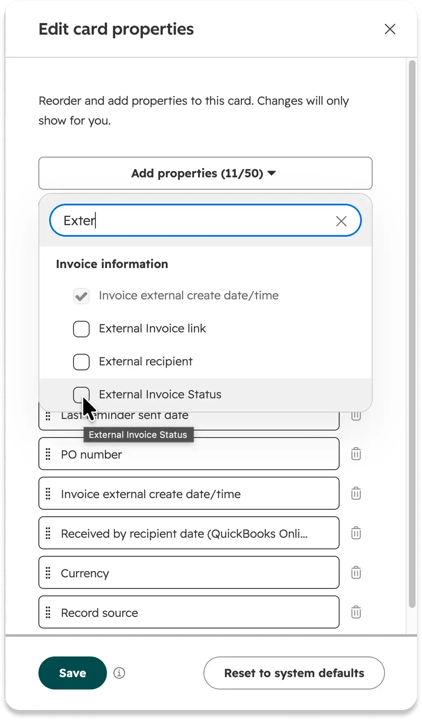
🏆 Elite Partner Tip: external invoice status is a real property, but it isn't displayed on the invoice record unless you add it yourself. It's worth adding, because it's the only way to tell "we marked this paid internally" apart from "the customer's checkout actually shows it as paid." That gap is where reconciliation disputes start.
How Do You Automate Invoice Reminders in HubSpot?
Go to Settings → Objects → Invoices → Automation and switch on "Send reminders to customers to pay their open invoices." HubSpot ships three reminders by default:
| Reminder | When it sends |
|---|---|
| 1 | On the due date |
| 2 | 7 days after the due date |
| 3 | 14 days after the due date |
All three fire on or after the due date by design. These are collection reminders for a bill already owed, not advance notice. The schedule does support before-due-date options if you want a courtesy nudge; HubSpot just doesn't enable one for you.
Each reminder goes to whichever contact on the invoice comes first alphabetically, not to a designated primary contact, and CCs up to 9 more associated contacts. Open an invoice and check the associated contacts. If accounts payable isn't in that list, they aren't being chased.
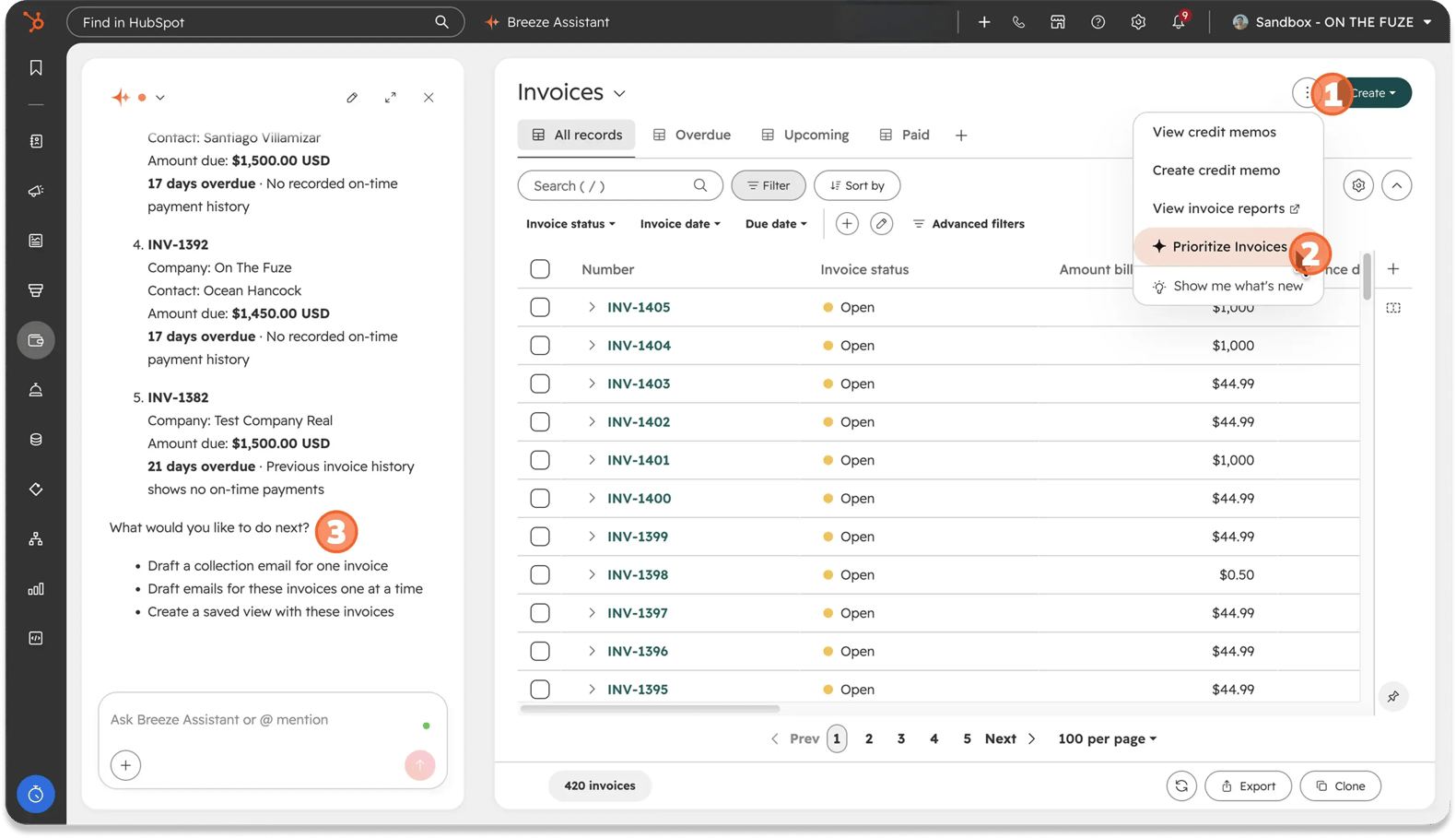
🏆 Elite Partner Tip: once you're carrying more overdue accounts than you can track from memory, click Prioritize invoices on the index page. Breeze AI ranks your riskiest accounts by age, size, and how overdue they are and drafts the follow-up email. You still click send, but you stop guessing who to call first.
How Do You Track What You're Owed?
On the invoices index, click View invoice reports, then open the Accounts Receivable dashboard. It gives you, without touching a spreadsheet:
- Expected versus actual revenue by month
- How many invoices were paid on time
- Open and past-due invoices
- An A/R aging summary grouping everything overdue by age
For a leadership team, this is the report that replaces "how much are we owed?" as a recurring question in the Monday meeting.
How Do HubSpot Payments Work?
Connect a processor once, and every invoice, quote, payment link, and subscription you send afterward can be paid online. Every completed payment creates its own payment record, attached to the invoice it paid and visible on the contact and company timeline.
You have two options:
- HubSpot payments. HubSpot's own processor. Available to businesses located in the United States, the United Kingdom, or Canada, with a bank account in the same country, on a paid HubSpot plan.
- Stripe as a payment processing option. Connects your existing Stripe account and is available internationally, with some exceptions.
Buyers can pay by credit and debit card (Visa, Mastercard, American Express, Discover, Diners Club, JCB), Apple Pay, Google Pay, or bank debit. Bank debit method depends on region: ACH in the US, PADs in Canada, BACS in the UK, and SEPA for euro payments.
New in 2026: as of August 2026, Affirm and Klarna are available in beta as buy now, pay later options for businesses based in the US and Canada.
Read more about HubSpot Payments Setup: HubSpot Revenue Hub (formerly Commerce Hub) Setup for beginners.
Credit Memo or Refund: Which One Do You Need?
One question decides it: does real money need to leave your bank account and go back to the buyer?
If not, the balance just needs adjusting → credit memo. Open the invoice and click Actions → Create credit memo. It reduces the balance immediately, with no draft step and no deleting the original invoice, so your audit trail stays intact. It pulls in the line items at their full amount by default, so to credit only part of an invoice, lower the quantity or unit price before you finalize.
If yes, money goes back → refund. Go to the Payments index, not the invoice, open the payment, and click Actions → Refund. Enter a full or partial amount, pick a reason, and confirm. Allow 5 to 10 business days for it to reach the buyer's statement.
🏆 Elite Partner Tip: a payment you recorded manually, like a mailed check, can't be refunded through HubSpot at all. There's no processor behind it to reverse. That one gets settled directly with the customer, and you'll want a written record of it outside HubSpot.
How Does HubSpot Sync With Your Accounting System?
HubSpot connects natively to QuickBooks Online, including workflow actions that sync collected payments as paid invoices or paid sales receipts. Xero also has an integration available in HubSpot's App Marketplace.
If you use a different accounting system, Super Admins can export payment reports from the payments index and upload them. It's not elegant, but it beats re-keying transactions.
Decide early which system is the source of truth for revenue. When HubSpot and your accounting platform both hold invoice records and neither is authoritative, month-end close turns into a reconciliation project. Pick one, and make the sync one-directional.
What Mistakes Should You Avoid With HubSpot Invoicing?
Most of the expensive mistakes in HubSpot invoicing happen in settings, before anyone sends a single invoice.
- Leaving the default payment term on whatever it was. Every manually created invoice starts on that term. Businesses with longer payment terms report cash flow problems at a noticeably higher rate than those billing on immediate terms, and that default is a decision you're making whether or not you make it consciously.
- Never turning on reminders. They're off until someone switches them on. Until then, every follow-up is a person remembering to do it.
- Assuming reminders reach accounts payable. They go to whichever associated contact sorts first alphabetically. If AP isn't associated to the invoice, they never see it.
- Choosing a processor on the card rate alone. The card rate is the visible number. The uncapped platform fee is the one that scales with your invoice size.
- Using a refund when you needed a credit memo. A refund moves money and can't be undone. A credit memo adjusts what's owed and leaves the audit trail intact.
- Never adding external invoice status. Without it, you can't tell what your customer sees, only what your team recorded.
- Building every recurring invoice by hand. If the work is contracted, the contract's billing schedule should be generating those invoices for you.
Frequently Asked Questions
Can HubSpot do invoices?
Yes. HubSpot has a native invoices tool available on every plan, including Free. Invoices get sequential numbering, due dates, and balance tracking, and can be paid online or marked paid manually.
Does HubSpot have an invoice generator?
Yes. The HubSpot invoice generator is built into the CRM, with nothing to install. It assigns the invoice number, calculates the due date from your payment terms, pulls line items from your product library, and applies your branding, comments, and tax IDs from the invoice preset automatically.
Is HubSpot CRM invoicing free?
The invoices tool itself is available on all plans, including Free, so you can create and send invoices at no extra cost. Collecting payment online requires a paid HubSpot plan, and you pay per-transaction processing and platform fees rather than a monthly invoicing fee.
Do I need Revenue Hub to send invoices?
No. The invoices tool is available on all plans. Quotes and contracts require a Revenue Hub subscription, and HubSpot payments requires a paid HubSpot plan.
How much does HubSpot payments cost?
For a US business in 2026: 2.9% on card transactions, or 0.8% capped at $10 on ACH, plus a platform fee of 0% for the first year and 0.5% after that. The platform fee is capped at $10 on ACH. Using Stripe as the processing option instead means an uncapped 0.75% platform fee on top of your Stripe rate.
Does HubSpot charge a fee to issue a refund?
No. HubSpot doesn't charge to process a refund, but the transaction fees from the original payment aren't returned.
When do HubSpot invoice reminders send?
By default, three reminders send on the due date, 7 days after, and 14 days after. The schedule supports before-due-date reminders, but none are enabled by default.
Who receives an invoice reminder?
Whichever contact associated to the invoice comes first alphabetically, with up to 9 more associated contacts CC'd.
What's the difference between a credit memo and a refund?
A credit memo reduces what's owed on an invoice and never moves money. A refund returns money to the buyer and is issued from the payments index, not from the invoice.
Can I refund a payment I recorded manually?
No. A manually recorded payment, such as a mailed check, has no processor behind it to reverse, so it can't be refunded through HubSpot.
Can I use HubSpot payments outside the US, UK, or Canada?
Not as the processor. Your business must be located in one of those three countries with a matching bank account. You can still accept international card payments, and businesses elsewhere can connect Stripe as a payment processing option.
Does HubSpot sync invoices with QuickBooks?
Yes. HubSpot integrates natively with QuickBooks Online, including workflow actions that sync collected payments as paid invoices or sales receipts. Xero has an integration in the App Marketplace, and other systems can be handled by exporting payment reports.
Key Takeaways
- The HubSpot invoice generator is native to the CRM and available on every plan, including Free. Quotes and contracts need Revenue Hub, and HubSpot payments need a paid plan.
- HubSpot CRM invoicing pulls from data you already have, so invoice numbers, due dates, line items, and branding are generated rather than typed.
- Invoice presets are the highest-leverage setup step. Default payment terms, comments, and tax IDs configured once apply to every invoice afterward.
- Reminders are off until you turn them on, and the default schedule fires on the due date, +7 days, and +14 days.
- Reminders go to the alphabetically first associated contact, which is why accounts payable often never receives them.
- Two fees always apply: processing and platform. HubSpot's ACH fees are capped at $10; Stripe's 0.75% platform fee is uncapped and grows with invoice size.
- The 0% first-year platform fee is a promotion, not permanent pricing. Model year two at 0.5%.
- Credit memos adjust what's owed. Refunds move money. Refunds only happen from the payments index, and manually recorded payments can't be refunded at all.
- External invoice status exists but is hidden by default, and it's the only way to see what your customer sees.

On The Fuze is a Top 1% HubSpot Elite Partner with 10+ years of experience and 3,000+ CRM setups optimized across North America. We help small and medium-sized businesses leverage the full potential of HubSpot to scale their businesses.