Landing Page Benchmark Cheat Sheet
Industry CVR benchmarks, HubSpot form & CTA data, and 10-point checklist Marketing VPs use to know where their landing pages really stand.
Download Now

Does HubSpot do landing pages?
Yes. HubSpot ships a native drag-and-drop landing page builder inside the Content Hub on every plan, including Free. Pages are connected to the CRM, forms, workflows, and reporting from the moment they are published — so you do not need Unbounce, Instapage, or a separate WordPress plugin to launch.
What you get changes by tier, but the foundation is included from day one:
| HubSpot Plan | Landing Page Capabilities | Best For |
|---|---|---|
| Content Hub Free | Basic templates, HubSpot branding, drag-and-drop builder, integrated forms | Founders validating a first offer |
| Content Hub Starter | Custom domain, branding removed, A/B testing on a limited set of pages, more templates | Early-stage SMBs running 1–2 campaigns at a time |
| Content Hub Professional | Smart Content, full A/B testing, dynamic content, multi-language support, custom modules | Marketing teams running personalized campaigns at scale |
| Content Hub Enterprise | Adaptive testing, content approvals, hierarchical teams, custom objects, advanced API access | Mid-market and enterprise teams with governance requirements |
What is the difference between HubSpot landing pages and website pages?
HubSpot landing pages are single-purpose conversion assets tied to a campaign, while website pages are part of your ongoing site experience and built for browsing. Both live inside Content Hub, but they are managed in different sections, reported on differently, and serve different jobs in the funnel.
Here is how they compare side-by-side:
| Attribute | Landing Page | Website Page |
|---|---|---|
| Primary purpose | Capture a single conversion (demo, download, registration) | Inform, educate, and support browsing across the site |
| Navigation | Main site nav stripped by default to keep focus on the offer | Full site navigation, footer, and cross-page links |
| Where it lives in HubSpot | Content → Landing Pages | Content → Website Pages |
| Campaign attribution | Tagged to a HubSpot Campaign; views and submissions roll up into campaign reporting | Reported on as part of overall site analytics |
| Form behavior | Form is a first-class object; submission creates or updates a CRM contact instantly | Forms supported, but pages are usually content-led, not conversion-led |
| Lifespan | Often campaign-bound (weeks or months); retired or archived after the campaign | Long-lived; refreshed but rarely retired |
If a page is meant to live in your top-nav and be discovered through SEO, it is a website page. If it is meant to receive paid or email traffic and convert that traffic into a record, it is a landing page. Putting the wrong asset in the wrong place is one of the most common reasons campaign reporting comes out misaligned.
What is the best platform for landing pages?
For growing teams, HubSpot is currently the most cost-aligned platform for landing pages because the page builder, the form, the CRM, the workflow engine, and the reporting are all native — not stitched together. Salesforce, Pardot, and Marketo all still require either a separate page builder (Unbounce, Instapage) or a heavier developer build to match what HubSpot ships out of the box.
Here is how the platforms compare:
| Platform | Landing Page Approach | Hidden Cost |
|---|---|---|
| HubSpot Content Hub | Native builder, native CRM, native forms, native reporting | None — included from the Free tier upward |
| Salesforce Marketing Cloud | Separate Pardot/Account Engagement builder | Additional license + integration work |
| Marketo Engage | Built-in builder, but limited templates | Often paired with Unbounce for design flexibility |
| Unbounce / Instapage | Strong page builder, no CRM | Per-conversion fee + integration to your CRM |
Every external page builder adds a join point that can break. Native HubSpot landing pages eliminate that join point entirely—which is why teams running on HubSpot tend to launch campaigns faster, attribute revenue more accurately, and spend less time debugging form submissions that never made it to the CRM.
What is a HubSpot landing page?
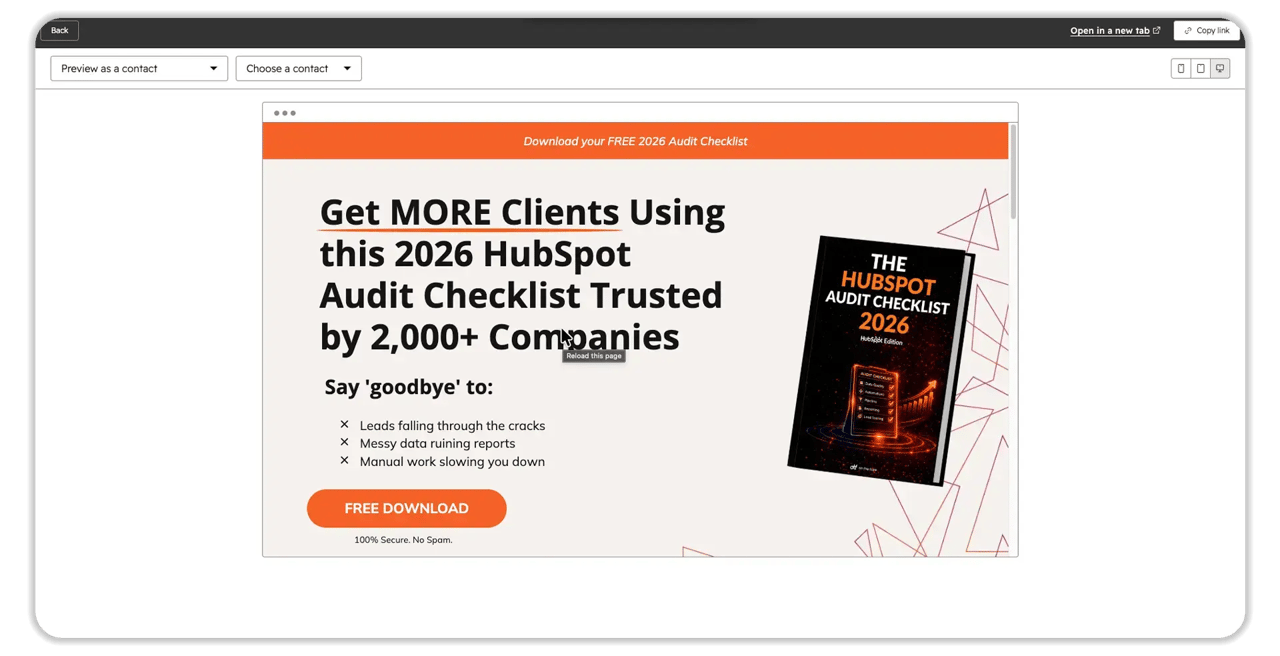 OFT Lead Magnet Landing page example.
A HubSpot landing page is a single-purpose web page hosted inside HubSpot's Content Hub that is built to capture a specific conversion—a demo request, a download, a webinar registration, or a meeting booking—and to feed that data straight into the Smart CRM.
Unlike a generic page builder, a HubSpot landing page is part of a connected system. The form, the page, the contact record, the workflow, and the reporting all live in the same database. That means the moment a visitor submits a form, your CRM knows their lifecycle stage, the sales team gets notified, and your reporting attributes the conversion back to the campaign that drove it—without any duct-taped integrations.
The four jobs every landing page should do
- Match the message. Mirror the headline, offer, and visual of the ad, email, or referral source that drove the click so visitors land where they expected to.
- Capture the right data. Use the smallest form that still gives sales what they need to qualify. Progressive profiling can fill in the rest later.
- Route the lead. Trigger the right workflow, owner assignment, and notification at the moment of submission — no manual handoff.
- Report on the outcome. Attribute the conversion to the campaign, the source, and the persona, and feed it into closed-loop reporting all the way to revenue.
One landing page should answer one question and ask for one action. If your page has two competing calls-to-action (CTAs), neither will perform. Build a second page before you compromise the first.

What do you need before building your first HubSpot landing page?
Five viability gates have to be cleared before your first page can carry a real campaign. Skip any of them and you will either lose conversions to slow load times or ship a page that does not route data to the right person.
- A connected custom domain. Available from Content Hub Starter upward. Pages on the default .hs-sites.com domain hurt brand trust and SEO.
- A branded template or theme. Either a HubSpot marketplace theme calibrated to your brand or a custom theme built and published to your portal.
- A working form strategy. Field list defined, required fields are agreed with sales, progressive profiling rules are set, and GDPR options are enabled where relevant.
- A campaign and follow-up workflow. A HubSpot Campaign object to attribute the page to, plus a workflow that handles owner assignment, internal notification, and the first follow-up email.
- A page-speed budget. Aim for a Largest Contentful Paint (LCP) under 2.5 seconds. Compress images (webP format recommended), lazy-load video, and audit any custom JavaScript before you publish.
How do you build a HubSpot landing page?
Configuration is done inside the Content Hub landing page editor, not in a separate tool. The build has six phases. Most underperforming pages fail in phase 1 because the message match was never defined.
Navigate to Content → Landing Pages → Create a Landing Page and walk through the phases below.
Phase 1: Define the offer and the message-match
- Write the offer in one sentence: who it is for + what they get + what they need to do.
- Mirror the headline, hero image, and key benefit from the ad, email, or referral source that drives traffic.
- Decide the single CTA — book a demo, download a guide, register for a webinar, or request pricing.
- Document the success metric for the page (conversion rate, qualified meetings, sourced pipeline) before you start designing.
Phase 2: Choose a template or theme
- Use a theme module tied to your brand—colors, fonts, button styles, and spacing all centralized.
- Avoid one-off templates that fork your design system. Every fork increases maintenance later.
- Confirm the template is responsive across desktop, tablet, and mobile breakpoints before you load content.
Phase 3: Build the form
The form is the most important block on the page. Get this right and conversion follows.
- Ask only what sales will use today. Every additional field reduces conversion.
- Enable progressive profiling so returning visitors are not asked the same questions twice.
- Set field validation (work email, phone format, country) at the form level — not in a downstream workflow.
- Configure follow-up emails and internal notification emails directly inside the form settings.
Your form should match the value of the offer. Asking for a phone number on a top-of-funnel ebook lowers conversion. Asking for it on a "request pricing" page raises lead quality. Calibrate the form to the buyer's intent at that step.
Phase 4: Add Smart Content where it earns its keep
If you are on Content Hub Professional or Enterprise, Smart Content lets a single page render different copy, imagery, or modules based on who the visitor is. Use it when the variant materially changes performance — not as decoration.
The eight Smart Content rules (covered in detail later) include ad source, country, device, referral source, preferred language, contact list membership, lifecycle stage, and query parameter.
Phase 5: Configure SEO, social, and tracking
- Set the page title, meta description, and canonical URL
- Tag the page to a HubSpot Campaign so views and submissions roll up into campaign reporting.
- Confirm tracking pixels (LinkedIn Insight Tag, Meta Pixel, Google Ads) are firing through the global site header—not pasted into every page.
Phase 6: Test, optimize, and publish
- Run the page through a real browser at desktop, tablet, and mobile widths.
- Submit the form yourself and confirm the contact record, the workflow, and the notification all fire correctly.
- Check the LCP score. If it is above 2.5 seconds, optimize images and scripts before launch.
- Set up an A/B test on the headline or hero image if you are on Starter or above. Adaptive testing is available on Enterprise.
Advanced configuration: custom modules, Smart Content, and webhooks
For organizations with technical resources or complex personalization needs, the drag-and-drop interface is the floor—not the ceiling. Three deeper levers separate enterprise-grade landing pages from average ones.
Custom modules built with the HubSpot CLI
When the standard library does not cover a use case, developers build custom modules using HubSpot's Design Manager and the HubSpot Command Line Interface (CLI). A custom module is a reusable component built from HTML, CSS, JavaScript, and HubL (HubSpot Markup Language).
- Install the CLI globally: npm install -g @hubspot/cli (requires Node.js v10+).
- Authenticate the local terminal to a HubSpot CMS Developer Sandbox, then write code in your preferred IDE (VS Code is the common choice) and version control it with Git.
- A module lives in a directory with a .module suffix (e.g., Testimonial.module) and contains meta.json, fields.json, module.html, module.css, and module.js.
- The meta.json file controls how the module appears in the editor — its icon, label, availability, and the content_types array that restricts where marketers can drop it (so a JavaScript-heavy widget never lands inside an email or quote template).
- The fields.json file defines the input fields marketers see (text boxes, color pickers, image uploaders) so non-technical users can configure the module safely.
Smart Content and dynamic personalization (Marketing Hub Pro+)
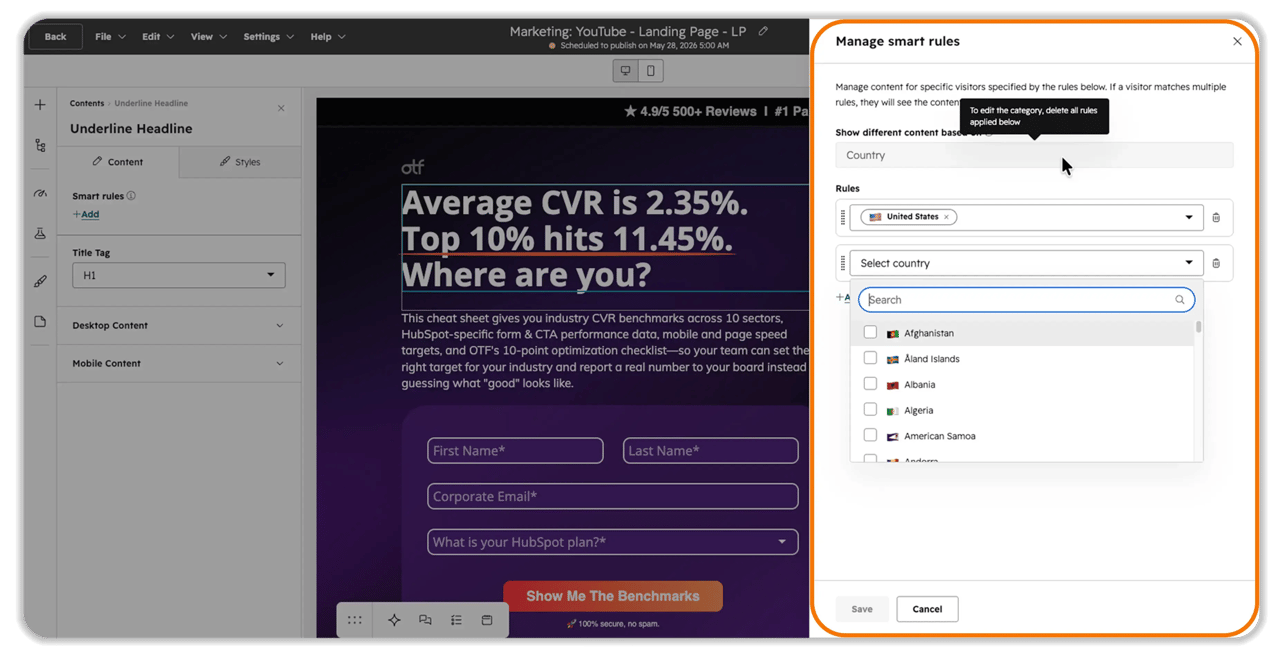 Smart Content modules dynamically swap their HTML output, imagery, and copy based on the visitor's attributes. The HubSpot engine evaluates eight criteria and renders the correct variant server-side — instantly, with no client-side flicker.
| Smart Content Rule | Common Use Case |
|---|---|
| 1. Ad source (UTM) | Different headlines for LinkedIn, Google, and Meta traffic—perfect message match. |
| 2. Country (IP) | Localize language, currency, or regional compliance notices without cloning URLs. |
| 3. Device type | Hide heavy video on mobile to protect the 2.5-second LCP threshold. |
| 4. Referral source | Co-branded messaging for visitors arriving from a specific partner site. |
| 5. Preferred language | Render content in the language set in the visitor's browser. |
| 6. Contact list membership | Show targeted copy if the visitor is on a list like "Q3 High Intent Targets." |
| 7. Lifecycle stage | Show technical specs to existing customers and educational content to new leads. |
| 8. Query parameter | Adapt content based on URL strings — useful for sales-shared links. |
This native rendering removes the need for a separate personalization engine, bringing enterprise-grade tailoring into the SMB workflow.
Webhooks and API interoperability
For landing pages to function inside a broader stack, data has to flow instantly between HubSpot and external systems. Webhooks push data the moment an event fires — eliminating the inefficient API polling that burns through rate limits.
HubSpot supports two webhook architectures:
- Webhooks API (Global Scope, Free tiers and up). A public or private app subscribes to global events using OAuth scopes (e.g., crm.objects.contacts.read). The moment a contact is created or updated through any landing page form, a JSON payload is sent to your secured HTTPS endpoint. Lightweight and scalable, but no custom payload structuring and no Ticket support yet.
- Workflow Webhooks (Contextual Scope, Marketing Hub Pro and Enterprise). Embedded inside a specific automation. When a visitor submits a form, the workflow fires a POST or GET webhook mid-sequence—sending data to a shipping system to create a purchase order, to a direct-mail platform like Sendoso for a corporate gift, or fetching external data to enrich the record before the next step runs.
Best practices: use a tool like webhook. site during testing to inspect the raw payload, define fallback errors for timeout scenarios, and authenticate via OAuth or static tokens in the HTTPS request. For SMBs without engineering resources, middleware like Make or Zapier can route webhook payloads to Google Sheets or Airtable until you outgrow the workaround.
What mistakes should you avoid?
Three deployment mistakes account for most underperforming HubSpot landing pages. None of them are technical — all of them are operational.
| Mistake | What goes wrong | The fix |
|---|---|---|
| 1. Two CTAs on one page | Visitors freeze when forced to choose between "book a demo" and "download the guide." Conversion drops on both. | One offer, one CTA, one form. Build a second page if you need a second offer. |
| 2. Heavy media that breaks LCP | Hero videos and uncompressed images push the Largest Contentful Paint past 2.5 seconds. Visitors bounce before the page renders. | Compress images, lazy-load video, and defer non-critical scripts. Use Smart Content to hide heavy assets on mobile. |
| 3. Form fields sales does not actually use | The form asks for company size, role, budget, and timeline. Conversion drops 30%+ and sales ignores half the data anyway. | Ask only what is required to qualify the lead today. Use progressive profiling to fill in the rest on the next visit. |
How much do HubSpot landing pages cost?
Landing pages are included on every HubSpot tier—including Free. What changes by tier is the level of personalization, testing, and developer extensibility you unlock.
- Free: Limited templates, HubSpot branding, default subdomain.
- Content Hub Starter: Custom domain, branding removed, basic A/B testing.
- Content Hub Professional: Smart Content, full A/B testing, dynamic content, multi-language, custom modules, Workflow Webhooks.
- Content Hub Enterprise: Adaptive testing, content approvals, hierarchical teams, custom objects, advanced API access.
For most SMBs running paid acquisition, Content Hub Professional is the tier where landing pages start carrying real revenue weight.
Frequently Asked Questions
What is a HubSpot landing page in one sentence?
It is a single-purpose web page hosted in HubSpot's Content Hub that captures a specific conversion and feeds the data straight into the Smart CRM, with native forms, workflows, and reporting attached.
What HubSpot tier do I need to remove HubSpot branding from a landing page?
Content Hub Starter or higher. The Free tier includes the builder but keeps HubSpot branding and a default subdomain.
Can I A/B test HubSpot landing pages?
Yes. Basic A/B testing is available on Content Hub Starter and full A/B testing is on Professional. Adaptive testing — where HubSpot automatically routes traffic to the winning variant — is an Enterprise feature.
What HubSpot plan do I need for personalization?
Smart Content and dynamic personalization require Content Hub Professional or Enterprise. The basic page builder, forms, and CRM sync are available on every plan.
How fast should a HubSpot landing page load?
Aim for a Largest Contentful Paint (LCP) under 2.5 seconds. Compress images, lazy-load video, and use Smart Content to hide heavy assets on mobile devices.
Can I build custom modules for my landing pages?
Yes. Use the HubSpot Command Line Interface (CLI) and the Design Manager to build reusable modules from HTML, CSS, JavaScript, and HubL. Each module lives in a .module directory with meta.json, fields.json, and rendering files. Available from Content Hub Professional upward.
Can HubSpot landing pages send data to external systems?
Yes—through Webhooks. The Webhooks API (Free and up) sends global event payloads to your endpoint. Workflow Webhooks (Marketing Hub Pro and Enterprise) fire contextual POST or GET requests inside a specific automation, with support for OAuth or static-token authentication.
Should I use Unbounce or Instapage instead?
Only if you are not on HubSpot CRM. Once you are on HubSpot, an external page builder adds a join point that breaks attribution and slows your campaign launch cycle. Native HubSpot pages are usually the simpler, faster path.
How many landing pages should one campaign have?
One per offer, per audience segment. If a single campaign has three audiences, build three pages—each with its own message match, form, and follow-up workflow. Smart Content can reduce that count when the variants are minor.
Where do HubSpot landing pages live in the portal?
Under Content → Landing Pages.
Key takeaways
- HubSpot landing pages are native—page, form, CRM, workflow, and reporting all live in one system.
- Every plan includes the builder. Personalization (Smart Content, custom modules, and A/B testing) unlocks at Content Hub Professional and above.
- Aim for LCP under 2.5 seconds. Compress images, lazy-load video, and defer non-critical scripts.
- One offer, one CTA, one form. Two competing calls-to-action will hurt both.
- Ask only what sales will use today. Use progressive profiling to fill the rest in over time.
- Smart Content uses eight criteria—ad source, country, device, referral, language, list, lifecycle stage, and query parameter—rendered server-side with no flicker.
- Custom modules are built locally with the HubSpot CLI, version-controlled in Git, and pushed to a CMS Developer Sandbox before going live.
- Webhooks (API or Workflow) push data to external systems instantly — preserving rate limits and enabling real-time integrations.