HubSpot Sequences Templates
5 ready-to-use sequence frameworks for cold outbound, speed-to-lead, post-demo follow-up, re-engagement, and customer onboarding.
Download Now
HubSpot Sequences are the 1:1 sales automation engine inside HubSpot's Smart CRM. They let your reps run timed, personalized email and task cadences from their own connected inbox—and they automatically stop the moment a prospect replies or books a meeting.
This matters for one reason: inconsistent follow-up is the single largest source of avoidable pipeline leakage in HubSpot-powered orgs. Sequences fix that by turning your best rep's playbook into a system every rep follows the same way, every time.
This post gives everything you need to make Sequences work—what they are, the four step types, how they differ from Workflows, how to configure them correctly, the mistakes that quietly cost you revenue, the advanced API and middleware patterns your should know about.
What Are Sequences on HubSpot?
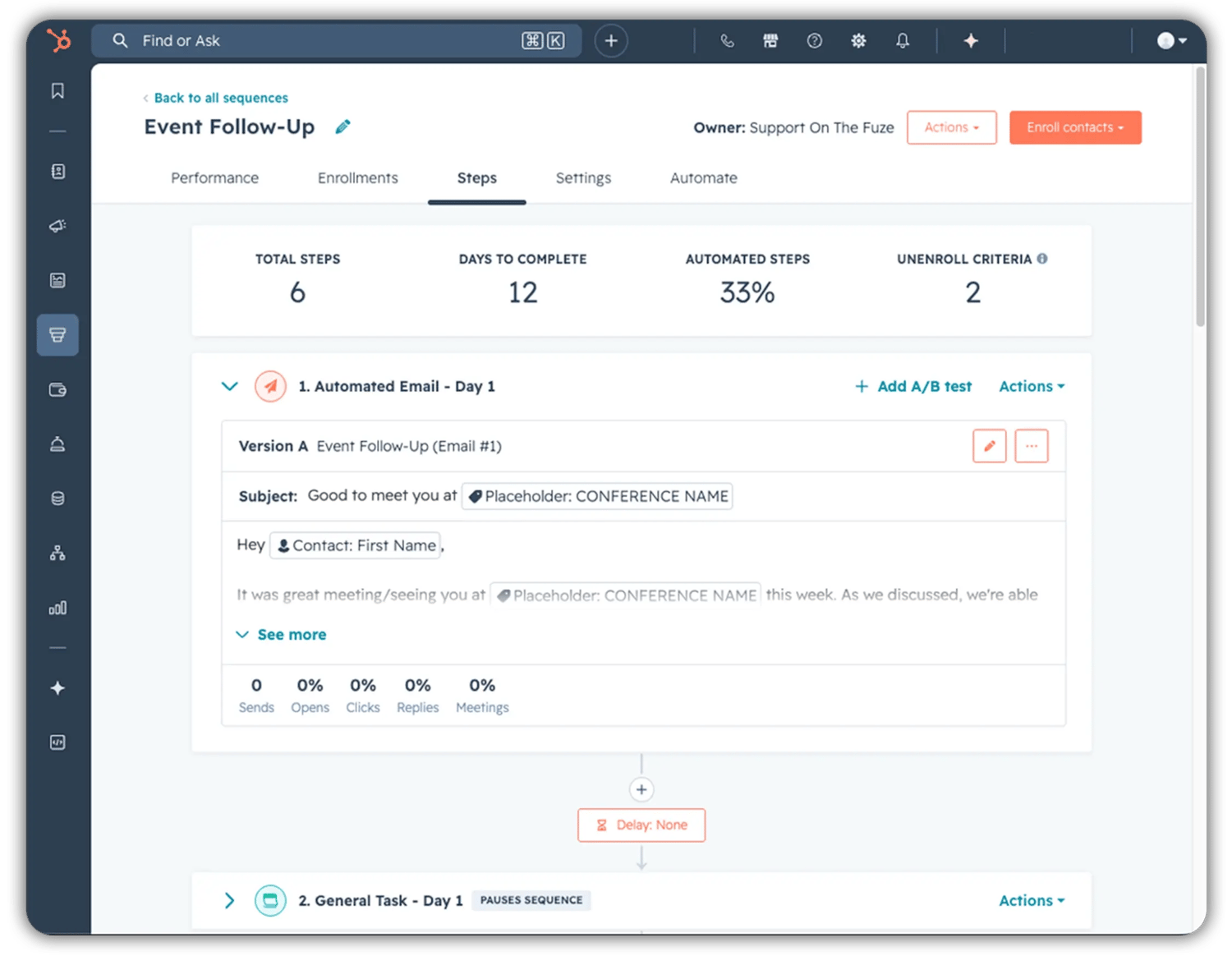 HubSpot Sequences are a Sales Hub and Service Hub feature that sends a series of timed sales emails and creates follow-up tasks for a single rep targeting a single contact. They are designed for personalized, one-to-one outreach — not for marketing batch sends.
Three things make Sequences distinct inside HubSpot:
- They send from your rep's connected personal inbox, not from HubSpot's marketing email infrastructure. The prospect sees a normal email, not a tracked marketing blast.
- They auto-unenroll on engagement. When the contact replies or books a meeting, the cadence stops on its own.
- They are seat-gated. A user must hold a paid Sales or Service seat with Sequences permissions and a connected personal email address to send them.
Elite Partner Tip: Sequences are not a substitute for a clean Lifecycle Stage and Lead Status model. If your rep enrolls a contact whose status is wrong, you are sending the wrong message to the wrong person at the wrong time—automated. Fix the data layer first.
Does HubSpot Do Sequencing?
Yes — HubSpot does sequencing natively, and it has since the original Sales Hub release. In 2026, Sequences remain HubSpot's first-party tool for rep-driven outbound and follow-up cadences.
What HubSpot's native sequencing does well:
- Linear, time-delayed steps that mix automated emails with manual tasks
- Reply and meeting detection to stop the cadence automatically
- Inbox-level sending so messages route through the rep's actual mailbox
- Sequence-level performance reporting on opens, clicks, replies, and meetings booked
What HubSpot's native sequencing does not do — and where teams sometimes need a third-party tool layered on top:
- No conditional branching. You cannot route the contact down a different path based on whether they opened or clicked.
- No multi-channel automation beyond email. SMS, WhatsApp, and full LinkedIn automation require integrations.
- No AI-personalized step generation inside the cadence itself. AI assist is available for individual email drafting, not for step-by-step decisioning.
If your team needs branching logic or cross-channel orchestration, the right move is usually to keep Sequences for the human-touch cadence and add a specialist tool for the rest — not to abandon HubSpot.
What Are the 4 Types of Sequences (Step Types) in HubSpot?
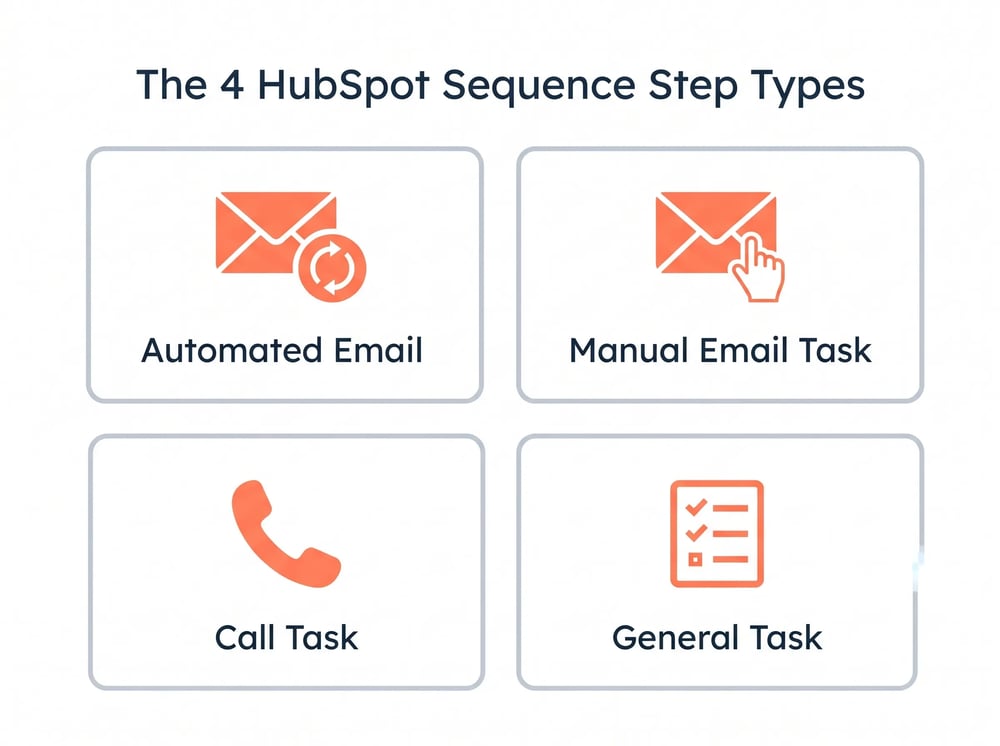 HubSpot Sequences are built from four step types, and every cadence you ever build is some combination of them. Knowing what each one does — and what it does not — is the difference between a sequence that books meetings and one that just creates noise.
1. Automated Email
A pre-templated email that sends automatically at the time and delay you configure from the rep's connected inbox. You can choose to start a new email thread or reply to the previous step's thread, which materially impacts deliverability and reply rates.
Use it for scalable touch points where every contact gets the same core message with personalization tokens.
2. Manual Email Task
A reminder for the rep to send an email themselves at the scheduled step. The task lands in their task queue with the prospect's context attached.
Use it for: the moments where personalization matters more than speed—usually steps 3, 5, or 7 in a multi-touch cadence.
3. Call Task
A reminder to call the contact at the scheduled time. The task is logged against the contact record and links directly to the call disposition flow.
Use it for: structured outbound where calls are a deliberate part of the cadence, not an afterthought.
4. General Task (including LinkedIn task reminders)
A flexible reminder for any other action — research, video message, voicemail, or LinkedIn outreach. With the LinkedIn Sales Navigator integration, the General Task can deep-link the rep into the prospect's LinkedIn profile to send a connection request or InMail manually.
Use it for: LinkedIn touches, gift sends, ABM research steps, or any non-email channel that requires a human in the loop.
Elite Partner Tip: The most common cadence design mistake we see is over-indexing on automated email. A balanced 8-step sequence usually runs three automated emails, two manual emails, two call tasks, and one LinkedIn task. That mix outperforms email-only cadences in reply rate every time we test it.
What Is the Difference Between Workflows and Sequences in HubSpot?
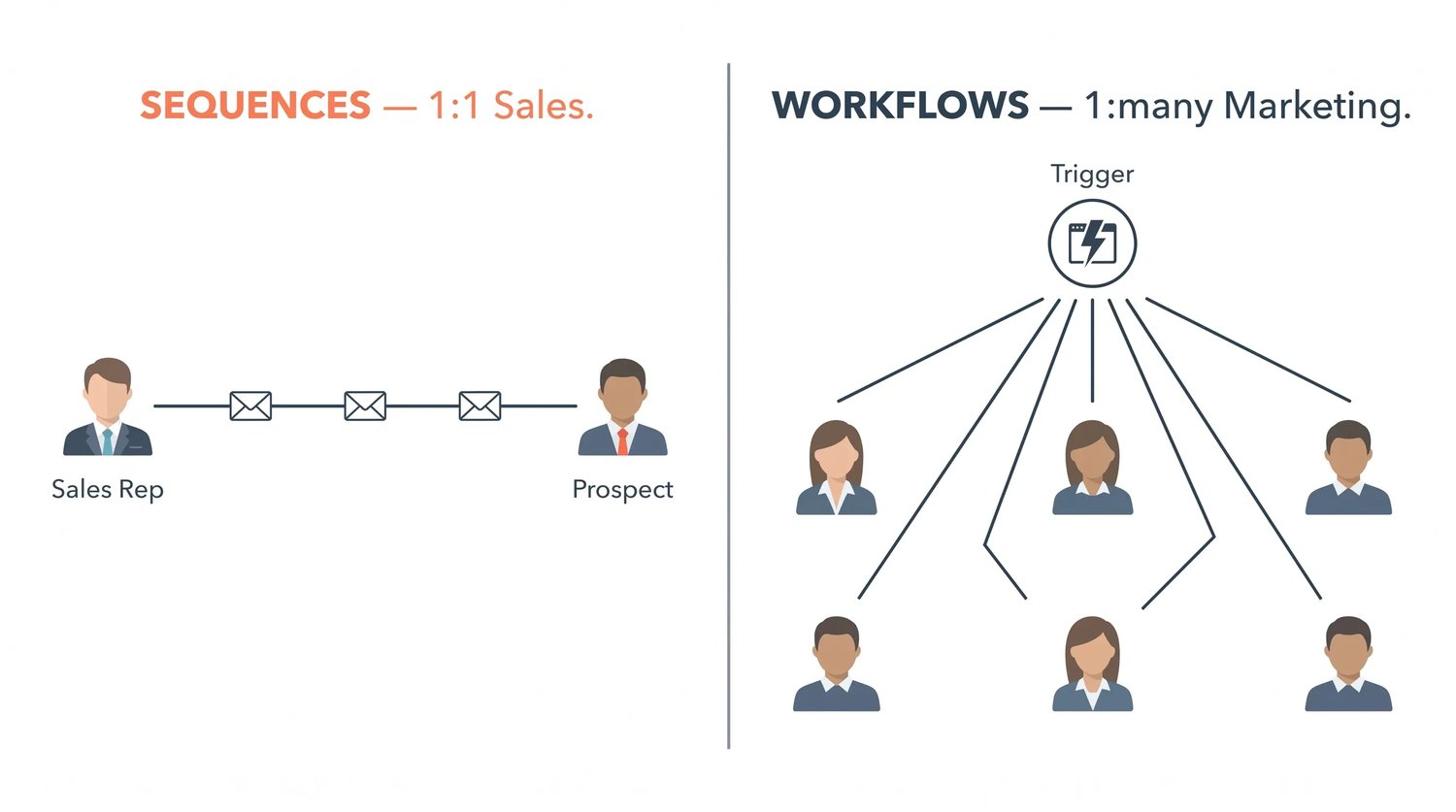 The simplest answer: Sequences are 1:1 sales tools that stop on reply. Workflows are 1:many marketing and operations tools that run until a goal is met. They look similar from the outside, but they solve different problems with different infrastructure.Here is the side-by-side your team needs:
| Dimension | Sequences | Workflows |
| Primary use case | 1:1 sales outreach | Marketing automation, internal ops, lifecycle |
| Sender | Rep's connected personal inbox | HubSpot marketing email infrastructure |
| Email type | Sales emails (templates) | Marketing emails |
| Enrollment | Manual by default; automated on Enterprise | Automated via triggers and lists |
| Stop condition | Auto-stops on reply or meeting booked | Continues until goal criteria met or hard exit |
| Step logic | Linear, no branching | Branches, delays, if/then logic |
| Required hub | Sales Hub Pro/Ent or Service Hub Pro/Ent | Marketing Hub Pro/Ent (most use cases) |
| Owner | Individual rep | Marketing or RevOps team |
| Reporting unit | Per-rep, per-sequence | Per-workflow, per-goal |
The right mental model: Workflows do the system-level work (route leads, update properties, score, notify, and hand off). Sequences do the human-level work (the actual conversation a rep has with a prospect once the system has done its job). The two are designed to work together, not compete.
if you want to know everything about HubSpot workflows, read our post: Automate Business Operations Using HubSpot Workflows for 2026 Success.
Elite Partner Tip: If you are using a Workflow to send a sales-style email from a rep's address, you are using the wrong tool. That email will fail SPF/DKIM alignment in many setups and will look like marketing to the recipient's inbox provider. Move it into a Sequence.
Why Do HubSpot Sequences Matter?
HubSpot Sequences matter because they convert your best rep's playbook into operational leverage—without adding headcount. That translates into three measurable outcomes:
- Coverage. Every lead gets the same number of touches in the same cadence. No more "the rep was busy and the lead went cold."
- Velocity. Auto-unenroll on reply means reps spend their time on responsive prospects, not on chasing the unresponsive ones.
- Forecast accuracy. Sequence performance data feeds directly into pipeline reporting, so you can see which cadences create stages and which create noise.
The hidden operational benefit: Sequences give you a system of record for outbound effort. You can finally answer the question "how many touches did we make on this account before they closed or churned?" — and that data point shapes everything from quota planning to compensation design.
How Do You Implement HubSpot Sequences? A Step-by-Step Configuration Guide
Implementing Sequences correctly is a five-stage process. Skip a stage and you build technical debt.
Step 1: Confirm Prerequisites
- Sales Hub Professional or Enterprise, or Service Hub Professional or Enterprise
- Each sending user assigned a paid Sales or Service seat
- Each user's personal email connected via Gmail, Outlook, or IMAP
- Sequences permission enabled on the user's role
- Default time zone and business hours set in the user's profile
Step 2: Build the Sequence Structure
Navigate to Sales › Sequences › Create sequence.
- Choose Start from scratch or use a HubSpot template as a starting frame
- Name the sequence with a clear convention: [Persona] – [Use Case] – [Owner Team] (for example, VP Sales – Cold Outbound – AE Team)
- Add steps in order: Automated Email, Manual Email Task, Call Task, or General Task
- Set the delay between each step (in business days, not calendar days, for sales cadences)
Step 3: Configure Templates and Tokens
- Each Automated Email step uses a saved sales email template
- Use personalization tokens for first name, company name, and any custom contact or company property
- For threading, set steps 2 onward to Reply to previous email unless you have a specific reason to start a new thread
- Test every token by running a test enrollment on a dummy contact record
Step 4: Set Settings and Safeguards
- Sending window: restrict to business hours in the recipient's time zone
- Pause on holidays: enable HubSpot's holiday pause for the recipient region
- Unenroll triggers: confirm reply and meeting-booked are toggled on (default), and evaluate the company-wide unenrollment BETA toggle for ABM cadences
- Max enrollments per rep per day: keep below 80 per rep to avoid stacking and to stay inside connected-inbox send limits
Step 5: Enroll and Measure
- For 1:1 enrollment, reps enroll directly from the contact record
- For bulk enrollment, use the contact list view (HubSpot processes a maximum of 3 emails per minute and respects your daily send limits)
- For automated enrollment from a Workflow, you need Sales Hub Enterprise or a middleware bridge (see the Advanced section)
- Track reply rate, meeting-booked rate, and unenroll reason in the Sequences performance dashboard weekly
Elite Partner Tip: Build one sequence, ship it, and let it run for 14 days before you build the next one. Teams that launch six sequences at once never get clean performance data on any of them.
What Are the Configuration Settings That Actually Matter?
Most teams use the defaults and miss the settings that drive outcomes. Here are the configuration choices that move the numbers:
- Sending window enforcement. Set to recipient time zone, not sender time zone. A 9 a.m. send to a contact in the right time zone outperforms a "send-immediately" by a wide margin.
- Reply detection scope. The default unenrolls only the contact who replies. The 2026 BETA toggle for company-wide unenrollment stops parallel outreach to colleagues at the same company — essential for any ABM motion.
- Threading behavior. Reply-in-thread for follow-ups keeps the conversation in one inbox view for the prospect, which lifts open and reply rates on later steps.
- Auto-pause on out-of-office detection. Enable it. It prevents your "did you see my last note?" step from firing into someone's two-week vacation reply.
- Meeting link consistency. Use the same HubSpot meeting link across every step in a sequence. Mixing links breaks routing and round-robin assignment.
What Are the Daily Send Limits and Enrollment Caps?
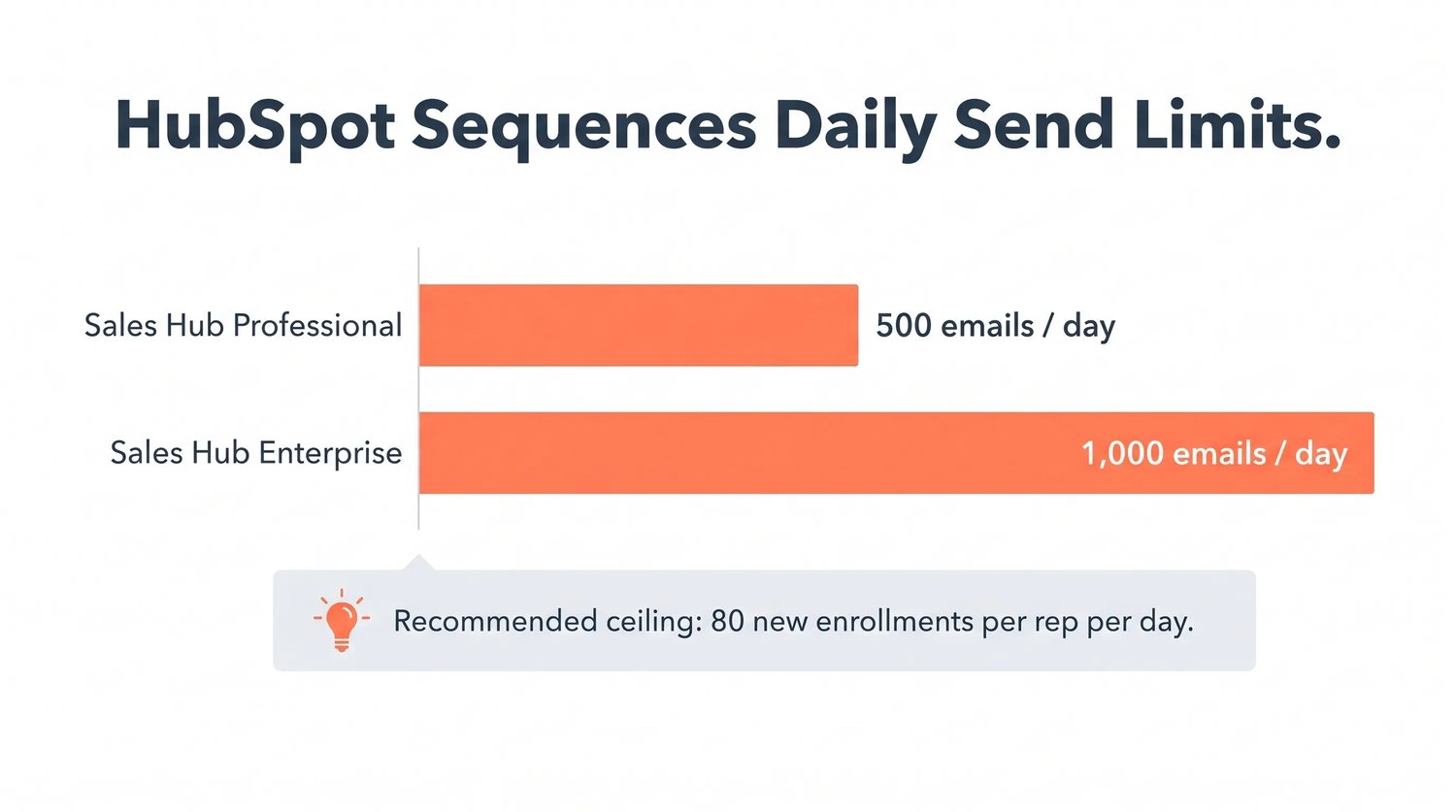 HubSpot enforces sequence sending against your connected inbox limits, not against an artificial sequence-only quota. Here is what that means in practice:
- Sales Hub Professional or Service Hub Professional: up to 500 sales emails per connected inbox per rolling 24-hour period
- Sales Hub Enterprise or Service Hub Enterprise: up to 1,000 sales emails per connected inbox per rolling 24-hour period
- Bulk enrollment throttle: HubSpot processes a maximum of 3 emails per minute during bulk enroll
- Recommended ceiling: keep daily new enrollments below 80 per rep to prevent stacked steps from breaching the rolling 24-hour send cap
- Behavior on overage: if a rep crosses the daily send limit, new contacts simply will not enroll until the rolling window clears
Elite Partner Tip: Treat the 80-per-rep guideline as a hard rule, not a guideline. The math gets ugly fast: 80 enrollments today plus the residual sends from yesterday's 80 enrollments plus the residual from the day before is exactly the kind of stack that hits the 500 cap on day three.
What Mistakes Should You Avoid?
Most sequence failures trace to one of seven configuration or process errors. Audit your setup against this list quarterly:
- Treating Sequences like a Workflow. Sequences are for 1:1 outreach. If you are sending the same email to 5,000 contacts, that is a Workflow's job.
- No unenrollment safety net. Forgetting to enable reply unenroll, or building automated enrollment without a paired automated unenrollment Workflow action, is how your reps end up emailing customers about onboarding three weeks after closed-won.
- Sender voice mismatch. Templates written by marketing in marketing voice get sent from a rep's inbox in marketing voice. Prospects spot it instantly. Templates need to sound like the rep.
- Calendar-day delays instead of business-day delays. A "Day 5" follow-up on a Saturday is a wasted step.
- Stacking sequences on the same contact. Two reps enrolling the same contact in two sequences is a deliverability and reputation risk. Use the duplicate-enrollment warning and enforce ownership rules.
- No suppression list. Customers, partners, competitors, and former employees should never be eligible for sales sequences. Build a suppression list and check it before every enrollment.
- No performance review cadence. Sequences that get built and never reviewed quietly degrade. Schedule a 30-minute monthly review of every active sequence's reply and meeting rate.
Advanced Configurations and API Deployments for Technical Experts
For systems architects, RevOps professionals, and advanced technical administrators, the standard UI is frequently insufficient for enterprise-grade ecosystem requirements. The latest HubSpot architecture provides sophisticated pathways for deep, programmatic integration.
API Architecture: automation/v4/sequences
HubSpot exposes robust API endpoints to programmatically govern sequence operations and synchronize data with external data warehouses or proprietary applications. Through the automation/v4/sequences infrastructure, external applications can natively interact with the Smart CRM.
- Retrieval operations. Execute a GET request to retrieve a comprehensive list of available sequences and the metadata required for external user interfaces or custom reporting dashboards.
- Enrollment operations. Issue a POST request to the sequence enrollment endpoint to push specific contacts into a sequence directly from external databases or proprietary lead-scoring systems. The payload requires explicit string data, including the toEmail parameter.
- Status verification. Continuously monitor granular enrollment status by reading parameters such as enrolledAt (UTC enrollment time), updatedAt (pause and unpause tracking), sequenceId, and enrolledBy (user credential). This delivers seamless, bidirectional synchronization between HubSpot and any external system of record.
Custom Unenrollment Triggers and Company-Wide Logic (BETA)
A key advancement in the 2026 architecture is the deployment of custom, systemic unenrollment triggers. Historically, a sequence only unenrolled the specific individual contact who replied. The new BETA configuration lets administrators enforce company-wide unenrollment logic.Inside the sequence's automation settings, toggling Unenroll all contacts at the same company from this sequence ensures that if one stakeholder in a buying committee replies, all parallel outreach to their colleagues is halted instantly. This prevents the redundant communications that signal a lack of internal coordination to a prospective client.
Workflow-to-Sequence Enrollment Logic and Middleware
A fundamental constraint for organizations on the Sales Hub Professional tier is the inability to natively trigger sequence enrollment from a Workflow based on CRM property changes (for example, enrolling a contact when their Lead Status shifts to "Attempted to Contact"). Native Workflow-to-Sequence enrollment is restricted to Sales Hub Enterprise and Service Hub Enterprise.Three primary architectures bridge this gap on the Professional tier:
- Custom API webhooks. Use Operations Hub Professional or Enterprise custom code actions to fire authenticated API enrollment payloads when Workflow criteria are met.
- Third-party middleware. Deploy interpreters such as FlowNer or Zapier. The Workflow fires a webhook to the middleware, which authenticates back into HubSpot and pushes the sequence enrollment via API.
- Lead scoring threshold triggers. Integrate Sequences with Marketing Hub's advanced lead scoring. Score models support up to 100 filter groups, balancing engagement-with-sales signals (for example, 15 points for a started call, 10 for a booked meeting) against engagement-with-marketing signals (for example, 6 for a CTA click, 2 for an email open). Once a prospect's cumulative score crosses a defined threshold, the system flags the contact for sequence enrollment — so reps only engage qualified, active targets.
Elite Partner Tip: If you choose middleware, log every webhook payload and every API response in a queryable system. The day a sequence misfires, you will need a forensic trail to diagnose whether the failure was in the Workflow trigger, the middleware translation, or the HubSpot API response.
Sequence Design Frameworks That Work in 2026
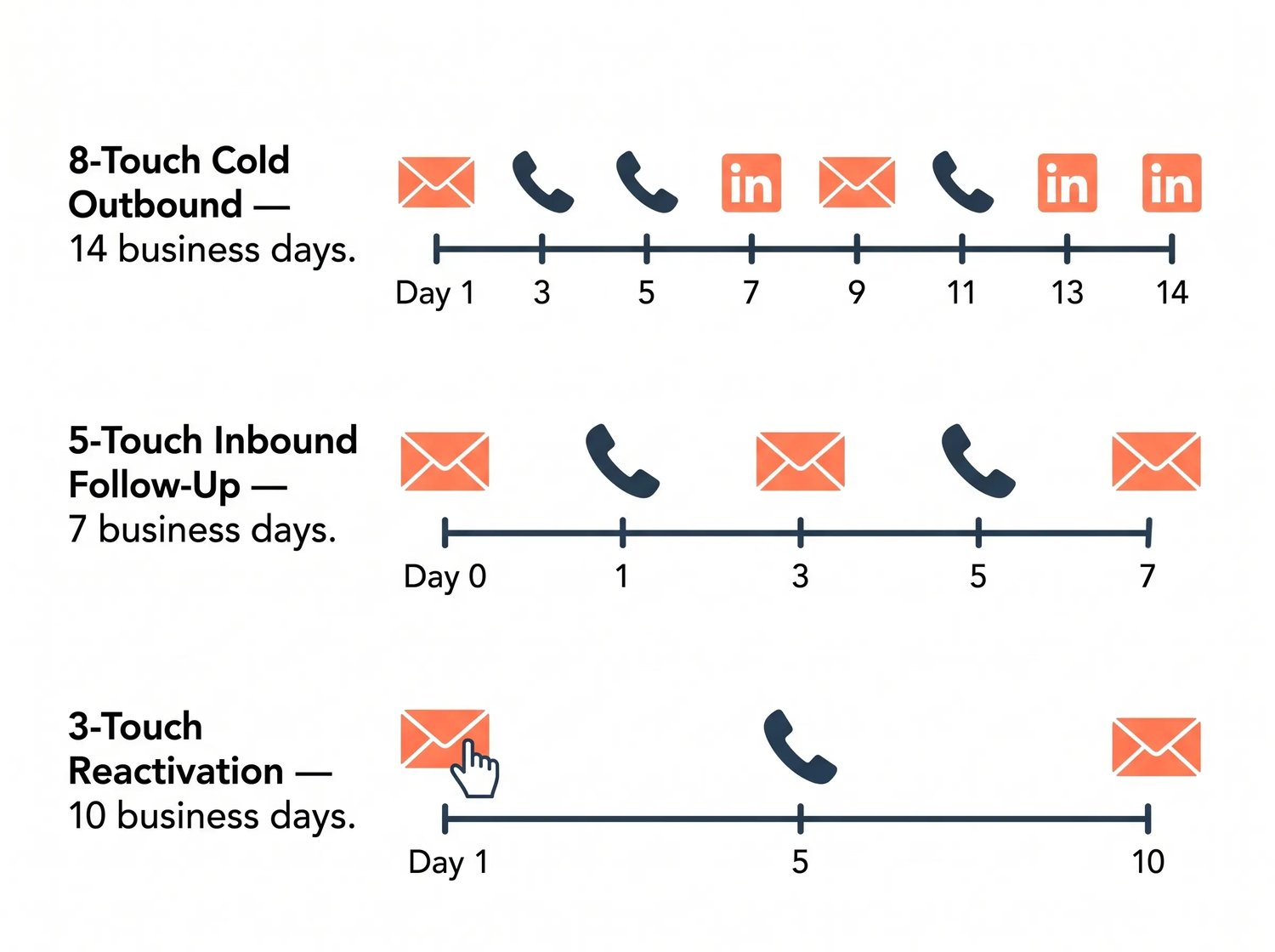 Three cadence frameworks consistently outperform improvised sequences in our client work. Pick the one that fits your motion.
The 8-Touch Outbound Framework (cold prospecting)
A 14-business-day cadence: automated email → call task → manual email → LinkedIn task → automated email → call task → manual email → break-up email. Reply rate target: 8 to 12 percent.
The 5-Touch Inbound Follow-Up Framework (MQL to SQL)
A 7-business-day cadence: automated email (immediate) → call task (Day 1) → automated email (Day 3) → call task (Day 5) → automated email (Day 7). Meeting-booked target: 15 to 20 percent.
The 3-Touch Reactivation Framework (closed-lost or stalled deals)
A 10-business-day cadence: manual email → call task → automated break-up email. Reply rate target: 4 to 6 percent.Use these as starting points, then iterate based on your actual reply and meeting data after 30 days.
Sequence Pre-Launch Checklist
Before you turn a sequence on for live prospects, walk this list:
- [ ] Sender's inbox is connected and authenticated
- [ ] Every step has a delay set in business days
- [ ] Every Automated Email step has a tested template with all tokens populated
- [ ] Reply unenroll and meeting-booked unenroll are both enabled
- [ ] Sending window is set to recipient time zone
- [ ] Suppression list is applied (customers, partners, competitors, former employees)
- [ ] Naming convention follows [Persona] – [Use Case] – [Owner Team]
- [ ] At least one test enrollment has run cleanly on a dummy contact
- [ ] Performance review is scheduled for 14 and 30 days post-launch
- [ ] Owner is documented in the sequence description field
FAQ: HubSpot Sequences in 2026
What HubSpot tier do I need to use Sequences?
Sales Hub Professional or Enterprise, or Service Hub Professional or Enterprise. Sequences are not available on Free or Starter.
Can I trigger a Sequence from a Workflow?
Natively, only on Sales Hub Enterprise or Service Hub Enterprise. On Professional, you can bridge the gap with Operations Hub custom code, third-party middleware, or lead scoring thresholds calling the API.
How many emails can a Sequence have?
A sequence supports up to 10 email templates, plus an unlimited number of task reminders.
How many contacts can I bulk-enroll at once?
HubSpot processes bulk enrollments at a maximum of 3 emails per minute and respects your daily send cap. We recommend keeping new enrollments below 80 per rep per day.
Will a Sequence stop if the prospect replies?
Yes — that is the default behavior. The contact is unenrolled automatically when they reply to a sequence email or book a meeting through a HubSpot meeting link in the email.
Can a Sequence unenroll the entire company when one contact replies?
Yes, in the 2026 BETA. Toggle Unenroll all contacts at the same company from this sequence in the sequence's automation settings.
Can Sequences send LinkedIn messages automatically?
No. With the LinkedIn Sales Navigator integration, Sequences create task reminders that deep-link the rep into LinkedIn to send the message manually.
What is the API endpoint for Sequences?
The 2026 endpoint is under automation/v4/sequences, supporting GET for retrieval, POST for enrollment, and status fields including enrolledAt, updatedAt, sequenceId, and enrolledBy.
Should marketing emails go in a Sequence or a Workflow?
Workflow. Sequences are for 1:1 sales emails sent from a rep's connected inbox. Marketing email belongs in Workflows on Marketing Hub.
Why isn't my sequence sending?
The most common causes: the rep hit their daily send cap, the inbox disconnected, the contact is already enrolled, the contact is on a suppression list, or the sending window is currently outside business hours.
Key Takeaways
- Sequences are HubSpot's 1:1 sales automation tool — for rep-driven, personalized outreach, not marketing batch sends.
- Four step types power every sequence: Automated Email, Manual Email Task, Call Task, and General Task (including LinkedIn).
- Sequences vs. Workflows is a system-versus-conversation distinction. Workflows automate the system, Sequences automate the human conversation.
- Tier matters. Sales or Service Hub Professional or Enterprise is required, and native Workflow-to-Sequence enrollment is Enterprise-only.
- Send limits are real. Stay under 80 enrollments per rep per day to avoid the 500/1,000 daily cap.
- The BETA company-wide unenroll is essential for any ABM motion in 2026.
- API and middleware bridge the gaps for Professional-tier teams that need automated enrollment.
- The biggest mistakes are configuration mistakes — wrong threading, no suppression list, calendar-day delays, no performance review cadence.
- Build one sequence, measure it, then build the next. Six at once gives you no clean data on any of them.
Get the HubSpot Sequences Template Library
Want the cadences, templates, and pre-launch checklists we use with our HubSpot Admin clients? We've packaged the same starting frameworks our team deploys — the 8-touch outbound, 5-touch inbound follow-up, and 3-touch reactivation — into a free HubSpot Sequences Template Library you can import directly into your portal. Use it to audit your current setup, deploy proven cadences faster, and reformat your messaging so it actually sounds like your reps.
[Download the HubSpot Sequences Template Library →]

On The Fuze is an Elite HubSpot Partner helping growing companies in the US and Canada keep HubSpot aligned with how their business actually works — so revenue stops leaking through the cracks of an out-of-date CRM.