HubSpot Chatflow Quick Setup Checklist
Get the free 4-phase setup checklist. Set up, build, target, and launch a HubSpot chatbot that greets, captures, and qualifies every visitor.
Download Now
If your website gets traffic but your team only sees a trickle of leads, the leak is usually the same: visitors show up with a question, no one answers fast enough, and they leave. On a busy site, that happens dozens of times a week—quietly, with no record it ever occurred.
This is one of the most common revenue leaks we find when auditing HubSpot accounts. The traffic is there. The interest is there. But there's nothing in place to catch it the moment intent is highest.
HubSpot Chatflows is the tool built to fix that. This guide covers everything you need to make a confident decision: what Chatflows actually are, whether HubSpot has a real chatbot, how the three types differ, exactly what it costs in 2026, how to set one up step by step, and the mistakes that quietly waste the setup.
What Are HubSpot Chatflows?
 A HubSpot Chatflow is the tool you use to build and manage the chat experience on your website—the widget that greets visitors, answers questions, captures details, and routes people to the right place. Think of it as a 24/7 front-desk receptionist for your site.
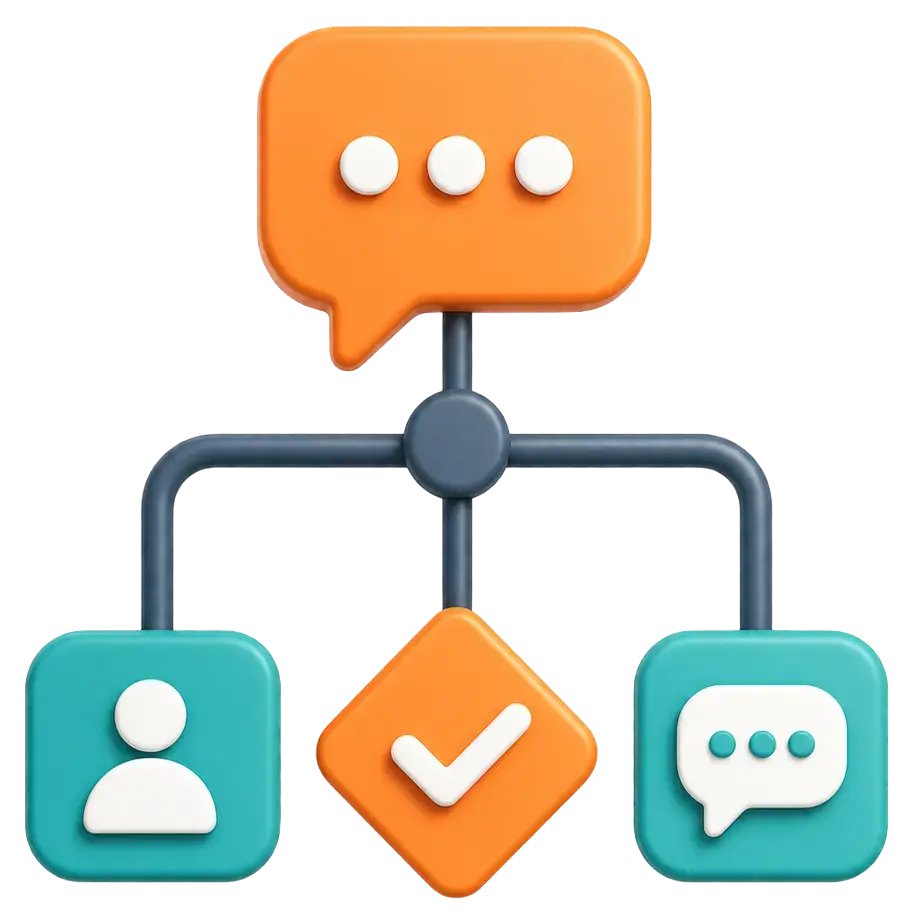
Here's the important nuance most people miss: "Chatflow" is not one thing. It's an umbrella over three different ways of handling a conversation, and choosing the wrong one is where budgets and leads get wasted.
- Live Chat — a real person on your team replies in real time.
- Rule-Based Chatbot — an automated "if this, then that" flow you design.
- Customer Agent (Breeze AI) — HubSpot's AI reads the question and answers on its own.
Every conversation, no matter the type, flows into the HubSpot Conversations inbox (or the Help Desk workspace), where it's tied to a contact record in your CRM. That link—chat to contact—is the whole point. A conversation you can't attribute to a person is a conversation you can't follow up on.
🏆 Elite Partner Tip: Don't think of Chatflows as "a chatbot." Think of them as a routing layer. The real value isn't the chat bubble — it's that every conversation lands in your CRM as a trackable, ownable lead you can nurture, score, and report on.
Does HubSpot Have a Chatbot?
Yes. HubSpot has three distinct kinds of built-in chatbots, from a simple rule-based bot all the way to a native AI agent. You do not need a third-party tool to add a working chatbot to your site.
Here's how the three types compare and when to use each:
| Type | Who answers | Best for | Works when your team is offline? |
|---|---|---|---|
| Live Chat | A human on your team | High-value sales chats that need judgment | No — only during staffed hours |
| Rule-Based Chatbot | An automated decision tree | Qualifying leads, booking meetings, FAQs, routing | Yes — runs 24/7 |
| Customer Agent (Breeze) | HubSpot's AI | Unscripted questions, support deflection at scale | Yes — runs 24/7 |
The Rule-Based Chatbot is where most growing companies should start. It runs around the clock, captures and qualifies leads automatically, and doesn't cost anything extra to operate. The AI Customer Agent is a powerful upgrade — but, as you'll see in the pricing section, it's a layer you add once the fundamentals are working, not your starting point.
🏆 Elite Partner Tip: A Live Chat–only setup quietly shuts your funnel off the moment your team logs off. If most of your traffic arrives evenings and weekends, a rule-based bot that captures an email after hours will out-earn a "nicer" live chat that's only online 9-to-5.
What Can You Use HubSpot Chatflows For?
Chatflows earn their keep in three places: capturing leads, booking meetings, and deflecting repetitive support. The most common high-value use cases we build for clients:
- Lead capture & qualification on high-intent pages (like pricing) — the bot asks a few qualifying questions and captures an email before the visitor leaves.
- Instant meeting booking — when a visitor qualifies, the bot surfaces a rep's live calendar and books the meeting in-chat while intent is hot.
- After-hours capture — when your team is offline, the bot still greets visitors, grabs their email, and promises a follow-up so no lead is lost overnight.
- Tier-1 support deflection — a bot surfaces the right knowledge base article for common questions ("where's my order," "how do I reset my password"), and escalates to a human with a ticket only when needed.
- Smart routing — known contacts go straight to their account owner; new inquiries get distributed across the team.
The through-line: each of these turns anonymous website traffic into a named, routed contact in your CRM — the difference between "we get traffic" and "we get leads."
How Much Does a HubSpot Chatbot Cost?
Live chat and rule-based chatbots are included in every HubSpot plan—including Free—at no extra cost. Only the AI Customer Agent (Breeze) carries a usage fee. Here's the full breakdown:
| Capability | Plan required | Cost |
|---|---|---|
| Live Chat | Any plan, including Free | Included — no per-conversation fee |
| Rule-Based Chatbot | Any plan, including Free* | Included — no per-conversation fee |
| Customer Agent (Breeze AI) | Professional or Enterprise | Usage-based — see below |
*Advanced bot logic (custom if/then branching, knowledge base lookups, webhooks) requires Professional or Enterprise. Free and Starter bots are limited to linear, form-style flows.
How Breeze AI pricing works in 2026: On April 14, 2026, HubSpot moved the Breeze Customer Agent to outcome-based pricing — you only pay when the agent actually resolves a conversation.
- ~$0.50 (50 credits) per resolved conversation — down from $1.00 per conversation under the old model.
- Credits cost $10 per 1,000.
- Included monthly credits: 3,000 on Professional (≈ 60 resolved conversations) and 5,000 on Enterprise (≈ 100 resolved conversations) — the two plans where the Customer Agent is available.
- Past your included credits, you pay overages at the same $10-per-1,000 rate.
- A conversation counts as "resolved" when the agent answers from a knowledge source or completes an action without a human handoff (within a 72-hour window) or qualifies a lead.
🏆 Elite Partner Tip: The credit pool is shared across all Breeze AI features. If your team is also using AI for prospecting or data work, model your monthly volume before switching the Customer Agent on — a high-traffic month can burn through included credits faster than you'd expect. Start with the free rule-based bot, prove it captures leads, then layer Breeze on only where it clearly deflects volume.
How Do You Set Up a Chatflow in HubSpot?
You build a Chatflow in the Chatflows tool, then point it at the right page — no code required. Below is the exact path we use with clients to stand up a rules-based, lead-qualifying bot (the highest-value place to start).
Before You Build
Two prerequisites, or the widget simply won't appear:
- Install the HubSpot tracking code. In Settings → Tracking & Analytics → Tracking Code, copy your snippet and add it before the
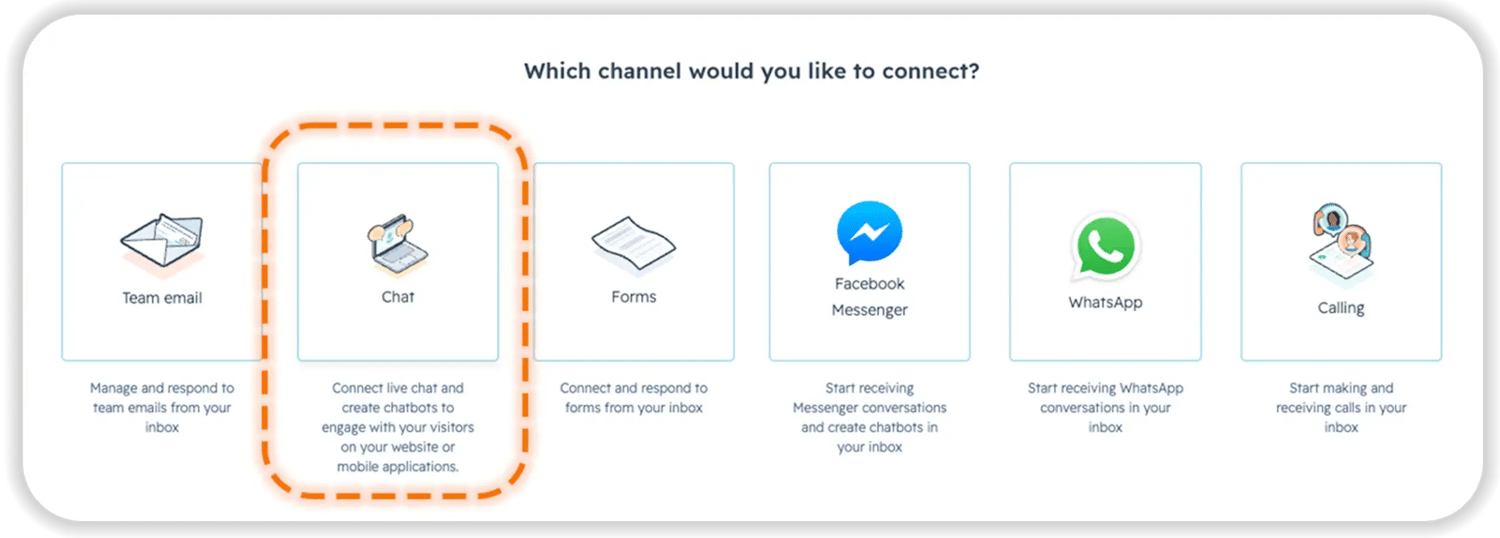
</body>tag on every page. On WordPress, install the official HubSpot plugin. - Connect a chat channel. Go to Settings → Inbox & Help Desk → Inboxes → Connect a channel → Chat → Web. This is also where your team's availability and away behavior live—not inside the chatflow itself (a detail that trips up a lot of admins).
Build the Bot — Step by Step
- Go to Service → Chatflows and click Create chatflow (top right).
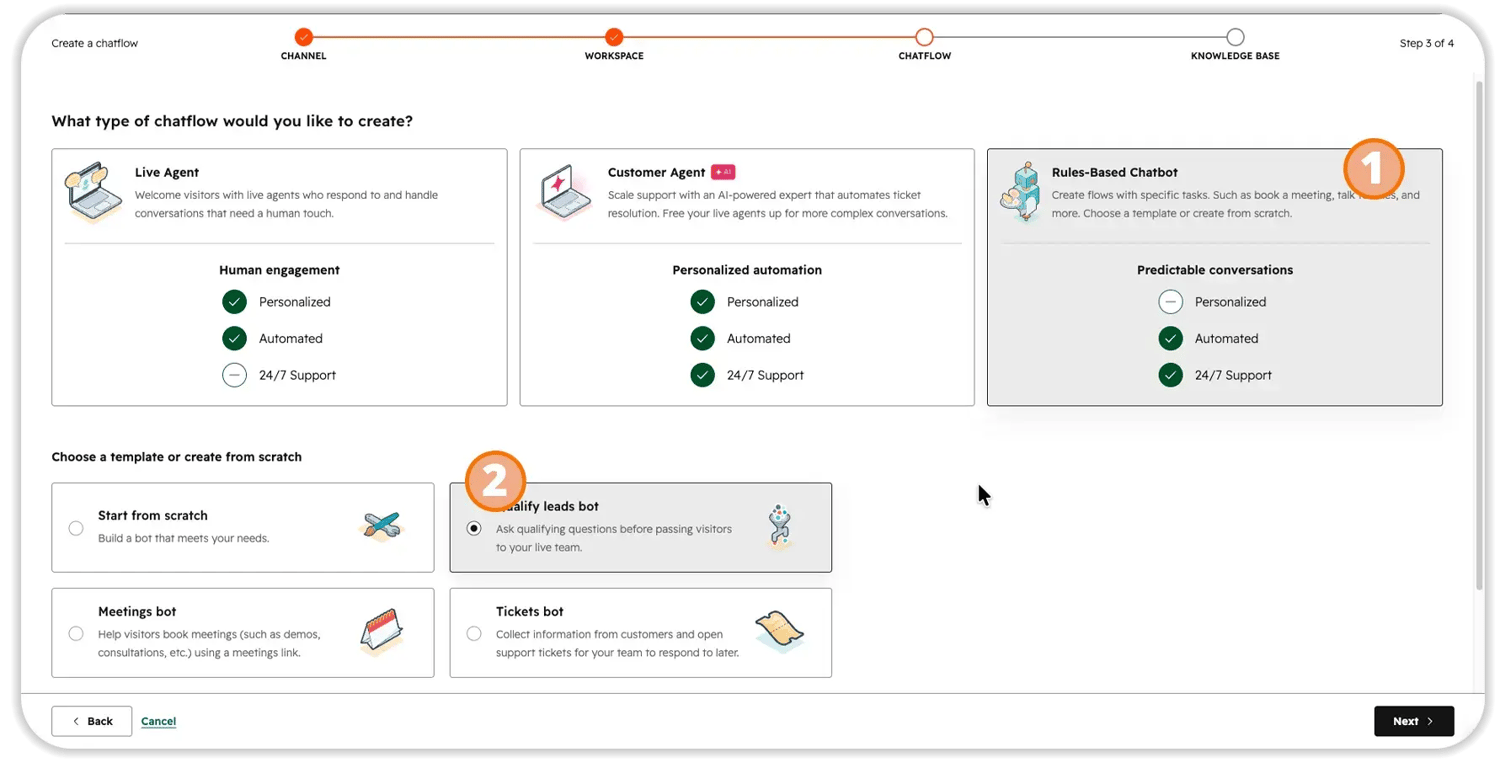
- Select "Website" as the channel. (You can also choose Facebook Messenger, or a mobile app via the Mobile SDK.)
- On the Workspace screen, choose the inbox or help desk these conversations should land in, set your language, and click Next.
- Choose the type: Rule-Based Chatbot. This is what runs 24/7 and qualifies leads on autopilot.
- Start from the "Qualify leads" template — it ships with a greet → question → email-capture flow already wired. Click Create.
- On the Build tab, edit the welcome message, then use the + icon to add Ask a question actions. Turn on quick replies (buttons instead of free text) and map each answer to a contact property.
- Confirm the email-capture step sits near the top of the flow. The moment a visitor enters their email, HubSpot creates a contact — so even an abandoned chat becomes a real lead.
- End with a real next step: add a "Book a meeting" action (with your meeting link) or "Send to team member."
- On the Target tab, add a Website URL rule for your high-intent page (e.g., URL contains /pricing), and an exclusion rule for pages like your privacy policy.
- On the Display tab, set a trigger — time on page (5s+), exit intent, or scroll depth — and turn on "Display quick replies below the welcome message."
- On the Options tab, keep consent settings on (GDPR/CCPA) and set Availability appropriately.
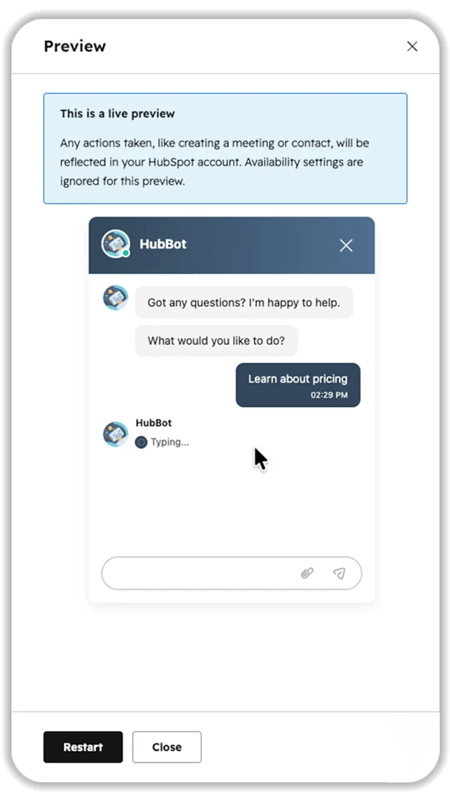
- Click Preview, run the whole conversation yourself, confirm a test contact appears in your CRM, then toggle the chatflow On.
🏆 Elite Partner Tip: Capturing the email early is the single highest-leverage setting in the whole build. Ask for it at the end and every visitor who drops off mid-conversation vanishes with no record. Ask for it near the top and a half-finished chat is still a lead you can follow up on tomorrow.
How Do You Make a HubSpot Bot Smarter? (Advanced Configuration)
Once the basics work, HubSpot's bot actions and branching turn a simple flow into a genuine qualification-and-routing engine. The features worth knowing:
- If/then branches (Professional & Enterprise) — send visitors down different paths based on their answers, a CRM property, or your team's availability. For example: route "Are you a current customer?" → Yes to a support ticket and No to a sales rep.
- Enroll in a Workflow — hand a qualified contact straight to back-end automation (owner assignment, lead scoring, nurture) the moment the chat ends.
- Knowledge base lookup (Service Hub Pro/Enterprise) — let the bot surface help articles so visitors self-serve before a human is involved.
- Send to team member with smart routing — use Contact Owner routing so known prospects reach their rep and Round Robin for new inquiries so nobody gets overloaded.
- Webhooks & custom code (Operations Hub Pro/Enterprise) — pull real-time data from an external system mid-conversation (inventory, pricing, account status).
- Chatflow priority — if you run multiple bots whose targeting overlaps, HubSpot shows only the highest-priority match, so drag your most specific flow to the top.
These are also where the AI Customer Agent fits: point it at your knowledge base, and it answers unscripted questions your button-based bot can't — the upgrade path once your rule-based foundation is capturing leads reliably.
What Mistakes Should You Avoid with HubSpot Chatflows?
The most expensive Chatflow mistakes aren't technical—they're setup decisions that quietly leak leads. The ones we fix most often:
- The silent widget. The chat never loads because the tracking code isn't installed, the flow is toggled off, or a targeting rule doesn't match. Fix: verify the tracking code, confirm the flow is On, and test in a browser with no ad-blocker.
- Capturing the email too late. Ask at the end, and early drop-offs disappear with no record. Fix: move the email step near the top of the flow.
- The dead-end flow. A visitor picks an option, gets one line of text, and hits a wall. Fix: every branch needs a next step — another question, a menu, or a human hand-off.
- Notifications routed to a connected inbox. HubSpot flags those internal alerts as spam, and you never see the lead. Fix: send chat alerts to Slack or the mobile app.
- Set-and-forget. Launching and never checking. Fix: watch the first 48 hours, then review transcripts monthly to see where people get stuck.
🏆 Elite Partner Tip: Almost every "our chatbot doesn't work" audit we run comes down to one of two things — it was never tested end-to-end, or the email was captured too late. Both are five-minute fixes that most teams never make because no one is regularly reviewing the setup as the business changes.
Frequently Asked Questions
Does HubSpot have a chatbot?
Yes. HubSpot includes three built-in chat options: Live Chat (human-staffed), a Rule-Based Chatbot (automated flows), and the AI-powered Customer Agent (Breeze). Live chat and rule-based bots are available on every plan, including Free.
How much does a HubSpot chatbot cost?
Live chat and rule-based chatbots are included at no extra cost, even on the Free plan. The AI Customer Agent (Breeze) requires a Professional or Enterprise plan and runs on usage-based pricing — about $0.50 (50 credits) per resolved conversation as of April 2026, with credits at $10 per 1,000 and included monthly allowances of 3,000 credits on Professional and 5,000 on Enterprise.
Do I need a paid plan to use HubSpot chat?
No. You can build and run live chat and a rule-based chatbot on HubSpot's Free plan. You only need a paid Professional or Enterprise plan for advanced bot logic (custom if/then branching, knowledge base lookups) and the AI Customer Agent.
Can a HubSpot chatbot book meetings and qualify leads?
Yes. A rule-based bot can ask qualifying questions, save answers to contact properties, and surface a rep's live calendar to book a meeting inside the chat — no human required.
Where do HubSpot chat conversations go?
Every conversation lands in the Conversations inbox (or Help Desk workspace) and is tied to a contact record in your CRM, so your team can respond, route, and follow up.
Does the HubSpot chat widget work on WordPress?
Yes. Install the HubSpot tracking code (or the official HubSpot WordPress plugin), and the widget will render on your WordPress pages based on your targeting rules.
Key Takeaways
- HubSpot Chatflows are three tools in one: Live Chat, a Rule-Based Chatbot, and the AI Customer Agent (Breeze). Most growing companies should start with the rule-based bot.
- Yes, HubSpot has a real chatbot — no third-party tool required — and live chat plus rule-based bots are included on every plan, including Free.
- Only the AI Customer Agent costs extra: ~$0.50 per resolved conversation on Professional or Enterprise, under outcome-based pricing introduced in April 2026.
- Chatflows ≠ Workflows. Chatflows run the live conversation. Workflows run the back-end automation. They're partners.
- The highest-leverage setting is capturing the email early — it's the difference between a captured lead and a lost one.
- Most "broken bot" problems are setup issues, not tool limitations — a silent widget, a late email capture, or a dead-end flow. All are quick fixes if someone is reviewing the setup regularly.

%20(1)-2.webp)
.webp)