
Get The Complete Revenue Hub Toolkit
5 done-for-you kits covering your entire revenue journey. Set it up once, get paid faster, stop chasing invoices, and protect your margin on every deal.
Download Now

If you can't say which clients are late and exactly how much they owe you, you're not running your revenue. You're guessing at it.
Most growing companies don't lose money in one dramatic event. They lose it in small, quiet gaps: a quote that sat for three days, a signed contract nobody invoiced against, an invoice nobody chased, and a renewal that passed while everyone was busy. Each gap looks minor. Together, they're your margin.
HubSpot Revenue Hub closes those gaps in two ways: analytics that show you where revenue is leaking and AI plus automation that handle the follow-up work without you. We will cover both: where the reports live, which ones matter, what each AI agent does and whether it has actually shipped, how to configure the workflows, and the setup mistakes that quietly cost real money.
What Is HubSpot Revenue Analytics?
HubSpot Revenue Analytics is a suite of pre-built reports that track your billing and payment data: invoices, quotes, subscriptions, payments, and contracts. It sits inside HubSpot's standard reporting tool, not in a separate billing product.
The important shift in 2026 is where the numbers come from. Historically, teams tracked recurring revenue by hacking deal properties, which corrupted pipeline data every time someone logged a mid-term upgrade. Revenue Analytics now reads from the Contract object, so a downgrade, an expansion, or a renewal is recorded as a revenue event without touching the deal record.
That distinction matters for one practical reason: a deal tells you what someone intended to buy. A contract tells you what they're committed to pay.
🏆 Elite Partner Tip: Before you build anything custom, work through the pre-built reports first. Most SMBs we audit have three custom reports answering questions HubSpot already answers out of the box, and no report answering "who owes us money right now."
Where Do You Find Revenue Reports in HubSpot?
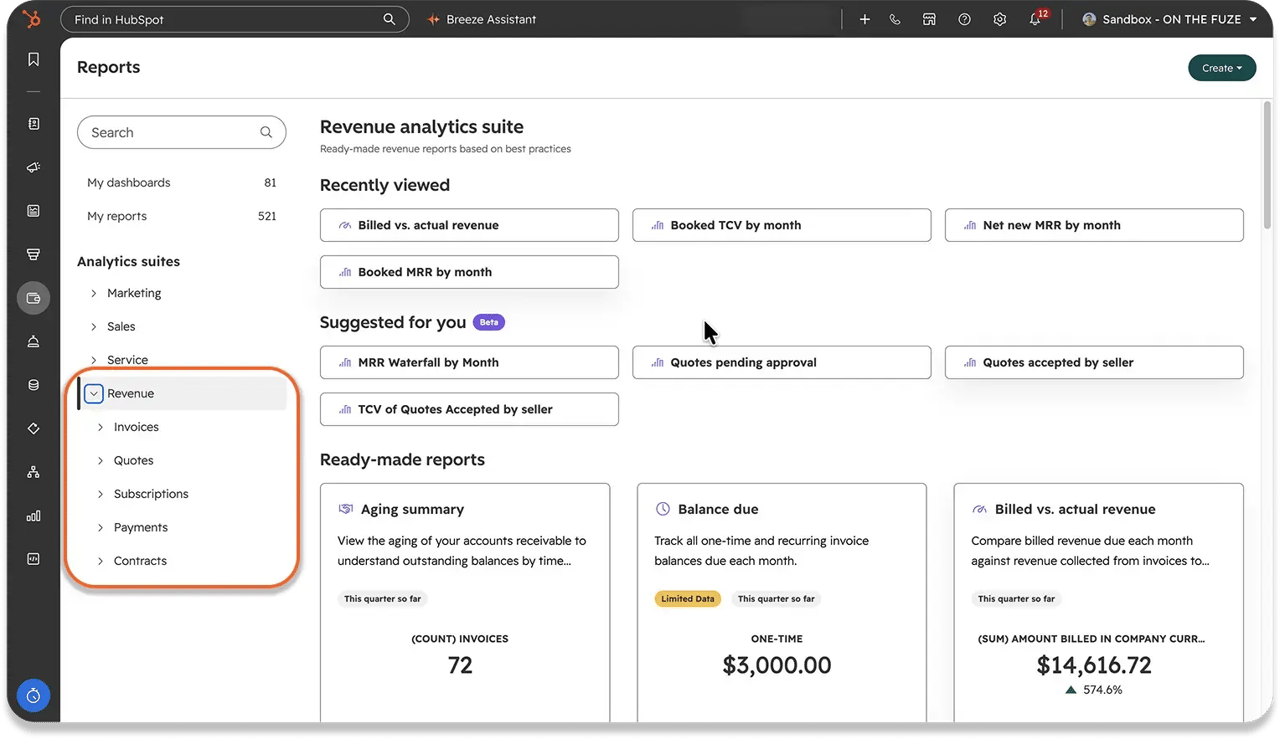
Go to Reporting > Reports, then click Revenue in the left sidebar. From there, select the topic area you want, and the ready-made reports appear in the middle panel.
The suite is organized by object, not as one flat list. Here's what lives where:
| Collection | Reports available |
|---|---|
| Invoices | Aging summary, Balance due, Billed vs. actual revenue, Invoice status |
| Quotes | Quotes created by seller, Quotes accepted by seller, TCV of quotes accepted by seller, Quotes pending approval, Quotes expiring |
| Subscriptions | Churn subscriptions, Churn subscriptions value, New subscriptions, New subscriptions value |
| Payments | Gross payment revenue, Total payment volume |
| Contracts | MRR waterfall by month, Net new MRR by month, Booked MRR by month, Booked TCV by month |
Each report opens with a preview, filters at the top, and a right-hand panel where you define properties, group by a dimension, and compare against a prior period. Once it's useful, click Save report to push it to a dashboard.
Tier requirement: the revenue analytics suite requires a Professional or Enterprise subscription. Free and Starter accounts can create invoices, payment links, and simple subscriptions, but the analytics suite isn't included.
Which Revenue Reports Should You Actually Watch?
Four reports answer the questions most owners lose sleep over. Ignore the rest until these four are part of a routine.
1. MRR Waterfall by Month
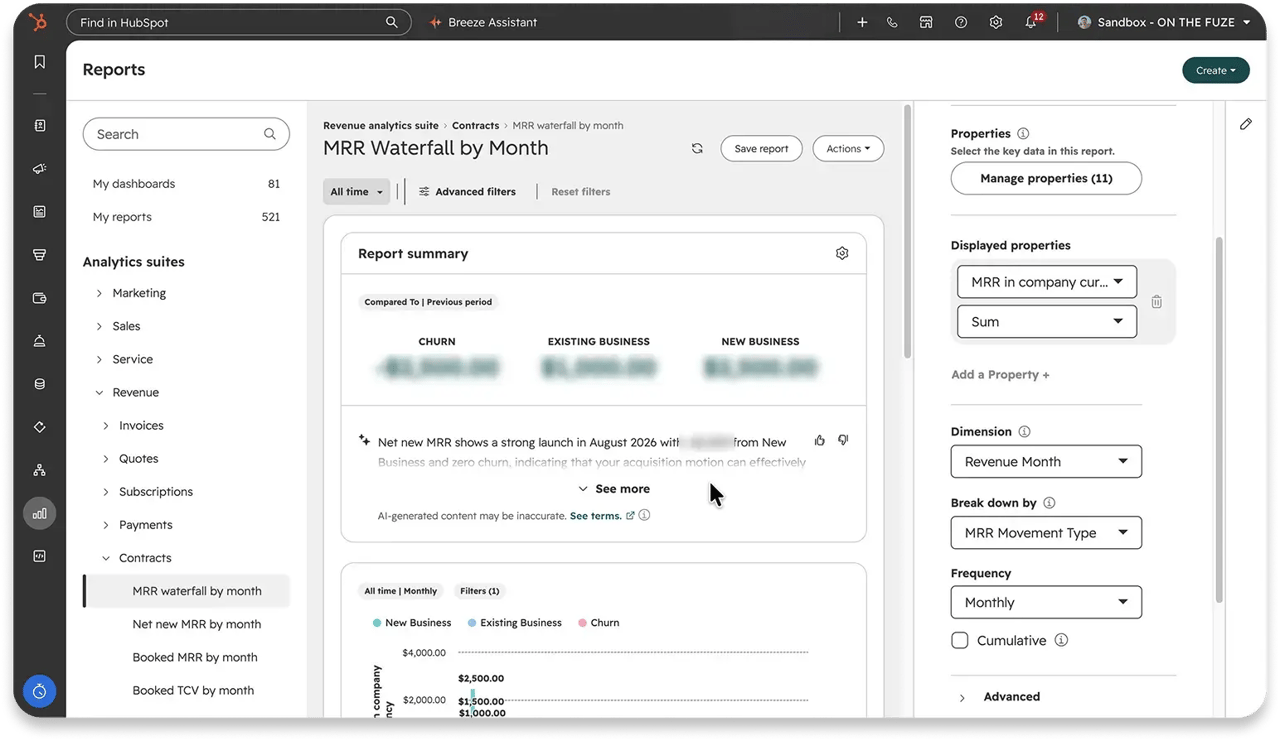
Tracks the monthly movement of recurring revenue and breaks it into existing business, new business, upgrades, downgrades, churn, and renewals. Revenue is reported when it becomes effective.
Use it to answer: is our recurring revenue growing, and which of the six movements is driving it?
2. Booked MRR by Month vs. Net New MRR by Month
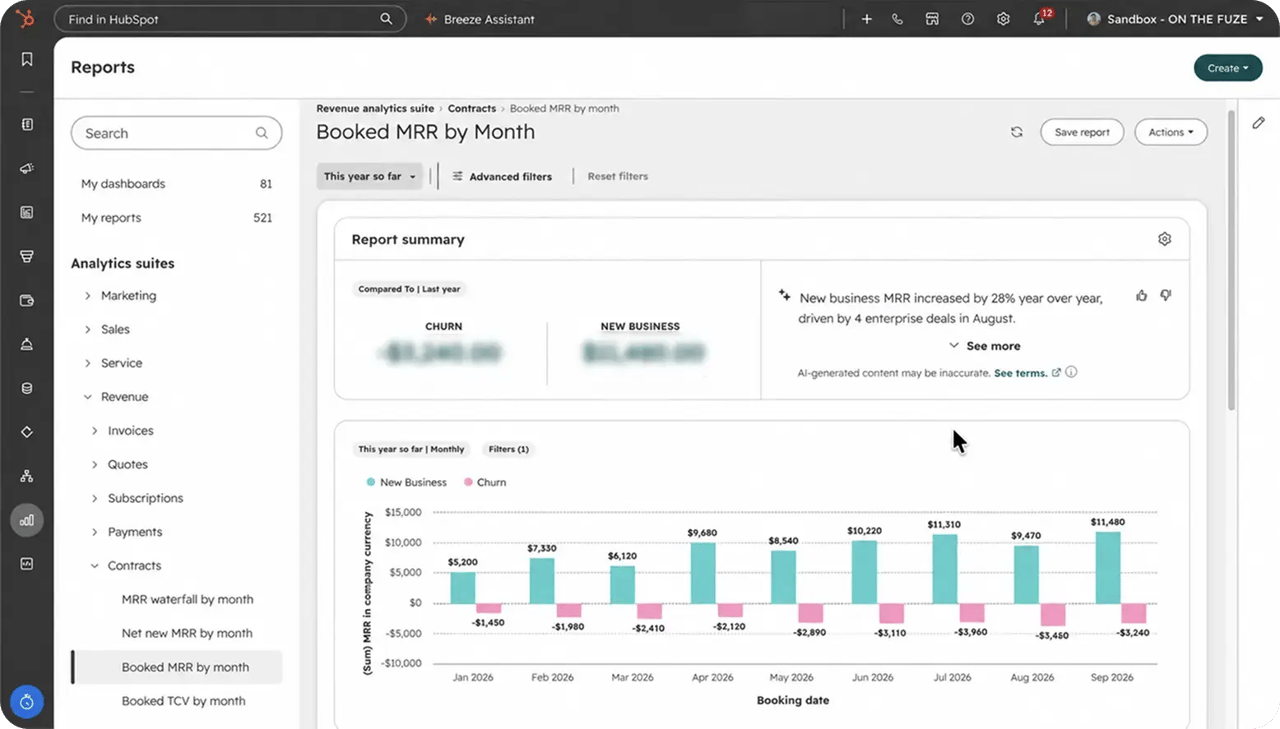
These two look similar and answer opposite questions.
- Booked MRR reports revenue when the contract is signed, even if it starts later. This is what you just sold.
- Net new MRR reports the net change once revenue becomes effective. This is what your recurring base is doing.
A month with strong booked MRR and flat net new MRR isn't a contradiction. It means you sold well and the revenue hasn't landed yet.
3. Billed vs. Actual Revenue
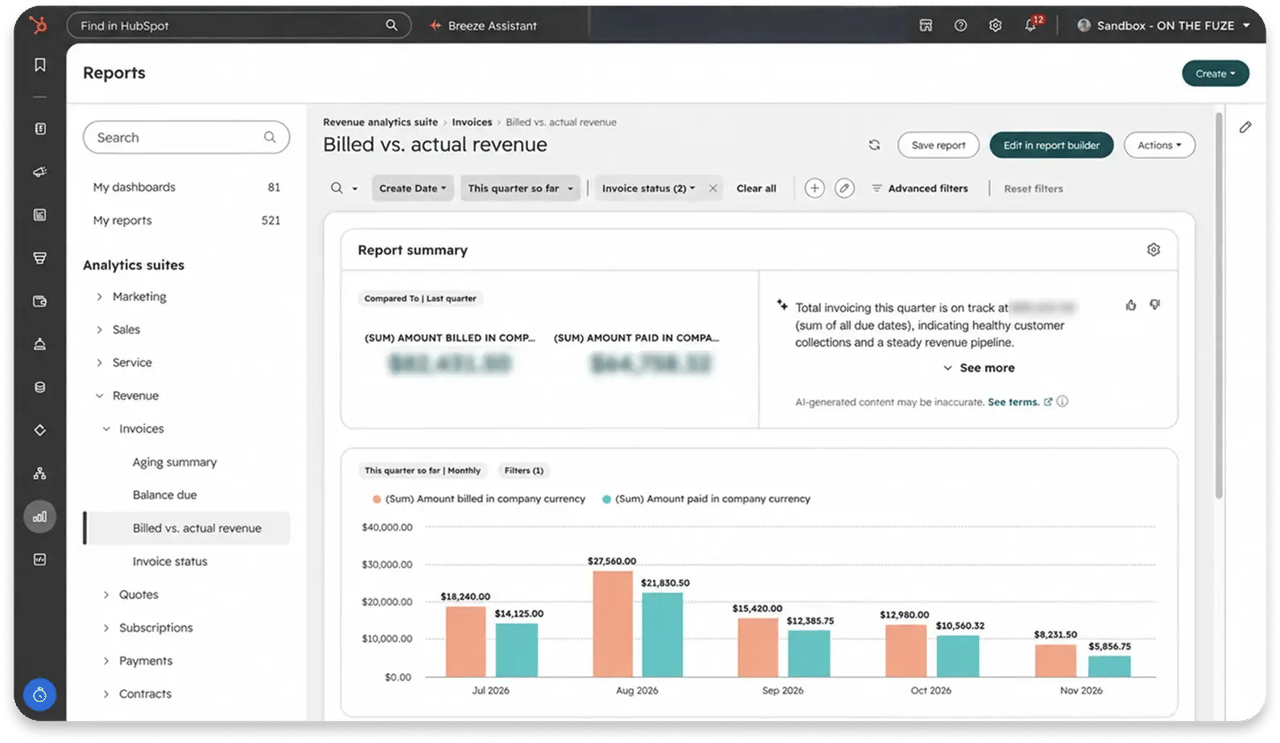
Compares the sum billed on invoices against the sum actually collected, in company currency, based on due date. The gap between those two lines is the money you've earned and haven't received.
4. TCV of Quotes Accepted by Seller
Total contract value from accepted quotes, segmented by rep. The cleanest answer to who is carrying the quarter, measured in contract value rather than deal count.
🏆 Elite Partner Tip: Don't try to memorize the full suite. Bookmark the two or three that answer your question, usually cash collected and pipeline health, and check those on a schedule. A report nobody opens is not a reporting system.

How Do You Track Overdue Invoices and Accounts Receivable?
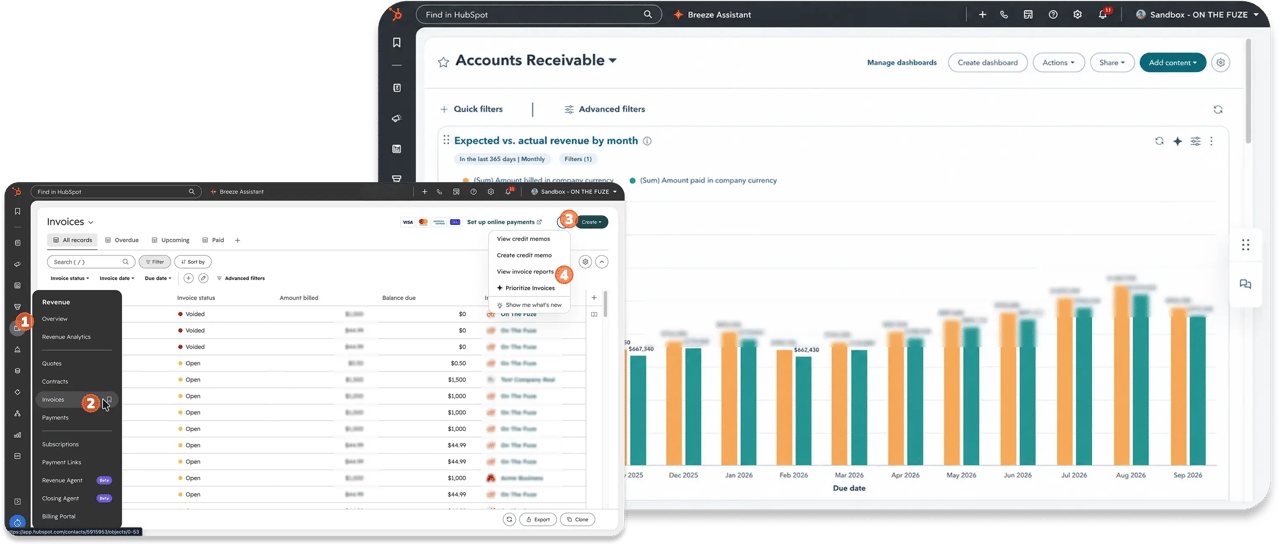
Through a dedicated Accounts Receivable dashboard, generated from the Invoices index page rather than the general reporting tool. Navigate to Revenue > Invoices > View invoice reports, then select the Accounts Receivable dashboard.
That dashboard includes:
- Balance due over time, total outstanding money owed across all invoices
- Open invoices, everything issued and unpaid
- Past due invoices, isolating accounts that missed their deadline
- A/R aging summary, unpaid receivables grouped into age buckets
- Expected vs. actual revenue by month
- Invoices paid on time
- A/R aging report (Professional and Enterprise only)
The aging summary is the one to read first. A balance of $40,000 means something very different when it's 15 days old versus 90 days old.
Breeze Invoice Prioritization
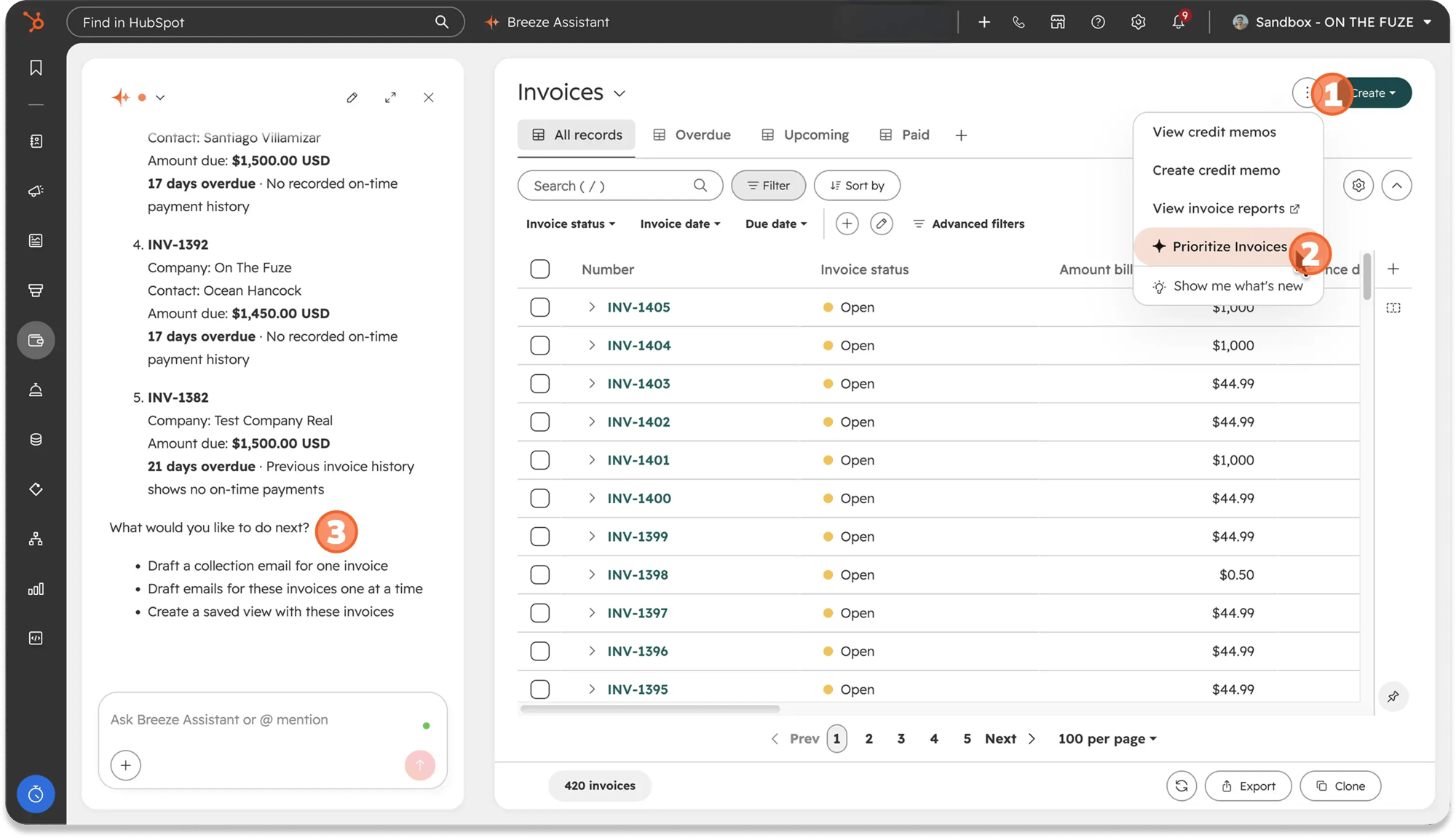
On the invoices index page, HubSpot's invoice prioritization reached general availability on August 2026 and is available across all hubs and tiers. It ranks your open invoices by revenue impact and drafts a personalized collection email for each one.
The scoring runs across three dimensions:
- Revenue risk, how much money is exposed
- Customer risk, the health and history of the account
- Invoice risk, how overdue and how likely to slip further
Worth being precise about what this does and doesn't do: it ranks and drafts. A human still reviews and sends. That distinction matters when you're deciding how much of collections you can genuinely hand over today.
What AI Agents Work on Revenue in HubSpot?
Four AI tools touch the money process, and they are at very different stages of maturity. Treating them as one capability is the fastest way to build a plan on something that hasn't shipped.
| Tool | What it does | Status (September 2026) | Requires |
|---|---|---|---|
| Breeze Assistant | Drafts quotes and payment links from plain language; answers MRR, TCV and ARR questions from Contract data | Live, with payment links and the revenue skill in public beta | Admin enables Breeze Assistant access in AI settings |
| Closing Agent | Sits on the hosted quote page and answers buyer questions on pricing and terms, then hands off if it can't resolve | Beta | Revenue Hub Professional or Enterprise; Super Admin to configure |
| Customer Agent | Answers billing questions across chat, email, and the self-serve billing portal; sends payment links and pulls up invoices in the conversation | Generally available | Service Hub Professional or above |
| Revenue Agent | Works open invoices from issue to payment: builds a collections plan per account, sends and monitors payment emails, adapts when a customer replies | Private beta; credit consumption began September 16, 2026 | Available across hubs and tiers in beta; consumes 500 credits per invoice collection outreach |
Breeze Assistant: the everyday one
Click the star icon in the top right of any screen and describe what you need. For quotes: "Create a quote for [Company] using [Template]. Include the Installation line items." Breeze pulls pricing from your product library, drops it into the template, and returns a draft for review before it reaches a buyer.
It now does the same for payment links, handling the full lifecycle: draft, clone, update, toggle discount codes, activate, and deactivate. As of the September 2026 release, this rolls out automatically to accounts with Payments access.
A newer addition worth knowing about: Breeze can answer revenue questions directly from Contract data. Ask "What is my MRR?" or "What's driving MRR change?" from anywhere in HubSpot.
HubSpot Customer Agent: the one that's fully shipped
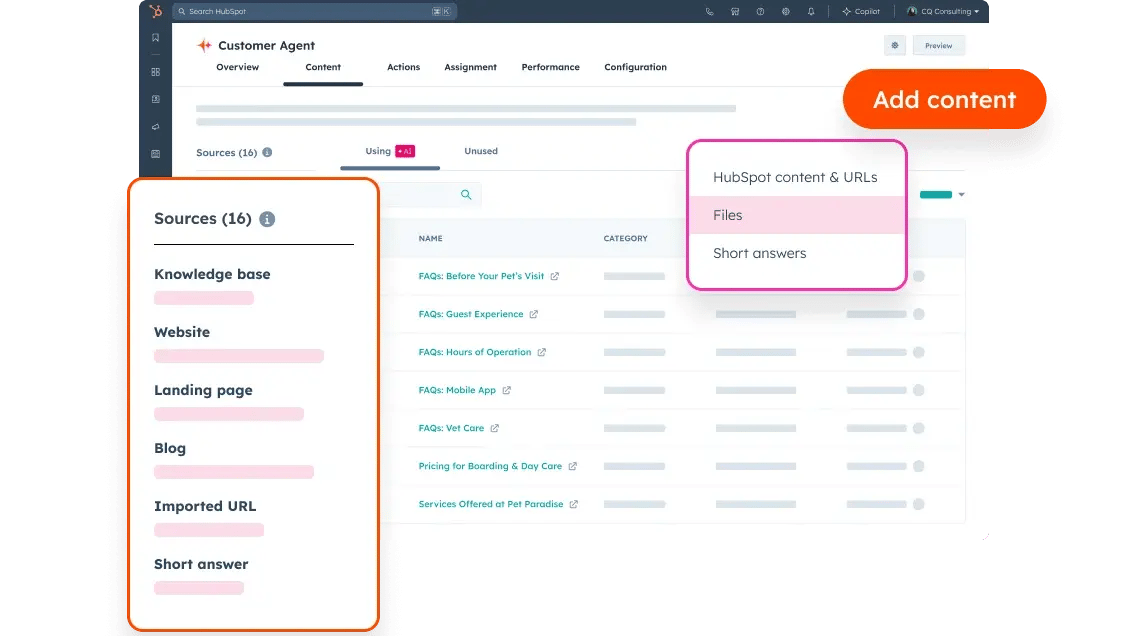
This is the only agent on the list in general availability. It resolves billing questions around the clock across chat, email, and your billing portal, and it can surface a payment link or pull up the actual invoice inside the conversation.
🏆 Elite Partner Tip: Customer Agent needs three data toggles enabled in AI settings before it can see anything real: CRM data, customer conversation data, and files. Skip that step and the agent looks broken when it's simply blind to your account.
Read more: HubSpot Customer Agent: Pricing & 2026 Setup Guide.
Revenue Agent: the one people are waiting for
Revenue Agent is the closest thing to autonomous collections HubSpot has built. It monitors every open invoice, builds an outreach plan per contact, watches for changes (paid, voided, reassigned, due date moved), regenerates the plan, and reads inbound replies to adjust timing when a customer asks for an extension.
It's in private beta. Your account may still show "coming soon." Plan around what's live today and treat Revenue Agent as the upgrade path, not the current state.
Do You Automate Quote-to-Cash With Workflows or Settings?
The three things teams reach for the workflow builder to do are native settings in 2026, and building them as workflows creates duplicate emails and maintenance nobody wants.
Here's where each one actually lives:
| What you want to happen | Where it's configured | Requirement |
|---|---|---|
| Contract, billing schedule, and first invoices created when a quote is accepted | Settings > Revenue > Billing, plus the Automatically create contracts from accepted quotes setting | Revenue Hub Professional or Enterprise, and enrollment in the Connected CPQ, Billing, and Payments beta |
| Reminders chasing open invoices | Settings > Objects > Invoices > Automation tab | Available broadly; invoice must be in Open status |
| Approval required above a discount or deal size | Settings > Objects > Quotes > Approvals tab | Standard approvals broadly available; Advanced quote approvals require Enterprise |
| Customer emailed when a payment fails | Settings > Revenue > Billing > Notifications tab | On by default, and the one billing setting that does not require the beta |
Setting up automatic invoice reminders
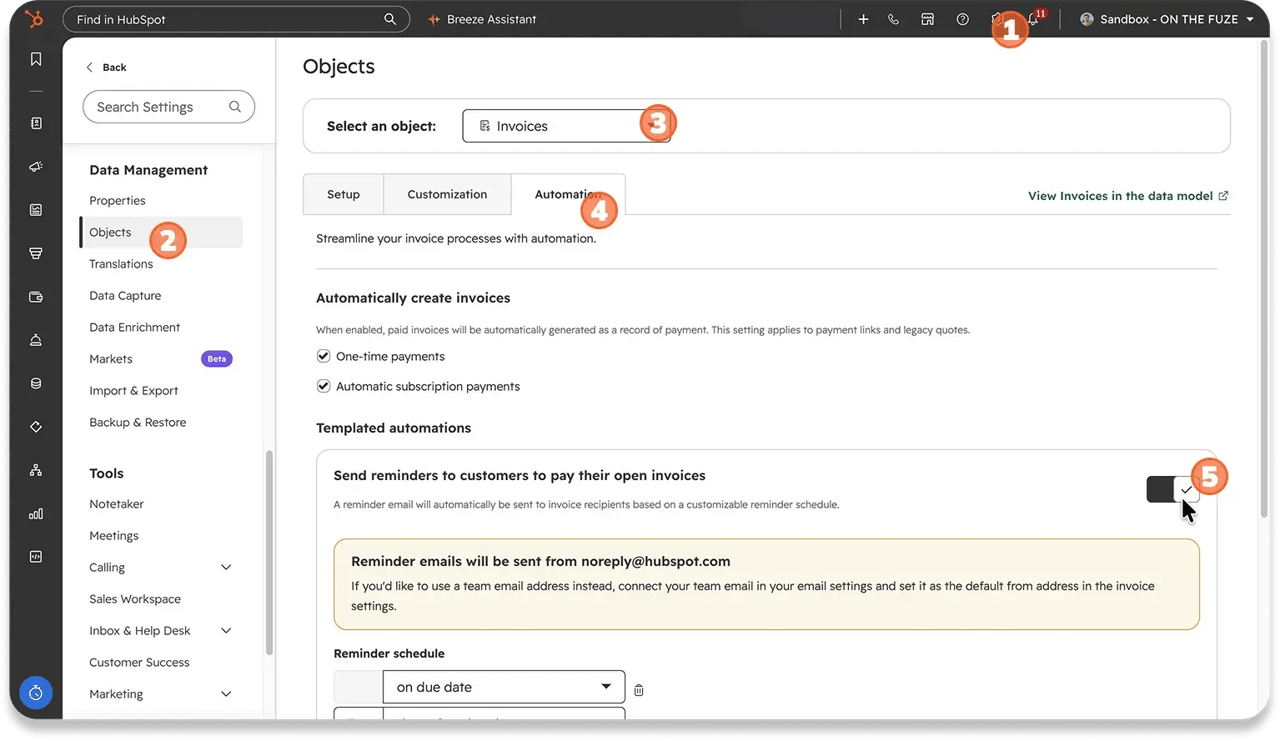
Go to Settings > Objects > Invoices, open the Automation tab, and toggle on Send reminders to customers to pay their open invoices.
The default schedule sends three reminders: on the due date, 7 days after, and 14 days after. You can add reminders, shift them before the due date, and set the hour they send.
Setting up quote approvals
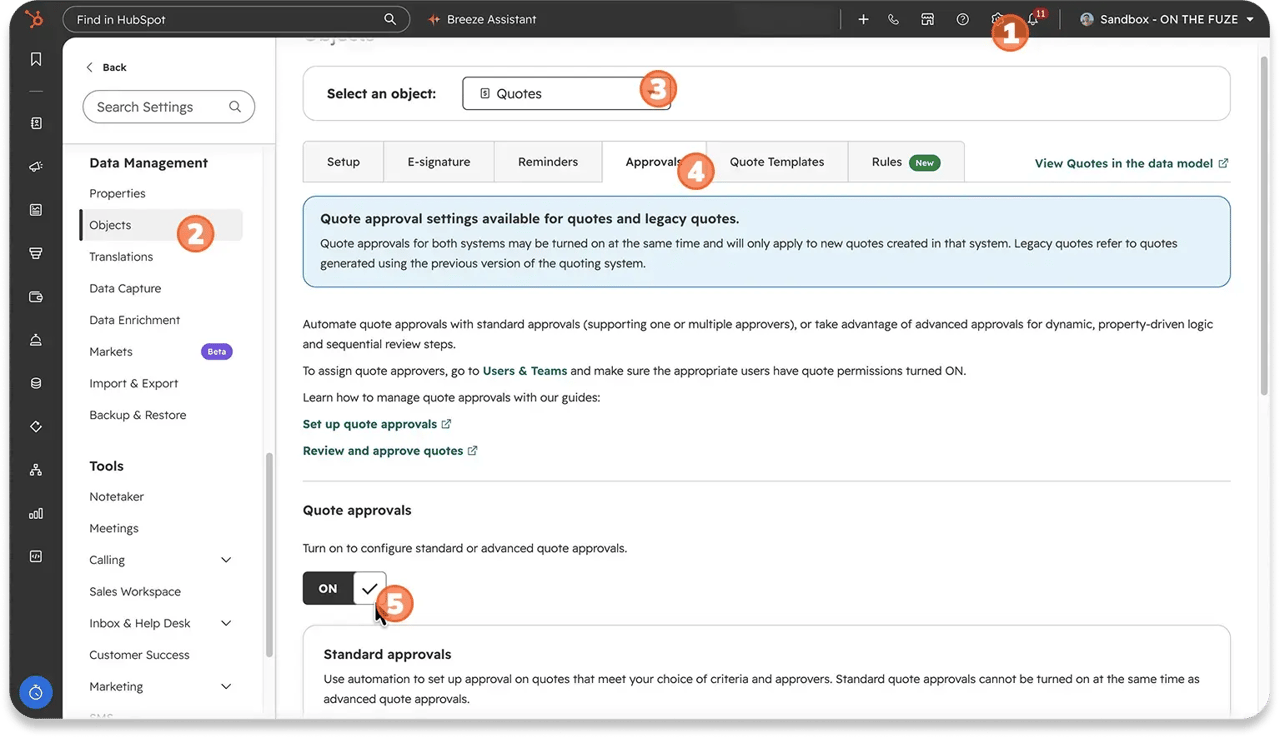
Go to Settings > Objects > Quotes, open the Approvals tab, and toggle Approvals on. Under Standard approvals, click Edit next to Quotes and add a filter, typically quote total above a threshold or discount percentage above a limit.
Enterprise accounts can additionally toggle on Advanced quote approvals, and that tier is where approvals genuinely do use the workflows tool, with branching based on line items.
So what are workflows still for?
Workflows handle the internal work that no setting covers:
- Notifying an account manager when a named account goes past due
- Updating a rollup property on the Company record so exposure is visible on the record
- Creating a task for a rep when a quote is viewed but not signed
- Custom branching that standard approvals can't express
Quote-based enrollment triggers do exist on Revenue Hub Professional and Enterprise, covering quote created, sent, viewed, signed, and approved. There's also a Convert to invoice action available on deal and quote workflows. Those are useful, but they're the exception, not the starting point.
🏆 Elite Partner Tip: Check the settings before you build the workflow. The most common finding in our audits is a workflow duplicating a native setting, which means the customer gets two overdue notices for the same invoice and starts ignoring both.
What Is the Weekly Revenue Review?
A ten-minute routine, once a week, where you pull the same reports in the same order. HubSpot's own guidance recommends using payment and invoice reports to check who has paid and follow up with anyone overdue.
Here's the version we give clients:
- Balance due over time, is the total owed going up or down?
- A/R aging summary, is anything slipping into an older bucket?
- Past due invoices, who specifically, and how much?
- MRR waterfall, what moved this month and why?
- Renewal information card on any contract renewing in the next 60 days
The reason this is a manual routine and not an alert is that HubSpot doesn't have a reliable way to push renewal dates in front of you automatically as they approach. The card tells you the truth when you open it. Nothing opens it for you.
What Mistakes Should You Avoid?
The expensive mistakes here are configuration mistakes, not strategy mistakes. Each of these is quiet, which is exactly why it costs money.
Skipping the renewal quote on a contract
If a renewal quote isn't added to the contract, the renewal date defaults to the date the contract ends. The Renewal information card stops reflecting reality, and your renewal forecasting goes with it.
The fix: create the renewal quote before that date arrives, and the card stays accurate.
Unchecking proration on a change quote
When you process a mid-term upgrade, the Prorate charges and credits for the remaining billing period box is there for a reason. Uncheck it and your customer is charged full price for a change that should have been split across the remaining period.
The fix: leave that box checked every time you update an active subscription. This is a billing dispute you caused, and it's entirely preventable.
Skipping the weekly review
All these reports, all this automation, none of it matters if nobody's looking. This is how a client reaches 90 days late before anyone notices.
The fix: put it on the calendar, same time every week, ten minutes.
Building analytics before you have transactional data
The analytics suite needs something to report on. You need at least one live quote, contract, invoice, or subscription running through the system, a populated product library, and a connected payment processor.
The fix: get one real transaction flowing end to end before you judge the reporting.
Frequently Asked Questions
Where is revenue analytics in HubSpot?
Go to Reporting > Reports, then click Revenue in the left sidebar. Select a topic area (Invoices, Quotes, Subscriptions, Payments, or Contracts) to see the ready-made reports for that object.
What subscription do I need for HubSpot revenue analytics?
The revenue analytics suite requires Professional or Enterprise. Free and Starter accounts can create invoices, payment links, and basic subscriptions, but not the analytics suite or the detailed A/R aging report.
Can HubSpot track MRR?
Yes. The MRR waterfall by month report breaks recurring revenue movement into existing business, new business, upgrades, downgrades, churn, and renewals, reading from the Contract object rather than deal properties.
How do I see which invoices are overdue in HubSpot?
Go to Revenue > Invoices > View invoice reports and open the Accounts Receivable dashboard. Use Past due invoices for the specific list and A/R aging summary to see how old the balances are.
Is HubSpot's Revenue Agent available now?
Revenue Agent is in private beta as of September 2026, with credit consumption beginning September 16, 2026. It consumes 500 credits each time it starts collection outreach on an invoice. Many accounts still display it as coming soon.
What's the difference between Breeze Invoice Prioritization and Revenue Agent?
Invoice Prioritization is generally available and ranks your open invoices while drafting collection emails, which a human then sends. Revenue Agent is in private beta and runs the outreach itself, monitoring replies and adjusting the plan.
Can Breeze Assistant create payment links?
Yes. Describe the product, price, and discount, and Breeze drafts a ready-to-use link. It also clones, updates, activates, and deactivates links. This rolls out automatically to accounts with Payments access.
Does the Closing Agent replace a salesperson?
No. It answers buyer questions on the quote page using files and knowledge sources you've uploaded, at any hour. Questions it can't resolve are handed to the quote owner, so a human is still required for the hard ones.
Can I automate creating a contract when a quote is signed?
Yes. Build a workflow with the enrollment trigger set to Quote status equals Signed, then add actions to create the Contract with its line items and issue the first Invoice.
Why is my Renewal information card showing the wrong date?
Most often because no renewal quote was added to the contract. Without one, the renewal date defaults to the contract end date. Create the renewal quote, and the card corrects itself.
Key Takeaways
- Revenue Analytics lives under Reporting > Reports > Revenue, organized into five collections: Invoices, Quotes, Subscriptions, Payments, and Contracts. It requires Professional or Enterprise.
- Contract-based reporting is the 2026 change that matters. MRR now reads from the Contract object, so upgrades and downgrades stop corrupting your deal pipeline.
- Four reports carry most of the weight: MRR waterfall by month, Booked MRR vs. Net new MRR, Billed vs. actual revenue, and TCV of quotes accepted by seller.
- The Accounts Receivable dashboard is separate and generated from Revenue > Invoices > View invoice reports. The aging summary is the first thing to read.
- Four AI tools touch revenue, at four different maturity levels. Customer Agent is generally available. Breeze Assistant is live with features in public beta. Closing Agent is in beta. Revenue Agent is in private beta.
- Breeze Invoice Prioritization ranks and drafts. A human still sends. Full autonomous chasing arrives with Revenue Agent, which hasn't reached general availability.
- Three workflows deliver most of the value: signed quote to contract to invoice, the 7-day overdue reminder, and discount approval routing on Enterprise.
- Two configuration mistakes cost real money: skipping the renewal quote (the renewal date silently defaults to the contract end date) and unchecking proration on a change quote (your customer gets overcharged).
- None of it works without a weekly review. Ten minutes, same time each week, or the reports become decoration.

On The Fuze is a Top 1% HubSpot Elite Partner with 10+ years of experience and 3,000+ CRM setups optimized across North America. We help small and medium-sized businesses leverage the full potential of HubSpot to scale their businesses.